Keyboard shortcuts

Press or to navigate between chapters

Press S or / to search in the book

Press ? to show this help

Press Esc to hide this help

ndn-rs Wiki

Pre-release. ndn-rs is working toward its first stable tag (v0.1.0). The workspace version reads 0.1.0, but no git tag or GitHub Release has been published yet — this wiki documents main. Pull ghcr.io/quarmire/ndn-fwd:latest or build from source to try the current state. See the draft 0.1.0 release notes for the planned scope.

ndn-rs is a Named Data Networking (NDN) forwarder stack written in Rust. It models NDN as composable data pipelines with trait-based polymorphism, departing from the class hierarchy approach of NFD/ndn-cxx.

What is NDN?

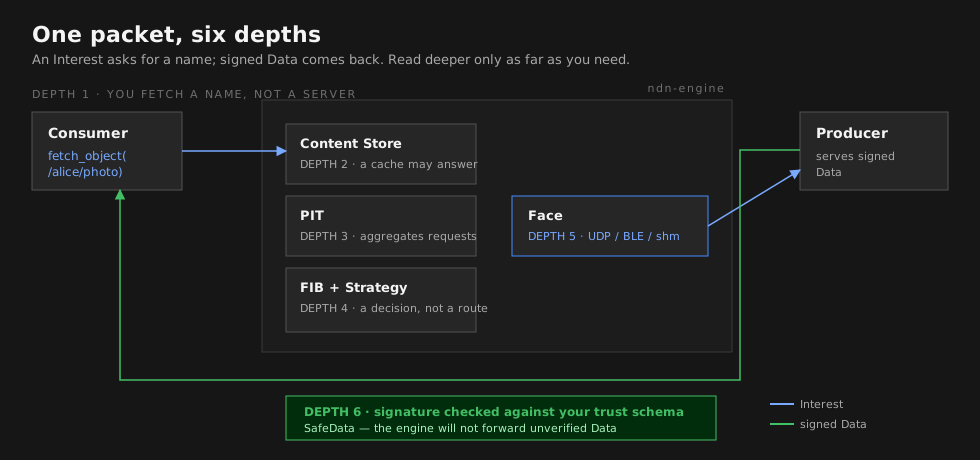
Named Data Networking is a network architecture where communication is driven by named data rather than host addresses. Consumers request data by name (Interest packets), and the network locates and returns the data (Data packets). Every Data packet is cryptographically signed by its producer, enabling in-network caching and security that travels with the data.

Why ndn-rs?

  • Library, not daemonForwarderEngine embeds in any Rust application
  • Zero-copy pipeline – wire-format Bytes flow from recv to send without re-encoding
  • Compile-time safety – packet ownership through the pipeline prevents use-after-short-circuit; SafeData typestate enforces verification
  • Concurrent data structuresDashMap PIT, RwLock-per-node FIB trie, sharded CS
  • Pluggable everything – faces, strategies, CS backends, and pipeline stages via traits
  • Embedded to serverno_std TLV and packet crates run on Cortex-M; same code scales to multi-core routers
SectionFor…
Getting StartedBuilding, running, first program
ConceptsNDN fundamentals and ndn-rs data structures
DesignArchitecture decisions and comparisons with NFD/ndnd
Deep DiveDetailed walkthroughs of subsystems
GuidesHow to extend ndn-rs
BenchmarksPerformance data and methodology
ReferenceSpec compliance, external links
ExplorerInteractive crate map and pipeline visualizer

Crate Map

Binaries        ndn-fwd  ndn-tools  ndn-bench
                     |          |          |
Engine/App      ndn-engine  ndn-app  ndn-ipc  ndn-config  ndn-discovery
                     |          |        |
Pipeline        ndn-engine  ndn-strategy  ndn-security
                     |             |
Faces           ndn-faces  ndn-faces  ndn-faces  ndn-faces
                     |              |
Foundation      ndn-store  ndn-transport  ndn-packet  ndn-tlv
                                                         |
Embedded                                           ndn-embedded

Research        ndn-sim  ndn-compute  ndn-sync  ndn-research  ndn-strategy-wasm

Dependencies flow strictly downward. ndn-tlv and ndn-packet compile no_std.

{
  "columns": [
    { "label": "Foundation", "nodes": [
        {"id": "ndn-tlv"}, {"id": "ndn-packet"}, {"id": "ndn-store"},
        {"id": "ndn-transport"}, {"id": "ndn-embedded"}
    ]},
    { "label": "Faces", "nodes": [
        {"id": "ndn-faces"}, {"id": "ndn-faces"},
        {"id": "ndn-faces"}, {"id": "ndn-faces"}
    ]},
    { "label": "Pipeline & Strategy", "nodes": [
        {"id": "ndn-engine"}, {"id": "ndn-strategy"}, {"id": "ndn-security"}
    ]},
    { "label": "Engine & App", "nodes": [
        {"id": "ndn-engine"}, {"id": "ndn-app"}, {"id": "ndn-ipc"},
        {"id": "ndn-config"}, {"id": "ndn-discovery"}
    ]},
    { "label": "Binaries", "nodes": [
        {"id": "ndn-fwd"}, {"id": "ndn-tools"}, {"id": "ndn-bench"}
    ]}
  ],
  "satellites": {
    "label": "Research  (depend on engine / app / strategy)",
    "nodes": [
        {"id": "ndn-sim"}, {"id": "ndn-compute"},
        {"id": "ndn-sync"}, {"id": "ndn-strategy-wasm"}
    ]
  },
  "edges": [
    ["ndn-tlv",       "ndn-packet"],
    ["ndn-tlv",       "ndn-embedded"],
    ["ndn-packet",    "ndn-store"],
    ["ndn-packet",    "ndn-transport"],
    ["ndn-transport", "ndn-faces"],
    ["ndn-transport", "ndn-faces"],
    ["ndn-transport", "ndn-faces"],
    ["ndn-transport", "ndn-faces"],
    ["ndn-faces",    "ndn-engine"],
    ["ndn-faces",  "ndn-engine"],
    ["ndn-faces", "ndn-engine"],
    ["ndn-faces",     "ndn-engine"],
    ["ndn-store",       "ndn-engine"],
    ["ndn-engine",    "ndn-strategy"],
    ["ndn-engine",    "ndn-security"],
    ["ndn-strategy",    "ndn-engine"],
    ["ndn-security",    "ndn-engine"],
    ["ndn-engine",    "ndn-ipc"],
    ["ndn-engine",    "ndn-discovery"],
    ["ndn-engine",      "ndn-fwd"],
    ["ndn-engine",      "ndn-tools"],
    ["ndn-engine",      "ndn-bench"],
    ["ndn-app",         "ndn-ipc"],
    ["ndn-app",         "ndn-tools"],
    ["ndn-app",         "ndn-bench"],
    ["ndn-config",      "ndn-fwd"]
  ],
  "satellite_edges": [
    ["ndn-sim",           "ndn-engine"],
    ["ndn-compute",       "ndn-engine"],
    ["ndn-sync",          "ndn-app"],
    ["ndn-strategy-wasm", "ndn-strategy"]
  ]
}

Installation

This page covers how to build ndn-rs from source and install its binaries.

Prerequisites

  • Rust 2024 edition – install via rustup. The workspace uses edition = "2024", so you need a nightly or recent stable toolchain that supports it.
  • cargo – ships with rustup.
  • Linux or macOS – some face types (raw Ethernet, SHM) are Unix-only. The core library compiles on Windows but network tooling is limited.

Clone and build

git clone https://github.com/user/ndn-rs.git   # replace with actual URL
cd ndn-rs

# Build the entire workspace
cargo build

# Run all tests
cargo test

# Lint (treat warnings as errors)
cargo clippy -- -D warnings

# Format check
cargo fmt -- --check

Building the forwarder binary

The standalone forwarder lives in binaries/ndn-fwd:

cargo build -p ndn-fwd

The compiled binary is at target/debug/ndn-fwd (or target/release/ndn-fwd with --release).

To build the CLI tools (ping, peek, put, ctl, traffic, iperf):

cargo build -p ndn-tools

This produces several binaries: ndn-ping, ndn-peek, ndn-put, ndn-ctl, ndn-traffic, and ndn-iperf.

Optional features

ndn-fwd features

The forwarder binary has three optional feature flags, all enabled by default:

FeatureDescriptionGate
spsc-shmShared-memory data plane between apps and forwarder (Unix only)ndn-faces/spsc-shm
websocketWebSocket face for browser and remote clientsndn-faces/websocket
serialSerial port face (RS-232 / USB-serial)ndn-faces/serial

To build without WebSocket support, for example:

cargo build -p ndn-fwd --no-default-features --features spsc-shm,serial

ndn-store features

The content store crate has an optional persistent backend:

FeatureDescription
fjallPersistent content store backed by fjall

Enable it from a dependent crate or when running benchmarks:

cargo test -p ndn-store --features fjall

Running the forwarder

Copy the example configuration and adjust it for your environment:

cp ndn-fwd.example.toml ndn-fwd.toml

# Start the forwarder (needs sudo for raw sockets / privileged ports)
sudo ./target/debug/ndn-fwd --config ndn-fwd.toml

The config file can also be specified via the NDN_CONFIG environment variable:

sudo NDN_CONFIG=ndn-fwd.toml ./target/release/ndn-fwd

The log level defaults to info and can be overridden at runtime:

sudo ./target/release/ndn-fwd --config ndn-fwd.toml --log-level debug

Or via the standard RUST_LOG environment variable:

sudo RUST_LOG=ndn_engine=debug ./target/release/ndn-fwd --config ndn-fwd.toml

See Running the Forwarder for a detailed configuration walkthrough.

Verifying the installation

After the forwarder starts, you should see log output indicating that faces are created and the pipeline is running. Use ndn-ctl to confirm the forwarder is alive:

ndn-ctl status

This connects to the forwarder’s management socket (default /run/nfd/nfd.sock) and prints forwarding engine state.

Hello World

This tutorial shows how to run a complete Interest/Data exchange using the ndn-rs library in a single Rust program. No external router is needed – everything runs in-process via InProcFace channel pairs.

How it works

In NDN, communication follows a pull-based model: a consumer sends an Interest packet naming the data it wants, and a producer responds with a matching Data packet. The forwarding engine sits between them, matching Interests to Data via the PIT (Pending Interest Table) and FIB (Forwarding Information Base).

💡 Key insight: No external router is needed for this example. The InProcFace creates an in-process channel pair – one side for the application, one side for the engine. Packets flow through the full forwarding pipeline (PIT, FIB, CS, strategy) but never touch the network. This is the same mechanism used for production in-process applications.

sequenceDiagram
    participant C as Consumer
    participant E as Engine (PIT + FIB)
    participant P as Producer

    C->>E: Interest /ndn/hello
    Note over E: PIT entry created<br/>FIB lookup -> Producer face
    E->>P: Interest /ndn/hello
    P->>E: Data /ndn/hello "hello, NDN!"
    Note over E: PIT entry satisfied<br/>Forward Data to Consumer face
    E->>C: Data /ndn/hello "hello, NDN!"
graph LR
    subgraph "Application Process"
        APP["Application code<br/>(Consumer / Producer)"]
    end

    subgraph "InProcFace Channel Pair"
        direction TB
        TX1["app_handle.send()"] -->|"mpsc"| RX1["engine face.recv()"]
        TX2["engine face.send()"] -->|"mpsc"| RX2["app_handle.recv()"]
    end

    subgraph "ForwarderEngine"
        PIPE["Pipeline<br/>(FIB + PIT + CS + Strategy)"]
    end

    APP -->|"Interest"| TX1
    RX1 -->|"Interest"| PIPE
    PIPE -->|"Data"| TX2
    RX2 -->|"Data"| APP

    style APP fill:#e8f4fd,stroke:#2196F3
    style PIPE fill:#fff3e0,stroke:#FF9800

Dependencies

Add these to your Cargo.toml:

[dependencies]
ndn-app        = { path = "crates/engine/ndn-app" }
ndn-engine     = { path = "crates/engine/ndn-engine" }
ndn-faces = { path = "crates/faces/ndn-faces" }
ndn-packet     = { path = "crates/foundation/ndn-packet", features = ["std"] }
ndn-transport  = { path = "crates/foundation/ndn-transport" }
tokio          = { version = "1", features = ["rt-multi-thread", "macros"] }

If you are working within the ndn-rs workspace, use workspace = true instead of path dependencies.

Full example

use ndn_app::{Consumer, EngineBuilder, Producer};
use ndn_engine::EngineConfig;
use ndn_faces::local::InProcFace;
use ndn_packet::Name;
use ndn_packet::encode::DataBuilder;
use ndn_store::FibNexthop;
use ndn_transport::FaceId;

#[tokio::main]
async fn main() -> anyhow::Result<()> {
    // 1. Create in-process face pairs.
    //    Each InProcFace::new() returns a face (for the engine) and a handle
    //    (for the application).  They are connected by an mpsc channel.
    let (consumer_face, consumer_handle) = InProcFace::new(FaceId(1), 64);
    let (producer_face, producer_handle) = InProcFace::new(FaceId(2), 64);

    // 2. Build the forwarding engine with both faces.
    let (engine, shutdown) = EngineBuilder::new(EngineConfig::default())
        .face(consumer_face)
        .face(producer_face)
        .build()
        .await?;

    // 3. Install a FIB route: Interests for /ndn/hello -> producer face.
    let prefix: Name = "/ndn/hello".parse()?;
    engine.fib().add_nexthop(&prefix, FibNexthop { face_id: 2, cost: 0 });

    // 4. Create Consumer and Producer from their handles.
    let mut consumer = Consumer::from_handle(consumer_handle);
    let mut producer = Producer::from_handle(producer_handle, prefix.clone());

    // 5. Spawn the producer in a background task.
    //    It loops, waiting for Interests and replying with Data.
    let producer_task = tokio::spawn(async move {
        producer
            .serve(|interest| {
                let name = (*interest.name).clone();
                async move {
                    let wire = DataBuilder::new(name, b"hello, NDN!").build();
                    Some(wire)
                }
            })
            .await
    });

    // 6. Consumer sends an Interest and waits for the Data reply.
    let data = consumer.fetch(prefix.clone()).await?;

    println!("Received Data: {}", data.name);
    println!("Content: {:?}", std::str::from_utf8(
        data.content().unwrap().as_ref()
    ));

    // 7. Clean shutdown: drop consumer/engine, then await the shutdown handle.
    drop(consumer);
    drop(engine);
    shutdown.shutdown().await;
    let _ = producer_task.await;

    Ok(())
}

Step-by-step walkthrough

1. Create InProcFace pairs

InProcFace::new(face_id, capacity) creates a face for the engine side and a handle for the application side, connected by a bounded channel. The capacity parameter controls backpressure – 64 is a good default.

2. Build the engine

EngineBuilder wires the PIT, FIB, content store, pipeline stages, and strategy table. Calling .face(f) registers a face with the engine. .build().await returns the running ForwarderEngine and a ShutdownHandle.

🔧 Implementation note: EngineBuilder uses sensible defaults for everything: LruCs for caching, BestRouteStrategy at the root prefix, and the standard Interest/Data pipeline stages. You only need to configure what you want to customize. The builder pattern ensures the engine is fully wired before it starts processing packets.

%%{init: {"layout": "elk"}}%%
graph TD
    EB["EngineBuilder::new(config)"]
    EB -->|".face(consumer_face)"| F1["Face: Consumer"]
    EB -->|".face(producer_face)"| F2["Face: Producer"]
    EB -->|"default"| CS["ContentStore (LruCs)"]
    EB -->|"default"| PIT["PIT (DashMap)"]
    EB -->|"default"| FIB["FIB (NameTrie)"]
    EB -->|"default"| ST["StrategyTable"]
    EB -->|"default"| PIPE["Pipeline Stages"]

    EB ==>|".build().await"| ENGINE["ForwarderEngine"]
    EB ==>|".build().await"| SH["ShutdownHandle"]

    ENGINE --- F1
    ENGINE --- F2
    ENGINE --- CS
    ENGINE --- PIT
    ENGINE --- FIB
    ENGINE --- ST
    ENGINE --- PIPE

    style EB fill:#e8f4fd,stroke:#2196F3
    style ENGINE fill:#c8e6c9,stroke:#4CAF50
    style SH fill:#fce4ec,stroke:#E91E63

3. Add a FIB route

The FIB maps name prefixes to outgoing faces. add_nexthop(&prefix, FibNexthop { face_id, cost }) tells the engine: “forward Interests matching this prefix to this face.” Cost is used when multiple nexthops exist (lower wins).

4. Consumer and Producer

  • Consumer::from_handle(handle) wraps the application-side handle with methods like fetch() and get().
  • Producer::from_handle(handle, prefix) wraps the handle with a serve() loop that dispatches incoming Interests to a callback.

5. The exchange

When consumer.fetch(name) is called, it builds an Interest packet, sends it through the InProcFace channel into the engine, which looks up the FIB, finds the producer face, and forwards the Interest. The producer’s serve() callback receives it, builds a Data packet, and sends it back through the engine to the consumer.

Connecting to an external router

If you have a running ndn-fwd instead of an embedded engine, applications connect via the router’s face socket:

use ndn_app::Consumer;

#[tokio::main]
async fn main() -> anyhow::Result<()> {
    // Connect to the router's management socket.
    let mut consumer = Consumer::connect("/run/nfd/nfd.sock").await?;
    let data = consumer.fetch("/ndn/hello").await?;
    println!("Got: {:?}", data.content());
    Ok(())
}

This uses a Unix socket (with optional SHM data plane) instead of in-process channels, but the Consumer API is identical.

Next steps

Running the Forwarder

This page explains how to configure and run ndn-fwd as a standalone NDN forwarder, connect applications and tools to it, and monitor its state.

Architecture overview

The forwarder is the central forwarding engine. Applications, remote peers, and management tools connect to it through various face types:

%%{init: {"layout": "elk"}}%%
graph TB
    subgraph "ndn-fwd"
        E[Forwarding Engine]
        PIT[PIT]
        FIB[FIB]
        CS[Content Store]
        E --- PIT
        E --- FIB
        E --- CS
    end

    subgraph "Local Applications"
        App1["ndn-ping<br/>(SHM + Unix socket)"]
        App2["Custom App<br/>(SHM + Unix socket)"]
    end

    subgraph "Remote Peers"
        R1["Router B<br/>(UDP 6363)"]
        R2["Router C<br/>(TCP 6363)"]
    end

    subgraph "Link-Local"
        MC["Multicast Peers<br/>(224.0.23.170:56363)"]
    end

    subgraph "Browser / Remote"
        WS["Web Client<br/>(WebSocket 9696)"]
    end

    subgraph "Management"
        CTL["ndn-ctl"]
        DASH["ndn-dashboard"]
    end

    App1 <-->|face socket| E
    App2 <-->|face socket| E
    R1 <-->|UDP| E
    R2 <-->|TCP| E
    MC <-->|UDP multicast| E
    WS <-->|WebSocket| E
    CTL -->|face socket| E
    DASH -->|WebSocket / NDN| E

Configuration file

ndn-fwd reads a TOML configuration file. Start from the provided example:

cp ndn-fwd.example.toml ndn-fwd.toml

The file is loaded via --config (or -c) or the NDN_CONFIG environment variable.

Minimal configuration

🎯 Tip: The three most impactful config options are cs_capacity_mb (how much RAM to dedicate to caching), the [[face]] entries (which transports to enable), and the [[route]] entries (where to forward Interests). Start with the minimal config below and add complexity as needed.

A minimal config to get started with UDP and multicast:

[engine]
cs_capacity_mb = 64

# UDP unicast face -- listen for incoming packets
[[face]]
kind = "udp"
bind = "0.0.0.0:6363"

# IPv4 multicast face -- link-local neighbor discovery
[[face]]
kind = "multicast"
group = "224.0.23.170"
port = 56363

# Static route: forward all /ndn Interests out the UDP face
[[route]]
prefix = "/ndn"
face = 0
cost = 10

[management]
transport = "ndn"
face_socket = "/run/nfd/nfd.sock"

[logging]
level = "info"

Full face type reference

UDP unicast

Point-to-point or open UDP face on port 6363 (the NDN default):

[[face]]
kind = "udp"
bind = "0.0.0.0:6363"
# Optional: restrict to a single remote peer
# remote = "10.0.0.1:6363"

TCP

Outbound connection to a remote router:

[[face]]
kind = "tcp"
remote = "192.168.1.1:6363"
# Optional: local bind address
# bind = "0.0.0.0:6363"

Multicast

Link-local neighbor discovery using the IANA-assigned NDN multicast group:

[[face]]
kind = "multicast"
group = "224.0.23.170"
port = 56363
# Optional: bind to a specific interface
# interface = "eth0"

Raw Ethernet multicast

Uses EtherType 0x8624 (IANA-assigned for NDN). Requires CAP_NET_RAW on Linux or root on macOS:

[[face]]
kind = "ether-multicast"
interface = "eth0"

Unix domain socket

Local app connectivity on Linux/macOS:

[[face]]
kind = "unix"
path = "/tmp/ndn-app.sock"

WebSocket

For browser clients or remote NDN-WS connections. Requires the websocket feature (enabled by default):

# Listen mode
[[face]]
kind = "web-socket"
bind = "0.0.0.0:9696"

# Or connect mode (mutually exclusive with bind)
# [[face]]
# kind = "web-socket"
# url = "ws://remote:9696"

Serial

Point-to-point over RS-232 / USB-serial. Requires the serial feature (enabled by default):

[[face]]
kind = "serial"
path = "/dev/ttyUSB0"
baud = 115200

Content store configuration

[cs]
variant = "lru"           # "lru", "sharded-lru", or "null"
capacity_mb = 64
# shards = 4              # only for "sharded-lru"
admission_policy = "default"  # "default" or "admit-all"

Static routes

Routes pre-load the FIB at startup. The face field is a zero-based index into the [[face]] list:

[[route]]
prefix = "/ndn"
face = 0
cost = 10

[[route]]
prefix = "/localhop"
face = 1
cost = 5

Routes can also be added at runtime via ndn-ctl.

Discovery

Enable neighbor discovery and service announcement:

[discovery]
node_name = "/ndn/site/router1"
profile = "lan"                          # "static", "lan", "campus", "mobile", etc.
served_prefixes = ["/ndn/site/sensors"]

Starting the forwarder

⚠️ Important: sudo is required when the forwarder uses raw sockets (Ethernet faces), privileged ports (UDP/TCP on port 6363 < 1024 on some systems), or multicast group membership. If you only use Unix socket faces and high-numbered ports, sudo is not needed. On Linux, you can alternatively grant CAP_NET_RAW and CAP_NET_BIND_SERVICE capabilities instead of running as root.

# Build in release mode for production
cargo build -p ndn-fwd --release

# Start (sudo required for raw sockets and privileged ports)
sudo ./target/release/ndn-fwd --config ndn-fwd.toml

Override the log level at runtime:

sudo ./target/release/ndn-fwd --config ndn-fwd.toml --log-level debug

# Or with RUST_LOG for per-crate control
sudo RUST_LOG="info,ndn_engine=debug,ndn_discovery=trace" \
    ./target/release/ndn-fwd --config ndn-fwd.toml

Connecting tools

ndn-ctl

ndn-ctl is the management CLI, similar to NFD’s nfdc. It connects to the forwarder’s face socket and sends management commands as NDN Interest/Data:

# Check forwarder status
ndn-ctl status

# List active faces
ndn-ctl face list

# Create a new UDP face at runtime
ndn-ctl face create udp4://192.168.1.1:6363

# Add a route
ndn-ctl route add /ndn --face 1 --cost 10

# List routes
ndn-ctl route list

# View content store info
ndn-ctl cs info

# List discovered neighbors
ndn-ctl neighbors list

# Announce / withdraw service prefixes
ndn-ctl service announce /ndn/myapp
ndn-ctl service withdraw /ndn/myapp

# Browse discovered services
ndn-ctl service browse

# Set forwarding strategy for a prefix
ndn-ctl strategy set /ndn --strategy /localhost/nfd/strategy/best-route

# Graceful shutdown
ndn-ctl shutdown

ndn-ping

Measure round-trip time to a named prefix. Run the server on one machine and the client on another (or the same machine):

# Server: register /ping and respond to ping Interests
sudo ndn-ping server --prefix /ping

# Client: send ping Interests and measure RTT
ndn-ping client --prefix /ping --count 10 --interval 1000

ndn-peek and ndn-put

Fetch or publish a single named Data packet:

# Fetch a packet by name
ndn-peek /ndn/example/data --timeout-ms 4000

# Publish a packet (another terminal)
ndn-put /ndn/example/data --content "hello"

ndn-iperf

Throughput measurement between two NDN endpoints:

# Server
sudo ndn-iperf server --prefix /iperf

# Client
ndn-iperf client --prefix /iperf --duration 10

Monitoring with ndn-dashboard

ndn-dashboard is a native desktop application (built with Dioxus) for managing and monitoring NDN forwarders. It communicates with the forwarder via the NDN management protocol over the face socket.

cargo build -p ndn-dashboard --release
./target/release/ndn-dashboard

The dashboard provides:

  • Start Forwarder – launch ndn-fwd as a managed subprocess with one of:
    • Quick Start (built-in defaults)
    • Build Config – interactive config builder with startup faces, startup routes, CS settings, and log level
    • Load Config File – point to an existing TOML file
    • Saved Presets – one-click relaunch of saved configurations
  • Overview – engine status, packet counters, throughput graphs
  • Faces – active faces with per-face traffic statistics
  • Routes – FIB entries and nexthop costs
  • Content Store – cache occupancy and hit/miss rates
  • Strategy – per-prefix forwarding strategy assignments
  • Config – view and edit forwarder configuration; edit startup faces and routes; restart the managed forwarder with an updated config via ↺ Restart with Config
  • Logs – real-time log viewer with filter and split-pane modes
  • Tools – embedded ndn-ping, ndn-iperf, ndn-peek, and ndn-put
  • Light/Dark mode – toggle via the ☀/🌙 button in the toolbar

The dashboard connects to the forwarder’s face socket (default /run/nfd/nfd.sock). If the forwarder is started through the dashboard, log output is captured in the Logs view automatically.

Typical deployment

A common LAN deployment with two forwarders and local apps:

# Router A (10.0.0.1) -- ndn-fwd.toml:
#   UDP face on :6363
#   Multicast face on 224.0.23.170:56363
#   Route /ndn -> UDP face
#   Discovery enabled with node_name = "/ndn/site/routerA"

# Router B (10.0.0.2) -- same config with:
#   remote = "10.0.0.1:6363" on the UDP face for a static tunnel
#   node_name = "/ndn/site/routerB"

# On Router A, start a ping server:
sudo ndn-ping server --prefix /ndn/site/routerA/ping

# From Router B, ping across the link:
ndn-ping client --prefix /ndn/site/routerA/ping --count 5

Next steps

NDN Overview for IP Developers

What If the Network Knew About Data?

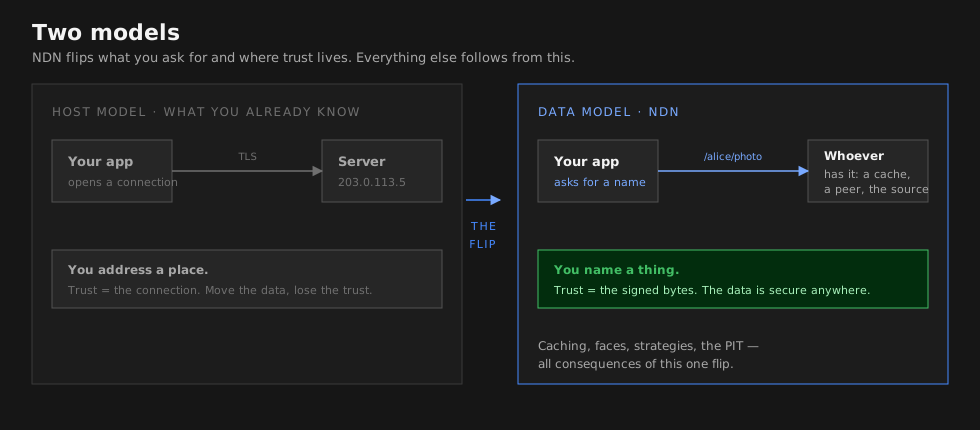
Every network you have ever used works the same way: you ask to talk to a machine, and the network tries to connect you. “Send these bytes to 10.0.0.5.” The network does not know or care what those bytes mean – it just shuffles them toward an address. If the machine is down, you get nothing. If a copy of exactly what you need is sitting on a router one hop away, the network ignores it and dutifully tries to reach the original host anyway.

Named Data Networking starts from a different question: what if you could just ask for the data by name?

Instead of “connect me to host X,” you say “I need /ucla/papers/2024/ndn-overview.” Any node in the network that has a copy – the original producer, a router that cached it earlier, a nearby peer – can answer. The data itself carries a cryptographic signature from its producer, so it does not matter where it came from. You can verify it is authentic regardless.

This is not just a caching layer bolted onto IP. It is a fundamental architectural inversion: from “where is the host?” to “what is the data?” – and it changes everything about how forwarding, security, and multicast work.

NDN was conceived by Van Jacobson and developed into a full architecture by the NDN project team led by Lixia Zhang at UCLA, with collaborators across multiple universities and research labs.

NDN hourglass architecture

The NDN hourglass: just as IP is the thin waist of today's Internet, named data becomes the thin waist of an NDN network. Applications, security, and transport all build on named, secured data rather than on host-to-host channels. (Image: named-data.net)

The Core Shift: Addresses vs. Names

If you are coming from IP networking, the easiest way to feel the difference is to look at the same scenario through both lenses:

IP NetworkingNamed Data Networking
“Connect to host 10.0.0.5 and fetch /index.html“Fetch /example/site/index.html
Security applied to the channel (TLS)Security applied to the data itself (signature on every Data packet)
Caching requires explicit infrastructure (CDN)Every router can cache and re-serve data natively
Routing tables map address prefixes to next hopsFIB maps name prefixes to next hops
No built-in multicast or aggregationDuplicate Interests are aggregated automatically (PIT)

The following diagram illustrates the contrast. In IP, the router is stateless and oblivious to content. In NDN, the router maintains a Pending Interest Table (PIT), a Content Store (CS), and a Forwarding Information Base (FIB) – it understands what data flows through it.

flowchart LR
    subgraph IP["IP Model: Where do I send it?"]
        direction LR
        srcA["Host A\n10.0.0.1"] -->|"src: 10.0.0.1\ndst: 10.0.0.5"| routerIP["Router\n(stateless forward)"]
        routerIP -->|"src: 10.0.0.1\ndst: 10.0.0.5"| dstB["Host B\n10.0.0.5"]
        dstB -->|"response\nsrc: 10.0.0.5\ndst: 10.0.0.1"| routerIP
        routerIP --> srcA
    end

    subgraph NDN["NDN Model: What data do I need?"]
        direction LR
        consumer["Consumer"] -->|"Interest\n/app/video/frame1"| routerNDN["Router\n(PIT + CS + FIB)"]
        routerNDN -->|"Interest\n/app/video/frame1"| producer["Producer"]
        producer -->|"Data\n/app/video/frame1\n+ signature"| routerNDN
        routerNDN -->|"Data\n/app/video/frame1\n(cached for next request)"| consumer
    end

The Two Packet Types

NDN’s network layer has exactly two packet types. That is not a simplification for this overview – it is the actual design.

An Interest is a request: “I want the data named X.” A consumer sends it into the network, and the network figures out where to find a copy. A Data packet is the answer: “Here is the data named X, signed by producer Y.” It travels back along the exact reverse path the Interest took, because the network remembers where each Interest came from.

There is no separate routing protocol for return traffic, no connection state, and no session layer. The Interest leaves breadcrumbs (PIT entries) on its way in, and the Data follows them back out.

How Data Stays Trustworthy Without Trusted Channels

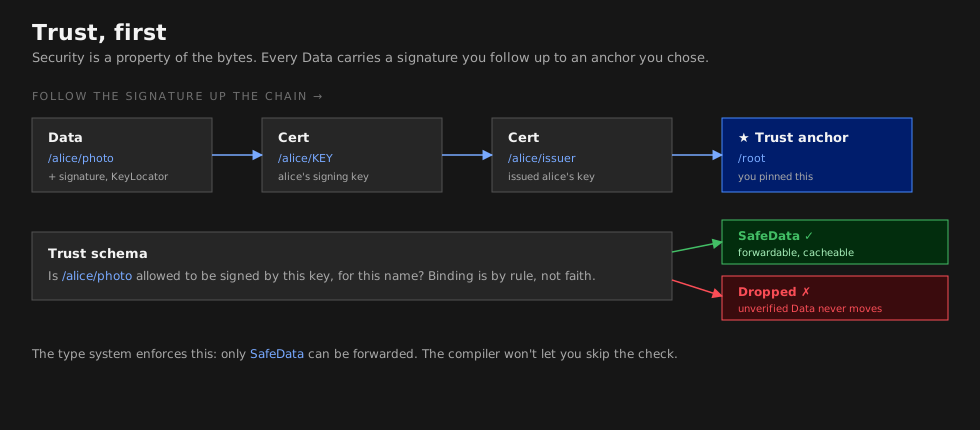
In IP, you secure the pipe: TLS encrypts the channel between two endpoints, so you trust the data because you trust the connection. But this breaks down when data is cached, replicated, or served by a third party. Who signed the TLS certificate for a CDN edge node you have never heard of?

NDN sidesteps this entirely. Every Data packet carries a cryptographic signature from its original producer. A cached copy served by a router three hops away is exactly as trustworthy as one served by the producer directly – the consumer verifies the signature against a trust schema and either accepts or rejects the data, regardless of where it came from.

In ndn-rs, this principle is encoded into the type system. The SafeData type can only be constructed after signature verification succeeds. Application callbacks receive SafeData, never raw unverified Data. The compiler itself prevents you from forwarding unverified content.

Inside the Forwarder

An NDN forwarder is more sophisticated than an IP router. Where an IP router has a single table (the routing table) and is stateless per-packet, an NDN forwarder maintains three core data structures that work together on every packet:

NDN forwarder internals

The internal structure of an NDN forwarder, showing how Interest and Data packets interact with the Content Store, PIT, FIB, and Strategy layer. (Image: named-data.net)

Content Store (CS): In-Network Caching

Every NDN forwarder – not just dedicated cache servers – can store Data packets it has forwarded and serve them to future Interests for the same name. When an Interest arrives and the CS has a match, the forwarder responds immediately without forwarding the Interest upstream. In ndn-rs, the CS is trait-based (ContentStore) with pluggable backends: LRU, sharded, and persistent (RocksDB/redb).

Pending Interest Table (PIT): Stateful Forwarding

When an Interest arrives and the CS does not have the data, the forwarder creates a PIT entry recording which face the Interest came from and forwards it upstream. If a second Interest for the same name arrives before the Data comes back, the forwarder simply adds the new face to the existing PIT entry – it does not forward a duplicate Interest. When the Data finally arrives, the forwarder sends it back to all faces listed in the PIT entry, then removes the entry.

This built-in aggregation is one of NDN’s most powerful features. It provides native multicast, loop prevention, and congestion control at the network layer.

Forwarding Information Base (FIB): Name-Based Routing

The FIB maps name prefixes to outgoing faces, just as an IP routing table maps address prefixes to next hops. The key difference is longest-prefix match on hierarchical names rather than IP addresses. In ndn-rs, the FIB is a name trie with HashMap<Component, Arc<RwLock<TrieNode>>> per level, enabling concurrent longest-prefix match without holding parent locks.

Strategy Layer: Adaptive Forwarding

Instead of a single forwarding algorithm, NDN allows per-prefix forwarding strategies. A strategy decides which nexthop(s) to use, whether to probe alternative paths, whether to retry on a different face after a timeout, or whether to suppress forwarding entirely. This makes NDN forwarding adaptive in a way that IP routing generally is not.

In ndn-rs, a name trie (parallel to the FIB) maps prefixes to Arc<dyn Strategy> implementations. Strategies receive an immutable StrategyContext and return a ForwardingAction.

Packet Flow: A Complete Example

Let us trace what happens when a consumer requests data, step by step. The first request goes all the way to the producer. The second request for the same data is satisfied from the router’s cache.

sequenceDiagram
    participant C as Consumer
    participant R as Router
    participant P as Producer

    Note over R: PIT and CS are empty

    C->>R: Interest /app/data/1
    Note over R: CS lookup: miss
    Note over R: PIT insert: record consumer face
    Note over R: FIB lookup: /app -> producer face
    R->>P: Interest /app/data/1

    P->>R: Data /app/data/1 [signed]
    Note over R: PIT match: found entry
    Note over R: CS insert: cache the Data
    Note over R: Forward to all PIT in-record faces
    R->>C: Data /app/data/1 [signed]

    Note over C: Verify signature against trust schema

    C->>R: Interest /app/data/1 (again)
    Note over R: CS lookup: hit!
    R->>C: Data /app/data/1 [from cache]
    Note over R: No PIT entry needed, no upstream forwarding

And here is how all three data structures cooperate within a single forwarder node. Notice how an Interest that hits the CS never touches the PIT or FIB, and how unsolicited Data (with no matching PIT entry) is dropped:

flowchart TD
    interest["Incoming Interest\n/app/video/frame1"] --> cs_check{"Content Store\n(CS)"}
    cs_check -->|"HIT: cached Data found"| reply["Return cached Data\nto incoming face"]
    cs_check -->|"MISS"| pit_check{"Pending Interest\nTable (PIT)"}
    pit_check -->|"Existing entry:\naggregate Interest\n(add in-record)"| suppress["Suppress\n(do not forward again)"]
    pit_check -->|"New entry:\ncreate PIT entry"| fib_lookup{"Forwarding Information\nBase (FIB)"}
    fib_lookup -->|"Longest-prefix match\n/app -> face 3, cost 10\n/app/video -> face 5, cost 5"| strategy["Strategy selects\nnexthop(s)"]
    strategy --> forward["Forward Interest\nupstream"]

    data["Incoming Data\n/app/video/frame1"] --> pit_match{"PIT Lookup"}
    pit_match -->|"No match"| drop["Drop\n(unsolicited)"]
    pit_match -->|"Match found"| cs_insert["Insert into CS"]
    cs_insert --> fan_out["Send Data to all\nPIT in-record faces"]
    fan_out --> consume["Remove PIT entry"]

NDN in Rust: Why the Fit Is Natural

If you have read this far, you might have noticed something: NDN’s architecture is full of shared ownership, concurrent access, and type-level safety guarantees. These are exactly the problems Rust’s ownership model and trait system are designed to solve.

ndn-rs is not a port of C++ code (like ndn-cxx/NFD) or Go code (like ndnd). It is a ground-up design that uses Rust’s strengths to express NDN concepts directly:

  • Arc<Name> – names are shared across PIT, FIB, and pipeline stages without copying. Rust’s reference counting ensures they are freed exactly when no longer needed.
  • bytes::Bytes – zero-copy slicing for TLV parsing and Content Store storage. A cached Data packet in the CS is the same allocation that came off the wire.
  • DashMap for PIT – sharded concurrent access with no global lock on the hot path. Multiple pipeline tasks process packets in parallel without contention.
  • PipelineStage trait – each processing step (decode, CS lookup, PIT check, strategy, dispatch) is a composable trait object. The pipeline is a fixed sequence of stages, optimized by the compiler.
  • SafeData newtype – the compiler prevents unverified data from being forwarded. This is not a runtime check you might forget; it is a type error.
  • Trait-based ContentStore – swap cache backends (LRU, sharded, persistent) without changing the pipeline.

The architecture is documented in detail in ARCHITECTURE.md, and the next pages in this section cover the Interest/Data lifecycle through the pipeline, the PIT, FIB, and CS data structures, and a glossary of NDN terms.

Further Reading

The foundational papers and resources for understanding NDN:

  • Van Jacobson, Diana K. Smetters, James D. Thornton, Michael F. Plass, Nicholas H. Briggs, and Rebecca L. Braynard. “Networking Named Content.” Proceedings of the 5th ACM International Conference on Emerging Networking Experiments and Technologies (CoNEXT), 2009. – The paper that started it all.
  • Lixia Zhang, Alexander Afanasyev, Jeffrey Burke, Van Jacobson, kc claffy, Patrick Crowley, Christos Papadopoulos, Lan Wang, and Beichuan Zhang. “Named Data Networking.” ACM SIGCOMM Computer Communication Review, 44(3):66-73, 2014. – The NDN project paper describing the full architecture.
  • NDN Publications – The complete list of NDN project publications covering security, routing, applications, and more.
  • named-data.net – The NDN project homepage.

Interest and Data Lifecycle

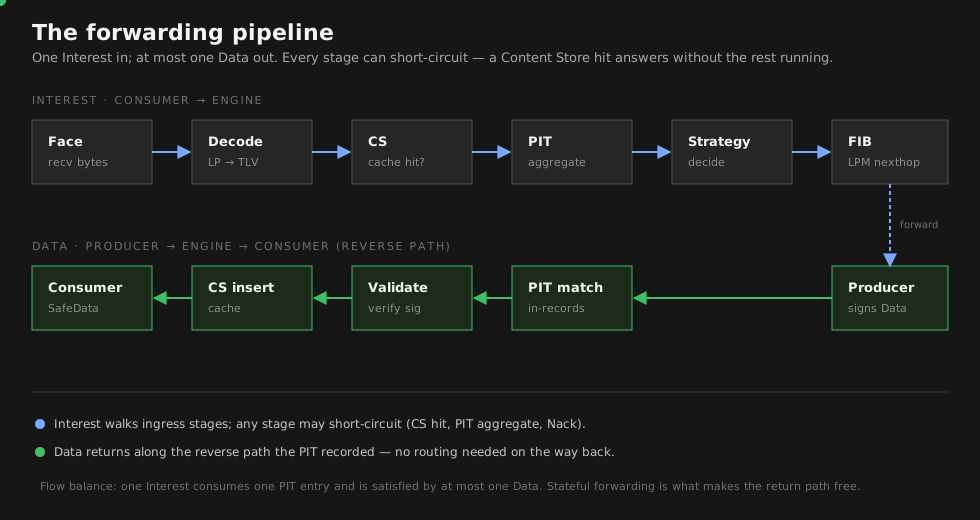
Every NDN packet that enters ndn-rs follows a carefully choreographed journey. Let’s trace an Interest from the moment it arrives as raw bytes to the moment matching Data flows back to the consumer.

The Pipeline Machine

At the core of this journey is a pipeline – a fixed sequence of PipelineStage trait objects determined at build time so the compiler can monomorphize the hot path. A runner loop drains a shared mpsc channel fed by all face tasks, picks up each packet, and drives it through the appropriate pipeline. There are no hidden callbacks or middleware chains; the runner simply matches on the Action returned by each stage and decides what happens next.

💡 Key insight: PacketContext is passed by value (moved) through each stage. This means ownership transfers at every step – a stage that short-circuits the pipeline consumes the context, and the compiler prevents any subsequent stage from accidentally using it. In C++, this invariant would require runtime checks; in Rust, it is a compile-time guarantee.

The stage contract is minimal:

#![allow(unused)]
fn main() {
pub trait PipelineStage: Send + Sync + 'static {
    fn process(
        &self,
        ctx: PacketContext,
    ) -> impl Future<Output = Result<Action, DropReason>> + Send;
}
}

And the Action enum gives each stage explicit control over what comes next:

#![allow(unused)]
fn main() {
pub enum Action {
    Continue(PacketContext),  // pass to next stage
    Send(PacketContext, SmallVec<[FaceId; 4]>),  // forward and exit
    Satisfy(PacketContext),   // satisfy PIT entries and exit
    Drop(DropReason),        // discard silently
    Nack(PacketContext, NackReason),  // send Nack to incoming face
}
}

The Traveling Context

Before we follow a packet through the pipeline, it helps to understand what it carries. A PacketContext is born the moment bytes arrive on a face, and it accumulates information as each stage does its work:

#![allow(unused)]
fn main() {
pub struct PacketContext {
    pub raw_bytes: Bytes,              // original wire bytes
    pub face_id:   FaceId,            // face the packet arrived on
    pub name:      Option<Arc<Name>>,  // None until TlvDecodeStage
    pub packet:    DecodedPacket,      // Raw -> Interest/Data after decode
    pub pit_token: Option<PitToken>,   // set by PitCheckStage
    pub out_faces: SmallVec<[FaceId; 4]>,  // populated by StrategyStage
    pub lp_pit_token: Option<Bytes>,  // LP PIT token echoed in responses
    pub cs_hit:    bool,
    pub verified:  bool,
    pub arrival:   u64,                // ns since Unix epoch
    pub tags:      AnyMap,             // extensible per-packet metadata
}
}

Notice that name starts as None – it won’t be populated until the TLV decode stage runs. This progressive population is deliberate: a Content Store hit can short-circuit the pipeline before expensive fields like nonce or lifetime are ever accessed.

flowchart LR
    FC["FaceCheck\n──────────\nface_id\nraw_bytes\narrival"]
    -->|"Continue"| DEC["TlvDecode\n──────────\nname\npacket"]
    -->|"Continue"| CS["CsLookup\n──────────\ncs_hit"]
    -->|"Continue"| PIT["PitCheck\n──────────\npit_token\nnonce check"]
    -->|"Continue"| STR["Strategy\n──────────\nout_faces\nFIB match"]
    -->|"Forward"| DSP["Dispatch\n──────────\nsend to\nout_faces"]

    style FC  fill:#e8f4fd,stroke:#2196F3
    style DEC fill:#e8f4fd,stroke:#2196F3
    style CS  fill:#fff3e0,stroke:#FF9800
    style PIT fill:#e8f4fd,stroke:#2196F3
    style STR fill:#f3e5f5,stroke:#9C27B0
    style DSP fill:#e8f5e9,stroke:#4CAF50

Now let’s follow an Interest through the full journey.

The Interest’s Journey

An Interest packet materializes on a face – perhaps a UDP datagram from a downstream consumer, or bytes pushed through an in-process InProcFace. Its journey begins.

flowchart TD
    A["Packet arrives on Face"] --> B["FaceCheck"]
    B -->|"face valid"| C["TlvDecode"]
    B -->|"face down/invalid"| X1["Drop"]
    C -->|"valid Interest"| D["CsLookup"]
    C -->|"malformed TLV"| X2["Drop"]
    D -->|"CS hit"| Y1["Send cached Data\nback to incoming face"]
    D -->|"CS miss"| E["PitCheck"]
    E -->|"duplicate nonce\n(loop detected)"| X3["Nack: Duplicate"]
    E -->|"existing PIT entry\n(aggregate)"| X4["Suppress\n(add in-record, do not forward)"]
    E -->|"new PIT entry"| F["Strategy"]
    F --> G{"ForwardingAction?"}
    G -->|"Forward"| H["Dispatch to\nnexthop face(s)"]
    G -->|"ForwardAfter"| I["Schedule delayed\nforward + probe"]
    G -->|"Nack"| X5["Nack to\nincoming face"]
    G -->|"Suppress"| X6["Drop\n(policy decision)"]

First contact: FaceCheck

The very first thing the forwarder does is verify that the face the packet arrived on is still alive. If the face has been torn down or is in the process of shutting down, there’s no point proceeding – the packet is dropped immediately. This is a cheap guard that prevents stale packets from wasting pipeline resources.

Making sense of the bytes: TlvDecode

With the face confirmed, the raw Bytes are parsed into a typed Interest struct. The context’s name field is populated with an Arc<Name>, giving subsequent stages a shared, zero-copy reference to the packet’s identity. Malformed TLV drops the packet here.

🔧 Implementation note: Fields like nonce and lifetime are decoded lazily via OnceLock<T>. They sit dormant inside the Interest struct, only computed when a later stage actually reads them. If the pipeline short-circuits before that happens, the CPU cycles are never spent.

The fast path: CsLookup

Now comes the moment that can make the entire rest of the pipeline irrelevant. The forwarder checks its Content Store for a cached Data packet matching this Interest’s name. If one is found, the cached wire-format Bytes are sent directly back to the incoming face. The pipeline short-circuits – no PIT entry is created, no FIB lookup occurs, no upstream forwarding happens.

📊 Performance: The CS short-circuit is the single most important optimization in the pipeline. A cache hit skips PIT insertion, FIB lookup, strategy invocation, and upstream forwarding – reducing a multi-stage pipeline to a hash lookup and a reference-count increment. With lazy OnceLock decoding, even the Interest’s nonce and lifetime fields are never parsed on this path.

Tracking the request: PitCheck

On a cache miss, the Interest reaches the Pending Interest Table. Here the forwarder must answer three questions at once. Has this exact Interest been seen before with the same nonce? If so, there’s a forwarding loop – the packet is Nacked with Duplicate. Is there already an outstanding PIT entry for this name from a different consumer? If so, the Interest is aggregated: its face is added as an in-record to the existing entry, but no new upstream Interest is sent. This is the mechanism behind NDN’s built-in multicast efficiency. Only if the entry is genuinely new does the Interest proceed to the next stage.

Deciding where to go: Strategy

For a fresh Interest that needs forwarding, the forwarder performs a longest-prefix match against the FIB to discover nexthop faces, then invokes the strategy assigned to that prefix. The strategy receives an immutable StrategyContext – it can observe the forwarder’s state but cannot mutate it – and returns a forwarding decision:

#![allow(unused)]
fn main() {
pub enum ForwardingAction {
    Forward(SmallVec<[FaceId; 4]>),
    ForwardAfter { faces: SmallVec<[FaceId; 4]>, delay: Duration },
    Nack(NackReason),
    Suppress,
}
}

Forward sends the Interest immediately. ForwardAfter enables probe-and-fallback patterns without the strategy needing to spawn its own timers – the forwarder handles the scheduling. Nack and Suppress end the journey here.

⚠️ Strategy isolation: Strategies cannot mutate global state. They receive a read-only snapshot and return a decision. This makes strategies safe to swap at runtime and prevents a buggy strategy from corrupting the FIB or PIT.

The final hop: Dispatch

The Interest is sent out on the selected nexthop face(s), and out-records are created in the PIT entry to track when each was sent. The Interest is now in flight, and the forwarder waits for a response.

The Satisfying Return: Data Pipeline

Somewhere upstream – perhaps one hop away, perhaps many – a producer or another router’s cache generates a Data packet matching the Interest. That Data now makes its way back through the network to our router.

flowchart TD
    A["Data arrives on Face"] --> B["FaceCheck"]
    B -->|"face valid"| C["TlvDecode"]
    B -->|"face down/invalid"| X1["Drop"]
    C -->|"valid Data"| D["PitMatch"]
    C -->|"malformed TLV"| X2["Drop"]
    D -->|"no PIT entry\n(unsolicited)"| X3["Drop"]
    D -->|"PIT match found"| E["Strategy\n(after_receive_data)"]
    E --> F["MeasurementsUpdate"]
    F --> G["CsInsert"]
    G --> H["Dispatch Data to\nall PIT in-record faces"]
    H --> I["Remove PIT entry"]

The Data’s journey begins with the same FaceCheck and TlvDecode stages that every packet passes through. But after decoding, the paths diverge.

Finding who asked: PitMatch

The forwarder looks up the PIT for an entry matching this Data’s name. If no entry exists, the Data is unsolicited – nobody asked for it, so it is dropped. This is a fundamental NDN security property: routers only accept Data that was explicitly requested. When a match is found, the PIT entry reveals which downstream faces are waiting for this content.

Learning from success: Strategy and Measurements

The strategy is notified that Data arrived via after_receive_data. This allows it to update its internal state – mark a path as working, cancel retransmission timers, adjust preferences. Then the MeasurementsUpdate stage computes per-face, per-prefix statistics: EWMA RTT (derived from the gap between the out-record’s send timestamp and this Data’s arrival) and satisfaction rate. These measurements feed back into future strategy decisions, letting the forwarder learn which paths perform best.

📊 Performance: Measurements are stored in a DashMap-backed MeasurementsTable, so updating statistics for one prefix never blocks lookups for another. The EWMA computation is a single multiply-and-add – negligible cost for valuable routing intelligence.

Caching for the future: CsInsert

Before the Data reaches its final recipients, it is inserted into the Content Store. The wire-format Bytes are stored directly – no re-encoding – so future cache hits can be served as zero-copy sends. The FreshnessPeriod is decoded once at insert time to compute a stale_at timestamp.

Delivering the payload: Dispatch

Finally, the Data is sent to every face listed in the PIT entry’s in-records. If three consumers requested the same content, all three receive it now. The PIT entry is consumed – removed from the table – and the lifecycle is complete.

The Power of Aggregation

The interplay between the Interest and Data pipelines reveals one of NDN’s most powerful properties. When multiple consumers request the same data, the PIT aggregates their Interests so that only a single Interest is forwarded upstream. When the Data returns, it fans out to all of them:

💡 Key insight: PIT aggregation is what makes NDN inherently multicast-friendly. Three consumers requesting the same video segment generate only one upstream Interest and one Data packet over the bottleneck link. The router’s PIT entry fans the Data out locally. This is fundamentally different from IP, where each consumer opens a separate connection and the same data traverses the network three times.

flowchart LR
    c1["Consumer 1"] -->|"Interest\n/app/data/1"| router["Router"]
    c2["Consumer 2"] -->|"Interest\n/app/data/1"| router
    c3["Consumer 3"] -->|"Interest\n/app/data/1"| router

    router -->|"Single Interest\n/app/data/1"| producer["Producer"]

    producer -->|"Data\n/app/data/1"| router2["Router"]

    router2 -->|"Data"| c1b["Consumer 1"]
    router2 -->|"Data"| c2b["Consumer 2"]
    router2 -->|"Data"| c3b["Consumer 3"]

    subgraph PIT Entry
        direction TB
        pit_name["Name: /app/data/1"]
        in1["InRecord: face 1 (Consumer 1)"]
        in2["InRecord: face 2 (Consumer 2)"]
        in3["InRecord: face 3 (Consumer 3)"]
        out1["OutRecord: face 4 (upstream)"]
    end

Consumer 1’s Interest arrives first and creates a new PIT entry. Consumer 2’s Interest for the same name finds the existing entry and is aggregated – an in-record is added, but no second Interest goes upstream. Consumer 3 is aggregated the same way. When the Data returns, the forwarder reads all three in-records and delivers the Data to each consumer. One upstream packet, three downstream deliveries.

When Things Go Wrong: The Nack Pipeline

Not every Interest finds its Data. Sometimes there is no route in the FIB. Sometimes the upstream path is congested. Sometimes the producer is unreachable. NDN handles these failures with Network Nacks – negative acknowledgements that flow back toward the consumer.

Nacks can be generated at two points in the Interest pipeline. A strategy that finds no viable nexthop returns ForwardingAction::Nack(reason), and any pipeline stage can return Action::Nack(ctx, reason) to signal a problem. The PitCheck stage does this when it detects a loop via duplicate nonce.

When a Nack arrives from upstream, it follows a shortened pipeline: decode, PIT match, and strategy notification. The strategy then faces a choice – try an alternative nexthop if one exists, or propagate the Nack downstream to the consumer. If no alternatives remain, the Nack flows back to every face in the PIT entry’s in-records, and the entry is removed.

⚠️ Nack propagation is conservative: A strategy will exhaust all available nexthops before propagating a Nack downstream. Only when every path has failed does the consumer learn that its Interest cannot be satisfied. This gives the network maximum opportunity to find the data through alternative routes.

The Full Picture

The two pipelines are symmetric and complementary. Interests flow upstream from consumer toward producer, driven by the FIB. Data flows downstream from producer toward consumer, guided by the PIT entries that Interests left behind. The Content Store sits at the junction, short-circuiting the loop when it can. And the strategy system ties it all together, learning from every Data arrival and every Nack to make better forwarding decisions over time.

This is the packet lifecycle in ndn-rs: a pipeline that is small enough to reason about stage by stage, yet powerful enough to express multicast aggregation, in-network caching, and adaptive forwarding – all without a single IP address in sight.

PIT, FIB, and Content Store

Three data structures sit at the heart of every NDN forwarder. Together they answer three questions: “Do I already have this data?” (CS), “Is someone already looking for it?” (PIT), and “Where should I look?” (FIB).

In ndn-rs, these three structures are not just containers – they are active participants in every packet’s lifecycle, tightly cooperating to move Interests upstream and Data downstream. Understanding how they work individually is important, but understanding how they work together is what makes the forwarding plane click.

The Cooperation

Before diving into each structure’s internals, let’s see how they collaborate. When an Interest arrives, the forwarder consults all three in sequence. When Data returns, the PIT and CS work in concert to cache and deliver it:

flowchart LR
    subgraph Interest Path
        I["Interest /a/b/c"] --> CS{"CS Lookup"}
        CS -->|miss| PIT{"PIT Check"}
        PIT -->|new entry| FIB{"FIB LPM"}
        FIB -->|"/a/b -> face 3"| OUT["Forward to face 3"]
    end

    subgraph Data Path
        D["Data /a/b/c"] --> PIT2{"PIT Match"}
        PIT2 -->|"in-records: face 1, face 2"| CS2["CS Insert"]
        CS2 --> SEND["Send to face 1, face 2"]
        PIT2 -->|"remove entry"| DONE["PIT entry consumed"]
    end

    OUT -.->|"Data returns"| D

An Interest for /a/b/c first asks the CS: “Do you have it?” On a miss, the PIT records who is asking and checks for loops. Then the FIB answers: “Try face 3.” When Data comes back on face 3, the PIT reveals who to deliver it to, the CS caches a copy for next time, and the PIT entry is consumed. Three structures, one fluid motion.

Let’s now examine each structure in depth, keeping in mind how each one’s design decisions ripple through to the others.

Content Store: “Do I Already Have This?”

The CS is the first structure consulted when an Interest arrives, and it has the power to end the pipeline immediately. If a cached Data packet matches the Interest, the forwarder sends it back to the consumer without ever touching the PIT or FIB. This short-circuit is the single most important optimization in the forwarding plane.

The Trait Abstraction

The CS is defined as a trait, not a concrete type. This means the pipeline doesn’t care how data is cached – only that the interface is honored:

#![allow(unused)]
fn main() {
pub trait ContentStore: Send + Sync + 'static {
    fn get(&self, interest: &Interest) -> impl Future<Output = Option<CsEntry>> + Send;
    fn insert(&self, data: Bytes, name: Arc<Name>, meta: CsMeta) -> impl Future<Output = InsertResult> + Send;
    fn evict(&self, name: &Name) -> impl Future<Output = bool> + Send;
    fn capacity(&self) -> CsCapacity;
}

pub struct CsEntry {
    pub data:    Bytes,  // wire-format, not re-encoded
    pub stale_at: u64,   // FreshnessPeriod decoded once at insert time
}
}

Three built-in backends implement this trait, each suited to different deployment scenarios.

LruCs is a byte-bounded LRU cache – the default choice for most deployments. When total cached bytes exceed the configured limit, the least recently used entries are evicted. It stores wire-format Bytes directly, so a cache hit sends the stored bytes to the face with no re-encoding or copying.

flowchart LR
    subgraph "LRU Content Store (byte-bounded)"
        direction LR
        MRU["Most Recently Used"]
        e1["/app/video/frame3\n512 bytes"]
        e2["/app/data/item7\n1024 bytes"]
        e3["/ndn/edu/paper\n2048 bytes"]
        e4["/app/video/frame1\n768 bytes"]
        LRU["Least Recently Used"]
        MRU ~~~ e1 --- e2 --- e3 --- e4 ~~~ LRU
    end

    new["New insert:\n/app/news/article\n1500 bytes"] -->|"Insert at head\n(MRU end)"| MRU
    LRU -->|"Evict from tail\nif over byte limit"| evicted["Evicted:\n/app/video/frame1"]

    style new fill:#d4edda,stroke:#28a745
    style evicted fill:#f8d7da,stroke:#dc3545

ShardedCs wraps any ContentStore implementation with sharding by name hash. Each shard is an independent instance of the inner store. When many pipeline tasks hit the CS concurrently, sharding ensures they don’t all contend on a single lock – the same principle that makes the PIT scale, applied here.

PersistentCs is backed by an on-disk key-value store (RocksDB or redb). It’s the right choice when the cache should survive restarts or when the dataset exceeds available memory. Its existence is invisible to the pipeline – the trait abstraction means swapping backends requires no code changes upstream.

Why Wire-Format Storage Matters

The CS stores Data as the original wire-format Bytes, not as decoded Rust structs. On a cache hit, those bytes are handed directly to face.send() with zero allocation and zero copying – Bytes uses reference-counted shared memory internally.

💡 Key insight: Storing wire-format bytes instead of decoded structs is a deliberate tradeoff. It means the CS cannot patch fields (e.g., decrementing a hop count) on cache hits. But NDN Data packets are immutable and cryptographically signed – modifying them would invalidate the signature anyway. So wire-format storage is both the fastest and the most correct approach.

This design choice connects directly to the PIT: because the CS returns raw bytes, a cache hit bypasses not just the PIT and FIB, but also any decoding that would be needed to re-encode the Data for transmission. The pipeline stage that performs CsLookup simply returns Action::Send with the cached bytes – no further stages execute.

Pending Interest Table: “Is Someone Already Looking?”

If the CS can’t satisfy an Interest, the next question is whether another consumer has already asked for the same data. The PIT tracks every outstanding Interest that has been forwarded upstream but not yet satisfied. It is the bridge between the Interest and Data pipelines – Interests create PIT entries on the way up, and Data consumes them on the way down.

Structure

#![allow(unused)]
fn main() {
// Conceptual: DashMap keyed on PIT token hash
type Pit = DashMap<PitToken, PitEntry>;

pub struct PitEntry {
    pub name:        Arc<Name>,
    pub selector:    Option<Selector>,
    pub in_records:  Vec<InRecord>,
    pub out_records: Vec<OutRecord>,
    pub nonces_seen: SmallVec<[u32; 4]>,
    pub is_satisfied: bool,
    pub created_at:  u64,
    pub expires_at:  u64,
}

pub struct InRecord  { pub face_id: FaceId, pub nonce: u32, pub expiry: u64, pub lp_pit_token: Option<Bytes>, }
pub struct OutRecord { pub face_id: u32, pub last_nonce: u32, pub sent_at: u64 }
}

The PIT key is a PitToken derived from the Interest name and selectors. Two Interests for the same name but different MustBeFresh or CanBePrefix values produce distinct PIT entries, matching NDN semantics exactly.

Each entry maintains two lists. In-records track which downstream faces sent Interests – these are the faces that need to receive Data when it arrives. Out-records track which upstream faces the Interest was forwarded to – these provide the timestamps needed to compute round-trip time and detect forwarding failures.

Concurrency Without Compromise

The PIT is the hottest data structure in the forwarder. Every Interest and every Data packet touches it. A naive global mutex would serialize all packet processing onto a single core. ndn-rs uses DashMap instead.

📊 Performance: DashMap provides sharded concurrent access – internally it is a fixed number of RwLock<HashMap> shards. Different PIT entries hash to different shards, so operations on unrelated Interests never contend. A global mutex (as NFD uses) serializes all packet processing onto one core. DashMap’s sharded design means N cores can process N unrelated packets in parallel with zero contention. This is the single biggest architectural difference enabling multi-core scaling.

Loop Detection

Each Interest carries a random 32-bit nonce. When an Interest arrives and a PIT entry already exists for that name, the entry’s nonces_seen list is checked. If the nonce is already present, the Interest has looped back to a router it already visited – a forwarding loop. The forwarder responds with a Nack carrying the Duplicate reason code.

🔧 Implementation note: nonces_seen uses SmallVec<[u32; 4]> to keep the common case (1–4 nonces) on the stack. Most PIT entries see exactly one nonce and are satisfied quickly. Only in unusual aggregation scenarios does the vector spill to the heap.

The Lifecycle of a PIT Entry

A PIT entry is born when a new Interest passes the CS (miss) and PIT (no existing entry) checks. It lives through possible aggregation – additional consumers requesting the same data add their in-records. It dies in one of three ways: Data arrives and satisfies it, its lifetime expires, or a Nack propagates through it.

stateDiagram-v2
    [*] --> Created: Interest arrives,\nCS miss, no existing entry
    Created --> Pending: In-record added\nfor incoming face
    Pending --> Aggregated: Duplicate Interest\nfrom different face\n(add in-record)
    Aggregated --> Aggregated: More duplicates
    Pending --> Satisfied: Matching Data arrives
    Aggregated --> Satisfied: Matching Data arrives
    Satisfied --> [*]: Data sent to all\nin-record faces,\nentry removed
    Pending --> Expired: Interest lifetime\nelapsed, no Data
    Aggregated --> Expired: Interest lifetime\nelapsed, no Data
    Expired --> [*]: Entry cleaned up\nby timing wheel
    Pending --> Nacked: Upstream returns Nack,\nno alternative nexthops
    Nacked --> [*]: Nack propagated\ndownstream, entry removed

🔧 Implementation note: ndn-rs does not scan the entire PIT for expired entries. Instead, a hierarchical timing wheel provides O(1) insertion and expiry notification. When a PIT entry is created, it is registered with the wheel at its expires_at time. The wheel fires a callback when that time passes, and the entry is removed – no periodic sweeps, no wasted CPU.

The PIT’s connection to the other structures is direct and essential. It depends on the CS having already been checked (no point tracking an Interest the CS can satisfy). And when Data arrives, the PIT entry’s in-records tell the dispatch stage exactly where to send it – information that the FIB never had, because the FIB only knows about upstream paths, not about which downstream faces are waiting.

Forwarding Information Base: “Where Should I Look?”

When an Interest passes both the CS (miss) and PIT (new entry), the forwarder needs to decide where to send it. The FIB maps name prefixes to sets of nexthop faces, and a longest-prefix match (LPM) finds the best entry for any given name.

Structure

The FIB is a name trie where each node holds an optional FibEntry:

#![allow(unused)]
fn main() {
pub struct Fib(NameTrie<Arc<FibEntry>>);

pub struct FibEntry {
    pub nexthops: Vec<FibNexthop>,
}

pub struct FibNexthop {
    pub face_id: u32,
    pub cost: u32,
}
}

The Concurrent Trie

Each trie node uses HashMap<NameComponent, Arc<RwLock<TrieNode<V>>>>:

#![allow(unused)]
fn main() {
pub struct NameTrie<V: Clone + Send + Sync + 'static> {
    root: Arc<RwLock<TrieNode<V>>>,
}

struct TrieNode<V> {
    entry: Option<V>,
    children: HashMap<NameComponent, Arc<RwLock<TrieNode<V>>>>,
}
}

The Arc wrapper on each child node is the key to concurrency. When a thread performing LPM visits a child node, it grabs the child’s Arc, then releases the parent’s read lock. This hand-over-hand locking means concurrent lookups on different branches never contend after diverging from their common ancestor.

🔧 Implementation note: The Arc<RwLock<TrieNode>> per child is what makes the FIB a concurrent trie, not just a trie behind a lock. A lookup for /a/b/c grabs the Arc for node a, releases the root lock, then grabs the Arc for b, releases a’s lock, and so on. Two concurrent lookups on different branches (e.g., /a/b and /x/y) never contend after the root level.

Here’s how a FIB trie looks in practice, with green nodes holding actual nexthop entries:

%%{init: {"layout": "elk"}}%%
flowchart TD
    root["/ (root)"] --> ndn["/ndn"]
    ndn --> edu["/ndn/edu"]
    ndn --> com["/ndn/com"]
    edu --> ucla["/ndn/edu/ucla\n&#9745; nexthop: face 3, cost 10"]
    edu --> memphis["/ndn/edu/memphis\n&#9745; nexthop: face 5, cost 20"]
    edu --> mit["/ndn/edu/mit\n&#9745; nexthop: face 7, cost 15"]
    com --> google["/ndn/com/google\n&#9745; nexthop: face 2, cost 5"]
    ucla --> papers["/ndn/edu/ucla/papers"]
    ucla --> cs_dept["/ndn/edu/ucla/cs\n&#9745; nexthop: face 4, cost 8"]

    style ucla fill:#d4edda,stroke:#28a745
    style memphis fill:#d4edda,stroke:#28a745
    style mit fill:#d4edda,stroke:#28a745
    style google fill:#d4edda,stroke:#28a745
    style cs_dept fill:#d4edda,stroke:#28a745

Intermediate nodes like /ndn/edu exist only for trie structure – they have no entry. A lookup for /ndn/edu/ucla/papers/2024 walks the trie and returns the deepest match at /ndn/edu/ucla.

Longest-Prefix Match in Action

LPM walks the trie component by component, tracking the deepest node that has an entry. For a lookup of /a/b/c/d:

  1. Read-lock root, check child a, clone its Arc, release root lock.
  2. Read-lock node a, record its entry (if any), check child b, clone, release.
  3. Continue until the name is exhausted or no child matches.
  4. Return the deepest recorded entry.

This is O(k) where k is the number of name components, with each level holding a lock only briefly. The result – a set of nexthops with associated costs – is handed to the strategy, which makes the final forwarding decision.

💡 Key insight: The FIB only provides candidates. It says “these faces might lead to the data.” The strategy layer, informed by measurements the PIT helped gather (RTT from out-record timestamps, satisfaction rates from PIT entry outcomes), makes the actual choice. The FIB and PIT are connected not just through the pipeline, but through the feedback loop that makes forwarding adaptive.

The Three Together: A Complete Example

Let’s trace a concrete scenario to see all three structures in action.

A consumer sends an Interest for /app/video/segment-42. The forwarder’s CS is checked first – no cached copy exists. The PIT is consulted next – no existing entry, so a new one is created with an in-record for face 1 (the consumer’s face). The FIB performs LPM and finds a match at /app/video with nexthop face 5 (cost 10) and face 7 (cost 20). The strategy picks face 5, the cheaper path. An out-record is added to the PIT entry with the current timestamp, and the Interest goes out on face 5.

Seconds later, a second consumer on face 2 sends the same Interest. The CS still has nothing. But the PIT already has an entry – the Interest is aggregated. Face 2 is added as a second in-record. No second Interest goes upstream.

The producer responds with Data on face 5. The PIT entry is matched, revealing two in-records (faces 1 and 2). The out-record’s timestamp is used to compute RTT, which is fed into the measurements table. The Data is inserted into the CS for future cache hits. Then the Data is dispatched to both face 1 and face 2. The PIT entry is consumed and removed.

If a third consumer now requests the same segment, the CS has the answer immediately. The PIT and FIB are never consulted. The cached bytes flow directly back to the consumer.

Summary Table

StructureImplementationKeyConcurrencyHot-Path Cost
FIBNameTrie<Arc<FibEntry>>Name prefix (trie)RwLock per trie nodeO(k) LPM, k = component count
PITDashMap<PitToken, PitEntry>Name + selector hashSharded RwLockO(1) insert/lookup
CSTrait (LruCs, ShardedCs, PersistentCs)NameImplementation-dependentO(1) LRU, zero-copy hit

Together, these three structures form a self-reinforcing system. The CS absorbs repeated requests, keeping them off the network. The PIT aggregates concurrent requests, preventing duplicate upstream traffic. The FIB directs new requests toward the right sources, guided by measurements that the PIT helped collect. No single structure works in isolation – their power comes from how they cooperate.

Glossary

Terms used throughout the ndn-rs codebase and NDN literature. Organized alphabetically.


Action
Enum returned by each PipelineStage to control packet flow. Variants: Continue (pass to next stage), Send (forward to faces and exit), Satisfy (satisfy PIT entries), Drop (discard), Nack (send negative acknowledgement).
InProcFace
An in-process face that connects an application to the ndn-rs engine. Implemented as a pair of shared-memory ring buffers with a Unix socket control channel. Applications interact with the forwarder through InProcFace rather than opening network sockets.
CanBePrefix
An Interest selector indicating that the Interest name may be a proper prefix of the Data name. Without this flag, the Data name must exactly match the Interest name.
CS (Content Store)
A per-node cache of Data packets. Any router can serve a cached Data to a future Interest without forwarding upstream. In ndn-rs, CS is a trait (ContentStore) with pluggable backends: LruCs, ShardedCs, PersistentCs.
Data
One of the two NDN network-layer packet types. A Data packet carries a name, content, and a cryptographic signature. Data is always a response to an Interest and travels the reverse path.
Face
An NDN communication interface, analogous to a network interface in IP. A face can be a UDP tunnel, TCP connection, Ethernet link, Unix socket, in-process channel, or any transport that implements the Face trait (recv() + send()). Each face has a unique FaceId.
FaceId
A u32 identifier assigned to each face when it is created. Used throughout PIT records, FIB nexthops, and pipeline dispatch. Application code does not use raw FaceId values directly.
FIB (Forwarding Information Base)
Maps name prefixes to sets of nexthop faces with costs. Implemented as a NameTrie with Arc<RwLock<TrieNode>> per level for concurrent longest-prefix match. Analogous to an IP routing table.
ForwardingAction
Enum returned by a Strategy to tell the pipeline what to do with an Interest. Variants: Forward (send to faces), ForwardAfter (delayed forward for probing), Nack (reject), Suppress (do not forward).
FreshnessPeriod
A field in a Data packet specifying how long (in milliseconds) the Data should be considered “fresh” after arrival. Used by the CS to honor MustBeFresh selectors. Decoded once at CS insert time and stored as a stale_at timestamp.
HopLimit
An optional field in an Interest packet, decremented at each hop. When it reaches zero the Interest is dropped. Prevents Interests from looping indefinitely in misconfigured networks.
Interest
One of the two NDN network-layer packet types. An Interest packet carries a name and optional selectors (CanBePrefix, MustBeFresh, Nonce, Lifetime, HopLimit). It requests a Data packet matching the given name.
MustBeFresh
An Interest selector requesting that the returned Data must not be stale (its FreshnessPeriod must not have expired). A CS entry whose stale_at has passed will not satisfy a MustBeFresh Interest.
Nack (Network Nack)
A negative acknowledgement sent by a router when it cannot satisfy or forward an Interest. Carries a reason code (NoRoute, Congestion, Duplicate). Nacks travel the reverse Interest path, same as Data.
Name
A hierarchical identifier for NDN content. Composed of a sequence of NameComponent values. Example: /ndn/example/data/v1. In ndn-rs, names use SmallVec<[NameComponent; 8]> for stack allocation in the common case and are shared via Arc<Name>.
NameComponent
A single segment of an NDN name. Components are typed (GenericNameComponent, ImplicitSha256DigestComponent, ParametersSha256DigestComponent, etc.) and carry arbitrary bytes, not just UTF-8 strings.
A link-layer protocol that fragments, reassembles, and annotates NDN packets on a single hop. Carries hop-by-hop fields such as PIT tokens, Nack reasons, congestion marks, and fragmentation headers. In ndn-rs, NDNLPv2 headers are parsed before the packet enters the forwarding pipeline.
Nonce
A random 32-bit value carried in every Interest packet. Used for loop detection: if a PIT entry already contains the same nonce, the Interest is a loop and is Nacked. Stored in SmallVec<[u32; 4]> per PIT entry.
PacketContext
The per-packet state object passed by value through the pipeline. Contains raw bytes, decoded packet, face ID, name, PIT token, output face list, and extensible tags. Fields are populated progressively as stages execute.
PipelineStage
A trait representing one step in the forwarding pipeline. Each stage receives a PacketContext and returns an Action. Built-in stages are monomorphized for zero-cost dispatch; plugin stages use dynamic dispatch via BoxedStage.
PIT (Pending Interest Table)
Records outstanding Interests that have been forwarded but not yet satisfied. Keyed by name + selector hash. Implemented as a DashMap for sharded concurrent access. Each entry tracks in-records (downstream faces), out-records (upstream faces), and nonces seen.
PitToken
A hash derived from the Interest name and selectors, used as the PIT lookup key. Distinct from the NDNLPv2 wire-protocol PIT token (an opaque hop-by-hop value echoed in Data/Nack responses).
SafeData
A newtype wrapper around Data that can only be constructed by the Validator after successful signature verification. Application callbacks and the Content Store receive SafeData, not raw Data. This enforces at compile time that unverified data cannot be forwarded or consumed.
ShmFace
A shared-memory face for high-throughput communication between an application and the ndn-rs router on the same host. Uses a ring buffer in a shared memory segment with a Unix socket control channel for signaling.
Strategy
A per-prefix forwarding policy that decides how to handle Interests and Data. Implements the Strategy trait with methods like after_receive_interest and after_receive_data. Strategies receive an immutable StrategyContext and return ForwardingAction values. A name trie parallel to the FIB maps prefixes to strategy instances.
TrustSchema
A declarative specification of which keys are allowed to sign which names. Uses name pattern matching with capture groups. The Validator checks incoming Data against the trust schema before constructing SafeData.

Building NDN Applications

ndn-app provides two ways to connect an application to NDN: through an external router process, or with the forwarder engine embedded directly in your binary. The high-level API — Consumer, Producer, Subscriber, Queryable — is the same either way.

This guide walks through both modes with complete, runnable examples.

The Two Connection Modes

graph LR
    subgraph "External router mode"
        App1["your app"] -->|"Unix socket\n/run/nfd/nfd.sock"| R["ndn-fwd process"]
        R -->|"UDP / Ethernet"| Net["network"]
    end

    subgraph "Embedded engine mode"
        App2["your app"] -->|"in-process\nInProcFace"| E["ForwarderEngine\n(same process)"]
        E -->|"UDP / Ethernet"| Net2["network"]
    end

External routerndn-fwd runs as a separate process. Your app connects to its Unix socket. This is the standard deployment: one router per host, many apps sharing it. Requires a running router.

Embedded engine — the ForwarderEngine lives inside your binary. There is no router process. The engine owns all faces and FIB state. This is the right choice for mobile apps, CLI tools, test harnesses, and any scenario where a separate process is inconvenient.

The Consumer and Producer types accept both connection variants behind an NdnConnection enum. The API surface is identical — switching between modes is a one-line change.

Mode 1: External Router

Add ndn-app to your Cargo.toml:

[dependencies]
ndn-app = { path = "crates/engine/ndn-app" }
tokio = { version = "1", features = ["full"] }

Consumer

use ndn_app::{Consumer, AppError};

#[tokio::main]
async fn main() -> Result<(), AppError> {
    let mut consumer = Consumer::connect("/run/nfd/nfd.sock").await?;

    // Fetch raw content bytes — the simplest call.
    let bytes = consumer.get("/example/hello").await?;
    println!("{}", String::from_utf8_lossy(&bytes));

    // Fetch the full Data packet (includes name, content, metadata).
    let data = consumer.fetch("/example/hello").await?;
    println!("name: {}", data.name());
    if let Some(content) = data.content() {
        println!("content: {} bytes", content.len());
    }

    Ok(())
}

fetch uses a 4-second Interest lifetime and a 4.5-second local timeout. For custom lifetimes, build the Interest wire yourself:

#![allow(unused)]
fn main() {
use std::time::Duration;
use ndn_packet::encode::InterestBuilder;

let wire = InterestBuilder::new("/example/sensor/temperature")
    .lifetime(Duration::from_millis(500))
    .must_be_fresh(true)
    .build();

let data = consumer.fetch_wire(wire, Duration::from_millis(600)).await?;
}

To set a hop limit, forwarding hint, or application parameters, use fetch_with. The local timeout is derived automatically from the Interest lifetime:

#![allow(unused)]
fn main() {
use ndn_packet::encode::InterestBuilder;

// Limit the Interest to 4 forwarding hops
let data = consumer.fetch_with(
    InterestBuilder::new("/ndn/remote/data").hop_limit(4)
).await?;

// Steer via a delegation prefix (forwarding hint)
let data = consumer.fetch_with(
    InterestBuilder::new("/alice/files/photo.jpg")
        .forwarding_hint(vec!["/campus/ndn-hub".parse()?])
).await?;

// ApplicationParameters — the ParametersSha256DigestComponent is
// computed and appended to the Name automatically
let data = consumer.fetch_with(
    InterestBuilder::new("/service/query")
        .app_parameters(b"filter=recent&limit=10")
).await?;
}

On the producer side these fields are accessible via the Interest argument:

#![allow(unused)]
fn main() {
producer.serve(|interest| async move {
    println!("hop limit: {:?}", interest.hop_limit());
    println!("params: {:?}", interest.app_parameters());
    println!("hints: {:?}", interest.forwarding_hint());
    // ...
    Some(response_wire)
}).await
}

Producer

use bytes::Bytes;
use ndn_app::{Producer, AppError};
use ndn_packet::{Interest, encode::DataBuilder};

#[tokio::main]
async fn main() -> Result<(), AppError> {
    // Register the prefix and start the serve loop.
    let mut producer = Producer::connect("/run/nfd/nfd.sock", "/example").await?;

    producer.serve(|interest: Interest| async move {
        let name = interest.name.to_string();
        println!("Interest for: {name}");

        // Return Some(wire_bytes) to respond, None to silently drop.
        let wire = DataBuilder::new((*interest.name).clone(), b"hello, NDN").build();

        Some(wire)
    }).await
}

The handler is async, so you can await database queries, file reads, or any other async work before returning the Data. Return None to drop the Interest without a response (the forwarder will Nack with NoRoute when the Interest times out).

Error handling

AppError has three variants:

#![allow(unused)]
fn main() {
match consumer.fetch("/example/data").await {
    Ok(data) => { /* use data */ }
    Err(AppError::Timeout) => {
        // No response within the timeout window.
        // The Interest either had no route or the producer didn't respond.
    }
    Err(AppError::Nacked { reason }) => {
        // The forwarder sent an explicit Nack (e.g. NoRoute).
        eprintln!("nacked: {:?}", reason);
    }
    Err(AppError::Engine(e)) => {
        // Connection error or protocol violation.
        eprintln!("engine error: {e}");
    }
}
}

Mode 2: Embedded Engine

The embedded mode builds a ForwarderEngine inside your process and connects Consumer/Producer to it via in-process InProcFace channel pairs. No Unix sockets, no separate process.

use ndn_app::{Consumer, Producer, EngineBuilder};
use ndn_engine::EngineConfig;
use ndn_faces::local::InProcFace;
use ndn_packet::{Name, encode::DataBuilder};
use ndn_transport::FaceId;

#[tokio::main]
async fn main() -> anyhow::Result<()> {
    // Create one InProcFace for the consumer and one for the producer.
    // Each InProcFace::new returns the face (engine side) and its handle (app side).
    let (consumer_face, consumer_handle) = InProcFace::new(FaceId(1), 64);
    let (producer_face, producer_handle) = InProcFace::new(FaceId(2), 64);

    // Build the engine, registering both faces.
    let (engine, _shutdown) = EngineBuilder::new(EngineConfig::default())
        .face(consumer_face)
        .face(producer_face)
        .build()
        .await?;

    // Install a FIB route: Interests for /example go to the producer face.
    let prefix: Name = "/example".parse()?;
    engine.fib().add_nexthop(&prefix, FaceId(2), 0);

    // Build Consumer and Producer from their handles.
    let mut consumer = Consumer::from_handle(consumer_handle);
    let mut producer = Producer::from_handle(producer_handle, prefix);

    // Run the producer in a background task.
    tokio::spawn(async move {
        producer.serve(|interest| async move {
            let wire = DataBuilder::new((*interest.name).clone(), b"hello from embedded engine").build();
            Some(wire)
        }).await.ok();
    });

    // Fetch from the consumer — goes through the in-process engine.
    let bytes = consumer.get("/example/greeting").await?;
    println!("{}", String::from_utf8_lossy(&bytes));

    Ok(())
}

The embedded mode is useful for:

  • Integration tests — spin up a full forwarding engine in #[tokio::test] without any external process
  • Mobile / Android / iOS — ship the engine as part of your app binary; no system daemon required
  • CLI tools — tools like ndn-peek and ndn-ping embed the engine so they work on machines that don’t have ndn-fwd running

Mobile shortcut: If you are targeting Android or iOS, use ndn-mobile instead of assembling EngineBuilder by hand. It pre-configures the engine with mobile-tuned defaults (8 MB CS, single pipeline thread, security enabled), exposes background suspend/resume lifecycle hooks, and provides Bluetooth face support. See the Mobile Apps guide.

Synchronous Applications

The blocking feature wraps Consumer and Producer in synchronous types that manage an internal Tokio runtime, following the same pattern as reqwest::blocking:

[dependencies]
ndn-app = { path = "crates/engine/ndn-app", features = ["blocking"] }
use ndn_app::blocking::{BlockingConsumer, BlockingProducer};

// No async, no #[tokio::main].
fn main() -> Result<(), ndn_app::AppError> {
    let mut consumer = BlockingConsumer::connect("/run/nfd/nfd.sock")?;
    let bytes = consumer.get("/example/hello")?;
    println!("{}", String::from_utf8_lossy(&bytes));
    Ok(())
}

BlockingProducer::serve takes a plain Fn(Interest) -> Option<Bytes> with no async:

#![allow(unused)]
fn main() {
let mut producer = BlockingProducer::connect("/run/nfd/nfd.sock", "/sensor")?;

producer.serve(|interest| {
    // Synchronous handler — called on the runtime thread.
    let reading = read_sensor();  // blocking I/O is fine here
    let wire = DataBuilder::new((*interest.name).clone(), reading.as_bytes()).build();
    Some(wire)
})?;
}

The blocking API is a good fit for Python extensions (ndn-python uses it internally), command-line tools, and any codebase that doesn’t use async.

Fetching with Security Verification

Consumer::fetch_verified validates the Data’s signature against a trust schema before returning it. The result is SafeData — a newtype that the compiler uses to enforce that only verified data reaches security-sensitive code.

#![allow(unused)]
fn main() {
use ndn_app::Consumer;
use ndn_security::KeyChain;

let keychain = KeyChain::open_or_create(
    std::path::Path::new("/etc/ndn/keys"),
    "/com/example/app",
)?;
let validator = keychain.validator();

let mut consumer = Consumer::connect("/run/nfd/nfd.sock").await?;
let safe_data = consumer.fetch_verified("/example/data", &validator).await?;

// safe_data is SafeData — the compiler knows it's been verified.
println!("verified: {}", safe_data.data().name());
}

If the certificate needed to verify the Data is not yet in the local cache, the validator expresses a side-channel Interest to fetch it. This happens transparently; fetch_verified waits for the certificate before returning.

Subscribe / Queryable

For datasets that change over time, Subscriber joins an SVS sync group and delivers new samples as they arrive. Queryable registers a prefix and handles request-response patterns more explicitly than Producer.

Subscriber

#![allow(unused)]
fn main() {
use ndn_app::{Subscriber, SubscriberConfig};

let mut sub = Subscriber::connect(
    "/run/nfd/nfd.sock",
    "/chat/room1",
    SubscriberConfig::default(),
).await?;

while let Some(sample) = sub.recv().await {
    println!(
        "[{}] seq {}: {:?}",
        sample.publisher,
        sample.seq,
        sample.payload,
    );
}
}

SubscriberConfig::auto_fetch (default true) automatically expresses an Interest for each sync update and populates sample.payload with the fetched bytes. Set it to false if you only need the name/seq and will fetch content selectively.

Queryable

#![allow(unused)]
fn main() {
use ndn_app::{Queryable, AppError};

let mut queryable = Queryable::connect("/run/nfd/nfd.sock", "/compute").await?;

while let Some(query) = queryable.recv().await {
    let name = query.interest().name().to_string();
    let result = compute_something(&name);

    let wire = DataBuilder::new(query.interest().name().clone())
        .content(result.as_bytes())
        .build_unsigned();

    query.reply(wire).await?;
}
}

Queryable differs from Producer in that the reply goes directly to the querying consumer via the engine’s PIT, without re-entering the producer’s serve loop. It is better suited to stateless request handlers that want explicit control over the response.

Putting It Together: A Complete Sensor App

This example shows a sensor producer and a monitor consumer running side-by-side against an external router.

use std::time::Duration;
use bytes::Bytes;
use ndn_app::{Consumer, Producer, AppError};
use ndn_packet::{Interest, encode::DataBuilder};
use tokio::time::sleep;

#[tokio::main]
async fn main() -> Result<(), AppError> {
    const SOCKET: &str = "/run/nfd/nfd.sock";
    const PREFIX: &str = "/ndn/sensor/temperature";

    // Spawn the producer in a background task.
    tokio::spawn(async move {
        let mut producer = Producer::connect(SOCKET, PREFIX).await?;
        producer.serve(|interest: Interest| async move {
            // Read a sensor value and build a Data response.
            let reading = format!("{:.1}", read_temperature());
            let wire = DataBuilder::new((*interest.name).clone(), reading.as_bytes())
                .freshness(Duration::from_secs(5))
                .build();
            Some(wire)
        }).await
    });

    // Give the producer a moment to register its prefix.
    sleep(Duration::from_millis(100)).await;

    // Poll the sensor every second from the consumer.
    let mut consumer = Consumer::connect(SOCKET).await?;
    loop {
        match consumer.get(PREFIX).await {
            Ok(bytes) => println!("temperature: {}°C", String::from_utf8_lossy(&bytes)),
            Err(AppError::Timeout) => eprintln!("no response"),
            Err(e) => return Err(e),
        }
        sleep(Duration::from_secs(1)).await;
    }
}

fn read_temperature() -> f32 { 23.5 }

Identity Management with NdnIdentity

ndn-identity provides a higher-level identity API that sits above the raw KeyChain. It manages certificate lifecycle, handles NDNCERT enrollment, and exposes a did() method that returns the W3C DID URI for the identity — all in a single type that persists across restarts.

Ephemeral Identities for Tests

NdnIdentity::ephemeral creates a throw-away identity entirely in memory. The key pair is generated fresh each time and is gone when the process exits. This is ideal for unit tests and integration tests where you want real signing behavior without touching the filesystem:

#![allow(unused)]
fn main() {
use ndn_identity::NdnIdentity;
use ndn_packet::encode::DataBuilder;

#[tokio::test]
async fn test_signed_producer() -> anyhow::Result<()> {
    // A fresh Ed25519 identity for this test run
    let identity = NdnIdentity::ephemeral("/test/sensor").await?;

    println!("test DID: {}", identity.did());
    // → did:ndn:test:sensor

    // Get a signer and sign a packet
    let signer = identity.signer()?;
    let wire = DataBuilder::new("/test/sensor/reading".parse()?, b"23.5°C")
        .sign(&*signer)
        .await?;

    // wire is now a signed Data packet whose key traces back to this identity
    Ok(())
}
}

Persistent Identities for Applications

NdnIdentity::open_or_create creates the identity (and persists it to disk) on first run, then loads it on subsequent runs without re-generating keys:

use std::path::PathBuf;
use ndn_identity::NdnIdentity;
use ndn_app::Producer;
use ndn_packet::{Interest, encode::DataBuilder};

#[tokio::main]
async fn main() -> anyhow::Result<()> {
    // First run: generates key, creates self-signed cert, saves to /var/lib/ndn/sensor-id
    // Subsequent runs: loads existing key and cert from disk
    let identity = NdnIdentity::open_or_create(
        &PathBuf::from("/var/lib/ndn/sensor-id"),
        "/ndn/sensor/node42",
    ).await?;

    println!("Running as: {}", identity.name());
    println!("DID:        {}", identity.did());

    let signer = identity.signer()?;

    let mut producer = Producer::connect("/run/nfd/nfd.sock", "/ndn/sensor/node42").await?;

    producer.serve(move |interest: Interest| {
        // Clone the signer Arc for each handler invocation
        let signer = signer.clone();
        async move {
            let reading = format!("{:.1}", read_sensor());
            // Sign with the identity's key
            let wire = DataBuilder::new((*interest.name).clone(), reading.as_bytes())
                .sign(&*signer)
                .await
                .ok()?;
            Some(wire)
        }
    }).await?;

    Ok(())
}

fn read_sensor() -> f32 { 23.5 }

Advanced: Custom Validator

NdnIdentity implements Deref<Target = KeyChain>, so all KeyChain methods are available directly. For advanced scenarios — custom trust schemas, adding external trust anchors — use manager_arc() to access the underlying SecurityManager:

#![allow(unused)]
fn main() {
use ndn_identity::NdnIdentity;
use ndn_security::{Validator, TrustSchema};
use std::path::PathBuf;

let identity = NdnIdentity::open_or_create(
    &PathBuf::from("/var/lib/ndn/app-id"),
    "/example/app",
).await?;

// NdnIdentity Derefs to KeyChain — signer() and validator() are available directly
let signer = identity.signer()?;

// For advanced access, use manager_arc()
let mgr = identity.manager_arc();
let my_cert = mgr.get_certificate()?;
let validator = Validator::new(TrustSchema::hierarchical());
validator.cert_cache().insert(my_cert);

// ... use validator to verify incoming SafeData
}

For most applications identity.signer() covers the signing case and Consumer::fetch_verified covers the verification case. manager_arc() is the escape hatch for framework code that needs to share the manager across async tasks.

For factory provisioning with NDNCERT, see NdnIdentity::provision and the Fleet and Swarm Security guide.

Cargo Features

FeatureWhat it enables
(default)Consumer, Producer, Subscriber, Queryable
blockingBlockingConsumer, BlockingProducer via an internal Tokio runtime

KeyChain lives in ndn-security and is re-exported by ndn-app for convenience.

Getting Started — Publish and Subscribe

This guide shows the two main ways to use ndn-rs:

  1. Embedded — forwarder runs inside your process (no IPC, ~20 ns round-trip)
  2. External — connect to a running ndn-fwd via Unix socket

Both modes share the same Consumer, Producer, and Subscriber API from ndn-app.


Prerequisites

# Cargo.toml
[dependencies]
ndn-app = "0.1"
tokio   = { version = "1", features = ["full"] }

Mode 1: Embedded (in-process forwarder)

No external router needed — ideal for testing, mobile apps, and embedded targets. The engine runs inside your process; InProcFace pairs replace IPC.

use ndn_app::{Consumer, EngineBuilder, Producer};
use ndn_engine::EngineConfig;
use ndn_faces::local::InProcFace;
use ndn_packet::{Name, encode::DataBuilder};
use ndn_transport::FaceId;

#[tokio::main]
async fn main() -> anyhow::Result<()> {
    // 1. Create in-process face pairs: one for the consumer, one for the producer.
    let (consumer_face, consumer_handle) = InProcFace::new(FaceId(1), 64);
    let (producer_face, producer_handle) = InProcFace::new(FaceId(2), 64);

    // 2. Build the forwarding engine with both faces.
    let (engine, shutdown) = EngineBuilder::new(EngineConfig::default())
        .face(consumer_face)
        .face(producer_face)
        .build()
        .await?;

    // 3. Route Interests for /hello → the producer face.
    let prefix: Name = "/hello".parse()?;
    engine.fib().add_nexthop(&prefix, FaceId(2), 0);

    // 4. Producer: serve Data on request.
    let producer = Producer::from_handle(producer_handle, prefix.clone());
    tokio::spawn(async move {
        producer.serve(|interest, responder| {
            let name = (*interest.name).clone();
            async move {
                let wire = DataBuilder::new(name, b"Hello, NDN!").build();
                responder.respond_bytes(wire).await.ok();
            }
        }).await
    });

    // 5. Consumer: fetch /hello/world.
    let mut consumer = Consumer::from_handle(consumer_handle);
    let data = consumer.fetch("/hello/world").await?;
    println!("Received: {:?}", data.content());

    shutdown.shutdown().await;
    Ok(())
}

Mode 2: External (connect to ndn-fwd)

Start the forwarder first:

ndn-fwd --config /etc/ndn-fwd/config.toml
# or: ndn-fwd  # uses /run/nfd/nfd.sock by default

Then connect from your app:

use ndn_app::{Consumer, Producer, AppError};
use ndn_packet::Name;

const SOCKET: &str = "/run/nfd/nfd.sock";

#[tokio::main]
async fn main() -> Result<(), AppError> {
    // Producer side.
    let mut producer = Producer::connect(SOCKET, "/hello").await?;
    tokio::spawn(async move {
        producer.serve(|_interest, responder| async move {
            responder.respond_bytes(b"Hello from ndn-fwd!".to_vec().into()).await.ok();
        }).await;
    });

    // Consumer side (separate connection).
    let consumer = Consumer::connect(SOCKET).await?;
    let name: Name = "/hello/world".parse().unwrap();
    let data = consumer.fetch(&name).await?;
    println!("Received: {:?}", data.content());

    Ok(())
}

Publish/Subscribe (SVS sync)

Subscriber uses State Vector Sync to discover new publications without polling.

#![allow(unused)]
fn main() {
use ndn_app::Subscriber;

let mut sub = Subscriber::connect("/run/nfd/nfd.sock", "/chat/room1").await?;

while let Some(sample) = sub.recv().await {
    println!("[{}] seq={}: {:?}", sample.publisher, sample.seq, sample.payload);
}
}

To use PSync instead of SVS:

#![allow(unused)]
fn main() {
let mut sub = Subscriber::connect_psync("/run/nfd/nfd.sock", "/chat/room1").await?;
}

Next Steps

Application Patterns

This page maps common application design patterns to the ndn-rs APIs that implement them. Each pattern includes the recommended crate/type, and a short code snippet showing the key call.


Fetch Content Once

Fetch a named piece of content by name and wait for a response.

API: ndn_app::Consumer::get or Consumer::fetch

#![allow(unused)]
fn main() {
let mut consumer = Consumer::connect("/run/nfd/nfd.sock").await?;
let bytes = consumer.get("/example/data").await?;
}

To set a hop limit, forwarding hint, or application parameters, use Consumer::fetch_with with an InterestBuilder:

#![allow(unused)]
fn main() {
use ndn_packet::encode::InterestBuilder;

// Limit to 4 forwarding hops
let data = consumer.fetch_with(
    InterestBuilder::new("/ndn/remote/data").hop_limit(4)
).await?;

// Reach a producer via a delegation prefix (forwarding hint)
let data = consumer.fetch_with(
    InterestBuilder::new("/alice/files/photo.jpg")
        .forwarding_hint(vec!["/campus/ndn-hub".parse()?])
).await?;

// Parameterised fetch — ApplicationParameters triggers
// ParametersSha256DigestComponent auto-appended to the name
let data = consumer.fetch_with(
    InterestBuilder::new("/service/query")
        .app_parameters(b"filter=recent&limit=10")
).await?;
}

The local receive timeout is derived automatically from the Interest lifetime (+ 500 ms buffer). Call fetch_wire directly if you need a non-standard timeout.


Serve Content on Demand

Register a prefix and respond to Interests with dynamically generated Data.

API: ndn_app::Producer::connect + serve

#![allow(unused)]
fn main() {
let mut producer = Producer::connect("/run/nfd/nfd.sock", "/sensor").await?;
producer.serve(|interest| async move {
    Some(DataBuilder::new((*interest.name).clone(), b"42").build())
}).await
}

Subscribe to a Live Data Stream

Receive all new data published to a shared group prefix (SVS-based sync).

API: ndn_app::Subscriber

#![allow(unused)]
fn main() {
let mut sub = Subscriber::connect(
    "/run/nfd/nfd.sock",
    "/chat/room1",
    SubscriberConfig::default(),
).await?;
while let Some(sample) = sub.recv().await {
    println!(
        "[{}] {}",
        sample.publisher,
        String::from_utf8_lossy(&sample.payload.unwrap_or_default()),
    );
}
}

Request/Response (RPC-style)

Handle request-response pairs where each reply goes only to the querying consumer.

API: ndn_app::Queryable

#![allow(unused)]
fn main() {
let mut queryable = Queryable::connect("/run/nfd/nfd.sock", "/compute").await?;
while let Some(query) = queryable.recv().await {
    let result = do_work(query.interest());
    query.reply(
        DataBuilder::new(query.interest().name().clone())
            .content(result.as_bytes())
            .build_unsigned(),
    ).await?;
}
}

Transfer Large Content (Segmented)

Transfer content larger than a single packet, with automatic segmentation and reassembly.

API: ndn_app::ChunkedProducer + ChunkedConsumer

#![allow(unused)]
fn main() {
// Producer side
ChunkedProducer::connect(socket, "/files/report.pdf", &file_bytes).await?;

// Consumer side
let bytes = ChunkedConsumer::connect(socket).fetch("/files/report.pdf").await?;
}

Verify Content Before Use

Fetch Data and cryptographically verify it against a trust schema before use. The SafeData type ensures only verified data reaches sensitive code paths.

API: Consumer::fetch_verified + KeyChain

#![allow(unused)]
fn main() {
let keychain = KeyChain::load_or_init("/etc/ndn/keys").await?;
let safe_data = consumer
    .fetch_verified("/example/data", &keychain.validator().await?)
    .await?;
// safe_data: SafeData — compiler-enforced proof of verification
}

Embedded / Mobile (No External Router)

Run the full NDN forwarding engine inside your binary. No system daemon required.

For Android / iOS: use ndn_mobile::MobileEngine — a pre-configured wrapper with mobile-tuned defaults, lifecycle suspend/resume, and Bluetooth face support. See the Mobile Apps guide.

#![allow(unused)]
fn main() {
// ndn-mobile: one-liner setup, mobile-tuned defaults
use ndn_mobile::{Consumer, MobileEngine};

let (engine, handle) = MobileEngine::builder().build().await?;
let mut consumer = Consumer::from_handle(handle);
let mut producer = engine.register_producer("/my/prefix");
}

For desktop / testing: use ndn_app::EngineBuilder directly. See the Embedded Engine section.

#![allow(unused)]
fn main() {
use ndn_app::EngineBuilder;
use ndn_engine::EngineConfig;
use ndn_faces::local::InProcFace;
use ndn_transport::FaceId;

let mut builder = EngineBuilder::new(EngineConfig::default());
let app_face_id = builder.alloc_face_id();
let (face, handle) = InProcFace::new(app_face_id, 64);
let (engine, _shutdown) = builder.face(face).build().await?;
let mut consumer = ndn_app::Consumer::from_handle(handle);
}

Publish State to a Sync Group

Publish local state updates to a distributed sync group; all members receive updates.

API: ndn_sync::join_svs_group + SyncHandle

#![allow(unused)]
fn main() {
let sync = join_svs_group(&engine, "/chat/room1", "/ndn/mynode").await?;
sync.publish(b"hello everyone".to_vec()).await?;
while let Some(update) = sync.recv().await {
    println!("from {}: {:?}", update.name, update.data);
}
}

Custom Forwarding Strategy

Override the default forwarding decision for a name prefix.

API: ndn_strategy::Strategy trait + EngineBuilder::strategy

#![allow(unused)]
fn main() {
struct MyStrategy;
impl Strategy for MyStrategy {
    fn on_interest(&self, ctx: &StrategyContext, interest: &Interest) -> ForwardingAction {
        // Custom forwarding logic
        ForwardingAction::Forward(ctx.fib_lookup(interest.name()))
    }
    // on_nack and on_data_in omitted for brevity
}
let engine = EngineBuilder::new(config)
    .strategy("/my/prefix", MyStrategy)
    .build()
    .await?;
}

Peer Discovery and Auto-FIB

Discover NDN neighbors on the local network and automatically populate the FIB.

API: ndn_discovery::UdpNeighborDiscovery + EngineBuilder::discovery

#![allow(unused)]
fn main() {
let discovery = UdpNeighborDiscovery::new(config)?;
let engine = EngineBuilder::new(config)
    .discovery(discovery)
    .build()
    .await?;
// FIB entries for discovered neighbors are installed automatically
}

Integration Testing with Simulated Topology

Spin up a full forwarding engine in tests without any external processes or network.

API: ndn_sim::Simulation

#![allow(unused)]
fn main() {
let mut sim = Simulation::new();
let router = sim.add_router("r1");
let producer = sim.add_producer("p1", "/test");
sim.add_link(router, producer, LinkConfig::default());
let result = sim.send_interest(consumer, "/test/data").await?;
assert!(result.is_ok());
}

Synchronous / Non-Async Applications

Use NDN in blocking code (Python extensions, CLI tools, non-async Rust).

API: ndn_app::blocking::{BlockingConsumer, BlockingProducer}

#![allow(unused)]
fn main() {
let mut consumer = BlockingConsumer::connect("/run/nfd/nfd.sock")?;
let bytes = consumer.get("/example/hello")?;
}

Embedded / Constrained Devices (no_std)

Run a minimal forwarder on ARM Cortex-M or RISC-V with no heap allocator.

API: ndn_embedded::Forwarder (const-generic, no_std)

Refer to the Embedded Targets guide.


For a deeper walkthrough of the most common patterns, see Building NDN Applications.

Security Identity and Key Management

ndn-fwd requires a signing identity to sign Data packets and management responses. This guide explains how identity is provisioned, what happens when things go wrong, and how to manage keys with ndn-sec.

Identity resolution at startup

When ndn-fwd starts, it resolves a signing identity in priority order:

  1. Configured identitysecurity.identity in ndn-fwd.toml points to a key name in the PIB at security.pib_path (default: ~/.ndn/pib/).
  2. Ephemeral identity — if no identity is configured, or if the PIB fails to load, an in-memory Ed25519 key is generated. The name is taken from:
    • security.ephemeral_prefix (config), or
    • $HOSTNAME, or
    • pid-<pid> as a last resort.

An ephemeral identity is never written to disk. It is recreated on every restart, so Data signed with it cannot be verified after the process exits.

PIB error recovery

If an identity is configured but the PIB fails (missing directory, corrupt key file, permission error), ndn-fwd behaves differently depending on how it is running:

  • Interactive (TTY): an interactive menu is presented:
    PIB error: <description>
    Options:
      [1] Generate a new key at <pib_path>
      [2] Continue with ephemeral identity (not persisted)
      [3] Abort
    Choice:
    
  • Daemon (no TTY): the error is logged as a structured tracing event at ERROR level and the router falls back to ephemeral automatically.

Checking identity status

# From CLI (requires a running router)
ndn-ctl security identity-status

# Programmatically (MgmtClient)
let resp = mgmt_client.security_identity_status().await?;
// "identity=/ndn/myhost/KEY/abc is_ephemeral=false pib_path=/var/lib/ndn/pib"

The dashboard Security tab always shows a banner:

  • Yellow — ephemeral identity; data cannot be verified after restart. The banner links to the config tab to set a persistent identity.
  • Green — persistent identity loaded from PIB.

Managing keys with ndn-sec

# Generate a new anchor key
ndn-sec keygen --anchor /mynet/myhost

# Generate (skip if already exists — idempotent)
ndn-sec keygen --anchor --skip-if-exists /mynet/myhost

# List keys in the default PIB
ndn-sec list

# Use a custom PIB path
ndn-sec --pib /var/lib/ndn/pib list

# Export a certificate (DER)
ndn-sec export /mynet/myhost > myhost.ndnc

NixOS

On NixOS, / is read-only and DynamicUser = true is incompatible with persistent key storage. The ndn-rs NixOS module handles this automatically:

services.ndn-fwd = {
  enable = true;
  identity         = "/mynet/myhost";   # key name
  pibPath          = null;              # defaults to /var/lib/ndn-fwd/pib
  generateIdentity = true;              # run ndn-sec keygen on every boot (idempotent)
};

With generateIdentity = true, the service runs:

ndn-sec --pib /var/lib/ndn-fwd/pib keygen --anchor --skip-if-exists /mynet/myhost

before starting ndn-fwd. This is idempotent — if the key already exists the step is a no-op. Keys are persisted in /var/lib/ndn-fwd/pib/ (the StateDirectory), which survives reboots.

The module creates a stable ndn-fwd user and group to own the state directory and run the service.

Configuration reference

[security]
identity         = "/mynet/myhost"       # key name; omit for ephemeral
pib_path         = "~/.ndn/pib"          # path to FilePib directory
pib_type         = "file"                # "file" | "memory"
ephemeral_prefix = "/ndn/ephemeral"      # name prefix for ephemeral identity

NDN on Android and iOS

ndn-mobile packages the NDN forwarding engine into a pre-configured crate tuned for Android and iOS. The forwarder runs inside the app process — no system daemon, no Unix sockets, no raw Ethernet faces. All app traffic uses in-process InProcFace channels (zero IPC overhead), while UDP faces handle LAN and WAN connectivity.

graph TD
    subgraph "Your Mobile App"
        C["Consumer / Producer"]
        A["InProcHandle (tokio mpsc)"]
        subgraph "MobileEngine"
            FWD["ForwarderEngine\n(FIB · PIT · CS)"]
            AF["InProcFace\n(in-process)"]
            MF["MulticastUdpFace\n(LAN 224.0.23.170)"]
            UF["UdpFace\n(unicast hub)"]
        end
    end
    NET["NDN network"]

    C <-->|"Interest / Data"| A
    A <--> AF
    AF <--> FWD
    FWD <--> MF
    FWD <--> UF
    MF <-->|"UDP multicast"| NET
    UF <-->|"UDP unicast"| NET

    style FWD fill:#2d5016,color:#fff
    style AF fill:#1a3a5c,color:#fff
    style MF fill:#1a3a5c,color:#fff
    style UF fill:#1a3a5c,color:#fff

When to Use ndn-mobile vs. Raw EngineBuilder

Use ndn-mobile when:

  • You are targeting Android or iOS/iPadOS
  • You want sensible mobile defaults (8 MB CS, single pipeline thread, full security validation) without assembling them from parts
  • You need background suspend / foreground resume lifecycle hooks

Use raw EngineBuilder when:

  • You are building a desktop router, simulation harness, or test fixture
  • You need fine-grained control over every face (custom strategies, raw Ethernet, etc.)

Quick Start

Add ndn-mobile to your Cargo.toml:

[dependencies]
ndn-mobile = { path = "crates/platform/ndn-mobile" }
tokio = { version = "1", features = ["full"] }

Build the engine and fetch some content:

use ndn_mobile::{Consumer, MobileEngine};

#[tokio::main]
async fn main() -> anyhow::Result<()> {
    let (engine, handle) = MobileEngine::builder().build().await?;

    let mut consumer = Consumer::from_handle(handle);
    let data = consumer.fetch("/ndn/edu/example/data/1").await?;
    println!("got {} bytes", data.content().map_or(0, |b| b.len()));

    engine.shutdown().await;
    Ok(())
}

MobileEngine::builder() returns a [MobileEngineBuilder] with mobile-tuned defaults:

SettingDefaultWhy
Content store8 MBTypical phone cache budget
Pipeline threads1Minimises wake-ups and battery drain
Security profileSecurityProfile::DefaultFull chain validation
MulticastdisabledOpt-in; requires a local IPv4 interface
DiscoverydisabledOpt-in alongside multicast
Persistent CSdisabledOpt-in; requires the fjall feature

LAN Connectivity: UDP Multicast

To discover and exchange content with other NDN nodes on the same Wi-Fi network, add a multicast face pointing at the device’s local interface:

#![allow(unused)]
fn main() {
use std::net::Ipv4Addr;
use ndn_mobile::MobileEngine;

let wifi_ip: Ipv4Addr = "192.168.1.10".parse()?;

let (engine, handle) = MobileEngine::builder()
    .with_udp_multicast(wifi_ip)
    .build()
    .await?;
}

This joins the standard NDN multicast group 224.0.23.170:6363 on the specified interface. The face is created after build() returns, so it is immediately active.

On iOS, pass the current Wi-Fi interface IP obtained from NWPathMonitor or getifaddrs. On Android, use WifiManager.getConnectionInfo().getIpAddress().

Neighbor Discovery

When with_discovery is set alongside with_udp_multicast, the engine runs the NDN Hello protocol (SWIM-based) to discover other ndn-rs nodes on the LAN and populate the FIB automatically:

#![allow(unused)]
fn main() {
use std::net::Ipv4Addr;
use ndn_mobile::MobileEngine;

let (engine, handle) = MobileEngine::builder()
    .with_udp_multicast("192.168.1.10".parse()?)
    .with_discovery("/mobile/device/phone-alice")
    .build()
    .await?;
}

node_name identifies this device on the NDN network. DiscoveryProfile::Mobile is used automatically — it uses conservative hello intervals tuned for topology changes at human-movement timescales, with fast failure detection.

Calling with_discovery without with_udp_multicast logs a warning and silently disables discovery.

WAN Connectivity: Unicast UDP Peers

To connect to a known NDN hub (e.g. a campus router or testbed node):

#![allow(unused)]
fn main() {
use ndn_mobile::MobileEngine;

let hub: std::net::SocketAddr = "203.0.113.10:6363".parse()?;

let (engine, handle) = MobileEngine::builder()
    .with_unicast_peer(hub)
    .build()
    .await?;
}

Multiple unicast peers can be added; each becomes a Persistent UDP face.

Producing Data

register_producer allocates a new InProcFace, installs a FIB route, and returns a ready Producer — all synchronously, with no async overhead:

#![allow(unused)]
fn main() {
let mut producer = engine.register_producer("/mobile/sensor/temperature");

producer.serve(|interest| async move {
    let reading = read_sensor().to_string();
    let wire = ndn_packet::encode::DataBuilder::new(
        (*interest.name).clone(),
        reading.as_bytes(),
    ).build();
    Some(wire)
}).await?;
}

Call register_producer once per prefix. Each call creates an independent InProcFace — a producer registered on /a and one on /b are isolated and can run concurrently.

Multiple App Components

If several independent components in the same app (e.g. a background service and a UI layer) need their own NDN faces, use new_app_handle:

#![allow(unused)]
fn main() {
let (face_id, bg_handle) = engine.new_app_handle();
let (face_id2, ui_handle) = engine.new_app_handle();

// Install FIB routes for each component.
engine.add_route(&"/background/prefix".parse()?, face_id, 0);
engine.add_route(&"/ui/prefix".parse()?, face_id2, 0);

let mut bg_consumer = ndn_mobile::Consumer::from_handle(bg_handle);
let mut ui_consumer = ndn_mobile::Consumer::from_handle(ui_handle);
}

Background and Foreground Lifecycle

Mobile OSes aggressively restrict network I/O while apps are backgrounded. Call suspend_network_faces when the app moves to background and resume_network_faces when it returns to the foreground. The in-process InProcFace (and any active consumers / producers) remains fully functional throughout.

#![allow(unused)]
fn main() {
// Android: call from onStop() or onPause()
// iOS: call from applicationDidEnterBackground(_:) or sceneDidEnterBackground(_:)
engine.suspend_network_faces();

// ... app is in background; in-process communication still works ...

// Android: call from onStart() or onResume()
// iOS: call from applicationWillEnterForeground(_:) or sceneWillEnterForeground(_:)
engine.resume_network_faces().await;
}

suspend_network_faces cancels all network face tasks. resume_network_faces recreates the UDP multicast face (if one was configured) using the same FaceId, preserving the discovery module’s state.

Unicast peer faces are not automatically resumed — their socket addresses are not stored. Re-add them via engine.engine() after calling resume_network_faces.

Bluetooth NDN Faces

Bluetooth requires a platform-supplied connection. The Rust side accepts any async AsyncRead + AsyncWrite pair — you bridge from Android’s BluetoothSocket or iOS’s CBL2CAPChannel over FFI and wrap it with COBS framing:

#![allow(unused)]
fn main() {
use ndn_mobile::{bluetooth_face_from_parts, CancellationToken};

// reader and writer come from your platform bridge (JNI / C FFI).
let face = bluetooth_face_from_parts(
    engine.engine().faces().alloc_id(),
    "bt://AA:BB:CC:DD:EE:FF",
    reader,
    writer,
);

// Use network_cancel_token() so the face suspends with UDP faces on background.
engine.engine().add_face(face, engine.network_cancel_token().child_token());
}

bluetooth_face_from_parts uses COBS framing — the same codec as ndn-faces. COBS is correct for Bluetooth because RFCOMM and L2CAP are stream-oriented; 0x00 never appears in a COBS-encoded payload, making it a reliable frame boundary after a dropped connection.

Android (Kotlin → JNI)

  1. Open a BluetoothSocket with createRfcommSocketToServiceRecord() and call connect().
  2. Get the socket fd via getFileDescriptor() on the underlying ParcelFileDescriptor.
  3. Pass the raw fd to Rust over JNI and wrap:
#![allow(unused)]
fn main() {
use std::os::unix::io::FromRawFd;
use tokio::net::UnixStream;

// SAFETY: fd is a valid, owned RFCOMM socket fd transferred from the JVM.
let stream = unsafe { UnixStream::from_raw_fd(raw_fd) };
let (r, w) = tokio::io::split(stream);
let face = bluetooth_face_from_parts(id, "bt://AA:BB:CC:DD:EE:FF", r, w);
}

iOS / iPadOS (Swift → C FFI)

  1. Use CoreBluetooth to open an L2CAP channel (CBPeripheral.openL2CAPChannel) and retrieve the CBL2CAPChannel.
  2. Bridge inputStream / outputStream to Rust via a socketpair(2) or a Swift-side copy loop.
  3. Wrap the resulting fd in tokio::io::split and pass to bluetooth_face_from_parts.

Persistent Content Store

By default, the content store is an in-memory LRU cache that does not survive app restarts. To enable a persistent on-disk store, add the fjall feature and call with_persistent_cs:

[dependencies]
ndn-mobile = { path = "crates/platform/ndn-mobile", features = ["fjall"] }
#![allow(unused)]
fn main() {
let (engine, handle) = MobileEngine::builder()
    .with_persistent_cs("/data/user/0/com.example.app/files/ndn-cs")
    .build()
    .await?;
}

On iOS, to share the content store between your main app and extensions (widgets, share extensions) in the same App Group:

// Swift — resolve the App Group container path, pass to Rust over FFI
let url = FileManager.default
    .containerURL(forSecurityApplicationGroupIdentifier: "group.com.example.app")!
    .appendingPathComponent("ndn-cs")
rust_engine_set_cs_path(url.path)

On Android, use Context.getFilesDir() in Kotlin/Java and pass the path to Rust via JNI.

Security Profiles

The default security profile (SecurityProfile::Default) performs full chain validation — every Data packet’s signature is verified against its cert chain up to a trust anchor. For isolated test networks or local-only deployments, this can be relaxed:

#![allow(unused)]
fn main() {
use ndn_mobile::{MobileEngine, SecurityProfile};

// Accept any signed packet (verify signature, skip cert-chain fetch):
let (engine, _handle) = MobileEngine::builder()
    .security_profile(SecurityProfile::AcceptSigned)
    .build()
    .await?;

// Disable validation entirely (isolated test network only):
let (engine, _handle) = MobileEngine::builder()
    .security_profile(SecurityProfile::Disabled)
    .build()
    .await?;
}

Do not use Disabled in production; it allows any unsigned or improperly signed Data to be accepted and cached.

Tuning Pipeline Threads

The default of one pipeline thread minimises battery drain. If your app saturates the forwarder at high Interest/Data rates (e.g. a video-streaming producer), increase the thread count:

#![allow(unused)]
fn main() {
let (engine, handle) = MobileEngine::builder()
    .pipeline_threads(2)
    .build()
    .await?;
}

Profile first with cargo flamegraph or Android Profiler / Instruments before increasing this.

Platform Notes

FeatureAndroidiOS/iPadOS
InProcFace (in-process)
UDP multicast✓ (Wi-Fi)✓ (Wi-Fi)
UDP unicast
Neighbor discovery (Hello/UDP)
Bluetooth NDN (via FFI stream)
Persistent content store✓ (incl. App Groups)
Background suspend / resume
Raw Ethernet (L2)
Unix domain socket IPC
POSIX shared-memory face

Raw Ethernet, Unix socket IPC, and POSIX SHM faces are excluded because they require OS capabilities unavailable in the Android and iOS application sandboxes.

Cross-Compiling

Install the target toolchains:

# iOS device
rustup target add aarch64-apple-ios

# iOS simulator (Apple Silicon Mac)
rustup target add aarch64-apple-ios-sim

# Android arm64
rustup target add aarch64-linux-android
cargo install cargo-ndk

Build:

# iOS — requires Xcode and the iOS SDK
cargo build --target aarch64-apple-ios -p ndn-mobile

# Android — requires Android NDK r27+
cargo ndk -t arm64-v8a build -p ndn-mobile

# With persistent CS (fjall links C++)
cargo ndk -t arm64-v8a build -p ndn-mobile --features fjall

The CI workflow .github/workflows/mobile.yml runs cargo check against both targets on every push to main.

Complete Example: Mobile Sensor App

use std::net::Ipv4Addr;
use ndn_mobile::{Consumer, MobileEngine, SecurityProfile};

#[tokio::main]
async fn main() -> anyhow::Result<()> {
    let wifi_ip: Ipv4Addr = get_wifi_ip(); // platform-specific

    let (engine, consumer_handle) = MobileEngine::builder()
        .with_udp_multicast(wifi_ip)
        .with_discovery("/mobile/device/my-phone")
        .security_profile(SecurityProfile::Default)
        .build()
        .await?;

    // Producer: serve temperature readings
    let mut producer = engine.register_producer("/mobile/sensor/temperature");
    tokio::spawn(async move {
        producer.serve(|interest| async move {
            let reading = read_sensor();
            let wire = ndn_packet::encode::DataBuilder::new(
                (*interest.name).clone(),
                reading.as_bytes(),
            ).build();
            Some(wire)
        }).await.ok();
    });

    // Consumer: fetch data from another node on the LAN
    let mut consumer = Consumer::from_handle(consumer_handle);
    let data = consumer.fetch("/mobile/device/other-phone/sensor/temp").await?;
    println!("remote temp: {:?}", data.content());

    engine.shutdown().await;
    Ok(())
}

fn get_wifi_ip() -> Ipv4Addr { "192.168.1.42".parse().unwrap() }
fn read_sensor() -> String { "23.5".into() }

Running ndn-rs on Embedded Targets

NFD requires a full Linux userspace. ndnd requires Go’s runtime with garbage collection. ndn-rs runs on a Cortex-M4 with 256 KB of RAM. Here is how.

The ndn-rs workspace was designed from the start to support bare-metal embedded targets alongside the full-featured Tokio-based forwarder. Three crates form the embedded stack: ndn-tlv and ndn-packet compile with no_std (they just need an allocator), and ndn-embedded provides a minimal forwarding engine that requires no heap allocator at all in its default configuration. No async runtime, no threads, no dynamic dispatch on the hot path – just a polling loop and fixed-size data structures.

graph TD
    subgraph "ndn-rs embedded stack"
        A["ndn-embedded<br/><i>Forwarder, FIB, PIT, CS, Face trait</i><br/><code>#![no_std]</code> always"]
        B["ndn-packet<br/><i>Interest, Data, Name, LpPacket</i><br/><code>no_std</code> via feature flag"]
        C["ndn-tlv<br/><i>TlvReader, TlvWriter, varint codec</i><br/><code>no_std</code> via feature flag"]
    end

    A --> B
    B --> C

    subgraph "Hardware"
        D["UART / SPI / LoRa / Ethernet MAC"]
    end

    A --> D

    style A fill:#2d5016,color:#fff
    style B fill:#1a3a5c,color:#fff
    style C fill:#1a3a5c,color:#fff
    style D fill:#5c3a1a,color:#fff

The no_std stack

ndn-tlv

ndn-tlv compiles without std when you disable the default feature:

ndn-tlv = { version = "...", default-features = false }

In this mode the crate still requires an allocator (for bytes::Bytes and BytesMut), but drops all std-specific dependencies. Everything works: TlvReader for zero-copy parsing, TlvWriter for encoding, and the read_varu64 / write_varu64 varint codec.

ndn-packet

ndn-packet follows the same pattern:

ndn-packet = { version = "...", default-features = false }

With std disabled, the crate drops two modules that require OS-level support:

ModuleRequires stdWhy
encodeYesUses BytesMut in ways that depend on std I/O traits
fragmentYesNDNLPv2 fragment reassembly needs ring for integrity checks

Everything else compiles: Interest, Data, Name, NameComponent, MetaInfo, SignatureInfo, LpPacket, Nack. Names use SmallVec<[NameComponent; 8]>, so typical 4-8 component names stay on the stack.

Note: Both crates still require an allocator (extern crate alloc) because bytes::Bytes uses heap memory internally. If your target has no heap allocator, use ndn-embedded directly – its wire module encodes packets into caller-supplied &mut [u8] buffers with zero allocation.

The embedded forwarder

The ndn-embedded crate is the heart of the embedded story. It is #![no_std] unconditionally – there is no std feature to enable. It provides a single-threaded, synchronous Forwarder that processes one packet at a time in a polling loop.

Feature flags

FeatureDefaultDescription
allocoffEnables heap-backed collections via hashbrown (requires a global allocator)
csoffEnables the optional ContentStore for caching Data packets
ipcoffEnables app-to-forwarder SPSC queues

In the default configuration (no features enabled), ndn-embedded requires no heap allocator. All data structures are backed by heapless::Vec with compile-time capacity limits.

How it works

The Forwarder is parameterized by three const generics and a clock type:

#![allow(unused)]
fn main() {
pub struct Forwarder<const P: usize, const F: usize, C: Clock> {
    pub pit: Pit<P>,    // P = max pending Interests
    pub fib: Fib<F>,    // F = max routes
    clock: C,           // monotonic millisecond counter
}
}

The processing model is straightforward. Your MCU main loop calls two methods:

  • process_packet(raw, incoming_face, faces) – decodes one raw TLV packet, dispatches it as Interest or Data, performs FIB lookup / PIT insert / PIT satisfy, and calls face.send() on the appropriate outbound face.
  • run_one_tick() – purges expired PIT entries using the supplied clock.

There is no async runtime, no task spawning, no channel multiplexing. The forwarder runs synchronously in whatever context you call it from – a bare loop {}, an RTOS task, or an Embassy executor.

Face abstraction

Faces use the nb::Result convention from embedded-hal:

#![allow(unused)]
fn main() {
pub trait Face {
    type Error: core::fmt::Debug;
    fn recv(&mut self, buf: &mut [u8]) -> nb::Result<usize, Self::Error>;
    fn send(&mut self, buf: &[u8]) -> nb::Result<(), Self::Error>;
    fn face_id(&self) -> FaceId;  // u8, 0-254
}
}

A face wraps whatever transport your MCU has: UART, SPI, LoRa, raw Ethernet MAC, or a memory-mapped buffer for inter-core communication. The ErasedFace trait provides dynamic dispatch so the forwarder can iterate over a heterogeneous slice of faces.

For serial links (UART, SPI, I2C), ndn-embedded includes a COBS framing module (cobs) that eliminates 0x00 bytes from the payload and uses 0x00 as a frame delimiter. This is compatible with the desktop stack’s ndn-faces framing.

Clock

The Clock trait supplies the monotonic millisecond counter for PIT expiry:

#![allow(unused)]
fn main() {
pub trait Clock {
    fn now_ms(&self) -> u32;  // wraps after ~49 days
}
}

Three implementations are provided:

  • NoOpClock – always returns 0. PIT entries never expire (useful when you rely on FIFO eviction from a small PIT).
  • FnClock(fn() -> u32) – wraps a function pointer to your hardware timer (SysTick, TIM2, etc.).
  • Your own impl – for Embassy, RTIC, or any other framework.

Wire encoding without allocation

The wire module encodes Interest and Data packets directly into &mut [u8] stack buffers, bypassing ndn-packet’s BytesMut-based encoder entirely:

#![allow(unused)]
fn main() {
let mut buf = [0u8; 256];
// From raw components:
let n = wire::encode_interest(&mut buf, &[b"ndn", b"sensor", b"temp"], 42, 4000, false, false)
    .expect("buf too small");
// Or from a name string:
let n = wire::encode_interest_name(&mut buf, "/ndn/sensor/temp", 42, 4000, false, false)
    .expect("buf too small");
// Data packets:
let n = wire::encode_data_name(&mut buf, "/ndn/sensor/temp", b"23.5")
    .expect("buf too small");
}

Data packets are encoded with a DigestSha256 signature stub (type 0, 32 zero bytes). This produces well-formed packets that NDN forwarders accept and cache.

Supported targets

The embedded CI (.github/workflows/embedded.yml) validates the following builds on every push:

TargetArchitectureExample boards
thumbv7em-none-eabihfARM Cortex-M4FSTM32F4, nRF52840, LPC4088

The crate is designed to also support RISC-V (riscv32imac-unknown-none-elf) and ESP32 (xtensa-esp32-none-elf) targets. The CI currently cross-compiles against thumbv7em-none-eabihf; additional targets can be added as the ecosystem matures.

Cross-compiling

Install the target toolchain and build:

# ARM Cortex-M4F (the CI-tested target)
rustup target add thumbv7em-none-eabihf
cargo build -p ndn-embedded --target thumbv7em-none-eabihf

# With optional content store
cargo build -p ndn-embedded --features cs --target thumbv7em-none-eabihf

# With heap allocator support
cargo build -p ndn-embedded --features alloc --target thumbv7em-none-eabihf

# RISC-V
rustup target add riscv32imac-unknown-none-elf
cargo build -p ndn-embedded --target riscv32imac-unknown-none-elf

The ndn-tlv and ndn-packet crates can be cross-compiled independently if you only need packet encoding/decoding without the forwarder:

cargo check -p ndn-tlv --no-default-features --target thumbv7em-none-eabihf
cargo check -p ndn-packet --no-default-features --target thumbv7em-none-eabihf

Memory budget

Every data structure in ndn-embedded has a compile-time size. There are no surprise heap allocations. Here is how to estimate your RAM usage.

PIT

Each PitEntry is 24 bytes:

FieldTypeSize
name_hashu648 bytes
incoming_faceu81 byte
nonceu324 bytes
created_msu324 bytes
lifetime_msu324 bytes
(padding)3 bytes

A Pit<64> costs 64 x 24 = 1,536 bytes. For a simple sensor node, Pit<16> (384 bytes) is plenty. The PIT uses FIFO eviction when full – the oldest pending Interest is dropped first.

FIB

Each FibEntry is 16 bytes:

FieldTypeSize
prefix_hashu648 bytes
prefix_lenu81 byte
nexthopu81 byte
costu81 byte
(padding)5 bytes

A Fib<8> costs 8 x 16 = 128 bytes. Most embedded nodes need only 2-4 routes (one default route, one per local prefix).

Content Store (optional)

The ContentStore<N, MAX_LEN> stores raw Data packet bytes in fixed-size arrays:

RAM = N * (MAX_LEN + 24 bytes overhead)

For example, ContentStore<4, 256> costs about 4 x 280 = 1,120 bytes. Enable the cs feature only if your node re-serves the same Data packets (e.g., a gateway caching upstream responses). Pure sensor nodes that produce unique readings every cycle should skip it.

Typical configurations

Node typePITFIBCSTotal (approx.)
Sensor leafPit<16>Fib<4>none~500 bytes
Sensor + cachePit<32>Fib<8>CS<4, 256>~2.2 KB
Edge gatewayPit<128>Fib<16>CS<16, 512>~12 KB

All of these fit comfortably in a Cortex-M4 with 64-256 KB of SRAM, leaving the bulk of memory for application logic, DMA buffers, and the stack.

Tip: The Forwarder struct itself is generic over P and F, so you can tune capacities per deployment without changing any code – just adjust the const generics at the instantiation site.

Example: sensor node producing temperature data

The following example shows a minimal sensor node that produces NDN Data packets containing temperature readings. It has two faces: a UART link to an upstream forwarder, and a local “app” face that generates Data in response to incoming Interests.

graph LR
    subgraph "Sensor MCU (Cortex-M4)"
        APP["App logic<br/><i>reads ADC, encodes Data</i>"]
        FW["ndn-embedded<br/>Forwarder&lt;16, 4, _&gt;"]
        UART_FACE["UART Face<br/>(face 0)"]
    end

    ROUTER["Upstream NDN<br/>forwarder"]

    ROUTER -- "Interest /ndn/sensor/temp" --> UART_FACE
    UART_FACE --> FW
    FW -- "FIB: /ndn/sensor -> app" --> APP
    APP -- "Data /ndn/sensor/temp" --> FW
    FW --> UART_FACE
    UART_FACE -- "Data (wire bytes)" --> ROUTER

    style FW fill:#2d5016,color:#fff
    style APP fill:#1a3a5c,color:#fff
    style ROUTER fill:#5c3a1a,color:#fff
#![no_std]
#![no_main]

use ndn_embedded::{Forwarder, Fib, FnClock, wire};
use ndn_embedded::face::{Face, FaceId};

// -- Hardware-specific face implementation (pseudocode) --

struct UartFace {
    // Your UART peripheral handle goes here
}

impl Face for UartFace {
    type Error = ();

    fn recv(&mut self, buf: &mut [u8]) -> nb::Result<usize, ()> {
        // Read from UART RX ring buffer; return WouldBlock if empty.
        // In practice, use COBS framing (ndn_embedded::cobs) to
        // delimit packets on the byte stream.
        Err(nb::Error::WouldBlock)
    }

    fn send(&mut self, buf: &[u8]) -> nb::Result<(), ()> {
        // Write to UART TX; COBS-encode before sending.
        Ok(())
    }

    fn face_id(&self) -> FaceId { 0 }
}

// -- Clock from SysTick --

fn read_systick_ms() -> u32 {
    // Read your MCU's millisecond counter
    0
}

// -- Main loop --

#[cortex_m_rt::entry]
fn main() -> ! {
    // Initialize hardware (UART, ADC, SysTick, etc.)
    let mut uart_face = UartFace { /* ... */ };

    // Set up the FIB: route everything under /ndn to face 0 (upstream).
    let mut fib = Fib::<4>::new();
    fib.add_route("/ndn", 0);

    // Create the forwarder with a 16-entry PIT and hardware clock.
    let clock = FnClock(read_systick_ms);
    let mut fw = Forwarder::<16, 4, _>::new(fib, clock);

    // Packet buffers
    let mut rx_buf = [0u8; 512];
    let mut tx_buf = [0u8; 512];

    loop {
        // 1. Poll the UART face for incoming packets.
        if let Ok(n) = uart_face.recv(&mut rx_buf) {
            let mut faces: [&mut dyn ndn_embedded::face::ErasedFace; 1] =
                [&mut uart_face];
            fw.process_packet(&rx_buf[..n], 0, &mut faces);
        }

        // 2. If we received an Interest for our prefix, produce Data.
        //    (In a real application, you'd check whether the Interest
        //    matched /ndn/sensor/temp and read the ADC.)
        let temperature = b"23.5";
        if let Some(n) = wire::encode_data_name(
            &mut tx_buf,
            "/ndn/sensor/temp",
            temperature,
        ) {
            let _ = uart_face.send(&tx_buf[..n]);
        }

        // 3. Expire stale PIT entries.
        fw.run_one_tick();
    }
}

This is a simplified sketch. A production sensor node would:

  • Use COBS framing (ndn_embedded::cobs) to delimit NDN packets on the UART byte stream.
  • Only produce Data when an Interest actually matches (check the PIT or inspect the Interest name).
  • Use a hardware RNG or counter for the Interest nonce when the node itself sends Interests upstream.
  • Optionally enable the content store (features = ["cs"]) if the same reading is requested multiple times within its freshness period.

The key point is that the entire NDN stack – TLV parsing, FIB longest-prefix match, PIT loop detection, packet forwarding – runs in under 2 KB of RAM with no heap allocator, no async runtime, and no operating system.

Browser WebSocket Interop Testing

ndn-rs includes a browser-based integration test suite that verifies NDN packet exchange between NDNts running inside a real Chromium browser and the ndn-rs forwarder over WebSocket.

Why browser tests?

The ndn-fwd WebSocket face is the primary transport for browser-based NDN applications. Unit and integration tests in Rust can verify the Rust side, but they cannot exercise the browser’s native WebSocket API and the JavaScript NDN stack in the same way a real browser can. Playwright automates a headless Chromium instance, giving confidence that:

  • NDNts WsTransport successfully connects to ndn-fwd’s WS face.
  • Interest forwarding works across two independent browser WS connections.
  • PIT aggregation deduplicates concurrent browser Interests correctly.

Test topology

browser page A (NDNts producer)
    │  WebSocket (ws://localhost:9797)
    ▼
ndn-fwd  ← started as a subprocess by the test
    │  WebSocket (ws://localhost:9797)
    ▼
browser page B (NDNts consumer)

Both pages connect to the same ndn-fwd instance on different WebSocket connections. Page A registers a prefix via the NFD management protocol (rib/register) and produces Data. Page B fetches the Data by name. ndn-fwd routes the Interest from B → A and the Data back from A → B.

Running locally

Prerequisites: Rust toolchain, Node.js ≥ 20, a release build of ndn-fwd.

# Build ndn-fwd
cargo build --release --bin ndn-fwd

# Install Node deps and build the NDNts browser bundle
cd testbed/tests/browser
npm install
node build.mjs

# Install Playwright's Chromium browser
npx playwright install chromium

# Run the tests (ndn-fwd is started automatically)
npm test

# Watch test output in a real browser window
npm run test:headed

NDNts bundle

build.mjs uses esbuild to bundle the following NDNts packages into fixture-page/ndnts.bundle.js as a browser IIFE (window.NDNts):

PackagePurpose
@ndn/ws-transportWebSocket transport (WsTransport.createFace)
@ndn/endpointConsumer (consume) and Producer (produce)
@ndn/packetInterest, Data, Name types
@ndn/fwNDNts in-browser mini-forwarder (pulled in transitively)

The bundle is gitignored and must be rebuilt after npm install.

Test scenarios

TestWhat is verified
browser producer → ndn-fwd WS → browser consumerEnd-to-end Interest-Data exchange through two WS faces
PIT aggregation: two consumers fetch the same namendn-fwd coalesces concurrent Interests; one upstream request satisfies both
sequential multi-fetch: 5 distinct namesWS face handles multiple request-reply cycles reliably

CI

The workflow .github/workflows/browser.yml runs on:

  • Push / PR touching the WebSocket face, ndn-fwd, or browser test code.
  • Weekly cron (Monday 04:00 UTC) to catch NDNts upstream changes.
  • Manual dispatch.

It builds ndn-fwd --release, installs Playwright, bundles NDNts, and runs the Playwright tests. The Playwright HTML report is uploaded as a CI artifact on failure.

Extending the tests

Add new scenarios to ws-transport.spec.ts. Common patterns:

// Open a fresh browser context per role to avoid shared JS state.
const ctx = await browser.newContext();
const page = await ctx.newPage();
await openPage(page);          // loads fixture page, waits for NDNts bundle

// Start a producer (sends rib/register, waits 600 ms for propagation).
await startProducer(page, '/my/prefix', 'my-content');

// Consume from another page.
const content = await fetchData(consumerPage, '/my/prefix');
expect(content).toBe('my-content');

await ctx.close();

To test TLS WebSocket (wss://), configure ndn-fwd with a [[face]] kind = "web-socket" and a tls sub-table, and change WS_URL in the spec to a wss:// URL with { rejectUnauthorized: false } in the Playwright launch options.

CLI Tools

You’ve got ndn-fwd running. Now what? The ndn-tools suite gives you the equivalent of ping, curl, and iperf for NDN networks.

Every tool in the suite communicates with the local router over the same IPC path: a Unix domain socket (default /run/nfd/nfd.sock) with an optional shared-memory data plane for high throughput. The management commands use the NFD-compatible control protocol; the data-plane tools use an InProcFace channel that plugs directly into the forwarding pipeline.

flowchart LR
    subgraph "ndn-tools"
        peek["ndn-peek"]
        put["ndn-put"]
        ping["ndn-ping"]
        iperf["ndn-iperf"]
        traffic["ndn-traffic"]
        ctl["ndn-ctl"]
    end

    subgraph "ndn-fwd"
        mgmt["Mgmt\n(NFD protocol)"]
        pipeline["Forwarding\nPipeline"]
        shm["SHM ring\nbuffer"]
    end

    ctl -- "control Interest/Data" --> mgmt
    peek -- "InProcFace (IPC)" --> pipeline
    put -- "InProcFace (IPC)" --> pipeline
    ping -- "InProcFace / ForwarderClient" --> pipeline
    iperf -- "ForwarderClient + SHM" --> shm
    traffic -- "embedded engine" --> pipeline

All data-plane tools accept a --face-socket flag (or $NDN_FACE_SOCK environment variable) to override the default socket path, and --no-shm to fall back to pure Unix-socket transport when shared memory is unavailable.

ndn-peek and ndn-put

These are the simplest tools in the suite – the equivalent of curl for NDN. One sends a single Interest and prints the Data it gets back; the other publishes a file as named Data segments.

ndn-peek

Fetch a single named Data packet:

ndn-peek /ndn/edu/ucla/ping/42
ndn-peek /ndn/video/frame-001 --timeout-ms 2000

The first argument is the NDN name to request. By default, ndn-peek waits 4 seconds for a response before giving up. Override this with --timeout-ms.

ndn-put

Publish a file as one or more named Data segments:

ndn-put /ndn/files/readme README.md
ndn-put /ndn/video/clip clip.mp4 --chunk-size 4096

ndn-put reads the file, splits it into segments using the NDN segmentation convention, and registers a prefix handler on the router to serve them. The default segment size follows the NDN standard (NDN_DEFAULT_SEGMENT_SIZE); use --chunk-size to override it for larger payloads.

ndn-ping

Reachability and latency testing for named prefixes, modeled directly after ICMP ping. It runs in two modes: a server that registers a prefix and replies to ping Interests, and a client that sends those Interests and measures round-trip time.

Server

Start a ping responder on the default /ping prefix:

ndn-ping server
ndn-ping server --prefix /ndn/my-node/ping --freshness 1000 --sign

The server registers the prefix with the router, then loops: for every Interest it receives, it sends back an empty Data packet. Passing --sign generates an ephemeral Ed25519 identity and signs each reply – useful for testing the cost of cryptographic verification in the pipeline.

The --freshness flag sets the FreshnessPeriod on response Data in milliseconds. A value of 0 (the default) omits the field entirely, meaning the Content Store will not serve stale cached copies.

Client

Measure RTT to a running ping server:

ndn-ping client --prefix /ping --count 10
ndn-ping client --prefix /ndn/remote/ping -c 100 -i 500 --lifetime 2000

The client sends Interests sequentially, printing per-packet timing as they return. When it finishes (or you press Ctrl-C), it prints a summary that mirrors the familiar ping format:

--- /ping ping statistics ---
10 transmitted, 10 received, 0 nacked, 0.0% loss, time 9.0s
rtt min/avg/max/p50/p99/stddev = 45µs/62µs/120µs/58µs/120µs/22 µs
FlagDefaultMeaning
--prefix/pingName prefix to ping
-c, --count4Number of pings (0 = unlimited)
-i, --interval1000Milliseconds between pings
--lifetime4000Interest lifetime in milliseconds
--no-shmfalseDisable shared-memory transport

ndn-ctl

Runtime management of a running router, following the same noun verb pattern as NFD’s nfdc. Under the hood, ndn-ctl sends NFD management Interests over the IPC socket and decodes the ControlResponse Data that comes back.

Face management

ndn-ctl face create udp4://192.168.1.1:6363
ndn-ctl face create tcp4://router.example.com:6363
ndn-ctl face destroy 3
ndn-ctl face list

Route management

ndn-ctl route add /ndn --face 1 --cost 10
ndn-ctl route remove /ndn --face 1
ndn-ctl route list

Strategy management

ndn-ctl strategy set /ndn --strategy /localhost/nfd/strategy/best-route
ndn-ctl strategy unset /ndn
ndn-ctl strategy list

Content Store

ndn-ctl cs info                          # capacity, entry count, memory usage
ndn-ctl cs config --capacity 1000000     # set max capacity in bytes
ndn-ctl cs erase /ndn/video              # evict cached entries by prefix
ndn-ctl cs erase /ndn/video --count 100  # evict at most 100 entries

Service discovery

ndn-ctl service list                    # locally announced services
ndn-ctl service browse                  # all known services (local + peers)
ndn-ctl service browse /ndn/sensors     # filter by prefix
ndn-ctl service announce /ndn/my-app    # announce a service at runtime
ndn-ctl service withdraw /ndn/my-app    # withdraw announcement

Neighbors, status, and shutdown

ndn-ctl neighbors list
ndn-ctl status
ndn-ctl shutdown

Security (local, no router needed)

The security subcommands operate on the local PIB (Public Information Base) and do not require a running router:

ndn-ctl security init --name /ndn/my-identity
ndn-ctl security info
ndn-ctl security export --name /ndn/my-identity -o cert.hex
ndn-ctl security trust cert.ndnc

Tip: ndn-ctl also supports a --bypass flag that uses the legacy JSON-over-Unix-socket transport instead of the NFD management protocol. This is mainly useful for debugging the router’s management layer itself.

ndn-traffic

A self-contained traffic generator that does not need a running router. It spins up an embedded forwarding engine with in-process InProcFace pairs and drives configurable Interest/Data traffic through the full pipeline. This makes it ideal for stress-testing the pipeline stages in isolation.

ndn-traffic --count 100000 --rate 50000 --size 1024 --concurrency 4
ndn-traffic --mode sink --count 10000   # no producer, all Interests Nack
FlagDefaultMeaning
--modeechoecho = producer replies with Data; sink = no producer (everything Nacks)
--count10,000Total Interests to send (split across flows)
--rate0 (unlimited)Target aggregate rate in packets/sec
--size1024Data payload size in bytes
--concurrency1Number of parallel consumer flows
--prefix/trafficName prefix for generated traffic

In echo mode, ndn-traffic creates a FIB route from the prefix to a producer face, so every Interest is satisfied. In sink mode, no producer exists, so every Interest results in a Nack – useful for measuring Nack processing overhead.

The output includes loss percentage, throughput in pps and Mbps, and latency percentiles (min, avg, p50, p95, p99, max):

ndn-traffic: mode=echo count=100000 rate=unlimited size=1024B concurrency=4
  sent=100000  received=100000  lost=0 (0.00%)
  throughput: 245000 pps, 2006.42 Mbps
  latency: min=8us avg=16us p50=14us p95=32us p99=58us max=210us
  elapsed: 0.41s

ndn-iperf

Sustained bandwidth measurement between two nodes, modeled after iperf3. Unlike ndn-traffic (which embeds its own engine), ndn-iperf connects to a running router and measures real network throughput including IPC overhead, SHM transfer, and pipeline processing.

Server

ndn-iperf server
ndn-iperf server --prefix /iperf --size 8192 --sign
ndn-iperf server --hmac --freshness 1000

The server registers its prefix, optionally announces it via service discovery, then replies to every Interest with a Data packet of the configured payload size. Signing options:

  • --sign: Ed25519 signatures (cryptographically strong, slower)
  • --hmac: HMAC-SHA256 signatures (faster, uses a fixed benchmark key)

Client

ndn-iperf client
ndn-iperf client --prefix /iperf --duration 30 --window 128
ndn-iperf client --cc cubic --window 64 --duration 60

The client sends Interests in a sliding window and measures throughput, loss, and RTT. It prints periodic interval reports during the test and a final summary:

--- ndn-iperf results ---
  duration:    10.02s
  transferred: 78.45 MB (82247680 bytes)
  throughput:  62.58 Mbps
  packets:     10032 sent, 10030 received, 2 lost (0.0% loss)
  RTT:         avg=523us min=89us max=4201us
               p50=412us p95=1205us p99=2880us

Congestion control

ndn-iperf includes three congestion control algorithms, selectable via --cc:

AlgorithmDescription
aimd (default)Additive-increase, multiplicative-decrease. Classic TCP-like behavior.
cubicCUBIC algorithm, less aggressive backoff on loss.
fixedConstant window, no adaptation. Good for controlled benchmarks.

Fine-tuning flags for advanced use:

ndn-iperf client --cc aimd --ai 2.0 --md 0.7 --min-window 4 --max-window 512
ndn-iperf client --cc cubic --cubic-c 0.2 --window 32
FlagDefaultMeaning
--duration10Test duration in seconds
--window64Initial (and for fixed, constant) window size
--ccaimdCongestion control: aimd, cubic, or fixed
--lifetime4000Interest lifetime in milliseconds
--interval1Interval in seconds between periodic status reports
-q, --quietfalseSuppress periodic reports, show only the final summary

Note: The --window flag also sets the initial slow-start threshold (ssthresh). This prevents unbounded slow start from rocketing the window on low-RTT links. For high-BDP (bandwidth-delay product) paths, increase --window and --max-window together.

ndn-bench

A lightweight micro-benchmark for measuring the overhead of the forwarding pipeline’s internal channels. It spins up an embedded engine and drives Interests through InProcFace channel round-trips, reporting latency percentiles and aggregate throughput.

ndn-bench
ndn-bench --interests 50000 --concurrency 20 --name /bench/test
FlagDefaultMeaning
--interests1000Total Interests to process
--concurrency10Number of parallel worker tasks
--name/benchName prefix for benchmark Interests

Sample output:

ndn-bench: 50000 interests, concurrency=20, prefix=/bench/test
ndn-bench: 1250000 interests/sec over 0.04s
rtt: n=50000 avg=3µs p50=2µs p95=5µs p99=8µs

Note: ndn-bench currently measures InProcFace channel overhead only (the Interest is not wired through the full pipeline). It is most useful for establishing a baseline cost for the IPC mechanism itself.

Common Workflows

The tools compose naturally. Here is a typical sequence for validating a new link and measuring its capacity.

1. Check reachability

First, verify that the remote prefix is reachable through the forwarding plane:

# On the remote node
ndn-ping server --prefix /ndn/remote

# On the local node
ndn-ping client --prefix /ndn/remote -c 10

If pings succeed, the FIB routes and faces are correctly configured. If they time out, use ndn-ctl to inspect the forwarding state:

ndn-ctl face list
ndn-ctl route list
ndn-ctl status

2. Measure throughput

Once reachability is confirmed, run a sustained bandwidth test:

# On the remote node
ndn-iperf server --prefix /ndn/remote/iperf --size 8192

# On the local node
ndn-iperf client --prefix /ndn/remote/iperf --duration 30 --window 128

Start with the default AIMD congestion control. If you see high loss or oscillating throughput, try CUBIC or a fixed window to isolate the issue:

ndn-iperf client --prefix /ndn/remote/iperf --cc fixed --window 32

3. Stress-test the local pipeline

For profiling the forwarder itself without network variables, use ndn-traffic with the embedded engine:

ndn-traffic --count 1000000 --concurrency 8 --size 4096

4. Monitor in real-time

While any of the above tests are running, use ndn-ctl in another terminal to watch the router state:

watch -n 1 ndn-ctl status
ndn-ctl cs info
ndn-ctl service browse

Docker Deployment

ndn-fwd is published as a minimal Docker image to the GitHub Container Registry. This page explains how to pull, configure, and run it.

Image tags

TagDescription
latestLatest stable release (tracks vX.Y.Z git tags)
X.Y.ZSpecific release, e.g. 0.1.0
edgeLatest commit on main (may be unstable)
docker pull ghcr.io/quarmire/ndn-fwd:latest

Quick start

docker run --rm \
  -p 6363:6363/udp \
  -p 6363:6363/tcp \
  ghcr.io/quarmire/ndn-fwd:latest

This starts the forwarder with the built-in default configuration (UDP + TCP listeners on port 6363, no static routes).

Supplying a configuration file

The container reads its config from /etc/ndn-fwd/config.toml. Mount your own file over it:

docker run --rm \
  -p 6363:6363/udp \
  -p 6363:6363/tcp \
  -v /path/to/ndn-fwd.toml:/etc/ndn-fwd/config.toml:ro \
  ghcr.io/quarmire/ndn-fwd:latest

A minimal ndn-fwd.toml for a router with UDP and multicast faces:

[engine]
cs_capacity_mb = 64

[[face]]
kind = "udp"
bind = "0.0.0.0:6363"

[[face]]
kind = "multicast"
group = "224.0.23.170"
port  = 56363

[[route]]
prefix = "/ndn"
face   = 0
cost   = 10

See Running the Forwarder for the full configuration reference.

Supplying TLS certificates

When the WebSocket face is configured with TLS, mount the certificate and key files into /etc/ndn-fwd/certs/ (the directory is pre-created in the image):

docker run --rm \
  -p 6363:6363/udp \
  -p 6363:6363/tcp \
  -p 9696:9696/tcp \
  -v /path/to/ndn-fwd.toml:/etc/ndn-fwd/config.toml:ro \
  -v /path/to/cert.pem:/etc/ndn-fwd/certs/cert.pem:ro \
  -v /path/to/key.pem:/etc/ndn-fwd/certs/key.pem:ro \
  ghcr.io/quarmire/ndn-fwd:latest

Reference the mounted paths in ndn-fwd.toml:

[[face]]
kind     = "web-socket"
bind     = "0.0.0.0:9696"
tls_cert = "/etc/ndn-fwd/certs/cert.pem"
tls_key  = "/etc/ndn-fwd/certs/key.pem"

Obtaining a certificate

With Let’s Encrypt / Certbot:

certbot certonly --standalone -d router.example.com
# Certificates written to /etc/letsencrypt/live/router.example.com/

Then mount the live directory:

-v /etc/letsencrypt/live/router.example.com/fullchain.pem:/etc/ndn-fwd/certs/cert.pem:ro
-v /etc/letsencrypt/live/router.example.com/privkey.pem:/etc/ndn-fwd/certs/key.pem:ro

Accessing the management socket

The router’s Unix management socket is created inside the container at /run/ndn-fwd/mgmt.sock. Bind-mount the directory to reach it from the host:

mkdir -p /run/ndn-fwd

docker run --rm \
  -p 6363:6363/udp \
  -p 6363:6363/tcp \
  -v /path/to/ndn-fwd.toml:/etc/ndn-fwd/config.toml:ro \
  -v /run/ndn-fwd:/run/ndn-fwd \
  ghcr.io/quarmire/ndn-fwd:latest

Then use ndn-ctl from the host:

ndn-ctl --socket /run/ndn-fwd/mgmt.sock status
ndn-ctl --socket /run/ndn-fwd/mgmt.sock face list
ndn-ctl --socket /run/ndn-fwd/mgmt.sock route add /ndn --face 1 --cost 10

Docker Compose

A complete docker-compose.yml for a single-node testbed:

services:
  ndn-fwd:
    image: ghcr.io/quarmire/ndn-fwd:latest
    restart: unless-stopped
    ports:
      - "6363:6363/udp"
      - "6363:6363/tcp"
      - "9696:9696/tcp"
    volumes:
      - ./ndn-fwd.toml:/etc/ndn-fwd/config.toml:ro
      - ./certs/cert.pem:/etc/ndn-fwd/certs/cert.pem:ro
      - ./certs/key.pem:/etc/ndn-fwd/certs/key.pem:ro
      - ndn-mgmt:/run/ndn-fwd

volumes:
  ndn-mgmt:

Building the image locally

From the repository root:

docker build -f binaries/ndn-fwd/Dockerfile -t ndn-fwd .
docker run --rm -p 6363:6363/udp ndn-fwd

Image details

PropertyValue
Base imagedebian:trixie-slim
Runtime dependenciesca-certificates
Default config path/etc/ndn-fwd/config.toml
Certificate directory/etc/ndn-fwd/certs/
Management socket/run/ndn-fwd/mgmt.sock
Exposed ports6363/udp, 6363/tcp, 9696/tcp

The image uses a two-stage build: the builder stage compiles ndn-fwd from source using the official rust:1.85-slim image; the runtime stage copies only the compiled binary into a minimal debian:trixie-slim base with no Rust toolchain.

Performance Tuning

ndn-rs is fast out of the box. But if you’re pushing millions of packets per second or running on constrained hardware, here’s how to squeeze out more performance — and more importantly, how to decide which knobs to turn first.

The single most important principle in performance tuning is this: measure before you change anything. The sections below are organized around the bottleneck you actually have, not the one you think you have. If you skip straight to tweaking settings, you will waste time optimizing the wrong thing.

Find Your Bottleneck First

Not all tuning is equal. Doubling your Content Store size does nothing if your pipeline is CPU-bound. Adding Tokio workers is pointless if your CS lock is the contention point. Before turning any knob, ask: where is my bottleneck?

The following decision tree will guide you to the right section:

flowchart TD
    A["Observe poor performance"] --> B{"Run cargo flamegraph\nor tracing analysis"}
    B --> C{"CPU utilization\nhigh across cores?"}
    C -- Yes --> D{"All cores busy,\nor one core pinned?"}
    D -- "All cores busy" --> E["CPU-bound:\nPipeline parallelism\n& Tokio workers"]
    D -- "One core pinned" --> F["Single-thread bottleneck:\nShardedCs or\nruntime config"]
    C -- No --> G{"Memory pressure\nor OOM?"}
    G -- Yes --> H["Memory-bound:\nCS sizing &\nPIT expiry"]
    G -- No --> I{"Throughput plateaus\nbefore CPU/memory limit?"}
    I -- Yes --> J["Throughput-bound:\nFace buffers, batch size,\nShardedCs"]
    I -- No --> K["Latency-bound:\nCS capacity,\nsingle-thread mode,\nFIB depth"]

    style E fill:#e8f4e8,stroke:#2d7a2d
    style F fill:#e8f4e8,stroke:#2d7a2d
    style H fill:#fff3e0,stroke:#e65100
    style J fill:#e3f2fd,stroke:#1565c0
    style K fill:#fce4ec,stroke:#c62828

CPU-bound

Your cores are maxed out processing packets. The forwarding pipeline itself — TLV decode, CS lookup, PIT operations, FIB longest-prefix match — is consuming all available CPU.

What to do: Increase Tokio worker threads to spread pipeline work across cores. If contention on shared data structures (CS, PIT) is the issue, switch to ShardedCs and confirm PIT sharding via DashMap is effective. See Tokio Runtime Configuration and ShardedCs.

Memory-bound

You’re running out of RAM, or garbage collection / eviction overhead is dominating. This is common on constrained devices or when caching large Data packets.

What to do: Reduce CS capacity, tighten PIT expiry lifetimes, or switch to a no-op CS on embedded targets. See Content Store Sizing and PIT Expiry.

Throughput-bound

CPU and memory look fine, but packets per second plateaus. This usually means something is blocking the pipeline: face readers stalling on a full channel, CS lock contention serializing concurrent lookups, or insufficient buffering on high-speed links.

What to do: Increase pipeline_channel_capacity, enlarge face buffers for fast links, and adopt ShardedCs. See Pipeline Channel Capacity and Face Buffer Sizes.

Latency-bound

Individual packet latency is too high, even though aggregate throughput is acceptable. Packets sit in queues too long, or CS misses dominate when hits would be possible with a larger cache.

What to do: Consider a current-thread runtime to eliminate cross-thread scheduling jitter. Increase CS capacity so more lookups are hits (CS hits short-circuit the pipeline early). Keep FIB prefixes short to reduce trie traversal depth. See Content Store Sizing and FIB Lookup Optimization.

Profiling: How to Find the Actual Bottleneck

⚠️ Important: Always profile before tuning. The most common mistake is optimizing the wrong thing. Run cargo flamegraph or perf record on a realistic workload first — the actual bottleneck is often not where you expect. The Criterion benchmark suite measures individual components in isolation, but production bottlenecks emerge from the interaction between components under load.

Tracing spans

ndn-rs instruments the pipeline with tracing spans. To see where time is spent, attach a tracing subscriber that records span durations. The tracing-timing or tracing-chrome crates produce per-span histograms and Chrome trace files, respectively.

A practical approach: run your workload with RUST_LOG=ndn_engine=trace and a timing subscriber, then look for spans with unexpectedly high durations. Common culprits are cs_lookup, pit_insert, and fib_lpm.

🔍 Tip: The library never initializes a tracing subscriber — that’s your binary’s responsibility. This means you can swap between a lightweight production subscriber and a detailed profiling subscriber without recompiling the engine.

Flamegraphs

Flamegraphs give you a visual map of where CPU time goes:

# Install cargo-flamegraph if needed
cargo install flamegraph

# Generate a flamegraph from a benchmark or your router binary
cargo flamegraph --bin ndn-fwd -- --config my-config.toml

# Or from the benchmark suite
cargo flamegraph --bench pipeline -- --bench "interest_pipeline"

Look for wide bars (functions consuming a lot of time). Common findings:

  • Wide bars in TlvDecode — your packets are large or complex; consider whether you need full decode on every path.
  • Wide bars in RwLock::read or RwLock::write — lock contention; switch to ShardedCs or check PIT access patterns.
  • Wide bars in HashMap::get — FIB or PIT hash collisions; check name distributions.

The benchmark suite

ndn-rs includes a Criterion-based benchmark suite in crates/engine/ndn-engine/benches/pipeline.rs. Use it to measure the impact of individual tuning changes in isolation before applying them to production:

# Run all benchmarks
cargo bench -p ndn-engine

# Run a specific benchmark group
cargo bench -p ndn-engine -- "cs/"

# Generate HTML reports (in target/criterion/)
cargo bench -p ndn-engine
open target/criterion/report/index.html

Key benchmarks to watch:

BenchmarkWhat it measures
decode/interestTLV decode cost per Interest
cs/hit, cs/missContent Store lookup latency
pit/new_entry, pit/aggregatePIT insert and aggregation
fib/lpmFIB longest-prefix match at 10/100/1000 routes
interest_pipeline/no_routeFull Interest pipeline (decode + CS miss + PIT new)
data_pipelineFull Data pipeline (decode + PIT match + CS insert)

See Pipeline Benchmarks for detailed results and Methodology for how measurements are collected.

📊 Tip: Run benchmarks with --save-baseline before before a tuning change, then --baseline before after. Criterion will show you a statistical comparison so you know whether your change actually helped or just added noise.

Pipeline Channel Capacity

The engine uses a shared mpsc channel to funnel packets from all face reader tasks into the pipeline runner. This is one of the most impactful tuning knobs because it sits at the convergence point of all inbound traffic.

#![allow(unused)]
fn main() {
let config = EngineConfig {
    pipeline_channel_capacity: 4096, // default: 1024
    ..Default::default()
};
}

The tradeoff: Increasing pipeline_channel_capacity from 1024 to 4096 absorbs traffic bursts — a face reader can dump a batch of received packets without blocking, keeping the network stack moving. But a larger channel uses more memory and, more subtly, can hide backpressure problems. If your pipeline is slow, a deep queue lets packets pile up, increasing latency for all of them. You want the queue deep enough that face readers rarely block, but shallow enough that packets do not age in the queue.

When to increase: If tracing shows face reader tasks spending significant time blocked on channel sends, your channel is too small. This manifests as throughput drops that correlate with high face counts or bursty traffic patterns.

When to decrease: If you care about tail latency more than peak throughput (e.g., real-time applications), a smaller channel ensures packets are processed promptly or dropped, rather than delivered late.

🎯 Tip: The three highest-impact tuning knobs are, in order: (1) ShardedCs on multi-threaded runtimes (eliminates CS lock contention), (2) pipeline channel capacity (prevents face reader stalls), and (3) Tokio worker threads (scales forwarding across cores). Start with these before touching anything else.

Content Store Sizing

The LruCs is sized in bytes, not entry count. This is a deliberate design choice: a Content Store holding 1 KiB Data packets behaves very differently from one holding 100-byte packets, and byte-based sizing adapts automatically.

#![allow(unused)]
fn main() {
let cs = LruCs::new(256 * 1024 * 1024); // 256 MiB
}

The tradeoff: A larger CS means more cache hits, which short-circuit the Interest pipeline early (before PIT insertion, FIB lookup, or outbound forwarding). Each CS hit saves significant work. But memory is finite, and on constrained devices, an oversized CS starves the OS page cache or other processes.

Rules of thumb:

  • Router with diverse traffic: 256 MiB – 1 GiB depending on available RAM. The CS stores wire-format Bytes, so the overhead per entry is minimal beyond the packet data itself.
  • Edge device / IoT gateway: 16 – 64 MiB. Enough to cache frequently-requested sensor data or configuration objects.
  • Embedded (no CS): Use a no-op CS implementation. Zero memory overhead, zero lookup cost.

When the byte limit is exceeded, the least-recently-used entries are evicted. This happens inline during insertion, so eviction cost is amortized across inserts rather than appearing as periodic GC pauses.

ShardedCs for Concurrent Access

Under high concurrency (many pipeline tasks hitting the CS simultaneously), lock contention on a single LruCs becomes the bottleneck. You will see this in flamegraphs as wide bars on RwLock::read or RwLock::write inside CS operations. ShardedCs distributes entries across multiple independent shards, each with its own lock:

#![allow(unused)]
fn main() {
use ndn_store::ShardedCs;

// 16 shards, 256 MiB total (16 MiB per shard).
let cs = ShardedCs::<LruCs>::new(16, 256 * 1024 * 1024);
}

The tradeoff: Sharding eliminates contention but sacrifices global LRU accuracy. Each shard maintains its own LRU list, so an entry that is “least recently used” globally might survive if its shard has capacity, while a more recently used entry in a full shard gets evicted. In practice, with reasonable shard counts (8–32), the hit rate impact is negligible and the throughput gain is substantial.

When to use ShardedCs:

  • You are running a multi-threaded Tokio runtime (multi_thread)
  • Benchmark or profiling shows CS lock contention
  • Pipeline throughput plateaus despite available CPU

When plain LruCs is fine:

  • Single-threaded runtimes or low-throughput scenarios
  • CS hit rate is low (most Interests miss the cache anyway, so CS access is not the bottleneck)

📊 Performance: In benchmarks, ShardedCs with 16 shards on an 8-core machine shows 3-5x throughput improvement over plain LruCs when the CS hit rate is high. The tradeoff is slightly less optimal LRU ordering (each shard maintains its own LRU list), which can marginally reduce hit rates. For most workloads, the concurrency gain far outweighs the eviction accuracy loss.

FIB Lookup Optimization

The FIB is a name trie with HashMap<Component, Arc<RwLock<TrieNode>>> per level. Longest-prefix match traverses from the root to the deepest matching node, locking each level independently (so concurrent lookups on disjoint branches do not contend).

The key insight: lookup cost is proportional to name depth, not route count. A lookup for /a/b touches 2 trie levels; /a/b/c/d/e/f touches 6. The trie fans out at each level via hash maps, so 1,000 routes under /app with 2-component names is fast, while 10 routes with 10-component names is slower per lookup.

What you can control:

  • Keep prefixes short. If your application can use shorter prefixes without ambiguity, do so. This is the single most effective FIB optimization.
  • Minimize deep nesting. Hierarchical naming is powerful, but deeply nested names (8+ components) incur measurable per-lookup cost under high Interest rates.

For FIB sizes above ~10,000 routes, monitor LPM latency via the benchmark suite (see Pipeline Benchmarks). At that scale, hash collision rates in per-level HashMaps can start to matter; the benchmark will tell you if they do in your name distribution.

PIT Expiry Interval

PIT entries are expired using a hierarchical timing wheel with O(1) insert and cancel. Entries expire based on their Interest Lifetime (typically 4 seconds), and the timing wheel granularity is 1 ms.

The tradeoff: The timing wheel is efficient by design, so under normal loads you do not need to tune it. However, at extremely high Interest rates (>1M/s), the expiry tick task competes with pipeline work for Tokio worker time. If expiry falls behind, stale PIT entries accumulate, consuming memory and potentially causing false aggregation (a new Interest matches a stale PIT entry instead of being forwarded).

What to do if PIT memory grows: Check whether the timing wheel tick task is being starved. If it is, either dedicate a Tokio worker thread to it or use spawn_blocking for the expiry sweep. On memory-constrained devices, consider reducing the default Interest Lifetime at the application level to keep PIT entries short-lived.

⚠️ Warning: Reducing Interest Lifetime aggressively (below 1 second) can cause legitimate Interests to expire before Data returns, leading to retransmissions that increase load rather than reducing it. Only shorten lifetimes if your RTT budget genuinely supports it.

Face Buffer Sizes

Each face uses bounded mpsc channels for inbound and outbound packet buffering. The buffer size determines the tradeoff between burst absorption and memory usage.

#![allow(unused)]
fn main() {
// In your face constructor:
let (tx, rx) = mpsc::channel(256); // 256 packets
}

The tradeoff: Larger buffers absorb traffic bursts without dropping packets, which is critical on high-speed links where a momentary pipeline stall could cause packet loss. But each buffer slot holds a Bytes handle (~32 bytes plus the packet data), so over-buffering across many faces adds up. On a router with 100 active faces, the difference between 128 and 2048 per face is significant.

ScenarioSuggested sizeRationale
Local face (App, SHM, Unix)128 – 256Low latency path, rarely bursts
Network face (UDP, TCP)256 – 512Network jitter causes bursty arrivals
High-throughput link (10G Ethernet)512 – 2048Must absorb line-rate bursts during pipeline stalls
Low-bandwidth link (Serial, BLE)16 – 64Limited bandwidth means limited burst size; save memory

🔍 Tip: If you see packet drops on a face but the pipeline has spare capacity, the face buffer is too small. If you see high memory usage but low throughput, the face buffers may be too large across too many idle faces. Consider dynamically sizing buffers based on link speed if you have heterogeneous faces.

Tokio Runtime Configuration

ndn-rs is built on Tokio throughout. The runtime configuration is one of the highest-leverage tuning decisions because it determines how pipeline work is scheduled across cores.

#![allow(unused)]
fn main() {
let rt = tokio::runtime::Builder::new_multi_thread()
    .worker_threads(4)       // match available cores
    .max_blocking_threads(2) // for CS persistence, crypto
    .enable_all()
    .build()?;
}

worker_threads controls how many OS threads run the Tokio executor. Set this to the number of cores you want dedicated to forwarding. On a 4-core router, use 4. On a shared system where other services need CPU, use fewer. More workers means more parallelism, but also more contention on shared data structures (CS, PIT, FIB locks) — which is why ShardedCs matters on multi-threaded runtimes.

max_blocking_threads caps the thread pool used for blocking operations: PersistentCs (RocksDB/redb) disk I/O and signature validation. 2 is usually enough. Increasing this only helps if profiling shows blocking tasks queueing up.

Current-thread runtime (embedded / latency-sensitive)

#![allow(unused)]
fn main() {
let rt = tokio::runtime::Builder::new_current_thread()
    .enable_all()
    .build()?;
}

All tasks run cooperatively on one thread — no synchronization overhead, no cross-thread scheduling jitter, but no parallelism. This is the right choice for:

  • Embedded deployments where only one core is available
  • Latency-sensitive applications where predictable per-packet timing matters more than aggregate throughput
  • Testing and debugging where deterministic execution simplifies reasoning

🔍 Tip: A single-threaded runtime with plain LruCs often has lower per-packet latency than a multi-threaded runtime with ShardedCs, because there is no lock contention or cross-thread wake-up cost. If your bottleneck is latency rather than throughput, try single-threaded first.

Thread pinning on NUMA systems

For maximum throughput on NUMA systems, pin Tokio workers to specific cores to avoid cross-socket memory access:

#![allow(unused)]
fn main() {
let rt = tokio::runtime::Builder::new_multi_thread()
    .worker_threads(4)
    .on_thread_start(|| {
        // Pin to core using core_affinity or similar crate.
    })
    .build()?;
}

This is an advanced optimization that only matters on multi-socket servers. If you are running on a single-socket machine or a VM, thread pinning provides no benefit.

Putting It All Together

The tuning process should follow this cycle:

  1. Profile your workload with tracing and flamegraphs. Identify the actual bottleneck.
  2. Change one thing. Adjust the knob that addresses your identified bottleneck.
  3. Benchmark. Run the Criterion suite or your production workload and compare before/after.
  4. Repeat. If performance is still insufficient, profile again — the bottleneck may have shifted.

⚠️ Important: Resist the urge to change multiple settings at once. If you increase channel capacity, switch to ShardedCs, and add worker threads simultaneously, you will not know which change helped (or hurt). Methodical, one-change-at-a-time tuning converges faster than shotgun optimization.

Quick reference: which knob for which bottleneck

BottleneckFirst knob to turnSecond knobThird knob
CPU-boundTokio worker_threadsShardedCsFIB prefix depth
Memory-boundCS byte capacityPIT Interest LifetimeFace buffer sizes
Throughput-boundShardedCspipeline_channel_capacityFace buffer sizes
Latency-boundCurrent-thread runtimeCS capacity (more hits)FIB prefix depth

Setting Up an NDNCERT CA

This guide walks through standing up an NDNCERT certificate authority from scratch. By the end you will have a running CA that accepts enrollment requests, issues 24-hour certificates, and handles both factory token provisioning and renewal via possession proof.

If you are deploying a fleet of devices and want the full architectural context, read Fleet and Swarm Security first. This guide focuses on the mechanics.

Prerequisites

  • A running NDN router (ndn-fwd on the same host, or reachable via UDP/Ethernet)
  • Rust toolchain and the ndn-rs workspace checked out
  • An identity for the CA (either self-signed or issued by a higher-level CA)

The CA uses ndn-identity, ndn-cert, and ndn-app. Add them to your Cargo.toml:

[dependencies]
ndn-identity = { path = "crates/protocols/ndn-identity" }
ndn-cert     = { path = "crates/protocols/ndn-cert" }
ndn-app      = { path = "crates/engine/ndn-app" }
tokio        = { version = "1", features = ["full"] }
anyhow       = "1"

Step 1: Create the CA Identity

The CA needs its own NDN identity — a key pair and a self-signed certificate (for a root CA) or a certificate issued by a higher authority (for a sub-CA). Use NdnIdentity::open_or_create so the identity persists across restarts.

#![allow(unused)]
fn main() {
use std::path::PathBuf;
use ndn_identity::NdnIdentity;

// Create (or load from disk) the CA's identity
let ca_identity = NdnIdentity::open_or_create(
    &PathBuf::from("/var/lib/ndn/ca-identity"),
    "/example/ca",
).await?;

println!("CA identity: {}", ca_identity.name());
println!("CA DID:      {}", ca_identity.did());
}

If /var/lib/ndn/ca-identity is empty, open_or_create generates a new Ed25519 key pair and creates a self-signed certificate. On subsequent runs, it loads the existing key and certificate from disk. The identity directory should be on a persistent, access-controlled volume — it contains the CA’s private key.

For a sub-CA whose certificate was issued by a root CA, you would provision it with NdnIdentity::provision (see Step 5 of the Fleet Security guide) and then load it with open_or_create for subsequent CA operations.

Step 2: Configure Challenge Handlers

Challenges are how the CA verifies that an applicant is authorized to receive a certificate. You can configure multiple challenge types on a single CA; the CA advertises them all in its INFO response and the applicant picks the one it supports.

Token Challenge

Best for factory provisioning (ZTP). Pre-generate tokens and burn them into firmware.

#![allow(unused)]
fn main() {
use ndn_cert::{TokenStore, TokenChallenge};

let mut store = TokenStore::new();

// Add individual tokens
store.add("tok-a3f9b2e1d4c5".to_string());
store.add("tok-7e8f1a2b3c4d".to_string());

// Or add a batch
let tokens: Vec<String> = generate_tokens(1000);
store.add_many(tokens);

let token_challenge = TokenChallenge::new(store);
}

Tokens are single-use and permanently consumed when presented. There is no way to “reset” a token — generate new ones if needed.

Possession Challenge

Best for renewal and sub-namespace enrollment. The applicant proves it holds a certificate that the CA already trusts.

#![allow(unused)]
fn main() {
use ndn_cert::PossessionChallenge;
use ndn_security::Certificate;

// Trust anything signed by our own CA cert (for renewals)
let ca_cert = ca_identity.security_manager().get_certificate()?;
let possession_challenge = PossessionChallenge::new(vec![ca_cert]);

// Or trust a set of root-of-trust certificates (for ECU enrollment)
let ecu_roots: Vec<Certificate> = load_hardware_root_certs()?;
let ecu_challenge = PossessionChallenge::new(ecu_roots);
}

Step 3: Configure Namespace Policy

The namespace policy controls which certificate requests the CA will accept. The two main options are HierarchicalPolicy (default, recommended for most deployments) and DelegationPolicy (for custom rules).

#![allow(unused)]
fn main() {
use ndn_cert::HierarchicalPolicy;

// HierarchicalPolicy: only accept namespaces that are suffixes of the CA's own name.
// CA name: /example/ca
// Accepted: /example/ca/devices/sensor-001
//           /example/ca/users/alice
// Rejected: /other-org/device/001  (different prefix)
//           /example               (CA's own name — not issued to applicants)
let policy = HierarchicalPolicy;
}

For a CA named /fleet/ca, this means it only issues certificates under /fleet/ca/.... If you want the CA to issue for /fleet/... (dropping the ca component), use a DelegationPolicy with explicit rules.

Step 4: Build and Start the CA

#![allow(unused)]
fn main() {
use std::time::Duration;
use ndn_cert::NdncertCa;
use ndn_app::Producer;

let ca = NdncertCa::builder()
    .name("/example/ca")
    .signing_identity(&ca_identity)
    .challenge(token_challenge)
    .challenge(possession_challenge)
    .policy(HierarchicalPolicy)
    .cert_lifetime(Duration::from_secs(24 * 3600)) // 24 hours
    .build()?;

// Register the CA prefix with the router and start serving
let producer = Producer::connect("/run/nfd/nfd.sock", "/example/ca").await?;

println!("NDNCERT CA running on /example/ca");
ca.serve(producer).await?;
}

ca.serve(producer) drives the CA’s event loop — it processes incoming INFO, NEW, and CHALLENGE Interests until the producer is shut down. This call does not return until the producer is dropped or the router disconnects.

Step 5: Provision a Device

On the device side, NdnIdentity::provision handles the full NDNCERT client exchange:

#![allow(unused)]
fn main() {
use std::path::PathBuf;
use ndn_identity::{NdnIdentity, DeviceConfig, FactoryCredential, RenewalPolicy};

let config = DeviceConfig {
    namespace: "/example/ca/devices/sensor-001".to_string(),
    storage: PathBuf::from("/var/lib/ndn/sensor-identity"),
    factory_credential: FactoryCredential::Token("tok-a3f9b2e1d4c5".to_string()),
    ca_prefix: "/example/ca".parse()?,
    renewal: RenewalPolicy::WhenPercentRemaining(20),
    delegate: None,
};

let identity = NdnIdentity::provision(config).await?;
println!("Provisioned: {}", identity.did());
// → did:ndn:example:ca:devices:sensor-001
}

Step 6: Verify the Certificate Chain

After provisioning, verify the full chain from the device cert back to the trust anchor:

#![allow(unused)]
fn main() {
use ndn_security::{Validator, TrustSchema};

// Load the CA's certificate as a trust anchor
let ca_cert = ca_identity.security_manager().get_certificate()?;

// Build a validator that trusts the CA cert
let validator = Validator::builder()
    .trust_anchor(ca_cert)
    .schema(TrustSchema::hierarchical())
    .build();

// Fetch a Data packet signed by the device
let data: Data = /* ... */;

match validator.validate_chain(&data).await {
    ValidationResult::Valid(safe_data) => println!("valid: chain verified"),
    ValidationResult::Invalid(e) => eprintln!("invalid: {e}"),
    ValidationResult::Pending => println!("cert not yet fetched"),
}
}

Generating Provisioning Tokens

For factory-scale deployments, generate tokens programmatically and hand them to the manufacturing system:

#![allow(unused)]
fn main() {
use ndn_cert::TokenStore;

fn generate_tokens(count: usize) -> Vec<String> {
    use rand::Rng;
    let mut rng = rand::thread_rng();
    (0..count)
        .map(|_| {
            let bytes: [u8; 16] = rng.gen();
            format!("tok-{}", hex::encode(bytes))
        })
        .collect()
}

// Generate 10,000 tokens for a production run
let tokens = generate_tokens(10_000);

// Write them to a file for the manufacturing system
let csv = tokens.join("\n");
std::fs::write("factory-tokens.csv", csv)?;

// Load them into the CA's token store
let mut store = TokenStore::new();
store.add_many(tokens);
}

Keep the token list in a secure location. A leaked token list allows unauthorized enrollment under your CA’s namespace.

Running Multiple CA Replicas

To run a second CA replica for high availability, point it at the same identity storage (read-only — the key material is the same on all replicas) and the same distributed token store. Register all replicas under the same prefix in the FIB.

FIB entry:  /example/ca → face-1 (CA replica A)
                          face-2 (CA replica B)
                          face-3 (CA replica C)

The forwarder distributes Interests across all registered faces. If one replica is unreachable, Interests naturally route to the others (with a brief delay for the forwarder’s dead face detection).

For possession challenges, there is no shared state — each replica independently verifies the proof. For token challenges, the TokenStore backend must be shared (e.g., backed by Redis or etcd) so a token consumed at one replica is not reusable at another.

#![allow(unused)]
fn main() {
// Replica A and Replica B both use the same distributed token store
let store = TokenStore::from_redis("redis://ca-token-store:6379")?;
}

Rotating the CA Certificate

CA certificate rotation is a planned operation. The procedure:

  1. Offline ceremony: On the machine holding the root (or parent) CA, issue a new sub-CA certificate with a later validity period. This is done with the same NDNCERT exchange, with the root CA as the issuer.

  2. Update trust anchors: Distribute the new CA certificate to all validators in your fleet. This can be done via NDN sync (SVS) — validators subscribe to a trust anchor sync group and pick up the new cert automatically.

  3. Transition period: Run the old and new CA certificates simultaneously. Devices renewing during the transition may receive either. Both are valid because both chain to the same root.

  4. Retire old cert: Once the old CA cert’s validity period expires, it is automatically invalid. No explicit retirement step needed — short-lived certs handle this naturally.

The root CA offline ceremony is the most sensitive step. Use an air-gapped machine, record the ceremony, and rotate root CA certs infrequently (once every few years is typical).

Full Working Example

Here is a complete, self-contained CA and client example you can run directly:

use std::path::PathBuf;
use std::time::Duration;
use ndn_identity::{NdnIdentity, DeviceConfig, FactoryCredential, RenewalPolicy};
use ndn_cert::{NdncertCa, TokenStore, TokenChallenge, PossessionChallenge, HierarchicalPolicy};
use ndn_app::Producer;

#[tokio::main]
async fn main() -> anyhow::Result<()> {
    // --- CA setup ---

    let ca_identity = NdnIdentity::open_or_create(
        &PathBuf::from("/tmp/demo-ca-identity"),
        "/demo/ca",
    ).await?;

    let mut token_store = TokenStore::new();
    token_store.add("demo-token-abc123".to_string());

    let ca_cert = ca_identity.security_manager().get_certificate()?;
    let possession = PossessionChallenge::new(vec![ca_cert]);

    let ca = NdncertCa::builder()
        .name("/demo/ca")
        .signing_identity(&ca_identity)
        .challenge(TokenChallenge::new(token_store))
        .challenge(possession)
        .policy(HierarchicalPolicy)
        .cert_lifetime(Duration::from_secs(24 * 3600))
        .build()?;

    let producer = Producer::connect("/run/nfd/nfd.sock", "/demo/ca").await?;

    // Spawn the CA in the background
    tokio::spawn(async move {
        ca.serve(producer).await.expect("CA failed");
    });

    // --- Device provisioning ---

    let device_config = DeviceConfig {
        namespace: "/demo/ca/device/001".to_string(),
        storage: PathBuf::from("/tmp/demo-device-identity"),
        factory_credential: FactoryCredential::Token("demo-token-abc123".to_string()),
        ca_prefix: "/demo/ca".parse()?,
        renewal: RenewalPolicy::WhenPercentRemaining(20),
        delegate: None,
    };

    let device_identity = NdnIdentity::provision(device_config).await?;

    println!("Device enrolled!");
    println!("  Name: {}", device_identity.name());
    println!("  DID:  {}", device_identity.did());

    // Use the device signer to sign Data packets
    let signer = device_identity.signer()?;
    println!("  Key name: {}", signer.key_name());

    Ok(())
}

See Also

Fleet and Swarm Security

The Scene

It is 3 AM in a logistics hub. Somewhere on a production line, vehicle number 7,432 rolls off the assembly and is loaded onto a transport truck before sunrise. By noon it will be in a distribution center three states away. By next week it will be making autonomous deliveries in a city it has never visited.

That vehicle needs a cryptographic identity. Every sensor reading it produces, every route update it broadcasts, every command it receives — all of it needs to be signed and verifiable. Not because of a compliance checkbox, but because in an autonomous vehicle network, an unsigned packet is an unsigned check: you have no idea who wrote it or whether it has been tampered with.

You have 10,000 vehicles. Managing 10,000 keys manually is not an option. Neither is shipping them all to a central server for enrollment — that server becomes a single point of failure for your entire fleet. You need a system that:

  • Provisions each vehicle automatically, with no human steps per vehicle
  • Works even when individual vehicles are temporarily offline
  • Allows each vehicle to bootstrap its own sub-systems without internet access
  • Makes “revoke this vehicle” as simple as pressing a button, with no CRL distribution
  • Scales to sub-systems: a vehicle has 40+ ECUs, each of which also needs a verifiable identity

This guide walks through exactly that system, built on NDNCERT and ndn-security.

The Trust Hierarchy

Before touching any code, it helps to visualize the chain of trust you are building:

Manufacturer root CA
(offline, air-gapped, ceremony once per year)
    │
    └── Fleet operations CA    ← online, runs NDNCERT, issues 24h vehicle certs
    │   /fleet/ca
    │       │
    │       └── Vehicle identity    ← auto-renewed every ~19h
    │           /fleet/vehicle/<vin>
    │               │
    │               └── ECU certs    ← issued by the vehicle itself, offline
    │                   /fleet/vehicle/<vin>/ecu/brake
    │                   /fleet/vehicle/<vin>/ecu/lidar
    │                   /fleet/vehicle/<vin>/ecu/camera-front
    │                   /fleet/vehicle/<vin>/ecu/gps
    │                   ...

Each arrow represents a certificate signature. The root CA signs the fleet operations CA cert. The fleet CA signs each vehicle cert. Each vehicle signs its ECU certs. A remote verifier who holds the root CA cert as a trust anchor can walk this chain and verify the authenticity of a sensor reading from a front camera three levels deep — without contacting any CA at verification time.

The offline root CA is critical. If the fleet operations CA is compromised, you can revoke it from the offline root and reissue a new operations CA cert without changing the trust anchor burned into your systems. The blast radius of a CA compromise is bounded by the namespace scope of that CA.

Factory Provisioning: Zero Human Steps

At manufacture time, the factory generates a unique one-time token for each vehicle and burns it into the firmware alongside the fleet CA prefix. This is the only provisioning step that requires access to the factory system. Everything else happens automatically.

On first boot, the vehicle calls NdnIdentity::provision. This is a single async call that handles the entire NDNCERT exchange:

#![allow(unused)]
fn main() {
use std::path::PathBuf;
use ndn_identity::{NdnIdentity, DeviceConfig, FactoryCredential, RenewalPolicy};

let vin = read_vin_from_hardware(); // e.g. "1HGBH41JXMN109186"
let token = read_factory_token_from_firmware(); // burned in at manufacture

let config = DeviceConfig {
    // The namespace this vehicle will own
    namespace: format!("/fleet/vehicle/{vin}"),
    // Where to persist the identity (survives reboots)
    storage: PathBuf::from("/var/lib/ndn/identity"),
    // The pre-provisioned token from the factory
    factory_credential: FactoryCredential::Token(token),
    // Where to find the fleet CA
    ca_prefix: "/fleet/ca".parse()?,
    // Renew when 20% lifetime remains (~19h for 24h certs)
    renewal: RenewalPolicy::WhenPercentRemaining(20),
    // No additional delegation needed
    delegate: None,
};

let identity = NdnIdentity::provision(config).await?;

println!("enrolled as: {}", identity.did());
// → did:ndn:fleet:vehicle:1HGBH41JXMN109186
}

Under the hood, provision does the following:

  1. Generates an Ed25519 key pair (or loads an existing one from storage if this is a restart after partial provisioning)
  2. Sends an INFO Interest to /fleet/ca/INFO to get the CA’s certificate and challenge type
  3. Sends a NEW Interest with the vehicle’s public key and desired namespace
  4. Responds to the token challenge with the factory token
  5. Receives the signed certificate from the CA
  6. Saves the certificate and private key to storage
  7. Starts the background renewal task

From this point on, NdnIdentity::open_or_create will load the existing identity without re-enrolling:

#![allow(unused)]
fn main() {
// Subsequent boots: loads from disk, no NDNCERT exchange needed
let identity = NdnIdentity::open_or_create(
    &PathBuf::from("/var/lib/ndn/identity"),
    &format!("/fleet/vehicle/{vin}")
).await?;
}

The provisioning token is single-use. If someone intercepts the provisioning exchange and tries to replay the token, the CA rejects it — the token is already marked consumed. An attacker would need to intercept the token before the vehicle uses it, which requires access to the firmware at manufacture time.

ECU Delegation: The Vehicle as a Mini-CA

After the vehicle is enrolled, it starts its own NDNCERT CA for its sub-systems. This happens before any internet-facing communication — the ECU enrollment runs over the vehicle’s internal network (CAN bus, automotive Ethernet, or internal WiFi).

#![allow(unused)]
fn main() {
use ndn_cert::{NdncertCa, PossessionChallenge, HierarchicalPolicy};
use ndn_app::Producer;

// The vehicle's identity (just enrolled above)
let vehicle_identity = NdnIdentity::open_or_create(/* ... */).await?;

// Start a CA that issues certs under the vehicle's namespace
let ca = NdncertCa::builder()
    .name(format!("/fleet/vehicle/{vin}/ca"))
    .signing_identity(&vehicle_identity)
    // ECUs prove ownership by signing with a hardware root-of-trust key
    // (burned into the ECU at manufacture and stored in the vehicle's manifest)
    .challenge(PossessionChallenge::new(load_ecu_root_certs()?))
    // Only allow namespaces under /fleet/vehicle/<vin>/ecu/
    .policy(HierarchicalPolicy)
    .cert_lifetime(Duration::from_secs(7 * 24 * 3600)) // 1 week for ECUs
    .build()?;

// Serve over the internal network face
let producer = Producer::connect("/var/run/ndn-internal.sock", "/fleet/vehicle").await?;
ca.serve(producer).await?;
}

Each ECU’s firmware knows its own role name (e.g., brake, lidar, camera-front) and runs a matching provisioning sequence using FactoryCredential::Existing, which presents the ECU’s hardware-bound root-of-trust certificate as a possession proof:

#![allow(unused)]
fn main() {
// On the brake ECU:
let ecu_config = DeviceConfig {
    namespace: format!("/fleet/vehicle/{vin}/ecu/brake"),
    storage: PathBuf::from("/var/lib/ndn/ecu-identity"),
    factory_credential: FactoryCredential::Existing {
        cert_name: load_hardware_cert_name()?,
        key_seed: load_hardware_key_seed()?,
    },
    ca_prefix: format!("/fleet/vehicle/{vin}/ca").parse()?,
    renewal: RenewalPolicy::WhenPercentRemaining(10),
    delegate: None,
};

let ecu_identity = NdnIdentity::provision(ecu_config).await?;
}

This entire ECU enrollment happens on the vehicle’s internal bus. The vehicle does not need internet connectivity. The fleet CA does not need to know that ECUs exist. The vehicle is the trust authority for its own sub-systems.

Renewal: 24 Hours Without Drama

Vehicle certs have a 24-hour lifetime. Renewal is fully automatic. The background renewal task in NdnIdentity watches the certificate’s validity period and, when the remaining lifetime falls below the configured threshold (20% by default, i.e., about 19h into a 24h cert), initiates a new NDNCERT exchange using the possession challenge — the vehicle’s current valid certificate is the proof of identity.

Time 0h:    Vehicle enrolls, receives 24h cert
Time 19h:   Renewal threshold reached (80% used)
            Background task sends CHALLENGE Interest to /fleet/ca
            using possession of current cert as proof
            Fleet CA issues new 24h cert
Time 24h:   Old cert expires (renewal already done at 19h)

If the fleet CA is unreachable when renewal is attempted, the background task retries with exponential backoff. The vehicle continues operating on its current certificate. As long as the vehicle reconnects to the CA within the remaining 5 hours of validity, renewal succeeds before expiry.

For a vehicle that is completely offline for more than 24 hours — say, in an underground facility with no network coverage — the cert expires. When the vehicle reconnects, it re-enrolls using the possession challenge with its recently-expired cert. The CA can be configured to accept certs that expired within a grace period (configurable per CA policy), or it can require a new token (which the fleet operator provisions through the management interface). Either way, the human burden is minimal.

Revocation Without CRL

Short-lived certs make revocation simple enough that it barely deserves the word “revocation”. Here is the entire process for decommissioning a compromised vehicle:

  1. An operator opens the fleet management console and marks VIN-1234 as revoked.
  2. The console calls the CA’s management API: ca.policy().block_namespace("/fleet/vehicle/vin-1234").
  3. The next time VIN-1234 tries to renew (within 5 hours), the CA rejects the renewal request.
  4. The vehicle’s certificate expires within 24 hours of the compromise being detected.

No CRL file to publish. No OCSP responder to query. No list of revoked serials to distribute to 10,000 other vehicles. The network does not need to know anything. Each vehicle’s cert either renews successfully or it does not, and within 24 hours of a failed renewal, the cert is gone.

For emergency situations where you cannot wait 24 hours, push a trust schema update that explicitly rejects the compromised namespace. This update propagates through NDN sync (SVS) to all validators in the fleet within seconds. But in practice, operators rarely need this — 24 hours is a small window for most threat scenarios.

Drone Swarms: The Same Model, No Infrastructure

The same architecture applies to a swarm of 500 drones. The key difference: there may be no internet connection at all. The swarm operates as an ad-hoc NDN mesh.

The swarm includes one or more CA nodes — designated drones (or a ground station) that run the fleet CA. The CA nodes run NDNCERT. Other drones in the swarm enroll by sending Interests that route through the mesh to the nearest CA node.

Because NDN routing is name-based, a drone doesn’t need to know which CA node handles its request. It just sends an Interest for /swarm/ca/INFO, and the forwarder routes it to whichever CA node has a FIB entry for that prefix. If one CA node crashes or flies out of range, the FIB re-converges and requests route to the next nearest CA.

#![allow(unused)]
fn main() {
// A drone in the swarm — same provisioning code as a vehicle
let drone_config = DeviceConfig {
    namespace: format!("/swarm/drone/{serial}"),
    storage: PathBuf::from("/data/ndn-identity"),
    factory_credential: FactoryCredential::Token(firmware_token),
    ca_prefix: "/swarm/ca".parse()?,
    renewal: RenewalPolicy::WhenPercentRemaining(20),
    delegate: None,
};

// This Interest routes through the ad-hoc mesh to the nearest CA node
// No IP, no DNS, no internet required
let identity = NdnIdentity::provision(drone_config).await?;
}

A nearby drone can relay the enrollment Interest through NDN’s normal forwarding. If the direct link to the CA is down, the Interest travels through intermediate nodes. This works because NDN routing is hop-by-hop and content-centric: any node with a FIB route to /swarm/ca will forward the Interest toward the CA.

Setting Up the Fleet CA

The fleet operations CA runs on a server (or a cluster of servers for high availability). Here is its complete setup:

use std::path::PathBuf;
use std::time::Duration;
use ndn_identity::{NdnIdentity, DeviceConfig, FactoryCredential, RenewalPolicy};
use ndn_cert::{NdncertCa, TokenStore, TokenChallenge, PossessionChallenge, HierarchicalPolicy};
use ndn_app::Producer;

#[tokio::main]
async fn main() -> anyhow::Result<()> {
    // The fleet CA's own identity — issued by the root CA during an offline ceremony
    // Stored on disk; load it (or create it if this is the first run)
    let ca_identity = NdnIdentity::open_or_create(
        &PathBuf::from("/var/lib/ndn/fleet-ca-identity"),
        "/fleet/ca",
    ).await?;

    println!("Fleet CA running as: {}", ca_identity.did());

    // Token store: pre-loaded with factory tokens for all vehicles
    // (this list comes from the manufacturing system)
    let mut token_store = TokenStore::new();
    for token in load_factory_tokens_from_manufacturing_db()? {
        token_store.add(token);
    }

    // Possession challenge: allows renewal using an existing /fleet cert
    let fleet_root_cert = ca_identity.security_manager().get_certificate()?;
    let possession = PossessionChallenge::new(vec![fleet_root_cert]);

    // Build the CA
    let ca = NdncertCa::builder()
        .name("/fleet/ca")
        .signing_identity(&ca_identity)
        // Support both challenges: token for first enrollment, possession for renewal
        .challenge(TokenChallenge::new(token_store))
        .challenge(possession)
        // Only issue for /fleet/ namespace
        .policy(HierarchicalPolicy)
        // 24-hour certs
        .cert_lifetime(Duration::from_secs(24 * 3600))
        .build()?;

    // Connect to the router and register the CA prefix
    let producer = Producer::connect("/run/nfd/nfd.sock", "/fleet/ca").await?;

    println!("Fleet CA accepting enrollment requests...");
    ca.serve(producer).await?;

    Ok(())
}

For high availability, run two or three instances of this process, all pointing to the same (distributed) token store. Register all of them under the /fleet/ca prefix in the FIB. The forwarder load-balances across them.

What You Have Built

At the end of this setup:

  • 10,000 vehicles each have a cryptographically verifiable identity, issued automatically with no human steps per vehicle.
  • Each vehicle’s sub-systems have their own identities, issued by the vehicle without internet access.
  • Every packet in the fleet is signed. Every signature can be traced back to the root CA that you control.
  • Compromised vehicles are effectively decommissioned within 24 hours of detection, with no infrastructure changes.
  • The entire trust infrastructure runs over NDN — it works on UDP, Ethernet, internal CAN bus, or a drone swarm mesh network with no internet connection.

See Also

Design Philosophy

NDN as Composable Data Pipelines

The central insight behind ndn-rs: Rust’s ownership model and trait system map naturally onto NDN’s packet processing as composable data pipelines with trait-based polymorphism. This stands in deliberate contrast to the class hierarchies used by NFD/ndn-cxx (C++) and the convention-based approach of ndnd (Go).

In ndn-rs, a packet enters the system as a Bytes buffer from a face, flows through a sequence of PipelineStage trait objects by value, and exits as a Bytes buffer sent to one or more faces. Each stage receives ownership of the PacketContext, processes it, and either passes it forward or consumes it (short-circuiting). The compiler enforces that no stage can accidentally use a packet after handing it off – a guarantee that NFD achieves only through runtime checks and careful documentation.

💡 Key insight: The central design principle is trait composition over class hierarchy. NFD and ndn-cxx model NDN with deep inheritance trees (Strategy, Face, Transport, LinkService). ndn-rs replaces each hierarchy with a flat trait and composes behaviors by wrapping types (e.g., StrategyFilter wraps a Strategy, ShardedCs wraps a ContentStore). This makes the extension points orthogonal – you can combine any strategy with any filter without writing a new subclass.

flowchart LR
    subgraph "Interest Pipeline"
        A["FaceCheck"] -->|"Continue"| B["TlvDecode"]
        B -->|"Continue"| C["CsLookup"]
        C -->|"Continue\n(miss)"| D["PitCheck"]
        C -->|"Send\n(hit)"| OUT["Dispatch"]
        D -->|"Continue"| E["Strategy"]
        E -->|"Forward / Nack\n/ Suppress"| OUT
    end

    style A fill:#e8f4fd,stroke:#2196F3
    style B fill:#e8f4fd,stroke:#2196F3
    style C fill:#fff3e0,stroke:#FF9800
    style D fill:#e8f4fd,stroke:#2196F3
    style E fill:#f3e5f5,stroke:#9C27B0
    style OUT fill:#e8f5e9,stroke:#4CAF50

Each stage receives PacketContext by value and returns an Action enum. The dispatcher inspects the action and either passes PacketContext to the next stage or terminates the pipeline.

Library, Not Daemon

ndn-rs is a library. There is no daemon/client split. The forwarding engine (ndn-engine) is a Rust library that any application can embed directly. The standalone router (ndn-fwd) is just one binary that links against this library; applications can equally embed the engine in-process and get a thin InProcFace backed by a shared memory ring buffer.

This means the same codebase runs as a full router, an embedded forwarder on a microcontroller (via ndn-embedded with no_std), or an in-process forwarder inside an application. No rewrite required.

⚠️ Important: ndn-rs is a library, not a daemon. There is no daemon/client split. Applications embed the forwarding engine directly and communicate via in-process InProcFace channels – no IPC serialization, no Unix socket round-trips. The standalone ndn-fwd binary is just one consumer of this library, not a privileged component. This is a fundamental departure from NFD’s architecture.

Key Design Decisions

DecisionWhatWhy
Packet ownership by valuePacketContext is passed by value through PipelineStage::process(ctx)Ownership transfer makes short-circuits and hand-offs compiler-enforced. A stage that drops the context ends the pipeline – no dangling references, no use-after-free.
Arc<Name> sharingNames are wrapped in Arc<Name> and shared across PIT, FIB, pipelineNDN names appear in many places simultaneously (PIT entries, FIB lookups, CS keys, strategy context). Arc avoids copying multi-component names while keeping them immutable and thread-safe.
DashMap PITDashMap<PitToken, PitEntry> for the Pending Interest TableThe PIT is the hottest data structure in the forwarder. DashMap provides sharded concurrent access without a global lock, enabling parallel Interest/Data processing across cores.
NameTrie FIBHashMap<Component, Arc<RwLock<TrieNode>>> per levelConcurrent longest-prefix match without holding parent locks. Each trie level is independently locked, so a lookup on /a/b/c does not block a concurrent lookup on /x/y.
Wire-format Bytes in CSContent Store stores the original wire-format BytesA cache hit sends the stored bytes directly to the outgoing face with zero re-encoding. Bytes is reference-counted, so multiple cache hits share the same allocation.
SmallVec<[ForwardingAction; 2]>Strategy returns a small-vec of forwarding actionsMost strategies produce 1-2 actions (forward + optional probe). SmallVec keeps them on the stack, avoiding a heap allocation on every Interest.
SafeData typestateSeparate Data and SafeData typesThe compiler enforces that only cryptographically verified data is inserted into the Content Store or forwarded. You cannot accidentally cache unverified data – it is a type error.
u64 nanosecond timestampsarrival, last_updated, and all timing fields use u64 ns since Unix epochNanosecond resolution is needed for EWMA RTT measurements and sub-millisecond PIT expiry. A single u64 avoids the overhead and platform variance of Instant or SystemTime in hot paths.
OnceLock lazy decodePacket fields decoded on demand via OnceLock<T>A Content Store hit may short-circuit before the nonce or lifetime fields are ever accessed. Lazy decode avoids wasted work on the fast path.
SmallVec<[NameComponent; 8]> for namesName components stored in a SmallVecTypical NDN names have 4-8 components. SmallVec keeps them on the stack, eliminating a heap allocation for the common case.

Trait-Based Polymorphism

Every extension point in ndn-rs is a trait:

  • Face – async send/recv over any transport (UDP, TCP, Ethernet, serial, shared memory, Bluetooth, Wifibroadcast)
  • PipelineStage – a single processing step that takes a PacketContext by value and returns an Action
  • Strategy – a forwarding decision function that reads StrategyContext and returns ForwardingAction values
  • ContentStore – pluggable cache backend (LruCs, ShardedCs, FjallCs)
  • Signer / Verifier – cryptographic operations decoupled from packet types
  • DiscoveryProtocol – neighbor and service discovery (SWIM, mDNS, etc.)

This trait-based approach means new transports, strategies, and cache backends can be added without modifying the core pipeline. The built-in pipeline is monomorphised at compile time for zero-cost dispatch; only plugin stages use dynamic dispatch via ErasedPipelineStage.

🔧 Implementation note: The built-in pipeline stages are monomorphised (generic, not dyn) so the compiler can inline and optimize the hot path. Only user-provided plugin stages go through dyn PipelineStage (via ErasedPipelineStage). This means the common case pays zero dynamic dispatch cost while still allowing runtime extensibility.

graph TB
    subgraph "NFD / ndn-cxx: Class Hierarchy"
        direction TB
        SBase["class Strategy (virtual)"]
        SBase --> BR["class BestRouteStrategy"]
        SBase --> MC["class MulticastStrategy"]
        SBase --> ASF["class AsfStrategy"]
        SBase -.->|"Extend via<br/>virtual override"| NEW1["class MyStrategy"]
    end

    subgraph "ndn-rs: Trait Composition"
        direction TB
        STrait["trait Strategy"]
        STrait -->|"impl"| BR2["BestRouteStrategy"]
        STrait -->|"impl"| MC2["MulticastStrategy"]
        STrait -->|"impl"| ASF2["AsfStrategy"]
        STrait -.->|"impl for any type"| NEW2["MyStrategy"]
        FTrait["trait Filter"] -->|"compose"| BR2
        FTrait -->|"compose"| MC2
    end

    style SBase fill:#ffcdd2,stroke:#F44336
    style STrait fill:#c8e6c9,stroke:#4CAF50
    style FTrait fill:#c8e6c9,stroke:#4CAF50

Concurrency Model

ndn-rs is built on Tokio. Each face runs its own async task, pushing RawPacket values into a shared mpsc channel. A single pipeline runner drains the channel and processes packets inline through the stage sequence. A separate expiry task drains expired PIT entries on a 1 ms tick using a hierarchical timing wheel.

%%{init: {"layout": "elk"}}%%
graph TD
    subgraph Faces
        F1["UdpFace task"]
        F2["TcpFace task"]
        F3["InProcFace task"]
        F4["EtherFace task"]
    end

    F1 -->|"RawPacket"| CH["mpsc channel"]
    F2 -->|"RawPacket"| CH
    F3 -->|"RawPacket"| CH
    F4 -->|"RawPacket"| CH

    CH --> PR["Pipeline Runner<br/>(drains channel)"]

    PR -->|"spawn"| T1["per-packet task"]
    PR -->|"spawn"| T2["per-packet task"]
    PR -->|"spawn"| T3["per-packet task"]

    T1 --> D["Dispatch<br/>(send to outgoing faces)"]
    T2 --> D
    T3 --> D

    EX["Expiry task<br/>(1 ms tick, timing wheel)"] -.->|"evict expired<br/>PIT entries"| PIT["PIT"]

    style CH fill:#fff3e0,stroke:#FF9800
    style PR fill:#e8f4fd,stroke:#2196F3
    style D fill:#e8f5e9,stroke:#4CAF50
    style EX fill:#fce4ec,stroke:#E91E63

Tracing uses the tracing crate with structured spans per packet. The library never initializes a tracing subscriber – that is the binary’s responsibility, following the principle that libraries should not make policy decisions about logging output.

vs. NFD (C++)

📝 Note: This is not a “ndn-rs is better” page. NFD is the reference implementation with over a decade of production deployment, a large research community, and de facto spec authority. This comparison explains the architectural differences and the tradeoffs each design makes, so you can choose the right tool for your deployment.

This page compares ndn-rs with NFD (NDN Forwarding Daemon) and its companion library ndn-cxx. NFD is the reference implementation of an NDN forwarder, written in C++ and developed by the NDN project team since 2014. Understanding the differences explains why ndn-rs exists and the tradeoffs it makes.

Comparison Table

AspectNFD / ndn-cxxndn-rsWhy ndn-rs chose differently
ArchitectureDaemon (nfd) + client library (ndn-cxx). Applications link against ndn-cxx and communicate with nfd over a Unix socket.Embeddable library. ndn-engine is a Rust library; applications can embed the forwarder in-process or run the standalone ndn-fwd binary.The daemon/client split forces IPC overhead on every packet and prevents co-optimization of application and forwarder logic. A library architecture lets the same crate run as a router, an embedded forwarder, or an in-app engine.
Pipeline safetyRuntime checks. Stages pass raw pointers or shared_ptr references; the pipeline relies on documentation and conventions to ensure stages do not use a packet after forwarding it.Ownership by value. PacketContext is moved through each PipelineStage. A stage that short-circuits consumes the context, making use-after-hand-off a compile error.C++ has no ownership transfer semantics that the compiler enforces. Rust’s move semantics give pipeline correctness for free, eliminating an entire class of bugs that NFD must catch through careful coding and review.
Data copy on CS hitRe-encodes on cache hit. When data is retrieved from the Content Store, NFD often re-encodes fields (e.g., updating the incoming face tag) before sending.Zero-copy Bytes. The CS stores the original wire-format Bytes (reference-counted). A cache hit sends the stored buffer directly – no re-encoding, no copy.Re-encoding is the dominant cost on cache hits. Storing wire-format bytes and using Bytes::clone() (which increments a reference count, not copies data) makes CS hits nearly free.
PIT concurrencyGlobal mutex. NFD’s PIT is protected by a single mutex; all pipeline processing is single-threaded within the forwarder.DashMap (sharded concurrent hash map). The PIT is partitioned into shards, each with its own lock. Multiple cores can process packets in parallel without contention.NDN PIT lookup is the hottest operation in the forwarder. A global mutex serializes all packet processing, limiting throughput to what one core can handle. Sharded locking scales with core count.
Strategy systemClass hierarchy. Strategies inherit from nfd::fw::Strategy (virtual methods). Adding a strategy requires C++ compilation and restarting the daemon.Trait composition + WASM. Strategies implement the Strategy trait. Built-in strategies are compiled in; external strategies can be loaded as WASM modules at runtime via ndn-strategy-wasm, with hot-swap and no restart.Class hierarchies are rigid – you cannot compose two strategies without writing a third class. Traits compose naturally (e.g., wrapping a strategy with a StrategyFilter). WASM allows deploying new forwarding logic to running routers without downtime.
Embedded supportSeparate project. ndn-lite is a completely separate C implementation for embedded devices, with its own packet format library and limited compatibility.Same crate, no_std. ndn-tlv and ndn-packet compile with no_std; ndn-embedded provides a minimal forwarder for bare-metal targets using the same types and encoding.Maintaining two separate codebases (NFD + ndn-lite) means divergent behaviour, duplicated bugs, and incompatible APIs. A single codebase with feature flags ensures embedded and full forwarders parse packets identically.
Face abstractionInheritance. Face types inherit from nfd::face::Face with virtual methods. Transport and link service are separate class hierarchies.Trait. Face is an async trait (recv() -> Bytes, send(Bytes)). Any type implementing the trait is a face. No inheritance, no link service split.The inheritance-based split between Transport and LinkService adds complexity without clear benefit for most transports. A flat trait is simpler, and Rust’s async trait support means faces are naturally non-blocking.
Packet parsingEager decode. ndn-cxx decodes all TLV fields upfront when constructing an Interest or Data object.Lazy decode via OnceLock. Fields are decoded on first access. A CS hit may never touch the nonce or lifetime fields.Eager decoding wastes cycles on fields the pipeline never reads. In the common case (cache hit or simple forwarding), only the name and type are needed. Lazy decode pays only for what is used.
Name representationndn::Name is a std::vector<Component> stored inline. Copying a name copies all components.Arc<Name> with SmallVec<[NameComponent; 8]>. Names are reference-counted and shared across PIT, FIB, CS, and pipeline without copying.NDN names appear in many data structures simultaneously. Copying a 6-component name on every PIT insert and FIB lookup adds up. Arc sharing eliminates these copies entirely.
Build systemwaf (Python-based). Complex dependency resolution, platform-specific patches, often requires manual intervention.Cargo. Standard Rust toolchain. cargo build compiles everything; cross-compilation to embedded targets works out of the box.Developer experience matters. Cargo’s dependency management, cross-compilation support, and reproducible builds reduce the barrier to contribution and deployment.

Where NFD Has the Advantage

NFD is the reference implementation with over a decade of production deployment and research use. Its advantages include:

  • Maturity: NFD has been tested in large-scale testbeds (NDN testbed, 30+ nodes worldwide) for years. ndn-rs is newer and less battle-tested.
  • Spec conformance: NFD defines the de facto standard for NDN forwarding behaviour. When the spec is ambiguous, NFD’s behaviour is the answer.
  • Ecosystem: Tools like ndnping, ndnpeek, ndncatchunks, and the NFD management protocol are widely used and well-documented. ndn-rs implements compatible tools (ndn-tools) and follows the NFD management protocol, but coverage is still growing.
  • Community: A larger developer and research community means more strategies, more faces, and more real-world deployment experience.

Migration Considerations

ndn-rs follows the NFD management protocol for router administration, so existing tooling (nfd-status, nlsrc) can interact with an ndn-rs router. The wire format is identical (NDN TLV), so ndn-rs nodes interoperate with NFD nodes on the same network. The main differences are in the internal API: applications using ndn-cxx’s C++ API need to be rewritten in Rust using ndn-app.

vs. ndnd (Go)

📝 Note: ndnd and ndn-rs share a goal of being simpler and more modern than NFD, but they make fundamentally different language-level tradeoffs. This comparison focuses on how Go’s garbage collector and goroutine model differ from Rust’s ownership and async model for the specific workload of NDN packet forwarding.

This page compares ndn-rs with ndnd, an NDN forwarder written in Go. ndnd was created as a simpler, more modern alternative to NFD, leveraging Go’s concurrency primitives and garbage collector. Understanding the differences clarifies what ndn-rs gains from Rust’s ownership model and what tradeoffs that entails.

Comparison Table

Aspectndnd (Go)ndn-rs (Rust)Why ndn-rs chose differently
ArchitectureSingle binary. ndnd is a standalone forwarder; applications communicate over a Unix socket or TCP.Embeddable library. The forwarder engine is a library crate that can be embedded in-process, run as a standalone router, or compiled for bare-metal targets.A single-binary forwarder forces IPC on every packet exchange between application and forwarder. Embedding the engine eliminates this overhead entirely and allows co-optimization of application and forwarding logic.
Pipeline modelConvention-based. Go functions pass packet structs through channels; the order of processing steps is enforced by code structure and developer discipline.Ownership-based. PacketContext is moved by value through PipelineStage trait objects. Short-circuits consume the context, making use-after-hand-off a compile error.Go’s garbage collector means any goroutine can hold a reference to a packet indefinitely. There is no compile-time guarantee that a forwarded packet is not also being read elsewhere. Rust’s ownership model makes the pipeline’s data flow explicit and compiler-checked.
PIT concurrencysync.Mutex. ndnd protects the PIT with a standard Go mutex.DashMap (sharded concurrent hash map). The PIT is split into independent shards, each with its own lock.A single mutex serializes all PIT operations. Under load, goroutines queue up waiting for the lock. DashMap distributes contention across shards, allowing multiple cores to process PIT lookups in parallel.
Strategy systemInterface-based. Strategies implement a Go interface. Adding or changing a strategy requires recompilation.Trait + WASM. Built-in strategies implement the Strategy trait; external strategies can be hot-loaded as WASM modules at runtime via ndn-strategy-wasm. Strategies compose via StrategyFilter wrappers.Go interfaces are similar to Rust traits for dispatch, but lack composability (no generic wrappers without reflection). WASM hot-loading allows deploying new forwarding logic to running routers in production without downtime or recompilation.
SimulationNone built-in. Testing ndnd at scale requires deploying multiple instances, often using Mini-NDN (Mininet-based).In-process simulation. ndn-sim provides SimFace and SimLink for building arbitrary topologies in a single process, with deterministic event replay and tracing.Network simulation with real OS processes is slow, non-deterministic, and hard to debug. In-process simulation with simulated links enables fast, reproducible integration tests and research experiments without any external tooling.
Embedded targetsNot supported. Go’s runtime (garbage collector, goroutine scheduler) requires an OS with virtual memory.Same crate, no_std. ndn-tlv and ndn-packet compile without the standard library; ndn-embedded provides a minimal forwarder for bare-metal microcontrollers.NDN’s value proposition includes IoT and edge devices. A forwarder that cannot run on a microcontroller leaves that space to separate, incompatible implementations. Rust’s no_std support lets the same packet library run everywhere.
Memory modelGarbage collected. The Go runtime traces live objects and reclaims memory periodically. GC pauses are short but non-deterministic.Ownership + reference counting. Memory is freed deterministically when the last owner drops. Arc provides shared ownership where needed (names, CS entries). No GC pauses.GC pauses are problematic for a forwarder where latency matters. A 100-microsecond GC pause during a PIT lookup is a 100-microsecond latency spike for every pending Interest. Deterministic deallocation means predictable, low-tail-latency forwarding.
Packet lifetimeGC-managed. A packet struct lives as long as any goroutine holds a reference. The programmer does not think about when memory is freed.Explicit. Bytes (reference-counted buffer) and Arc<Name> make sharing explicit. When the last reference is dropped, memory is freed immediately.Explicit lifetime management is more work for the programmer but provides two benefits: (1) memory usage is predictable and bounded, critical for routers under load; (2) zero-copy sharing via Bytes::clone() (reference count increment, not data copy) is opt-in and visible in the code.
Error handlingMultiple returns (value, error). Errors are values; forgetting to check an error is a silent bug (though errcheck linters help).Result<T, E>. The compiler forces every error to be handled. Ignoring a Result is a warning; discarding it silently requires an explicit let _ =.In a forwarder, silently swallowed errors (e.g., a failed PIT insert) can cause hard-to-diagnose forwarding failures. Rust’s Result type makes error handling mandatory, catching these bugs at compile time.
Build and deploygo build produces a single static binary. Fast compilation, simple deployment.cargo build produces a single binary. Compilation is slower than Go but produces faster code. Cross-compilation to embedded targets is straightforward via Cargo.Go’s fast compilation is a genuine advantage for developer iteration speed. ndn-rs accepts slower builds in exchange for zero-cost abstractions, no GC overhead, and the safety guarantees described above.

Go’s GC vs. Rust’s Ownership for NDN

The choice between garbage collection and ownership-based memory management has particular implications for NDN packet processing:

PIT entry lifetime. A PIT entry must live exactly as long as the Interest is pending – typically milliseconds to seconds. In Go, the GC will eventually reclaim expired entries, but “eventually” may mean the entry lingers in memory for multiple GC cycles after expiry. In ndn-rs, dropping a PIT entry frees its memory immediately, and the hierarchical timing wheel ensures expired entries are drained on a 1 ms tick.

Content Store pressure. The CS is the largest memory consumer in a forwarder. In Go, cached Data packets are opaque to the GC – it must trace through them to determine liveness, adding GC overhead proportional to CS size. In ndn-rs, the CS stores Bytes (reference-counted buffers). Eviction drops the reference count; if no pipeline is currently sending that data, the buffer is freed instantly. The GC never needs to scan cached data because there is no GC.

Name sharing. An NDN name may appear simultaneously in the PIT, FIB, CS, and multiple pipeline contexts. In Go, the GC handles this transparently – all references are equal. In ndn-rs, Arc<Name> makes sharing explicit: cloning an Arc is a reference count increment (one atomic operation), and the name is freed when the last Arc is dropped. The cost is identical to Go’s approach at runtime, but the programmer can see exactly where names are shared.

Zero-copy forwarding. When a Data packet satisfies multiple PIT entries, ndnd typically copies the packet for each downstream face. In ndn-rs, Bytes::clone() creates a new handle to the same underlying buffer (one atomic increment). Multiple faces receive the same data without any copy – a pattern that is natural with reference counting but requires careful manual management in GC’d languages where “sharing” and “copying” look the same.

Where ndnd Has the Advantage

  • Simplicity. ndnd’s codebase is smaller and easier for newcomers to read. Go’s lack of generics complexity (traits, lifetimes, associated types) means less to learn.
  • Compilation speed. Go compiles significantly faster than Rust, improving developer iteration time.
  • Goroutine ergonomics. Go’s goroutines and channels make concurrent code straightforward to write. Rust’s async model requires more explicit annotation (async, .await, Send bounds) and familiarity with pinning.
  • Community overlap. ndnd is actively maintained by NDN project contributors, ensuring close alignment with evolving NDN specifications.

vs. NDN-DPDK (C/Go, DPDK)

📝 Note: NDN-DPDK and ndn-rs are not direct competitors — they target fundamentally different deployment tiers. NDN-DPDK is purpose-built for carrier-grade, multi-Tbps line-rate forwarding on dedicated hardware. ndn-rs is designed to be embedded anywhere: in an application, on a microcontroller, or on a commodity server. This comparison explains the tradeoffs so you can choose the right tool for your throughput and deployment requirements.

This page compares ndn-rs with NDN-DPDK, a high-performance NDN forwarder that uses the DPDK (Data Plane Development Kit) kernel-bypass framework. NDN-DPDK is developed at the University of Memphis and is the reference implementation for high-throughput NDN forwarding research. It achieves multi-Tbps forwarding rates by bypassing the OS kernel entirely and dedicating CPU cores and NICs to packet processing.

Comparison Table

AspectNDN-DPDKndn-rsRationale
Target deploymentDedicated DPDK hardware. Requires DPDK-compatible NICs (Intel, Mellanox), huge pages, CPU core isolation, and root access. Designed for ISP or testbed core routers.Commodity servers, embedded devices, and in-process embedding. Runs anywhere cargo build runs: a laptop, a Raspberry Pi, a microcontroller, or inside another application.NDN-DPDK’s DPDK requirement makes it impractical for edge nodes, developer workstations, or IoT gateways. ndn-rs trades maximum throughput for universal deployability.
Peak throughputMulti-Tbps at line rate. NDN-DPDK is the fastest NDN forwarder known; it processes packets in dedicated polling loops without any system-call overhead.Hundreds of Gbps on high-core-count servers, limited by OS network stack. Not kernel-bypass, so there is one syscall per batch of packets.If your requirement is maximizing raw forwarding throughput on dedicated hardware, NDN-DPDK wins. ndn-rs prioritizes low-latency, embeddable, general-purpose forwarding over peak throughput.
Implementation languageC (data plane) + Go (control plane). The DPDK fast path is written in C; the management and configuration layer is in Go.Rust (full stack). The same language covers packet encoding, the engine core, the management protocol, and binaries. No FFI boundary on the critical path.An FFI boundary between C and Go (or between C and any managed language) complicates error propagation, lifetime management, and tooling. A single-language stack is easier to analyze with profilers, sanitizers, and static analyzers.
EmbeddabilityNot embeddable. NDN-DPDK is a standalone daemon; applications talk to it over a management API. Embedding DPDK itself in a library is possible but extremely complex.Embeddable library. ndn-engine is a regular Rust crate. An application adds it as a dependency, calls EngineBuilder::new(), and the forwarder runs in the same process with zero IPC overhead.Embedding the forwarder in-process removes the application/router IPC boundary entirely. For producer applications that serve high-request-rate data (e.g., a video CDN node), eliminating the Unix socket round-trip is significant.
Memory modelHugepage-backed DPDK mempools. Packet buffers live in pre-allocated hugepage memory; no dynamic allocation on the fast path. GC is absent; all memory is controlled by the mempool.bytes::Bytes reference-counted buffers. Dynamic allocation via the system allocator; jemalloc is the default for the ndn-fwd binary. No hugepages; no DPDK mempool required.DPDK mempools are the right tool for kernel-bypass line-rate forwarding, but they require upfront memory reservation and NUMA-aware configuration. Bytes is simpler to use and sufficient for general-purpose deployment.
Kernel bypassYes. DPDK binds the NIC directly, bypassing the kernel network stack entirely. No interrupt handling, no socket syscalls, no context switches on the packet path.No. ndn-rs uses standard OS networking (UDP, TCP, Unix sockets). Kernel involvement adds latency and limits maximum throughput, but makes deployment trivial.Kernel bypass requires root, DPDK-compatible NICs, and significant operational complexity. For the vast majority of NDN deployments — research labs, edge nodes, developer machines — the kernel overhead is acceptable.
Strategy systemFixed strategy. NDN-DPDK implements a single, highly optimized forwarding strategy hardcoded for throughput. Changing strategy logic requires modifying and recompiling the C data plane.Trait + WASM. Built-in strategies implement the Strategy trait; external strategies can be hot-loaded as WASM modules at runtime via ndn-strategy-wasm.NDN-DPDK’s strategy inflexibility is a deliberate tradeoff for performance — branching in the data plane costs throughput. ndn-rs accepts lower peak throughput in exchange for runtime-configurable forwarding behaviour.
Simulation supportNone built-in. Testing NDN-DPDK requires physical DPDK hardware or emulation (DPDK’s software PMD has limitations).In-process simulation. ndn-sim provides SimFace and SimLink for building arbitrary topologies in a single process with deterministic event replay.Simulation is essential for research and testing. Running NDN-DPDK experiments requires physical infrastructure; ndn-rs experiments can run on a laptop in CI.
Embedded / no_std targetsNot applicable. DPDK requires an OS, huge pages, and a DPDK-capable NIC driver.Same crate, no_std. ndn-tlv and ndn-packet compile without the standard library; ndn-embedded targets bare-metal microcontrollers.NDN-DPDK and ndn-rs serve non-overlapping ends of the hardware spectrum. ndn-rs intentionally covers the full range from microcontroller to server.
Operational complexityHigh. Setup requires: DPDK-compatible NIC, hugepage configuration, CPU isolation, NUMA pinning, kernel module loading (or vfio/uio binding), and a Go control-plane daemon.Low. cargo install ndn-fwd produces a single binary. Run it. No kernel modules, no hugepages, no NIC driver changes.Operational simplicity matters for research deployments, CI, and edge nodes. NDN-DPDK’s setup complexity is justified only when the throughput gain is required.

Where NDN-DPDK Has the Advantage

NDN-DPDK is the right choice when your requirement is maximum forwarding throughput on dedicated hardware:

  • Line-rate forwarding. NDN-DPDK can saturate 100 GbE links (and beyond with multi-port configurations) with real NDN traffic. ndn-rs does not approach these rates on the same hardware because it does not bypass the kernel.
  • NUMA-aware memory. DPDK mempools are NUMA-local by construction. On multi-socket servers, packet buffers are always allocated from the same NUMA node as the CPU processing them, eliminating cross-socket memory traffic.
  • Polling model. NDN-DPDK’s data plane spins on RX queues without interrupts, trading CPU utilization for minimal and predictable latency at high packet rates.
  • Research pedigree. NDN-DPDK is widely used in high-throughput NDN research and has published throughput results that serve as the community’s performance upper bound.

Interoperability

Both NDN-DPDK and ndn-rs use the standard NDN TLV wire format, so they interoperate on the same network. A typical deployment might use NDN-DPDK on core infrastructure routers and ndn-rs on edge nodes, producer applications, and embedded devices — the two layers communicate over standard NDN Faces (UDP multicast, TCP unicast) without any special configuration.

vs. NDNph / NDN-Lite (Embedded C/C++)

📝 Note: NDNph and NDN-Lite are the right answer for resource-constrained targets where ndn-rs cannot run: microcontrollers with under 8 KB RAM and no heap. This comparison is not about which project is better overall — it explains the design tradeoffs so you can pick the right implementation for your hardware target.

This page compares ndn-rs with two embedded NDN implementations: NDNph (a header-only C++ library targeting Arduino, ESP8266, and ESP32) and NDN-Lite (a C library targeting RIOT OS and bare-metal embedded systems). Both projects solve the same problem — running NDN on extremely resource-constrained devices — but from different starting points and with different design philosophies.

Comparison Table

AspectNDNph / esp8266ndnNDN-Litendn-rsRationale
LanguageC++ (header-only). Compiles with any Arduino-compatible C++ compiler. No build system required — include headers and compile.C (C11). Targets GCC-based embedded toolchains (arm-none-eabi, RIOT OS build system).Rust (edition 2024). Requires a Rust cross-compilation toolchain (rustup target add).NDNph’s header-only approach minimises the barrier to entry on Arduino. NDN-Lite targets the existing C ecosystem in embedded RIOT OS projects. ndn-rs requires more toolchain setup but provides memory safety at compile time.
Minimum RAM<8 KB for a basic consumer/producer. NDNph uses stack allocation and fixed-size arrays; there is no heap dependency. Runs on ATmega328 (the original Arduino Uno).~4–16 KB depending on feature set. NDN-Lite can be trimmed to a minimal footprint with compile-time feature flags, but is typically paired with devices larger than an ATmega.Depends on no_std feature set. ndn-embedded targets Cortex-M with at least 64 KB RAM for a minimal forwarder. The TLV parser alone (ndn-tlv) can run in much less.NDNph is unmatched for devices under 10 KB RAM. ndn-rs is appropriate for Cortex-M4/M33 and similar mid-range microcontrollers with a real-time OS or bare-metal async executor.
Dynamic allocationNone. NDNph avoids new/delete entirely; all buffers are fixed-size arrays declared on the stack or as class members.Optional. NDN-Lite can work without malloc using static allocation pools, but some features use dynamic allocation.no_std + alloc (optional). ndn-tlv and ndn-packet can operate without an allocator using fixed-size buffer slices; ndn-embedded uses a simple bump allocator for packet buffers.Avoiding dynamic allocation prevents heap fragmentation and makes memory usage statically provable — critical for safety-critical embedded systems. ndn-rs’s no_std feature gates provide this property when needed, but are less deeply embedded in the design than NDNph.
Async modelNone. NDNph is synchronous. Face I/O is polled in a main loop (face.loop()) with callback-based packet dispatch.None. NDN-Lite uses synchronous callbacks and a simple event loop. No RTOS threading is assumed.Async-first. ndn-rs is built on async/await with a pluggable executor. On embedded targets, ndn-embedded uses a cooperative async executor (embassy or a custom one).Synchronous polling is simpler on microcontrollers with no RTOS and limited concurrency. ndn-rs’s async model is more expressive but requires more setup — an executor, task scheduling, and pinning — that pays off most on devices handling multiple concurrent Interests.
SecurityMinimal. NDNph supports DigestSha256 signing and HMAC-SHA256. EdDSA/RSA is not supported in the base library.Certificate-based security baked in. NDN-Lite includes ECDSA and HMAC signing, symmetric key scheduling, and certificate handling as core (not optional) features. This was a design priority from the start.Modular. ndn-security provides a full signing and validation stack (DigestSha256, EdDSA, ECDSA, BLAKE3). On embedded targets, feature flags select a subset.NDN-Lite’s strong security story was deliberate — IoT devices are a primary attack surface. ndn-rs matches the feature set but makes it opt-in via Cargo features, which reduces binary size for targets that do not need cryptographic validation.
ForwarderNone. NDNph is a consumer/producer library; it does not include a forwarding plane. Routing is implicit — the device has one face and no PIT-based multiplexing.Minimal. NDN-Lite includes a simple forwarding table but is designed for end devices, not routers.Full forwarding plane. ndn-embedded provides a real PIT, FIB, and Content Store running on bare-metal, with the same forwarding semantics as the full ndn-engine.NDNph and NDN-Lite assume end-device roles. ndn-rs on embedded targets can act as a true NDN router (e.g., a Cortex-M33-based gateway that forwards between a BLE sensor network and an Ethernet uplink).
Code sharing with routerNone. NDNph and NDN-Lite are independent codebases. A packet parsed by NDNph must be re-encoded if handed off to NFD or ndnd.None. NDN-Lite is a separate codebase; its packet format is compatible but its API is not shared with any full forwarder.Full sharing. ndn-tlv, ndn-packet, ndn-transport, and ndn-security are the same crates on embedded and server targets. The forwarder, tools, and embedded runtime all parse packets with the same code.Divergent codebases accumulate divergent bugs. A format extension added to NFD and forgotten in NDN-Lite causes interoperability failures. Sharing a single codebase via no_std feature flags guarantees that the embedded device and the core router see identical wire format semantics.
ToolchainArduino IDE or PlatformIO. Familiar to the maker/embedded community; minimal setup.GCC cross-compiler + RIOT OS build system, or CMake for bare-metal. More complex but standard in the embedded C world.Rust cross-compiler via rustup. One command to add a target (rustup target add thumbv7em-none-eabihf), then cargo build.NDNph’s Arduino IDE integration is the most accessible path for hobbyists. ndn-rs requires familiarity with Rust and cross-compilation toolchains, which is a higher bar.
Ecosystem / communitySmall but active. NDNph is maintained by a single developer (yoursunny) with a focus on practical deployability on off-the-shelf hardware.Maintained by the NDN project team, aligned with academic research. Published several papers on IoT security with NDN-Lite as the platform.Shared with the ndn-rs full-stack community. Contributions to ndn-packet improve embedded and server paths simultaneously.NDN-Lite has the strongest institutional backing for IoT NDN research. NDNph has the most real-world deployments on consumer hardware. ndn-rs benefits from a larger Rust ecosystem (crates.io) but has a smaller NDN-specific community.

Where NDNph and NDN-Lite Have the Advantage

  • Ultra-low RAM targets. On ATmega328 (2 KB SRAM), ATmega2560, or early ESP8266 modules with under 40 KB RAM, NDNph is the only practical option. ndn-rs’s no_std build currently requires more RAM than NDNph for an equivalent feature set.
  • Arduino ecosystem integration. NDNph works out of the box with Arduino libraries (Ethernet, WiFi, BLE). Mapping ndn-rs faces to Arduino network APIs requires custom glue code.
  • Synchronous simplicity. For a device that does one thing (sense and produce data), NDNph’s synchronous main loop is far simpler to reason about than an async executor.
  • NDN-Lite’s security framework. NDN-Lite’s key management and certificate scheduling primitives are more mature and better documented than ndn-rs’s embedded security story.

Code Sharing Benefit in Practice

The shared-codebase advantage becomes concrete when extending the NDN wire format. Adding a new TLV type to ndn-packet automatically makes it available on embedded targets without any additional porting work. A packet encoded by an ndn-embedded node and forwarded by an ndn-fwd server is parsed by the same ndn-packet::Data::from_wire() function — the same code path, the same validation logic, and the same test coverage on both platforms.

vs. NDNts (TypeScript) and mw-nfd (Multi-worker NFD)

📝 Note: NDNts and mw-nfd serve different audiences than ndn-rs. NDNts targets browser and Node.js applications where JavaScript is the only option. mw-nfd targets existing NFD deployments that need higher throughput without a full rewrite. This comparison explains each project’s niche and where ndn-rs overlaps or differs.

This page compares ndn-rs with two further implementations: NDNts, a full NDN stack written in TypeScript that runs in browsers and Node.js, and mw-nfd, a modified NFD that adds a multi-threaded worker model to the reference C++ forwarder. They occupy distinct niches — browser applications and high-throughput C++ deployments, respectively — but both are common points of comparison when evaluating NDN implementations.

NDNts (TypeScript / Browser)

AspectNDNtsndn-rsRationale
Runtime environmentBrowser and Node.js. NDNts is the only NDN implementation that runs natively in a web browser via WebTransport and WebSocket faces. Bundle size is approximately 150 KB (gzip).Native binary and WASM. ndn-rs compiles to native code for servers and embedded targets, and to WASM for in-browser simulation (ndn-sim). The WASM build is not a production forwarder — it is used for research and testing.There is no substitute for NDNts when building a web application that needs to participate in an NDN network. ndn-rs does not compete here; it complements NDNts by acting as the router or producer that browser-based NDNts clients connect to.
Packet encodingTypeScript with BigInt TLV encoding. NDNts encodes TLV lengths as JavaScript BigInt values to handle >32-bit length fields correctly.bytes::Bytes zero-copy slicing. TLV is parsed directly over the wire buffer; no intermediate JavaScript objects are created per field.JavaScript’s JIT compiler can optimise hot encoding/decoding paths, but the overhead of object allocation per TLV field is unavoidable in a GC’d runtime. ndn-rs’s lazy decode via OnceLock and zero-copy Bytes slicing avoids per-field allocation entirely.
Face typesWebTransport, WebSocket, Unix socket (Node.js only). The face set is constrained by what browsers expose — no raw UDP multicast, no Ethernet, no shared memory.Full face set. UDP multicast, TCP unicast, Unix socket, shared-memory (ShmFace), in-process (InProcFace), and Ethernet (ndn-faces).Browser security policy prevents raw socket access, so NDNts’s face options are inherently limited. ndn-rs runs outside the browser sandbox and can use any OS networking primitive.
Concurrency modelSingle-threaded event loop. JavaScript is single-threaded; NDNts uses async/await over the event loop. True parallelism requires Web Workers with postMessage overhead for packet transfer.Multi-core async. ndn-rs uses Tokio’s multi-threaded runtime; pipeline stages and face I/O run on a shared thread pool without message-passing overhead between threads.JavaScript’s event loop model is excellent for I/O-bound tasks but cannot parallelize CPU-bound packet processing across cores. ndn-rs’s DashMap PIT and sharded locking are designed specifically to scale with core count.
Type safetyTypeScript (structural typing). NDNts is well-typed for a TypeScript library; type errors are caught at compile time. However, TypeScript types are erased at runtime, and any casts can silently bypass type checking.Rust (nominal typing with ownership). The compiler enforces not just type correctness but ownership and lifetime invariants. PacketContext cannot be used after it has been forwarded — this is a type error, not a runtime panic.Both projects prioritise correctness via type systems. Rust’s type system is strictly stronger: ownership eliminates a class of bugs (use-after-forward, data races) that TypeScript’s type system cannot express.
Signing and validationFull signing suite. NDNts supports SHA-256, ECDSA, RSA, and HMAC signing. It has the most complete browser-compatible signing story of any NDN implementation, using the Web Crypto API when available.Full signing suite via ndn-security. DigestSha256, EdDSA, ECDSA, BLAKE3, HMAC. Does not use Web Crypto (not in the browser).NDNts’s Web Crypto integration is its signing advantage — hardware key storage via the browser’s credential manager is accessible to NDNts but not to ndn-rs.
Ecosystem fitJavaScript/TypeScript ecosystem. NDNts is a set of npm packages; applications add it with npm install. Works with any JS build tool (Vite, webpack, esbuild).Rust ecosystem. ndn-rs is a set of Cargo crates. Works with Rust’s standard toolchain and cross-compilation targets.NDNts is the right choice whenever the application is already in JavaScript — a React SPA, an Electron app, a Next.js server. Rewriting in Rust to gain ndn-rs’s performance would rarely be justified for web applications.
SimulationNone built-in. Testing NDNts applications typically requires a real NFD or ndnd instance running locally.In-process simulation. ndn-sim provides SimFace and SimLink for topology simulation without any external process.The lack of a built-in simulation environment means NDNts integration tests depend on external infrastructure. ndn-rs integration tests are self-contained and run in CI without any setup.

mw-nfd (Multi-worker NFD, C++)

Aspectmw-nfdndn-rsRationale
ArchitectureModified NFD with a worker thread pool. mw-nfd adds multiple worker threads to NFD’s pipeline, each owning a subset of faces, while sharing global PIT and FIB data structures with reader-writer locks.Embeddable engine with DashMap PIT. ndn-rs is not a modification of an existing codebase; it was designed for concurrency from the start, with a sharded PIT and an async trait pipeline.mw-nfd’s multi-threading is bolted onto a single-threaded codebase. Shared data structures still require coarse reader-writer locks in many places. ndn-rs’s DashMap is sharded at a fine granularity, designed so that independent PIT entries can be inserted and looked up simultaneously.
DeploymentDrop-in for existing NFD deployments. mw-nfd is intended to replace nfd in existing setups; it speaks the same management protocol and uses the same configuration format.Independent binary (ndn-fwd) or embedded library. Compatible with NFD management protocol for monitoring tools; configuration is TOML-based rather than NFD-config.mw-nfd’s drop-in story is a genuine advantage for organisations already running NFD. Migrating to ndn-rs requires re-expressing configuration in TOML and updating any scripts that invoke NFD-specific internals. The NFD management protocol compatibility means monitoring tools (nfd-status) work without modification.
EmbeddabilityNot embeddable. mw-nfd is a daemon; applications connect over a Unix socket.Embeddable library. ndn-engine is a Rust crate that can be added as a dependency and run in-process.Same argument as vs. NFD: eliminating the IPC boundary removes a round-trip on every packet and allows the application and forwarder to share data structures directly.
Memory safetyC++ (unsafe). mw-nfd inherits NFD’s C++ codebase. The multi-threading changes introduce new shared mutable state that is difficult to audit for data races. ThreadSanitizer can catch races at runtime, but not exhaustively.Rust (memory-safe). The compiler rejects data races statically. Adding a new shared data structure forces the programmer to choose between Mutex, RwLock, or DashMap explicitly — the choice is visible in the type, not hidden in comments.Introducing shared mutable state into a previously single-threaded C++ codebase is one of the highest-risk refactors in systems programming. Rust’s ownership model makes this safe by construction: if it compiles, there are no data races.
PIT concurrencyGlobal reader-writer lock per worker, or per-worker PIT partitions (implementation varies by version). Contention can occur when multiple workers process packets for the same name prefix.DashMap: fine-grained sharding by name hash. Independent names in different shards never contend. Workers processing different name prefixes run in true parallel.Fine-grained sharding is more work to implement correctly but scales better under diverse traffic. A global or coarse lock limits throughput gains from adding more workers.
Strategy systemInherits NFD’s strategy system. Strategies are C++ classes; changing a strategy requires recompilation and daemon restart. mw-nfd adds no new strategy extensibility beyond NFD.Trait + WASM. Built-in strategies compile in; external strategies load as WASM modules at runtime without a restart.mw-nfd’s focus is throughput scaling, not strategy extensibility. ndn-rs adds runtime extensibility that mw-nfd does not attempt to address.
Forward compatibilityTied to NFD’s release cadence. mw-nfd is a fork; divergence from upstream NFD grows over time and merging upstream changes requires effort.Independent codebase. ndn-rs evolves on its own roadmap and tracks the NDN spec directly, not NFD’s implementation.Maintaining a fork of a large C++ project accumulates technical debt. ndn-rs does not carry this burden, but also lacks a decade of NFD’s production hardening.

Where NDNts and mw-nfd Have the Advantage

NDNts:

  • Browser-native. No other NDN implementation runs in a web browser. If your application is a web app, NDNts is the answer.
  • npm ecosystem. One npm install and it works with any JavaScript build pipeline. No Rust toolchain required.
  • Web Crypto integration. Hardware-backed key storage via browser credentials is accessible only to browser-native code.
  • Community. NDNts is actively maintained and has the widest adoption among JavaScript NDN developers.

mw-nfd:

  • Drop-in for NFD. Existing NFD deployments gain multi-core throughput with minimal configuration changes.
  • Spec authority. mw-nfd inherits NFD’s status as the reference implementation, so its forwarding behaviour is de facto correct by definition.
  • Production history. mw-nfd runs in real testbed deployments; ndn-rs’s multi-core forwarding is newer and less battle-tested at scale.

Complementary Deployment Pattern

A common pattern that uses all three projects together: NDNts runs in a browser application (consumer and producer), connecting over WebSocket to an ndn-fwd instance (ndn-rs) acting as an edge forwarder, which peers upstream with mw-nfd or NDN-DPDK nodes on the testbed backbone. Each implementation operates in the tier where it has the clearest advantage.

NDN TLV Encoding

From Bytes on the Wire to Structured Packets

Every NDN packet – Interest, Data, Nack – is just a sequence of bytes when it arrives at a network interface. Before the forwarder can look up a name in the FIB, check the PIT, or consult a strategy, those raw bytes need to become structured data. The question is: how do you parse them efficiently, without copying memory you don’t need to, and without breaking on malformed input?

This is the job of the ndn-tlv crate, the lowest layer in the ndn-rs stack. It implements NDN’s Type-Length-Value wire format: a recursive encoding where every element starts with a type number, followed by a length, followed by that many bytes of value. The value itself can contain more TLV elements, nesting arbitrarily deep. An Interest packet is a TLV element whose value contains the Name (another TLV element, whose value contains name components, each of which is yet another TLV element), plus optional fields like Nonce and Lifetime.

The entire crate is built around one principle: parse without copying. Every slice of decoded data points back into the original byte buffer. When the Content Store serves a cache hit, the bytes that go out on the wire are the same bytes that came in – no serialization round-trip, no intermediate allocations.

📊 Performance: Zero-copy parsing means a Content Store hit can serve cached data by incrementing a reference count and handing out a Bytes slice. No memcpy, no allocation. On a forwarder handling millions of packets per second, this is the difference between keeping up and falling behind.

The VarNumber Trick: Compact Headers for a Wide Range

Before we can parse TLV elements, we need to understand how NDN encodes the Type and Length fields themselves. Both are variable-width unsigned integers called VarNumbers, and the encoding is surprisingly elegant.

The problem: NDN type numbers range from small values like 0x05 (Interest) and 0x06 (Data) up to application-defined types that could be any 64-bit value. Fixed-width fields would waste space – most types and lengths fit in a single byte, but the encoding needs to handle the rare large values too.

NDN’s solution is a compact variable-width encoding. If the value fits in one byte (0 through 252), it’s encoded as-is. For larger values, a marker byte announces the width, followed by the value in big-endian:

Value rangeWire bytesFormat
0 – 2521Single byte
253 – 6553530xFD + 2-byte big-endian
65536 – 2^32 - 150xFE + 4-byte big-endian
2^32 – 2^64 - 190xFF + 8-byte big-endian

marker byte value bytes

1-byte (0–252) value (1 byte)

3-byte (253–65 535) 0xFD value (2 bytes, big-endian)

5-byte (65 536–4 G) 0xFE value (4 bytes, big-endian)

9-byte (4 G–2⁶⁴) 0xFF value (8 bytes, big-endian)

In practice, the vast majority of TLV elements use the 1-byte form. A name component of type 0x08 with a 4-byte value costs just 6 bytes of overhead (1 for type, 1 for length, 4 for value). The multi-byte forms exist for the rare cases where a packet carries a large payload or an application uses a high-numbered type.

⚠️ Spec requirement: The encoding is canonical – the smallest representation that fits the value must be used. Encoding the value 100 with the 3-byte form (0xFD 0x00 0x64) is illegal even though it would decode correctly. ndn-rs rejects non-minimal encodings with TlvError::NonMinimalVarNumber. This prevents ambiguity: every value has exactly one valid encoding, which matters for signature verification (you don’t want two different wire encodings of the same logical packet producing different signature digests).

The three core functions that implement this in ndn-tlv are straightforward:

#![allow(unused)]
fn main() {
/// Read a VarNumber, returning (value, bytes_consumed).
pub fn read_varu64(buf: &[u8]) -> Result<(u64, usize), TlvError>;

/// Write a VarNumber, returning bytes written.
pub fn write_varu64(buf: &mut [u8], value: u64) -> usize;

/// Compute encoded size without allocating.
pub fn varu64_size(value: u64) -> usize;
}

The varu64_size function is particularly useful during encoding: you can calculate the total wire size of a packet before writing a single byte, which lets you pre-allocate the exact buffer size needed.

TlvReader: Parsing Without Copying a Single Byte

With VarNumbers understood, we can now follow a packet through the parsing pipeline. A raw Bytes buffer arrives from the network. We need to extract structured fields – the packet type, the name, the nonce – but we want to avoid copying any of the underlying data.

TlvReader makes this possible by wrapping a Bytes buffer and yielding sub-slices that share the same reference-counted allocation. When you call read_tlv(), it reads the type and length VarNumbers, then returns a Bytes slice pointing into the original buffer. No memcpy, no new allocation – just a pointer, a length, and an incremented reference count.

#![allow(unused)]
fn main() {
let raw: Bytes = receive_from_network();
let mut reader = TlvReader::new(raw);

// Read a complete TLV element: (type, value_bytes)
let (typ, value) = reader.read_tlv()?;

// value is a Bytes slice into the original allocation
// -- zero copy, reference counted

// Peek without advancing
let next_type = reader.peek_type()?;

// Scoped sub-reader for nested TLV parsing
let mut inner = reader.scoped(value.len())?;
}

The diagram below shows what’s happening in memory. There’s one allocation, shared across every slice:

graph LR
    subgraph "Original Bytes buffer (single allocation, ref-counted)"
        B0["T"] ~~~ B1["L"] ~~~ B2["V₁ V₂ V₃ V₄ V₅ V₆ ..."]
    end

    subgraph "After read_tlv()"
        S1["typ = T"]
        S2["value: Bytes slice → V₁ V₂ V₃ ..."]
    end

    subgraph "After scoped()"
        S3["inner TlvReader → V₁ V₂ ..."]
    end

    B2 -. "zero-copy slice\n(same Arc'd allocation)" .-> S2
    B2 -. "bounded sub-reader\n(no copy)" .-> S3

    style B0 fill:#c44,color:#fff
    style B1 fill:#c90,color:#fff
    style B2 fill:#2d5a8c,color:#fff
    style S2 fill:#2d5a8c,color:#fff
    style S3 fill:#3a7ca5,color:#fff

💡 Key insight: The scoped() method is what makes nested TLV parsing safe. It returns a sub-reader that is bounded to exactly len bytes. If the inner parsing tries to read beyond the declared length of the enclosing element, it gets an error instead of silently consuming bytes from the next sibling element. This turns a class of subtle parsing bugs into hard failures.

The four key methods tell the full story of how parsing works:

  • read_tlv() reads type + length + value, advancing the cursor and returning (u64, Bytes). The returned Bytes is a zero-copy slice into the original buffer.
  • peek_type() peeks at the next type number without advancing, so the parser can decide which field comes next without committing.
  • scoped(len) returns a sub-reader bounded to len bytes, for safely descending into nested TLV structures.
  • skip_unknown(typ) handles forward compatibility by skipping unrecognized TLV elements – but only if they’re non-critical.

⚠️ Spec requirement: The critical-bit rule from NDN Packet Format v0.3 section 1.3 determines which unknown types can be safely skipped. Types 0 through 31 are always critical (grandfathered from earlier spec versions). For types 32 and above, odd numbers are critical and even numbers are non-critical. skip_unknown enforces this automatically: encountering an unknown critical type is a hard error, while unknown non-critical types are silently skipped. This is how NDN achieves forward compatibility – new optional fields can be added to packets without breaking older parsers.

What Gets Parsed, and When

Not every field in a packet needs to be decoded immediately. Consider an Interest arriving at a forwarder. The pipeline always needs the Name (for FIB lookup), but the Nonce, Lifetime, and ApplicationParameters might never be accessed – especially on a Content Store hit, where the matching Data is returned without the Interest ever reaching the strategy layer.

An NDN Interest packet has the following wire structure:

graph TD
    A["Interest (0x05)"] --> B["Name (0x07)"]
    A --> C["CanBePrefix (0x21)"]
    A --> D["MustBeFresh (0x12)"]
    A --> E["Nonce (0x0A, 4 bytes)"]
    A --> F["InterestLifetime (0x0C)"]
    A --> G["HopLimit (0x22, 1 byte)"]
    A --> H["ForwardingHint (0x1E)"]
    A --> I["ApplicationParameters (0x24)"]

    B --> B1["GenericNameComponent (0x08)\n'ndn'"]
    B --> B2["GenericNameComponent (0x08)\n'test'"]
    B --> B3["GenericNameComponent (0x08)\n'data'"]

    H --> H1["Name (0x07)\nDelegation 1"]

    style A fill:#2d5a8c,color:#fff
    style B fill:#3a7ca5,color:#fff
    style B1 fill:#5ba3c9,color:#fff
    style B2 fill:#5ba3c9,color:#fff
    style B3 fill:#5ba3c9,color:#fff
    style E fill:#3a7ca5,color:#fff
    style F fill:#3a7ca5,color:#fff

In ndn-rs, the Interest struct uses OnceLock<T> for lazy decoding. The Name is always decoded eagerly – every pipeline stage needs it. But fields like Nonce, Lifetime, and ApplicationParameters are decoded on first access. The raw Bytes slices for those fields are stored during the initial parse, and the actual decoding happens only when (and if) something reads the field. This means a Content Store hit can short-circuit before paying the cost of decoding the Nonce or signature fields.

🔧 Implementation note: OnceLock<T> is perfect here because it provides interior mutability with initialization-once semantics. The first access decodes the field and stores the result; subsequent accesses return the cached value. Since the underlying Bytes slice is immutable and the decode is deterministic, this is safe even across threads.

The Data Packet and Its Signed Region

A Data packet (type 0x06) is more complex because it carries a cryptographic signature. The signed region spans from the Name through the SignatureInfo (inclusive), and the SignatureValue covers that region:

graph TD
    D["Data (0x06)"] --> N["Name (0x07)"]
    D --> MI["MetaInfo (0x14)"]
    D --> CO["Content (0x15)"]
    D --> SI["SignatureInfo (0x16)"]
    D --> SV["SignatureValue (0x17)"]

    N --> N1["GenericNameComponent (0x08)\n'ndn'"]
    N --> N2["GenericNameComponent (0x08)\n'test'"]
    N --> N3["GenericNameComponent (0x08)\n'data'"]

    MI --> CT["ContentType (0x18)"]
    MI --> FP["FreshnessPeriod (0x19)"]

    CO --> PL["&lt;application payload&gt;"]

    SI --> ST["SignatureType (0x1B)"]
    SI --> KL["KeyLocator (0x1C)"]

    SV --> SB["&lt;signature bytes&gt;"]

    style D fill:#2d5a8c,color:#fff
    style N fill:#3a7ca5,color:#fff
    style N1 fill:#5ba3c9,color:#fff
    style N2 fill:#5ba3c9,color:#fff
    style N3 fill:#5ba3c9,color:#fff
    style MI fill:#3a7ca5,color:#fff
    style CO fill:#3a7ca5,color:#fff
    style SI fill:#8c5a2d,color:#fff
    style ST fill:#a5793a,color:#fff
    style KL fill:#a5793a,color:#fff
    style SV fill:#8c2d2d,color:#fff
    style SB fill:#a53a3a,color:#fff

Understanding the signed region is critical for both parsing and encoding:

Data (0x06)
+-- Name (0x07)
|   +-- NameComponent (0x08) ...
+-- MetaInfo (0x14)
|   +-- ContentType (0x18)
|   +-- FreshnessPeriod (0x19)
+-- Content (0x15)
|   +-- <application payload>
+-- SignatureInfo (0x16)        --|
|   +-- SignatureType (0x1B)      |  signed region
|   +-- KeyLocator (0x1C)         |
+-- SignatureValue (0x17)       --|  covers above

💡 Key insight: Because the signature covers the wire-format bytes (not some abstract representation), zero-copy parsing is essential for verification. The forwarder can verify a signature directly against the original buffer without re-encoding anything. And because Bytes slices share the underlying allocation, the TlvWriter::snapshot() method can capture the signed region as a cheap sub-slice rather than a copy.

TlvWriter: Building Packets for the Wire

Parsing is only half the story. When a producer creates a Data packet, or the forwarder generates a Nack, bytes need to flow in the other direction: from structured fields to wire format.

TlvWriter is backed by a growable BytesMut buffer. It handles the bookkeeping of emitting type and length VarNumbers, nesting elements correctly, and capturing byte ranges for signing:

#![allow(unused)]
fn main() {
let mut w = TlvWriter::new();

// Flat TLV element
w.write_tlv(0x08, b"component");

// Nested TLV -- closure writes inner content,
// write_nested wraps it with the correct outer type + length
w.write_nested(0x07, |inner| {
    inner.write_tlv(0x08, b"ndn");
    inner.write_tlv(0x08, b"test");
});

// Raw bytes (pre-encoded content, e.g. signed regions)
w.write_raw(&pre_encoded);

// Snapshot for signing: capture bytes from offset
let signed_region = w.snapshot(start_offset);

let wire_bytes: Bytes = w.finish();
}

The write_nested method solves a classic chicken-and-egg problem in TLV encoding. The outer element’s length field must contain the total size of the inner content, but you don’t know that size until you’ve written the inner content. write_nested handles this by writing the inner content to a temporary buffer first, then emitting the outer type, the minimal-length VarNumber for the inner size, and finally the inner bytes. The caller just writes inner elements in a closure and the framing happens automatically.

🔧 Implementation note: The snapshot method is how signing works during encoding. A producer writes fields from Name through SignatureInfo, captures a snapshot of that byte range, computes the signature over it, and then writes the SignatureValue. The snapshot is a Bytes slice into the writer’s buffer – no copy needed.

Stream Transports: Reassembling Packets from TCP

On datagram transports like UDP, each received message is exactly one NDN packet. But on stream transports like TCP and Unix sockets, packets arrive as a continuous byte stream with no built-in framing. A single read() call might return half a packet, or two and a half packets.

TlvCodec solves this by implementing Tokio’s Decoder and Encoder traits. It reassembles complete NDN packets from the byte stream by peeking at the type and length VarNumbers, then buffering until the full value has arrived:

#![allow(unused)]
fn main() {
// Used internally by TcpFace and other stream-based faces
let framed = Framed::new(tcp_stream, TlvCodec);

// Decoder yields complete Bytes frames (one NDN packet each)
while let Some(frame) = framed.next().await {
    let pkt: Bytes = frame?;
    // pkt is a complete TLV element: type + length + value
}
}

📊 Performance: The decoder pre-allocates buffer space based on the declared length as soon as it reads the length VarNumber. This avoids repeated reallocations as bytes trickle in for large packets. A 64 KB Data packet arriving over a slow TCP connection results in one allocation, not dozens of growing reallocs.

Everything described so far assumes a reliable transport – either datagrams with clear boundaries (UDP) or a byte stream where TLV length-prefix framing can work (TCP). Serial links like UART and RS-485 break both assumptions. There are no message boundaries, and byte-level errors (noise, dropped bytes) can desynchronize the parser. If a single byte of the length field is corrupted, a TLV parser will try to read millions of bytes and never recover.

SerialFace uses Consistent Overhead Byte Stuffing (COBS) to solve this problem. COBS provides unambiguous frame boundaries using a simple trick: the 0x00 byte is reserved as a frame delimiter, and any 0x00 bytes within the actual data are replaced with a run-length encoding scheme.

The process works in three steps:

  1. Each NDN TLV packet is COBS-encoded, replacing all 0x00 bytes with a run-length scheme that the receiver can reverse.
  2. A 0x00 sentinel byte marks the end of each frame.
  3. The receiver accumulates bytes until it sees 0x00, COBS-decodes the frame, and passes the resulting TLV bytes to TlvCodec for normal NDN parsing.

If a byte is corrupted or dropped, the worst that happens is the current frame is garbled – the receiver discards it and resynchronizes at the next 0x00 boundary. The damage is contained to a single packet rather than cascading through all subsequent parsing.

📊 Performance: The overhead of COBS encoding is at most 1 byte per 254 bytes of payload – negligible for typical NDN packets. A 1 KB Interest costs at most 4 extra bytes of framing overhead. The tradeoff is worth it: on unreliable serial links, the alternative is a parser that can lose synchronization and never recover.

Running Without std

The ndn-tlv crate supports no_std environments (with an allocator). Disabling the default std feature (default-features = false in Cargo.toml) enables #![no_std] mode. An allocator is still required because TlvWriter uses BytesMut for its growable buffer.

🔧 Implementation note: This makes ndn-tlv suitable for embedded NDN nodes – microcontrollers running a minimal NDN stack can use the same TLV parsing code as the full forwarder. The zero-copy design actually matters more in embedded contexts, where memory is scarce and every unnecessary allocation counts.

Zero-Copy Pipeline

ndn-rs is designed so that a packet can travel from ingress face to egress face without a single data copy in the common case. This page explains the mechanisms that make this possible.

The Core Idea

When a face receives a packet from the network, it arrives as a bytes::Bytes buffer. That same buffer – the exact same allocation – can be sent out on another face without ever being copied. The Content Store can hold onto it for days and serve it to thousands of consumers, all sharing the same underlying memory.

This is possible because Bytes is a reference-counted, immutable byte buffer. Bytes::clone() increments an atomic counter and returns a new handle to the same data. Bytes::slice(start..end) creates a sub-view into the same allocation. Neither operation copies any packet data.

💡 Key insight: Bytes is the foundational type that makes zero-copy possible. Every “copy” in the pipeline is actually a reference count increment (a single atomic operation). The underlying memory is freed only when the last handle is dropped. This is why the Content Store can hold a cached packet for days while simultaneously serving it to multiple consumers – they all share the same allocation.

graph TD
    subgraph "Underlying Allocation"
        BUF["Memory buffer<br/>[TLV type | name TLV | nonce | lifetime | content ... ]"]
    end

    H1["Bytes handle: raw_bytes<br/>(full packet)"] -->|"refcount +1"| BUF
    H2["Bytes handle: name_bytes<br/>slice(4..38)"] -->|"refcount +1"| BUF
    H3["Bytes handle: content_bytes<br/>slice(52..152)"] -->|"refcount +1"| BUF
    H4["Bytes handle: CS entry<br/>clone() of raw_bytes"] -->|"refcount +1"| BUF

    style BUF fill:#e8f4fd,stroke:#2196F3
    style H1 fill:#fff3e0,stroke:#FF9800
    style H2 fill:#fff3e0,stroke:#FF9800
    style H3 fill:#fff3e0,stroke:#FF9800
    style H4 fill:#fff3e0,stroke:#FF9800

Each Bytes handle (whether a full clone or a sub-slice) points into the same allocation. The buffer is freed only when the last handle is dropped.

Bytes Through the Pipeline

graph TD
    A["Face recv()"] -->|"Bytes (wire format)"| B["PacketContext::new()"]
    B -->|"raw_bytes: Bytes"| C["TlvDecodeStage"]
    C -->|"Bytes::slice() for each field"| D{"CS Lookup"}
    D -->|"Cache miss"| E["PitCheck / Strategy / Dispatch"]
    D -->|"Cache hit: Bytes::clone()"| F["Face send()"]
    E -->|"Forward: raw_bytes"| F
    E -->|"CsInsert: Bytes::clone()"| G["Content Store"]
    G -->|"Future hit: Bytes::clone()"| F

    style A fill:#e8f4fd,stroke:#2196F3
    style F fill:#e8f4fd,stroke:#2196F3
    style G fill:#fff3e0,stroke:#FF9800

At every arrow in this diagram, the data does not move. Only a reference-counted handle is passed, cloned, or sliced.

PacketContext Carries Wire Bytes

Every packet entering the pipeline is wrapped in a PacketContext:

#![allow(unused)]
fn main() {
pub struct PacketContext {
    /// Wire-format bytes of the original packet.
    pub raw_bytes: Bytes,
    /// Face the packet arrived on.
    pub face_id: FaceId,
    /// Decoded name -- hoisted because every stage needs it.
    pub name: Option<Arc<Name>>,
    /// Decoded packet -- starts as Raw, transitions after TlvDecodeStage.
    pub packet: DecodedPacket,
    // ... other fields
}
}

The raw_bytes field holds the original wire-format buffer for the packet’s entire lifetime in the pipeline. When a stage needs to send the packet, it uses raw_bytes directly – no re-encoding.

TlvReader: Zero-Copy Parsing

The TlvReader in ndn-tlv parses TLV-encoded packets without copying any data. It works by slicing into the source Bytes:

#![allow(unused)]
fn main() {
// TlvReader holds a Bytes and a cursor position.
// Reading a TLV value returns a Bytes::slice() -- same allocation, no copy.
let value: Bytes = reader.read_value(length)?;  // Bytes::slice(), not memcpy
}

When TlvDecodeStage runs, it parses the packet’s type, name, and other fields by slicing into raw_bytes. The resulting Interest or Data struct contains Bytes handles pointing into the original buffer. The original buffer stays alive because Bytes is reference-counted – as long as any slice exists, the underlying allocation persists.

Content Store: Wire-Format Storage

The Content Store stores the wire-format Bytes directly, not a decoded Data struct:

CsInsert: store raw_bytes.clone() keyed by name
CsLookup: if hit, return stored Bytes -- this IS the wire packet, ready to send

This design means a cache hit is nearly free:

  1. Look up the name in the CS (hash map lookup).
  2. Clone the stored Bytes (atomic reference count increment).
  3. Send the cloned Bytes to the outgoing face.

There is no re-encoding, no field patching, no serialization. The exact bytes that were received from the network are the exact bytes sent to the consumer. This is the fastest possible cache hit.

Arc<Name>: Shared Name References

Names are the most frequently shared data in an NDN forwarder. A single name may appear simultaneously in:

  • The PacketContext flowing through the pipeline
  • A PIT entry waiting for Data
  • A FIB entry for route lookup
  • A CS entry for cache lookup
  • A StrategyContext for the forwarding decision
  • A MeasurementsTable entry for RTT tracking

Copying a name with 6 components means copying 6 NameComponent values (each containing a Bytes slice and a TLV type). Arc<Name> eliminates all of these copies: cloning the Arc is a single atomic increment, and all holders share the same Name allocation.

📊 Performance: Without Arc<Name>, every PIT insert, FIB lookup, CS insert, and strategy invocation would copy the full name (6 components = 6 Bytes slices + 6 TLV type tags). With Arc, all of these operations are a single atomic increment. On a forwarder processing 1M packets/second, this eliminates millions of allocations per second.

graph TD
    NAME["Arc&lt;Name&gt;<br/>/ndn/app/video/frame/1<br/>(single heap allocation)"]

    PC["PacketContext<br/>.name"] -->|"Arc::clone()"| NAME
    PIT["PIT entry<br/>.name"] -->|"Arc::clone()"| NAME
    FIB["FIB lookup result<br/>.prefix"] -->|"Arc::clone()"| NAME
    CS["CS entry<br/>.key"] -->|"Arc::clone()"| NAME
    SC["StrategyContext<br/>.name"] -->|"&Arc (borrow)"| NAME
    MT["MeasurementsTable<br/>.key"] -->|"Arc::clone()"| NAME

    style NAME fill:#c8e6c9,stroke:#4CAF50
    style PC fill:#e8f4fd,stroke:#2196F3
    style PIT fill:#fff3e0,stroke:#FF9800
    style FIB fill:#f3e5f5,stroke:#9C27B0
    style CS fill:#fff3e0,stroke:#FF9800
    style SC fill:#fce4ec,stroke:#E91E63
    style MT fill:#e8f4fd,stroke:#2196F3
#![allow(unused)]
fn main() {
// In PacketContext:
pub name: Option<Arc<Name>>,

// In StrategyContext:
pub name: &'a Arc<Name>,

// In PIT entry, CS key, measurements key: Arc<Name>
}

OnceLock: Lazy Decode

Not all packet fields are needed on every code path. A Content Store hit, for example, may never need the Interest’s nonce or lifetime – only the name matters for the lookup. Fields that are expensive to decode or rarely needed are wrapped in OnceLock<T>:

#![allow(unused)]
fn main() {
// Conceptual: field is decoded on first access, never before
let nonce: &u32 = interest.nonce(); // decodes from raw_bytes on first call, cached thereafter
}
graph LR
    subgraph "Interest (OnceLock lazy decode)"
        direction TB
        N["name: Arc&lt;Name&gt;<br/>--- DECODED ---"]
        NO["nonce: OnceLock&lt;u32&gt;<br/>--- not yet accessed ---"]
        LT["lifetime: OnceLock&lt;Duration&gt;<br/>--- not yet accessed ---"]
        CBP["can_be_prefix: OnceLock&lt;bool&gt;<br/>--- DECODED ---"]
        MBF["must_be_fresh: OnceLock&lt;bool&gt;<br/>--- not yet accessed ---"]
        FH["forwarding_hint: OnceLock&lt;...&gt;<br/>--- not yet accessed ---"]
    end

    RAW["raw_bytes: Bytes<br/>(wire format)"] -->|"decode on<br/>first access"| N
    RAW -->|"decode on<br/>first access"| CBP

    style N fill:#c8e6c9,stroke:#4CAF50
    style CBP fill:#c8e6c9,stroke:#4CAF50
    style NO fill:#eeeeee,stroke:#9E9E9E
    style LT fill:#eeeeee,stroke:#9E9E9E
    style MBF fill:#eeeeee,stroke:#9E9E9E
    style FH fill:#eeeeee,stroke:#9E9E9E
    style RAW fill:#e8f4fd,stroke:#2196F3

This means the pipeline pays only for what it uses. On the fast path (CS hit), the decode cost is minimal: parse the type byte, extract the name (a Bytes::slice()), look up the CS, and send.

Where Copies Do Happen

Zero-copy is not absolute. Copies occur in specific, deliberate places:

  • NDNLPv2 fragmentation: If a packet must be fragmented for a face with a small MTU, each fragment is a new allocation containing a header plus a slice of the original.
  • Signature computation: Computing a signature requires reading the signed portion of the packet, which may involve a copy into the signing buffer depending on the crypto library.
  • Logging/tracing: Debug-level logging that formats packet contents creates string copies, but this is behind a log-level gate and never runs in production hot paths.
  • Cross-face-type adaptation: When a packet moves between face types with different framing (e.g., UDP to Ethernet), the link-layer header is different. The NDN packet bytes themselves are not copied, but a new buffer may be allocated for the new framing around them.

⚠️ Important: These are the only places where data is copied. If you are implementing a new face or pipeline stage, avoid introducing additional copies. Use Bytes::slice() for sub-views and Bytes::clone() for sharing – never Vec::from() or to_vec() on the hot path.

The important invariant: the NDN packet data itself is never copied on the forwarding fast path. Framing and metadata may be allocated, but the TLV content – which is the bulk of the bytes – flows through untouched.

Pipeline Walkthrough

The Scene: A Packet Arrives

An Interest for /ndn/edu/ucla/cs/class arrives on a UDP face. The consumer application – maybe a student’s laptop running a content-fetching tool – has just expressed its desire for some course data. The Interest is nothing but raw bytes in a UDP datagram, sitting in a kernel socket buffer. It has no idea what’s about to happen to it.

Let’s follow it through every stage of the ndn-rs forwarding pipeline, from raw bytes to satisfied consumer.

The Cast of Characters

The pipeline is a fixed sequence of stages compiled at build time. Packets flow through stages as a PacketContext value that is passed by ownership – Rust’s move semantics ensure that exactly one stage owns the packet at any given moment. Each stage returns an Action enum that tells the pipeline runner what to do next:

  • Continue(ctx) – pass to the next stage
  • Satisfy(ctx) – Data found, send it back
  • Send(ctx) – forward out a face
  • Drop(reason) – discard the packet
  • Nack(reason) – send a Nack upstream

💡 Key insight: The pipeline is not a runtime plugin system. Stages are fixed at compile time, which lets the compiler inline aggressively and eliminate virtual dispatch overhead. The Action enum drives control flow without dynamic trait objects on the hot path.

The Full Journey

Here’s the complete sequence, from the consumer sending an Interest to receiving the Data back. We’ll walk through each box in detail below.

sequenceDiagram
    participant App as Consumer App
    participant FaceA as UdpFace (in)
    participant Pipeline as Pipeline Runner
    participant Decode as TlvDecodeStage
    participant CS as CsLookupStage
    participant PIT as PitCheckStage
    participant Strategy as StrategyStage
    participant FIB as FIB
    participant FaceB as UdpFace (out)
    participant Producer as Producer App

    App->>FaceA: Interest (wire bytes)
    FaceA->>Pipeline: InboundPacket { raw, face_id, arrival }
    Pipeline->>Decode: process(ctx)
    Note over Decode: LP-unwrap + TLV parse<br/>Set ctx.name, ctx.packet

    Pipeline->>CS: process(ctx)
    Note over CS: Lookup by name<br/>(miss path)

    Pipeline->>PIT: process(ctx)
    Note over PIT: Create PIT entry<br/>Record in-face, nonce<br/>Check for duplicate nonce

    Pipeline->>Strategy: process(ctx)
    Strategy->>FIB: lpm(name)
    FIB-->>Strategy: nexthops
    Note over Strategy: BestRoute selects<br/>lowest-cost nexthop

    Strategy->>FaceB: send(Interest bytes)
    FaceB->>Producer: Interest

    Producer->>FaceB: Data (wire bytes)
    FaceB->>Pipeline: InboundPacket { raw, face_id, arrival }
    Pipeline->>Decode: process(ctx)
    Note over Decode: Parse Data, set ctx.name

    Pipeline->>PIT: PitMatchStage::process(ctx)
    Note over PIT: Match by name<br/>Collect in-record faces<br/>Remove PIT entry

    Pipeline->>Strategy: Validation
    Note over Strategy: Signature/chain validation<br/>(optional)

    Pipeline->>CS: CsInsertStage::process(ctx)
    Note over CS: Insert Data into cache<br/>Fan-out to in-record faces

    CS->>FaceA: send(Data bytes)
    FaceA->>App: Data

Act I: Arrival

Bytes Hit the Wire

Our Interest for /ndn/edu/ucla/cs/class arrives as a UDP datagram on port 6363. The UdpFace has been waiting for exactly this moment. Each face runs its own Tokio task – a tight loop calling face.recv() and pushing results into a shared channel:

#![allow(unused)]
fn main() {
pub struct InboundPacket {
    pub raw: Bytes,           // Raw wire bytes (zero-copy from socket)
    pub face_id: FaceId,      // Which face received this
    pub arrival: Instant,     // Arrival timestamp
    pub meta: InboundMeta,    // Link-layer metadata (source MAC, etc.)
}
}

The raw field is a bytes::Bytes – a reference-counted, zero-copy buffer. The kernel wrote the datagram into a buffer, and Bytes lets us slice and share it without ever copying the actual packet data. This matters: our Interest might pass through six pipeline stages, and none of them will memcpy the wire bytes.

🔧 Implementation note: The InboundPacket captures an Instant at arrival time, not a wall-clock timestamp. This is used later for PIT expiry calculations and RTT measurement – both of which need monotonic time, not time-of-day.

The Batch Drain: Amortizing Overhead

Here’s where the first clever optimization lives. The pipeline runner doesn’t process packets one at a time. It drains them in batches.

The runner blocks on the channel waiting for the first packet. But as soon as one arrives, it greedily pulls up to 63 more with non-blocking try_recv() calls. In a burst scenario – say, a hundred Interests arrive in quick succession – this amortizes the tokio::select! wakeup cost across the entire batch:

#![allow(unused)]
fn main() {
const BATCH_SIZE: usize = 64;

let first = tokio::select! {
    _ = cancel.cancelled() => break,
    pkt = rx.recv() => match pkt { ... },
};
batch.push(first);

while batch.len() < BATCH_SIZE {
    match rx.try_recv() {
        Ok(p) => batch.push(p),
        Err(_) => break,
    }
}
}

📊 Performance: Without batch drain, every packet pays the full cost of a tokio::select! wakeup – parking and unparking the task, checking the cancellation token, etc. With batch drain, 64 packets share a single wakeup. Under load, this reduces per-packet scheduling overhead by up to 60x.

Here’s the task topology. Every face feeds into one shared channel, and the pipeline runner fans out to per-packet processing:

%%{init: {"layout": "elk"}}%%
flowchart LR
    subgraph Face Reader Tasks
        F1["UdpFace\nrecv loop"]
        F2["TcpFace\nrecv loop"]
        F3["EtherFace\nrecv loop"]
        Fn["..."]
    end

    CH[/"mpsc channel\n(InboundPacket queue)"/]

    F1 --> CH
    F2 --> CH
    F3 --> CH
    Fn --> CH

    subgraph Pipeline Runner
        PR["run_pipeline\n(batch drain up to 64)"]
    end

    CH --> PR

    subgraph Per-Packet Processing
        PP1["spawn: process_packet"]
        PP2["spawn: process_packet"]
        PP3["spawn: process_packet"]
    end

    PR --> PP1
    PR --> PP2
    PR --> PP3

    subgraph Face Send Tasks
        S1["FaceA.send()"]
        S2["FaceB.send()"]
        S3["FaceC.send()"]
    end

    PP1 --> S1
    PP2 --> S2
    PP3 --> S3

    style CH fill:#c90,color:#000
    style PR fill:#2d5a8c,color:#fff
    style PP1 fill:#5a2d8c,color:#fff
    style PP2 fill:#5a2d8c,color:#fff
    style PP3 fill:#5a2d8c,color:#fff

💡 Key insight: The single mpsc channel is intentional. All faces – UDP, TCP, Ethernet, shared memory – feed into the same queue. This means Interest aggregation works correctly even when the same Interest arrives on different face types simultaneously. One channel, one PIT, one truth.

Parallel vs. Single-Threaded Mode

Before the runner dispatches each packet, it makes a choice based on the pipeline_threads configuration:

#![allow(unused)]
fn main() {
if parallel {
    let d = Arc::clone(self);
    tokio::spawn(async move { d.process_packet(pkt).await });
} else {
    self.process_packet(pkt).await;
}
}
  • Single-threaded (pipeline_threads == 1): packets are processed inline in the pipeline runner task. No task spawn overhead, no cross-thread synchronization. Best for embedded devices, low-traffic deployments, or when you want deterministic packet ordering.
  • Parallel (pipeline_threads > 1): each packet is spawned as a separate Tokio task and can run on any worker thread. Higher throughput under load, at the cost of task spawn overhead (~200ns per packet) and non-deterministic ordering.

⚠️ Important: In parallel mode, two Interests for the same name can race through the PIT check stage concurrently. The DashMap-based PIT handles this correctly through fine-grained locking, but the ordering of in-records may differ between runs. If your application depends on Interest ordering, use single-threaded mode.

🔄 What happens next: The batch is drained, the mode is selected. Now each packet enters the pipeline proper. Our Interest for /ndn/edu/ucla/cs/class is about to be decoded.

Act II: The Interest Pipeline

The Fragment Sieve: Reassembly on the Fast Path

Before our Interest enters the full pipeline, it passes through the fragment sieve. NDN Link Protocol (LP) packets can be fragmented – a single NDN packet split across multiple LP frames. The sieve collects fragments and only passes reassembled packets forward.

For our Interest, this is a no-op. A typical Interest for /ndn/edu/ucla/cs/class is well under the MTU, so it arrives as a single LP frame. The sieve checks the fragment header, sees it’s a complete packet, and passes it through immediately.

📊 Performance: The fragment sieve adds roughly 2 microseconds per packet, even on the fast path (no fragmentation). This is cheap insurance – without it, a fragmented packet would enter the TLV parser as a truncated blob and fail with a confusing decode error.

🔄 What happens next: Our Interest has survived the sieve intact. Time to find out what it actually says.

Decode: From Wire Bytes to Structured Packet

The TlvDecodeStage is where raw bytes become a structured NDN packet. It does two things:

  1. LP-unwraps the packet – strips the NDN Link Protocol header, extracting any LP fields (congestion marks, next-hop face hints, etc.)
  2. TLV-parses the bare NDN packet – determines that this is an Interest (type 0x05), decodes the name /ndn/edu/ucla/cs/class, and creates a partially-decoded Interest struct
#![allow(unused)]
fn main() {
let ctx = match self.decode.process(ctx) {
    Action::Continue(ctx) => ctx,
    Action::Drop(DropReason::FragmentCollect) => return,
    Action::Drop(r) => { debug!(reason=?r, "drop at decode"); return; }
    other => { self.dispatch_action(other); return; }
};
}

The word “partially” is critical here. The name is always decoded eagerly – every subsequent stage needs it. But other Interest fields like the Nonce (4 random bytes for loop detection) and InterestLifetime are behind OnceLock<T> – they’ll be decoded on first access, if and when they’re needed.

🔧 Implementation note: The OnceLock<T> lazy decoding pattern means that a Content Store hit (coming up next) might satisfy the Interest without ever parsing the Nonce or Lifetime fields. On a cache-heavy workload, this saves measurable CPU time.

🔄 What happens next: We now have a decoded Interest with name /ndn/edu/ucla/cs/class. But before it enters the forwarding path, someone else gets first dibs.

Discovery Hook: The Gatekeeper

After decode, the discovery subsystem gets first look at the packet. Hello Interests, service record browse packets, and SWIM protocol probes are consumed here and never enter the forwarding pipeline:

#![allow(unused)]
fn main() {
if self.discovery.on_inbound(&ctx.raw_bytes, ctx.face_id, &meta, &*self.discovery_ctx) {
    return; // Consumed by discovery
}
}

Our Interest for /ndn/edu/ucla/cs/class is a normal forwarding packet, so discovery lets it pass. But if it had been a /localhop/_discovery/hello Interest, the journey would end here – handled entirely by the discovery subsystem.

🔄 What happens next: Discovery waves our Interest through. Now the real forwarding begins.

CS Lookup: The Triumphant Short-Circuit

The Content Store is checked first. If someone recently fetched /ndn/edu/ucla/cs/class and the Data is still cached, the Interest never even makes it to the PIT. The pipeline returns Action::Satisfy, and the cached Data is sent directly back to the consumer on the face the Interest arrived from.

This is the fastest possible path through the forwarder. No PIT entry created, no FIB lookup, no strategy consultation, no outbound Interest sent. The packet came in, found its answer in the cache, and went home. Total time: single-digit microseconds.

Because of the OnceLock<T> lazy decoding, a CS hit is even cheaper than it looks. The Interest’s Nonce and Lifetime fields were never decoded – they’re irrelevant when the answer is already sitting in the cache. The only field that mattered was the name, and that was decoded eagerly in the previous stage.

But today, we’re not so lucky. The Content Store doesn’t have /ndn/edu/ucla/cs/class cached. Action::Continue passes the Interest to the next stage.

💡 Key insight: Checking the Content Store before the PIT is a deliberate design choice. A CS hit satisfies the Interest with zero PIT state. If the PIT were checked first, we’d create (and then immediately clean up) a PIT entry for every cache hit – wasted work on what should be the fastest path.

🔄 What happens next: Cache miss. Our Interest needs to actually be forwarded. First, we need to record who’s waiting for the answer.

PIT Check: Leaving Breadcrumbs

The Pending Interest Table is the forwarder’s memory. It records which faces are waiting for which data, so that when a Data packet eventually arrives, the forwarder knows where to send it.

The PIT stage does three things for our Interest:

  1. Creates a PIT entry keyed by (Name, Option<Selector>) – in our case, (/ndn/edu/ucla/cs/class, None)
  2. Records the in-face – the UDP face our Interest arrived on. This is the breadcrumb: when Data comes back, follow this trail.
  3. Checks the nonce for duplicate suppression. Every Interest carries a random 4-byte nonce. If the same nonce for the same name has been seen recently from a different face, this Interest is a loop – drop it.

Our Interest has a fresh nonce, and there’s no existing PIT entry for this name. The stage creates a new entry and returns Action::Continue.

⚠️ Important: Interest aggregation happens here too. If a second Interest for /ndn/edu/ucla/cs/class arrives (with a different nonce) while the first is still pending, the PIT stage adds a second in-record to the existing entry but does not forward the Interest again. When the Data returns, both consumers get it. This is one of NDN’s most powerful features – natural multicast without any special configuration.

🔄 What happens next: PIT entry created, breadcrumb laid. Now we need to figure out where to send this Interest.

Strategy Stage: The Forwarding Decision

This is where the forwarder’s intelligence lives. The strategy stage has two jobs: find the routes, then pick the best one.

FIB longest-prefix match. The Name trie is walked from the root, matching one component at a time: ndn -> edu -> ucla -> cs -> class. At each level, the trie follows HashMap<Component, Arc<RwLock<TrieNode>>> links. The longest matching prefix wins – maybe there’s a FIB entry for /ndn/edu/ucla pointing to two nexthops.

Strategy selection. A parallel name trie maps prefixes to Arc<dyn Strategy> implementations. The strategy for /ndn/edu/ucla might be the default BestRoute, or it might be a custom multicast strategy. The strategy receives an immutable StrategyContext – it can see the FIB entry, the PIT token, and the measurements table, but it cannot mutate global state.

Forwarding decision. The strategy returns one of:

  • Forward(faces) – send the Interest to these faces
  • ForwardAfter { delay, faces } – probe-and-fallback: try the primary face, and if no Data arrives within delay, try the fallback faces
  • Nack(reason) – no route, or strategy decides to suppress
  • Suppress – do nothing (used for Interest management)

The default BestRoute strategy selects the lowest-cost nexthop from the FIB entry. Our Interest for /ndn/edu/ucla/cs/class is enqueued on the selected outgoing face – say, another UDP face pointing toward a UCLA campus router.

The Interest leaves the forwarder. Now we wait.

🔄 What happens next: The Interest has been forwarded. Somewhere upstream, a producer (or another forwarder’s cache) will generate a Data packet. When it arrives, Act III begins.

The Packet Lifecycle at a Glance

Before we follow the Data return path, here’s the full state machine. Every packet eventually reaches one of the terminal states: Satisfied, Dropped, or Expired.

stateDiagram-v2
    [*] --> Received: Raw bytes arrive on face
    Received --> Decoded: TlvDecodeStage\n(LP unwrap + TLV parse)
    Decoded --> Discovery: Discovery hook check

    Discovery --> Consumed: Discovery packet\n(hello/probe/service)
    Consumed --> [*]

    Discovery --> Checked: Forwarding packet

    state Checked {
        [*] --> CSLookup
        CSLookup --> CacheHit: Name match found
        CSLookup --> PITCheck: Cache miss
        PITCheck --> Duplicate: Same nonce detected
        PITCheck --> Aggregated: Existing PIT out-record
        PITCheck --> StrategyStage: New Interest
        StrategyStage --> Forwarded: Forward to nexthop(s)
        StrategyStage --> Nacked: No route / suppressed
    }

    CacheHit --> Satisfied: Data sent to in-face
    Forwarded --> WaitingForData: PIT entry active
    Duplicate --> Dropped
    Nacked --> Dropped

    WaitingForData --> Cached: Data arrives, CS insert
    Cached --> Satisfied: Fan-out to in-record faces
    WaitingForData --> Expired: PIT timeout

    Satisfied --> [*]
    Dropped --> [*]
    Expired --> [*]
    Aggregated --> [*]

Act III: The Data Returns

Closing the Loop

A Data packet for /ndn/edu/ucla/cs/class arrives on the outgoing face. A producer upstream – or another forwarder’s cache – has answered our Interest. The Data enters the pipeline through the same front door: face recv loop, mpsc channel, batch drain, fragment sieve, decode stage.

But this time, the decode stage identifies the packet as a Data (TLV type 0x06) instead of an Interest. The pipeline switches to the data path.

💡 Key insight: Interests and Data share the same inbound path through decode. The fork happens after decoding, based on the packet type. This means a single pipeline runner handles both directions – there’s no separate “data pipeline process.”

PIT Match: Following the Breadcrumbs

Remember the PIT entry we created in Act II? The Data’s name is /ndn/edu/ucla/cs/class – exactly matching our pending entry. The PIT match stage:

  1. Looks up the entry by name
  2. Collects all in-record faces – these are the consumers waiting for this Data. In our case, it’s the UDP face the original Interest arrived on. If Interest aggregation had occurred, there might be multiple faces here.
  3. Removes the PIT entry – its job is done

On no match, the Data is unsolicited – nobody asked for it. Unsolicited Data is dropped immediately. This is a security feature: the forwarder never forwards Data that wasn’t requested, preventing cache pollution attacks.

⚠️ Important: The PIT entry removal is atomic with the match. Between the match and the removal, no new Interest for the same name can sneak in and miss the Data. The DashMap provides this guarantee through its entry API.

🔄 What happens next: We have the Data and we know who’s waiting for it. But before we deliver it, we might want to verify it and cache it.

Validation: Trust but Verify

ValidationStage always runs. Security is on by default: if no SecurityManager is configured, the stage still verifies cryptographic signatures (AcceptSigned behaviour) — it just skips the certificate chain walk and namespace hierarchy check. To turn off all validation, you must explicitly set SecurityProfile::Disabled.

The SecurityProfile enum controls what the stage does:

ProfileBehaviour
Default (no SecurityManager)Crypto-verify the signature; accept if valid. No chain walk.
Default (with SecurityManager)Full chain validation: trust schema + cert fetching + trust anchor check.
AcceptSignedCrypto-verify only; no chain walk. Explicit equivalent of the fallback above.
DisabledSkip all validation — every Data passes through unchecked. Must be set explicitly.
Custom(validator)Caller-supplied Validator with full control.

The stage may produce three outcomes for each Data packet:

  • Action::Satisfy (valid) – the signature checks out; the Data is promoted to SafeData
  • Action::Drop (invalid signature) – cryptographic verification failed; discard
  • Action::Pending (certificate needed) – the certificate for the signing key isn’t in the cache yet; a side-channel Interest is issued to fetch it

Pending packets are queued and re-validated by a periodic drain task once the missing certificate arrives. See the Security Model deep dive for the full certificate chain walk.

🔧 Implementation note: The SafeData typestate ensures that code expecting verified data cannot accidentally receive unverified data – the compiler enforces the boundary regardless of which SecurityProfile was chosen.

CS Insert: Caching for the Future

The Data is inserted into the Content Store. The next Interest for /ndn/edu/ucla/cs/class – maybe from a different consumer, maybe from the same one a minute later – will get a cache hit in the CS lookup stage and never need to be forwarded at all.

#![allow(unused)]
fn main() {
let action = self.cs_insert.process(ctx).await;
self.dispatch_action(action);
}

Then comes the fan-out. The dispatch_action method sends the Data wireformat to every in-record face collected from the PIT match. Our original consumer’s UDP face receives the Data bytes. The face’s send task transmits them back to the consumer application.

The loop is closed. The student’s laptop receives the course data it asked for. The Interest left a breadcrumb trail through the PIT, the Data followed it home, and a cached copy now sits in the Content Store for the next person who asks.

📊 Performance: The Content Store stores wire-format Bytes, not decoded structures. A future cache hit can send the cached bytes directly to a face without re-encoding. Zero-copy in, zero-copy out.

Act IV: When Things Go Wrong

The Nack Pipeline

Not every Interest gets answered with Data. Sometimes the upstream forwarder has no route, or the producer is unreachable. In these cases, a Nack arrives – a negative acknowledgment carrying the original Interest and a reason code.

When a Nack arrives for our previously forwarded Interest, the nack pipeline:

  1. Looks up the PIT entry by the nacked Interest’s name – the entry is still there, waiting
  2. Builds a StrategyContext with the FIB entry and measurements – the strategy needs the full picture
  3. Asks the strategy what to do via on_nack_erased:
    • Forward(faces) – try alternate nexthops. The original Interest bytes are re-sent on a different face. Maybe there’s a backup route to UCLA.
    • Nack(reason) – give up. Propagate the Nack back to all in-record consumers. The student’s application receives a Nack and can decide whether to retry.
    • Suppress – silently drop. Used when the strategy has already initiated a retry via ForwardAfter.

💡 Key insight: The strategy’s ability to retry on alternate nexthops is what makes NDN resilient to path failures. A BestRoute strategy with two nexthops will try the second one when the first returns a Nack – automatic failover without any application-level retry logic.

Epilogue: The Architecture in Perspective

What we’ve traced is a single Interest-Data exchange, but the design scales to millions of concurrent flows. The key structural decisions that make this possible:

  • Arc<Name> – names are shared across PIT, FIB, and pipeline stages without copying
  • bytes::Bytes – zero-copy slicing from socket buffer through to Content Store
  • DashMap for PIT – no global lock on the hot path; concurrent Interests for different names never contend
  • OnceLock<T> for lazy decode – fields parsed only when accessed, saving CPU on cache hits
  • SmallVec<[NameComponent; 8]> for names – stack-allocated for typical 4-8 component names, heap-allocated only for unusually deep hierarchies
  • Compile-time pipeline – no virtual dispatch on the per-packet hot path; the compiler sees through every stage boundary

The pipeline processes each packet in isolation, but the shared state – PIT, FIB, CS, measurements – creates the emergent behavior that makes NDN work: Interest aggregation, multipath forwarding, ubiquitous caching, and loop-free routing. All from following a packet through a few stages.

Strategy Composition

The strategy system is how ndn-rs decides where to forward each Interest. Unlike NFD’s class hierarchy, ndn-rs strategies are composable trait objects that can be swapped at runtime – including hot-loading WASM modules without restarting the router.

The Strategy Trait

Every strategy implements the Strategy trait:

#![allow(unused)]
fn main() {
pub trait Strategy: Send + Sync + 'static {
    /// Canonical name identifying this strategy (e.g., /localhost/nfd/strategy/best-route).
    fn name(&self) -> &Name;

    /// Synchronous fast path. Returns Some(actions) if the decision can be made
    /// without async work, avoiding the Box::pin heap allocation. Returns None
    /// to fall through to the async path.
    fn decide(&self, ctx: &StrategyContext) -> Option<SmallVec<[ForwardingAction; 2]>>;

    /// Called when an Interest arrives and needs a forwarding decision.
    async fn after_receive_interest(&self, ctx: &StrategyContext) -> SmallVec<[ForwardingAction; 2]>;

    /// Called when Data arrives.
    async fn after_receive_data(&self, ctx: &StrategyContext) -> SmallVec<[ForwardingAction; 2]>;

    /// Called when a PIT entry times out. Default: suppress.
    async fn on_interest_timeout(&self, ctx: &StrategyContext) -> ForwardingAction;

    /// Called when a Nack arrives. Default: suppress.
    async fn on_nack(&self, ctx: &StrategyContext, reason: NackReason) -> ForwardingAction;
}
}

Key design points:

⚠️ Important: Strategies are immutable decision functions. They receive a read-only StrategyContext and return ForwardingAction values – they cannot modify the FIB, PIT, or any global state. This is enforced by the borrow checker: StrategyContext contains only shared references (&). If your strategy needs persistent state (e.g., a round-robin counter), use atomic types or interior mutability within the strategy struct itself.

  • Pure decision function. A strategy reads state through StrategyContext but cannot modify forwarding tables directly. It returns ForwardingAction values and the pipeline runner acts on them. This prevents strategies from introducing subtle side effects.
  • Sync fast path. The decide() method allows synchronous strategies (like BestRoute) to skip the async machinery entirely, avoiding a Box::pin allocation on every Interest.
  • SmallVec<[ForwardingAction; 2]> return type. Most strategies produce 1-2 actions (forward to best face, optionally probe an alternative). SmallVec keeps these on the stack.

StrategyContext

Strategies receive an immutable view of the engine state:

#![allow(unused)]
fn main() {
pub struct StrategyContext<'a> {
    /// The name being forwarded.
    pub name: &'a Arc<Name>,
    /// The face the Interest arrived on.
    pub in_face: FaceId,
    /// FIB entry for the longest matching prefix.
    pub fib_entry: Option<&'a FibEntry>,
    /// PIT token for the current Interest.
    pub pit_token: Option<PitToken>,
    /// Read-only access to EWMA measurements per (prefix, face).
    pub measurements: &'a MeasurementsTable,
    /// Cross-layer enrichment data (radio metrics, flow stats, etc.).
    pub extensions: &'a AnyMap,
}
}

The context is a borrow, not an owned value – strategies cannot accidentally hold onto engine state beyond the forwarding decision. The extensions field provides an escape hatch for cross-layer data (e.g., wireless channel quality from ndn-research) without polluting the core context type.

ForwardingAction

The strategy’s output is one or more ForwardingAction values:

#![allow(unused)]
fn main() {
pub enum ForwardingAction {
    /// Forward to these faces immediately.
    Forward(SmallVec<[FaceId; 4]>),
    /// Forward after a delay (enables probe-and-fallback patterns).
    ForwardAfter { faces: SmallVec<[FaceId; 4]>, delay: Duration },
    /// Send a Nack back to the incoming face.
    Nack(NackReason),
    /// Suppress -- do not forward (loop detected or policy decision).
    Suppress,
}
}

ForwardAfter is particularly important: it enables strategies like ASF (Adaptive Smoothed RTT-based Forwarding) to send a probe on an alternative face after a short delay, falling back only if the primary face does not respond in time.

Strategy Table

The StrategyTable is a NameTrie that maps name prefixes to Arc<dyn Strategy>:

#![allow(unused)]
fn main() {
pub struct StrategyTable<S: Send + Sync + 'static + ?Sized>(NameTrie<Arc<S>>);
}

When an Interest arrives, the pipeline performs a longest-prefix match on the strategy table to find the strategy responsible for that name. This runs in parallel with the FIB lookup (which finds the nexthops) – the strategy table determines how to choose among nexthops, while the FIB determines which nexthops exist.

Operations:

  • lpm(name) – longest-prefix match, returns the strategy for the deepest matching prefix.
  • insert(prefix, strategy) – register or replace a strategy at a prefix. This is how hot-swap works: insert a new Arc<dyn Strategy> and all subsequent Interests under that prefix use the new strategy immediately.

🔧 Implementation note: Strategy hot-swap is lock-free for readers. The StrategyTable stores Arc<dyn Strategy>, and insert() atomically replaces the Arc. In-flight packets that already cloned the old Arc continue using the old strategy; new packets pick up the new one. There is no “strategy update” lock that blocks forwarding.

  • remove(prefix) – remove a strategy, causing Interests to fall back to a shorter prefix match (ultimately the root, where the default strategy lives).

Measurements Table

Strategies make informed decisions using the MeasurementsTable, a concurrent (DashMap-backed) table of per-prefix, per-face statistics:

#![allow(unused)]
fn main() {
pub struct MeasurementsTable {
    entries: DashMap<Arc<Name>, MeasurementsEntry>,
}

pub struct MeasurementsEntry {
    /// Per-face EWMA RTT measurements.
    pub rtt_per_face: HashMap<FaceId, EwmaRtt>,
    /// EWMA satisfaction rate (0.0 to 1.0).
    pub satisfaction_rate: f32,
    /// Last update timestamp (ns since Unix epoch).
    pub last_updated: u64,
}
}

The MeasurementsUpdateStage in the Data pipeline updates these measurements on every satisfied Interest. RTT is computed as the difference between the Data arrival time and the PIT entry creation time, smoothed with EWMA (alpha = 0.125, matching TCP’s RTT estimation). Satisfaction rate tracks the fraction of Interests that receive Data vs. timing out.

Built-In Strategies

BestRouteStrategy. The default strategy. For each Interest, it selects the FIB nexthop with the lowest cost, excluding the incoming face (split-horizon). If measurements are available, it prefers the face with the lowest smoothed RTT among nexthops with equal cost. Simple, fast, and synchronous (uses the decide() fast path).

MulticastStrategy. Forwards every Interest to all FIB nexthops except the incoming face. Used for prefix discovery, sync protocols, and scenarios where redundant forwarding improves reliability (e.g., wireless networks with lossy links).

Strategy Filters

Strategies can be wrapped with StrategyFilter to modify their behaviour without subclassing:

#![allow(unused)]
fn main() {
pub trait StrategyFilter: Send + Sync + 'static {
    fn name(&self) -> &str;
    fn filter(&self, actions: SmallVec<[ForwardingAction; 2]>, ctx: &StrategyContext)
        -> SmallVec<[ForwardingAction; 2]>;
}
}

A filter receives the actions produced by the inner strategy and can transform, prune, or augment them. For example, a rate-limiting filter could replace Forward with Suppress if the face is congested, without the inner strategy needing to know about congestion control.

WASM Strategies

The ndn-strategy-wasm crate enables loading forwarding strategies as WebAssembly modules at runtime:

  1. A WASM module exports functions matching the strategy interface (receive Interest, receive Data, timeout, nack).
  2. The router loads the WASM binary and wraps it in an Arc<dyn Strategy>.
  3. The wrapped strategy is inserted into the StrategyTable at the desired prefix.
  4. All subsequent Interests under that prefix are forwarded by the WASM strategy.
  5. To update: load a new WASM module and insert() it at the same prefix. The Arc swap is atomic – in-flight packets continue with the old strategy; new packets pick up the new one.

This enables deploying experimental forwarding logic to production routers without recompilation, restart, or downtime.

🎯 Tip: WASM strategies are sandboxed – a buggy WASM module cannot crash the router or corrupt memory. Combined with hot-swap, this makes WASM strategies ideal for A/B testing forwarding logic in production: deploy version B at a sub-prefix, compare measurements, and roll back instantly if performance degrades.

Decision Flow

graph TD
    A["Interest arrives"] --> B["Pipeline: Strategy stage"]
    B --> C["StrategyTable.lpm(name)"]
    C --> D{"Strategy found?"}
    D -->|"No"| E["Nack: NoRoute"]
    D -->|"Yes"| F["strategy.decide(ctx)"]
    F --> G{"Sync result?"}
    G -->|"Some(actions)"| H["Use actions directly"]
    G -->|"None"| I["strategy.after_receive_interest(ctx)"]
    I --> H
    H --> J{"ForwardingAction type?"}
    J -->|"Forward(faces)"| K["Set ctx.out_faces, continue pipeline"]
    J -->|"ForwardAfter"| L["Schedule delayed forward"]
    J -->|"Nack(reason)"| M["Send Nack to in_face"]
    J -->|"Suppress"| N["Drop silently"]
    K --> O["Dispatch to out faces"]

    style A fill:#e8f4fd,stroke:#2196F3
    style O fill:#e8f4fd,stroke:#2196F3
    style E fill:#ffebee,stroke:#f44336
    style M fill:#ffebee,stroke:#f44336
    style N fill:#fff3e0,stroke:#FF9800

The sync fast path (decide()) is critical for performance: BestRouteStrategy, the most common strategy, always returns Some(actions) from decide(), meaning the async runtime is never involved in the forwarding decision for the common case.

IPC and Application Communication

The Problem: Talking to a Forwarder Shouldn’t Be This Hard

An application needs to talk to the NDN forwarder. In the reference C++ implementation (NFD), this means opening a Unix domain socket, serializing every Interest and Data packet into TLV wire format, pushing it through the kernel’s socket buffer, and deserializing on the other side. For a temperature sensor publishing one reading per second, the overhead is invisible. For a video streaming application pushing 8 KB frames at line rate, the kernel copies alone consume more CPU than the forwarding logic.

Can we do better?

The answer is yes – but “better” means different things depending on where your application lives relative to the forwarder. An application embedded in the same process has fundamentally different constraints than one running in a separate container. Rather than pick one transport and force everyone to use it, ndn-rs provides three tiers of escalating performance, with automatic negotiation so applications get the fastest transport available without changing their code.

The Three Tiers

The design follows a simple principle: the closer you are to the forwarder, the less ceremony you need. Each tier removes a layer of overhead.

flowchart LR
    subgraph Tier1["Tier 1: Unix Socket"]
        A1["Application"] -->|"serialize"| K1["Kernel Buffer"]
        K1 -->|"deserialize"| F1["Forwarder"]
    end

    subgraph Tier2["Tier 2: Shared Memory"]
        A2["Application"] -->|"memcpy into slot"| SHM["SPSC Ring Buffer<br/>(POSIX shm)"]
        SHM -->|"read slot"| F2["Forwarder"]
    end

    subgraph Tier3["Tier 3: In-Process"]
        A3["Application"] -->|"Arc pointer"| CH["mpsc Channel"]
        CH -->|"Arc pointer"| F3["Forwarder"]
    end

    style Tier1 fill:#f9f0e8,stroke:#d4a574
    style Tier2 fill:#e8f4e8,stroke:#74d474
    style Tier3 fill:#e8e8f9,stroke:#7474d4

Tier 1: Unix Socket (~2 us per packet)

The baseline. An application connects to the router’s IPC socket (/run/nfd/nfd.sock on Unix, \\.\pipe\ndn on Windows) and sends TLV-encoded NDN packets over a stream. The IpcFace type abstracts over the platform differences – Unix domain sockets on Linux and macOS, Named Pipes on Windows – so application code is identical everywhere.

The control channel is always a socket, even when the data plane uses a faster transport. Management commands (create face, register prefix, query status) flow over this socket using the NFD management protocol: the application sends an Interest for a name like /localhost/nfd/rib/register/<parameters> and receives a Data packet containing a ControlResponse.

NDNLPv2 framing. External forwarders (NFD, yanfd/ndnd) use NDNLPv2 (LP) framing on all their Unix socket faces — they reject bare TLV packets silently. ForwarderClient and MgmtClient therefore wrap all outgoing packets in a minimal LpPacket (type 0x64) before sending, and strip LP from received packets via strip_lp. The wrapping is idempotent — packets that are already LP-wrapped pass through unchanged. ndn-fwd (our own forwarder) accepts both LP and bare TLV, so this is compatible in all deployment configurations.

📊 Performance. Unix sockets are fast for control traffic, but each packet crosses the kernel twice (send buffer, receive buffer) and requires at least one context switch. At high packet rates (100K+ pps), the kernel copy cost dominates. For a 1 KB Interest, the round trip through the kernel adds roughly 1.5-2 us on Linux.

This tier works everywhere and requires no special setup. It is the automatic fallback when shared memory is unavailable.

Tier 2: Shared Memory Ring Buffer (~200 ns per packet)

The performance tier for cross-process communication. Instead of pushing packets through the kernel, the application and forwarder share a POSIX shm_open region containing two lock-free SPSC (single-producer, single-consumer) ring buffers – one for each direction.

The SHM region layout is carefully designed around cache-line alignment to avoid false sharing between the producer and consumer cores:

flowchart TB
    subgraph HDR["Header — 7 cache lines · 448 bytes"]
        direction LR
        h0["Magic\nCapacity\nSlot Size"] ~~~ h1["a2e Tail\napp writes →"] ~~~ h2["a2e Head\n← engine reads"] ~~~ h3["e2a Tail\nengine writes →"] ~~~ h4["e2a Head\n← app reads"] ~~~ h5["a2e Parked\nengine flag"] ~~~ h6["e2a Parked\napp flag"]
    end
    subgraph A2E["App → Engine Ring  (capacity × slot_stride)"]
        direction LR
        a0["Slot 0\nlen · payload"] ~~~ a1["Slot 1\nlen · payload"] ~~~ a2["  ···  "] ~~~ aN["Slot N-1\nlen · payload"]
    end
    subgraph E2A["Engine → App Ring  (capacity × slot_stride)"]
        direction LR
        e0["Slot 0\nlen · payload"] ~~~ e1["Slot 1\nlen · payload"] ~~~ e2["  ···  "] ~~~ eN["Slot N-1\nlen · payload"]
    end

    HDR ~~~ A2E
    HDR ~~~ E2A

    style HDR fill:#f0f4ff,stroke:#4a74c9
    style A2E fill:#fff0f0,stroke:#c94a4a
    style E2A fill:#f0fff0,stroke:#4ac94a

Each ring has 256 slots by default, each holding up to 8960 bytes (enough for any standard NDN packet). The producer writes a 4-byte length prefix followed by the packet payload into the next slot, then advances the tail index with a Release store. The consumer reads the slot when head != tail, using an Acquire load to ensure it sees the complete write. No locks, no CAS loops – just atomic loads and stores on cache-line-separated indices.

Wakeup without busy-waiting. When the consumer has drained the ring and has nothing to do, it needs to sleep efficiently. The implementation uses named FIFOs (pipes) integrated into Tokio’s epoll/kqueue event loop. Before sleeping, the consumer sets a parked flag in shared memory with SeqCst ordering. The producer checks this flag after each write – if the consumer is parked, it writes a single byte to the wakeup pipe. This conditional wakeup avoids a pipe syscall on every packet (the common case at high throughput is that the consumer is already spinning) while still integrating cleanly with Tokio’s async runtime.

💡 Key insight. The spin-then-park protocol gives the best of both worlds. At high packet rates, the consumer never touches the pipe – it spins for 64 iterations (sub-microsecond) and finds the next packet waiting. At low packet rates, it parks on the pipe and wakes up with zero latency via epoll/kqueue. The SeqCst fences on the parked flag guarantee that the producer never misses a sleeping consumer.

⚠️ Important. Because the wakeup pipes are opened O_RDWR by both sides (to avoid the FIFO blocking-open problem), EOF detection alone cannot tell the application that the engine has crashed. The ForwarderClient solves this with a disconnect monitor on the control socket – see the ForwarderClient section below.

Tier 3: In-Process InProcFace (~20 ns per packet)

When the forwarder runs as a library inside the application process (the embedded mode), there is no serialization boundary at all. InProcFace is a pair of tokio::sync::mpsc channels – one for each direction. The application gets an InProcHandle; the forwarder gets the InProcFace. Sending a packet is a pointer handoff through the channel; the Bytes value (which is reference-counted) moves without copying.

#![allow(unused)]
fn main() {
// Create a linked face pair with 64-slot buffers
let (face, handle) = InProcFace::new(FaceId(1), 64);

// Application sends an Interest to the forwarder
handle.send(interest_bytes).await?;

// Forwarder receives it (in the pipeline runner)
let pkt = face.recv().await?;
}

This mode is ideal for mobile applications (Android/iOS) where the forwarder and application are in the same process anyway, and for testing where you want to spin up a full forwarding pipeline without any OS-level resources.

🔧 Implementation note. The face_rx receiver inside InProcFace is wrapped in a Mutex to satisfy the &self requirement of the Face trait. This looks like it could be a contention point, but the pipeline’s single-consumer contract means the mutex never actually contends – only one task ever calls recv().

ForwarderClient: Connecting to the Forwarder

Applications don’t pick a transport tier manually. The ForwarderClient handles negotiation automatically.

sequenceDiagram
    participant App as Application
    participant RC as ForwarderClient
    participant Sock as Unix Socket
    participant Router as ndn-fwd

    App->>RC: ForwarderClient::connect("/run/nfd/nfd.sock")
    RC->>Sock: Connect to face socket
    Sock->>Router: New IPC connection

    Note over RC: Try SHM data plane
    RC->>Router: faces/create {Uri: "shm://app-<pid>-0"}
    Router-->>RC: {FaceId: 5}
    RC->>RC: SpscHandle::connect("app-<pid>-0")

    Note over RC: SHM ready -- Unix socket becomes control-only

    App->>RC: register_prefix("/myapp")
    RC->>Router: rib/register {Name: "/myapp", FaceId: 5}
    Router-->>RC: OK

    App->>RC: send(interest_bytes)
    RC->>Router: [via SHM ring buffer]
    Router-->>RC: [Data via SHM ring buffer]
    RC-->>App: data_bytes

The connection flow works like this:

  1. Connect to the control socket. ForwarderClient::connect() opens an IpcFace to the router’s face socket. This socket handles management commands for the lifetime of the connection.

  2. Attempt SHM upgrade. The client generates a unique name (app-<pid>-<counter>) and sends a faces/create command with URI shm://<name>. If the router supports SHM and the creation succeeds, the client calls SpscHandle::connect() to attach to the shared memory region. The control socket becomes a dedicated management channel.

  3. Fall back gracefully. If SHM setup fails (unsupported platform, permission error, feature not compiled in), the client logs a warning and reuses the Unix socket for both control and data traffic. The application’s send/recv calls work identically either way.

#![allow(unused)]
fn main() {
// Automatic SHM negotiation (preferred)
let client = ForwarderClient::connect("/run/nfd/nfd.sock").await?;

// Explicit Unix-only mode (skip SHM attempt)
let client = ForwarderClient::connect_unix_only("/run/nfd/nfd.sock").await?;

// Check which transport was negotiated
if client.is_shm() {
    println!("Using shared memory data plane");
}
}

Prefix registration follows the NFD management protocol. register_prefix() sends an Interest for /localhost/nfd/rib/register with ControlParameters encoding the prefix name and the face ID (the SHM face ID if using SHM, or 0 to default to the requesting face). The router installs a FIB entry pointing the prefix at the application’s face.

Disconnect detection is subtle in SHM mode. Because the data plane reads from shared memory, the application cannot detect router death from a failed recv() – the SHM region persists after the router process exits. The ForwarderClient spawns a background monitor task (automatically, on the first recv() call) that watches the control socket. When the socket closes, the monitor fires a CancellationToken that propagates to the SpscHandle, causing its recv() to return None and send() to return Err(Closed).

🔧 Implementation note. The NdnConnection enum in ndn-app unifies embedded and external connections behind a single interface. Consumer and Producer work with either mode, so application code does not need to know whether it’s talking to an in-process engine or an external router.

Chunked Transfer: Beyond the MTU

NDN packets have an 8800-byte MTU – a networking constraint that makes sense for router forwarding but is awkward for IPC, where payloads can be megabytes. The chunked transfer layer handles segmentation and reassembly transparently.

ChunkedProducer takes a name prefix and a Bytes payload, and splits it into fixed-size segments (8192 bytes by default, safely under the MTU). Each segment is identified by its zero-based index:

#![allow(unused)]
fn main() {
let payload = Bytes::from(large_buffer);
let producer = ChunkedProducer::new(prefix, payload, NDN_DEFAULT_SEGMENT_SIZE);

// Serve segments in response to Interests
for i in 0..producer.segment_count() {
    let segment_data: &Bytes = producer.segment(i).unwrap();
    // Build Data packet with name: /<prefix>/seg=<i>
}
}

ChunkedConsumer reassembles segments that may arrive out of order. You tell it how many segments to expect (from the FinalBlockId in the first Data packet), feed it segments as they arrive, and call reassemble() when complete:

#![allow(unused)]
fn main() {
let mut consumer = ChunkedConsumer::new(prefix, segment_count);

// Segments can arrive in any order
consumer.receive_segment(2, seg2_bytes);
consumer.receive_segment(0, seg0_bytes);
consumer.receive_segment(1, seg1_bytes);

if consumer.is_complete() {
    let original: Bytes = consumer.reassemble().unwrap();
}
}

The beauty of chunked transfer over NDN is that the Content Store does the heavy lifting. Once a producer has published all segments, it can exit. Subsequent consumers fetching the same named payload get every segment from the CS cache without the producer being involved. This is fundamentally better than pipes or traditional IPC – the producer can be a batch job that ran once, and consumers retrieve the result later.

📊 Performance. Reassembly allocates a single BytesMut with the total size pre-computed, then copies each segment in order. For a 1 MB payload this is one allocation and 128 memcpys of 8 KB each – essentially memcpy speed.

Service Registry: Finding Each Other by Name

NDN’s name-based architecture naturally supports service discovery. The ServiceRegistry provides a simple mechanism for applications to advertise named services and find each other.

Services register under the /local/services/<name> namespace:

  • /local/services/<name>/info – a ServiceEntry containing an application-defined capabilities blob
  • /local/services/<name>/alive – a heartbeat Data packet with a short FreshnessPeriod

Discovery is a single CanBePrefix Interest for /local/services – the Content Store returns all registered service descriptors.

#![allow(unused)]
fn main() {
let mut registry = ServiceRegistry::new();

// Advertise a service
registry.register("video-encoder", capabilities_bytes);

// Discover a service
if let Some(entry) = registry.lookup("video-encoder") {
    // entry.capabilities contains the service's descriptor
}
}

The elegance of this design is in what happens when a service exits. The engine closes its face, removing the FIB entries that routed Interests to it. The heartbeat Data in the CS expires naturally (its FreshnessPeriod runs out and it is evicted). No deregistration protocol, no central registry daemon, no single point of failure. The NDN namespace is the service registry.

The MgmtClient also provides programmatic access to the router’s service discovery subsystem through the NFD management protocol:

#![allow(unused)]
fn main() {
let mgmt = MgmtClient::connect("/run/nfd/nfd.sock").await?;

// Announce a service prefix
mgmt.service_announce(&"/myapp/service".parse()?).await?;

// Browse all known services (local and from peers)
let services = mgmt.service_browse(None).await?;

// Withdraw when shutting down
mgmt.service_withdraw(&"/myapp/service".parse()?).await?;
}

💡 Key insight. NDN IPC is strongest when you need at least one of: discovery without prior knowledge of the producer, data that outlives the producer, data consumed by multiple processes without producer scaling, or seamless transparency between local and remote data sources. For processes that know at compile time they will communicate and do not need any of these properties, a direct tokio::sync::mpsc channel is simpler and faster.

Putting It All Together

The IPC stack forms a clean layered architecture. At the bottom, transport faces (IpcFace, ShmFace, InProcFace) move bytes. In the middle, ForwarderClient and NdnConnection handle transport negotiation and provide a unified send/recv interface. At the top, Consumer, Producer, ChunkedProducer/ChunkedConsumer, and ServiceRegistry provide application-level abstractions.

An application that starts with Consumer::connect("/run/nfd/nfd.sock") gets SHM-accelerated data transfer, automatic prefix registration, and transparent chunked reassembly – without knowing or caring about any of the machinery described in this page. And if that application later moves into the same process as the forwarder (say, for a mobile deployment), only the connection setup changes. The rest of the code stays identical.

That is the goal: NDN’s name-based decoupling applied all the way down to the transport layer itself.

Discovery Protocols

The Problem: Finding Your Neighbors in a Content-Centric Network

When an ndn-fwd starts up, it knows nothing about its neighbors. It has faces configured – maybe a UDP socket, maybe a raw Ethernet interface – but no idea who else is out there. In IP networking, you’d configure static routes or run BGP. In NDN, the question is different: you don’t need to know addresses, you need to know who has the content your consumers want.

Discovery in ndn-rs solves this in three layers, each building on the one below. First, find your neighbors. Then, learn what content they serve. Finally, wire it all together so Interests flow to the right place automatically. The first two layers are fully implemented; the third builds on their foundation.

💡 Key insight: Discovery in NDN is fundamentally about content reachability, not host reachability. “Node B is alive” is useful, but “Node B serves /app/video” is what actually populates your FIB and makes forwarding work.

The Discovery Trait: Plugging Into the Engine

All discovery protocols share a common interface. The DiscoveryProtocol trait lets the engine call into any protocol implementation at well-defined points – when faces come up, when packets arrive, and on periodic ticks:

#![allow(unused)]
fn main() {
trait DiscoveryProtocol: Send + Sync {
    fn protocol_id(&self) -> ProtocolId;
    fn claimed_prefixes(&self) -> &[Name];
    fn tick_interval(&self) -> Duration;

    fn on_face_up(&self, face_id: FaceId, ctx: &dyn DiscoveryContext);
    fn on_face_down(&self, face_id: FaceId, ctx: &dyn DiscoveryContext);
    fn on_inbound(&self, raw: &Bytes, incoming_face: FaceId, meta: &InboundMeta,
                  ctx: &dyn DiscoveryContext) -> bool;
    fn on_tick(&self, now: Instant, ctx: &dyn DiscoveryContext);
}
}

🔧 Implementation note: The engine calls on_inbound after TLV decode but before the forwarding pipeline. If a discovery protocol returns true, the packet is consumed and never enters the Interest/Data pipeline. This keeps discovery traffic invisible to applications – they never see hello packets or browse requests cluttering their content streams.

Multiple protocols run simultaneously via CompositeDiscovery, which fans out every callback to each registered protocol. This is how neighbor discovery and service discovery coexist without knowing about each other.

Layer 1: Finding Your Neighbors

The Hello Protocol

Imagine two ndn-fwds, A and B, sitting on the same Ethernet segment. Neither knows the other exists. Here’s how they find each other.

Node A’s HelloProtocol fires its periodic tick and sends a multicast hello Interest to /ndn/local/nd/hello/<nonce>. The nonce is random – it ensures the Interest isn’t satisfied by a cached reply. Node B receives this Interest, recognizes it as a hello, and responds with a Data packet containing a HelloPayload:

  • Node name – B’s NDN identity (e.g., /ndn/router-b)
  • Served prefixes – prefixes B can route (when InHello mode is active)
  • Neighbor diffs – recent gossip about other nodes B knows about

When the hello Data arrives back at A, the protocol measures the round-trip time and feeds it into an EWMA estimator (alpha = 0.125, matching TCP’s RTO algorithm). Node A now knows Node B exists, how fast the link is, and potentially what content B serves.

sequenceDiagram
    participant A as Node A
    participant B as Node B

    Note over A,B: Initial Discovery
    A->>B: Hello Interest\n/ndn/local/nd/hello/<nonce1>
    B->>A: Hello Data\n(node name, prefixes, neighbor diffs)
    Note over A: Measure RTT, update EWMA\nState: Probing → Established

    Note over A,B: Periodic Probing
    loop Every tick interval
        A->>B: Probe Interest\n/ndn/local/nd/probe/direct/<B>/<nonce>
        B->>A: Probe Data (ACK)
        Note over A: Update last_seen, RTT
    end

    Note over A,B: Liveness Timeout
    A->>B: Probe Interest (no reply)
    Note over A: timeout exceeded\nState: Established → Stale
    A->>B: Unicast Hello (retry)
    B->>A: Hello Data
    Note over A: State: Stale → Established

    Note over A,B: Peer Failure
    A--xB: Probe Interest (no reply)
    Note over A: miss_count >= threshold\nState: Stale → Absent
    Note over A: Remove faces, withdraw FIB entries\nGossip removal to other peers

The hello exchange works the same conceptually over UDP and Ethernet, but the details differ – UDP hellos are signed with Ed25519, Ethernet hellos are unsigned (the MAC layer provides implicit authentication on a local segment). Rather than duplicating the state machine, ndn-rs uses a generic HelloProtocol<T> parameterized over a LinkMedium:

pub type UdpNeighborDiscovery  = HelloProtocol<UdpMedium>;
pub type EtherNeighborDiscovery = HelloProtocol<EtherMedium>;

The LinkMedium trait handles everything link-specific:

MethodPurpose
build_hello_data()Build signed hello reply (Ed25519 for UDP, unsigned for Ethernet)
handle_hello_interest()Extract source address, create peer face
verify_and_ensure_peer()Verify signature, ensure unicast face exists
send_multicast()Broadcast on all multicast faces
on_face_down() / on_peer_removed()Link-specific cleanup

🔧 Implementation note: The generic parameter is resolved at compile time, so HelloProtocol<UdpMedium> and HelloProtocol<EtherMedium> are fully monomorphized – no dynamic dispatch on the hot path of hello processing.

SWIM: Gossip-Based Failure Detection

Simple periodic probing has a weakness: if Node A can’t reach Node B, is B actually dead, or is there just a transient link problem between A and B? If A immediately declares B dead, it might tear down perfectly good FIB entries for no reason.

This is where SWIM comes in. The core idea behind SWIM-style failure detection is that nodes don’t just check their own neighbors – they ask others to check too. It’s gossip-based: “Hey C, I can’t reach B. Can you reach B? Let me know what you find out.”

When swim_indirect_fanout > 0, the protocol works in three phases:

  1. Direct probes – on every tick, A sends a probe Interest to each established neighbor via /ndn/local/nd/probe/direct/<target>/<nonce>.
  2. Indirect probes – if a direct probe to B times out, A picks K other established neighbors and asks them to probe B on its behalf: /ndn/local/nd/probe/via/<intermediary>/<target>/<nonce>.
  3. Gossip piggyback – recent neighbor additions and removals are piggybacked onto hello Data payloads, bounded to 16 entries per packet. This is how information about topology changes propagates without dedicated announcement traffic.
sequenceDiagram
    participant A as Node A
    participant C as Node C (intermediary)
    participant B as Node B (suspect)

    Note over A,B: Direct probe fails
    A->>B: Probe /ndn/local/nd/probe/direct/<B>/<nonce>
    Note over A: Timeout — no reply from B

    Note over A,C: SWIM indirect probe
    A->>C: Indirect Probe\n/ndn/local/nd/probe/via/<C>/<B>/<nonce>
    C->>B: Probe /ndn/local/nd/probe/direct/<B>/<nonce2>

    alt B is alive
        B->>C: Probe Data (ACK)
        C->>A: Indirect Probe Data (alive)
        Note over A: B is reachable via C\nKeep Established state
    else B is truly dead
        Note over C: Timeout — no reply from B
        C->>A: Indirect Probe Nack (unreachable)
        Note over A: Confirmed failure\nState → Stale / Absent
    end

🌐 Protocol detail: The indirect probe mechanism means a single transient link failure between A and B won’t cause a false positive. Only when multiple nodes independently confirm that B is unreachable does A move B to the Absent state. This dramatically reduces unnecessary face teardowns and FIB churn in real networks.

Adaptive Probing

The probing interval isn’t fixed. A neighbor that just responded to a hello doesn’t need to be probed again immediately, but one that missed a probe deserves closer attention. The NeighborProbeStrategy trait (with implementations ReactiveStrategy, BackoffStrategy, PassiveStrategy, and CompositeStrategy) adapts the probing rate based on events:

  • on_probe_success(rtt) – received a reply, may back off probing frequency
  • on_probe_timeout() – missed a reply, may probe more aggressively
  • trigger(event) – external events like FaceUp, NeighborStale, or ForwardingFailure can force immediate probing

⚠️ Important: The adaptive probing strategies are composable. CompositeStrategy layers multiple strategies together, so you can combine a BackoffStrategy (exponential backoff on success) with a ReactiveStrategy (immediate probe on forwarding failure) to get both efficiency and responsiveness.

The Neighbor Lifecycle

As hello and probe traffic flows, each neighbor transitions through a well-defined lifecycle. Think of it as a trust progression: a node starts as unknown, becomes a tentative contact, graduates to a confirmed neighbor, and might eventually be declared unreachable.

stateDiagram-v2
    [*] --> Probing : First hello sent
    Probing --> Established : Hello Data reply received\n(RTT measured, FIB populated)
    Established --> Stale : Liveness timeout exceeded\n(unicast hello + gossip sent)
    Stale --> Established : Hello Data reply received
    Stale --> Absent : miss_count ≥ liveness_miss_count\n(faces removed, FIB withdrawn)
    Absent --> [*] : Entry removed

Each transition tells a story:

Probing to Established. A hello Data reply arrives from a new neighbor. The protocol records the RTT, updates the neighbor state, and creates a face binding. If InHello mode is active, any served prefixes advertised in the payload are immediately populated into the FIB – the neighbor is reachable and already telling us what content it has.

Established to Stale. On each tick, the protocol checks last_seen against liveness_timeout. When the timeout is exceeded, two things happen simultaneously: a unicast hello is sent directly to the stale neighbor’s face (maybe it just missed the multicast), and emergency gossip hellos are sent to K other established peers. The gossip accelerates convergence – if B is down, A wants C and D to know about it quickly.

Stale to Absent. When miss_count >= liveness_miss_count, the neighbor is declared unreachable. This triggers a cascade of cleanup: link-specific teardown fires via on_peer_removed, all associated faces and FIB entries are removed, and a DiffEntry::Remove is queued for gossip propagation so the entire network learns about the departure.

⚠️ Important: The neighbor table is engine-owned, not protocol-owned. This means it survives protocol swaps at runtime and can be shared across multiple simultaneous discovery protocols. If you replace UdpNeighborDiscovery with a custom protocol, the neighbors already discovered over Ethernet are still there.

The Neighbor Table

The neighbor table stores the state for every known peer:

#![allow(unused)]
fn main() {
pub struct NeighborEntry {
    pub node_name: Name,
    pub state: NeighborState,
    /// Per-link face bindings: (face_id, source_mac, interface_name)
    /// A peer may be reachable over multiple interfaces simultaneously.
    pub faces: Vec<(FaceId, MacAddr, String)>,
    pub rtt_us: Option<u32>,    // EWMA RTT
    pub pending_nonce: Option<u32>,
}
}

Mutations go through NeighborUpdate variants (Upsert, SetState, AddFace, RemoveFace, UpdateRtt, Remove) applied via DiscoveryContext::update_neighbor. This ensures all state changes are atomic and auditable – no partial updates to a neighbor entry.

Layer 2: What Content Do They Have?

Once you know your neighbors, the next question is: what content do they have? Knowing that Node B exists and has a 2ms RTT is useful, but knowing that Node B serves /app/video is what actually lets you forward Interests to the right place.

The ServiceDiscoveryProtocol handles this second layer. It runs alongside neighbor discovery inside the same CompositeDiscovery, handling service record publication, browsing, and demand-driven peer queries.

sequenceDiagram
    participant P as Producer
    participant R as Router
    participant C as Consumer

    Note over P,R: Service Announcement
    P->>P: publish ServiceRecord\nprefix=/app/video, owner=face3

    Note over R,P: Browse Phase
    R->>P: Browse Interest\n/ndn/local/sd/services/ (CanBePrefix)
    P->>R: Browse Data\n(ServiceRecord: /app/video)
    Note over R: Auto-populate FIB:\n/app/video → face to P

    Note over C,R: Consumer discovers via Router
    C->>R: Browse Interest\n/ndn/local/sd/services/ (CanBePrefix)
    R->>C: Browse Data\n(relayed ServiceRecord: /app/video)
    Note over C: Auto-populate FIB:\n/app/video → face to R

    Note over C,P: Normal forwarding now works
    C->>R: Interest /app/video/frame/1
    R->>P: Interest /app/video/frame/1
    P->>R: Data /app/video/frame/1
    R->>C: Data /app/video/frame/1

Announce, Browse, Withdraw

The lifecycle of a service record follows a simple pattern:

Publish. A producer registers a ServiceRecord containing an announced prefix, node name, freshness period, and capability flags. Records can be published with an owner face – when that face goes down, the record is automatically withdrawn. No orphaned advertisements cluttering the network.

Browse. The protocol sends browse Interests to /ndn/local/sd/services/ with CanBePrefix to all established neighbors. Peers respond with Data packets containing their local service records. This is how a router learns what each of its neighbors serves.

Withdraw. Calling withdraw(prefix) removes the local record. Peer records are evicted when the associated face goes down or when the auto-FIB TTL expires. The system is self-cleaning – if a producer disappears without explicitly withdrawing, the records expire on their own.

🌐 Protocol detail: When relay_records is enabled, incoming service records from one neighbor are relayed to all other established neighbors (excluding the source face). This provides multi-hop service discovery without network-wide flooding – records propagate outward through the neighbor graph, one hop at a time.

The Peer List

Any node can express an Interest for /ndn/local/nd/peers to receive a snapshot of the current neighbor table as a compact TLV list:

PeerList ::= (PEER-ENTRY TLV)*
PEER-ENTRY  ::= 0xE0 length Name

This is useful for monitoring tools and for applications that want to make topology-aware decisions without implementing their own discovery protocol.

The Payoff: FIB Auto-Population

Discovery isn’t just about knowing who’s there – it’s about knowing how to reach content. Every piece of discovery information ultimately exists to answer one question: “if an Interest arrives for prefix X, which face should I forward it to?”

When a service record Data arrives from a peer, the protocol automatically installs a FIB entry routing the announced prefix through that peer’s face:

#![allow(unused)]
fn main() {
struct AutoFibEntry {
    prefix: Name,
    face_id: FaceId,
    expires_at: Instant,
    node_name: Name,
}
}

💡 Key insight: Auto-FIB entries have a TTL and are expired by on_tick. The browse interval adapts to be half the shortest remaining TTL, ensuring records are refreshed before they expire. A 10-second floor prevents excessive traffic. This means the FIB is always fresh without manual configuration – the network is self-organizing.

Here’s the full picture of how discovery feeds the forwarding plane:

  1. Neighbor discovery establishes that Node B is reachable on face 7 with 2ms RTT.
  2. Service discovery learns that Node B serves /app/video and /app/chat.
  3. FIB auto-population installs entries: /app/video -> face 7, /app/chat -> face 7.
  4. An Interest arrives for /app/video/frame/42. The FIB lookup matches /app/video, and the Interest is forwarded out face 7 – all without a single line of manual configuration.

When Node B eventually disappears (its face goes down, or its neighbor entry transitions to Absent), the auto-FIB entries are withdrawn, and the FIB returns to its previous state. The network heals itself.

Layer 3: Network-Wide Routing (Planned)

The current discovery layers provide link-local neighbor detection and one-hop (or relayed) service discovery. This is sufficient for many deployments – a local mesh of ndn-fwds can fully self-organize using just these two layers.

Network-wide routing will build on this foundation, using the neighbor table as the link-state database input. The gossip infrastructure (SVS gossip, epidemic gossip) in ndn-discovery provides the dissemination substrate. The vision is a system where discovery scales seamlessly from a two-node setup to a continent-spanning network, with the same protocols operating at every level.

Runtime Configuration

The HelloProtocol parameters can be tuned while the router is running without a restart. All fields are stored in an Arc<RwLock<DiscoveryConfig>> shared between the running protocol and the management handler.

ParameterDefaultDescription
hello_interval_base5 sMinimum hello period (backoff starts here)
hello_interval_max20 sMaximum hello period after full back-off
liveness_miss_count3Missed hellos before a neighbor turns Stale
gossip_fanout2Neighbors contacted per gossip tick
swim_indirect_fanout2SWIM indirect probe targets (0 = disable probing)

The management socket exposes these via:

# Read current values
/localhost/nfd/discovery/status    (status dataset)

# Apply new values (URL query string in ControlParameters.Uri)
/localhost/nfd/discovery/config    (command)
# e.g. Uri = "hello_interval_base_ms=3000&gossip_fanout=3"

The ndn-dashboard Fleet panel provides a GUI for these controls, including preset profiles (Static, LAN, Campus, Mobile, HighMobility).

See Also

Routing Protocols

ndn-rs separates the Routing Information Base (RIB) from the Forwarding Information Base (FIB). Routing protocols compute paths and write them into the RIB; the engine’s FIB is derived automatically.

Architecture

  ┌──────────────┐   ┌──────────────┐   ┌──────────────┐
  │  Static      │   │  DVR         │   │  (future)    │
  │  Protocol    │   │  Protocol    │   │  NLSR / …    │
  └──────┬───────┘   └──────┬───────┘   └──────┬───────┘
         │ origin=255        │ origin=127        │ origin=128
         └──────────────────┴──────────────────►│
                                                 ▼
                                          ┌──────────────┐
                                          │     RIB      │  per-prefix,
                                          │  (ndn-engine)│  per-face, best-cost
                                          └──────┬───────┘
                                                 │ apply_to_fib()
                                                 ▼
                                          ┌──────────────┐
                                          │     FIB      │  longest-prefix match
                                          └──────────────┘

Multiple protocols run concurrently. Each owns routes under a unique origin value. The RIB arbitrates: for each prefix, per face_id, it picks the route with the lowest cost (ties broken by lowest origin value) and writes the result to the FIB atomically.

Route Origins

OriginConstantProtocol
0origin::APPApp-registered via management API
64origin::AUTOREGAuto-registration
65origin::CLIENTClient auto-registration
66origin::AUTOCONFAuto-configuration
127origin::DVRDistance Vector Routing (ndn-routing)
128origin::NLSRNLSR-compatible routing
129origin::PREFIX_ANNPrefix announcements
255origin::STATICStatic routes

Built-in Protocols (ndn-routing)

StaticProtocol

Installs a fixed set of routes at startup and holds them until stopped. Suitable for single-hop links, testing, and hybrid deployments.

#![allow(unused)]
fn main() {
use ndn_routing::{StaticProtocol, StaticRoute};
use ndn_transport::FaceId;

let proto = StaticProtocol::new(vec![
    StaticRoute {
        prefix: "/ndn/edu/ucla".parse()?,
        face_id: FaceId(3),
        cost: 10,
    },
]);
// register with EngineBuilder::routing_protocol(proto)
}

Routes use origin::STATIC (255) and CHILD_INHERIT flags, so /ndn/edu/ucla/cs is also reachable without explicit registration.

DvrProtocol

Distributed Bellman-Ford over NDN link-local multicast. Routes are learned from neighbors and expire if not refreshed (default TTL: 90 s). Features:

  • Split horizon: routes learned via face F are not re-advertised on face F, preventing two-node loops.
  • Periodic updates every 30 s.
  • Face-down cleanup: all routes learned via a downed face are withdrawn immediately.

DVR needs both packet I/O (via discovery context) and RIB write access (via routing handle). It implements both DiscoveryProtocol and RoutingProtocol — register it with both systems:

#![allow(unused)]
fn main() {
use ndn_routing::DvrProtocol;
use ndn_discovery::DiscoveryProtocol;
use std::sync::Arc;

let dvr = DvrProtocol::new(my_node_name.clone());

let engine = EngineBuilder::new()
    .discovery(Arc::clone(&dvr) as Arc<dyn DiscoveryProtocol>)
    .routing_protocol(Arc::clone(&dvr))
    .build()
    .await?;
}

DVR Wire Format

Advertisements are sent as NDN Interest packets with AppParams:

Interest name:  /ndn/local/dvr/adv
AppParams TLV:
  DVR-UPDATE  (0xD0)
    NODE-NAME (0xD1)  — sender's NDN node name
    ROUTE*    (0xD2)  — zero or more routes
      PREFIX  (0xD3)  — Name TLV
      DVR-COST(0xD4)  — big-endian u32

Packets with this name are consumed by on_inbound and never reach the forwarding pipeline.

Compatibility with ndnd DVR

The ndn-rs DVR is not interoperable with ndnd’s dv module. ndnd uses a fundamentally different architecture:

ndn-rs DVRndnd DV
Sync mechanismPeriodic broadcast InterestSVS v3 state-vector sync
Name prefix/ndn/local/dvr/adv/localhop/<network>/32=DV/32=ADS/ACT
Advertisement unit(prefix, cost)(router, nexthop, cost)
Route tableprefix → costrouter → cost, then prefix → router
Cost infinityu32::MAX16
ECMPNoTwo-best-path
Loop preventionSplit horizonPoison reverse + split horizon
SecurityNoneLightVerSec (Ed25519)

For testbed interoperability, a future NLSR-compatible protocol (origin 128) is required. The ndn-rs DVR is designed for private, trust-homogeneous networks only.

RoutingManager

The engine owns a RoutingManager that controls all running protocols:

#![allow(unused)]
fn main() {
// Start a protocol
engine.routing().enable(Arc::new(my_protocol));

// Stop and flush its routes
engine.routing().disable(origin_value);

// Inspect running protocols
let origins: Vec<u64> = engine.routing().running_origins();
}

Disabling a protocol cancels its background task and synchronously flushes all its RIB routes, recomputing the FIB for affected prefixes. Any routes registered by other protocols for the same prefixes are immediately promoted.

RIB Details

The RIB stores RibRoute { face_id, origin, cost, flags, expires_at } per (prefix, face_id, origin) triple. Key invariants:

  • Expiry: routes with expires_at are drained every second by a background task.
  • Face teardown: rib.handle_face_down(face_id, fib) is called automatically when a face goes down, flushing routes via that face and recomputing affected FIB entries.
  • FIB derivation: for each unique face_id, the lowest-cost route across all origins wins. Equal-cost ties break by lowest origin value.

Runtime Configuration

DvrProtocol exposes two parameters that can be changed while the router is running without a restart:

ParameterDefaultDescription
update_interval30 sHow often DVR broadcasts its distance vector
route_ttl90 sExpiry time for DVR-learned routes if not refreshed

Both are stored in an Arc<RwLock<DvrConfig>> shared between the running protocol and the management handler. The management socket exposes them via:

# Read current values
/localhost/nfd/routing/dvr-status   (status dataset)

# Apply new values (URL query string in ControlParameters.Uri)
/localhost/nfd/routing/dvr-config   (command)
# e.g. Uri = "update_interval_ms=15000&route_ttl_ms=45000"

The ndn-dashboard Routing panel provides a GUI for these controls.

See Also

Sync Protocols

The Problem: Keeping Distributed Datasets in Agreement

Imagine three weather stations scattered across a valley. Each one periodically records temperature, humidity, and wind speed under its own NDN name prefix – /weather/station-north/temp/42, /weather/station-east/humidity/17, and so on. Every station needs every other station’s data. In the IP world, you’d build a database replication layer on top of TCP connections, manage reconnections, handle ordering, and worry about consistency. You’d essentially be reinventing a distributed database.

In NDN, the network already knows how to fetch named data. The missing piece is much narrower: each node needs to learn which names exist on other nodes. Once it knows a name exists, it can fetch the data using ordinary Interests. That’s exactly what sync protocols do – they are lightweight set-reconciliation protocols that tell each node “here are the names I have that you don’t.”

This turns out to be a profound simplification. Sync doesn’t move data. It moves knowledge about data, and lets NDN’s native Interest/Data exchange handle the rest.

ndn-rs ships two sync protocols in the ndn-sync crate: State Vector Sync (SVS) for small groups with frequent updates, and Partial Sync (PSync) for large namespaces with sparse changes. Both share a common SyncHandle API so applications can switch protocols without changing their code.

State Vector Sync: The Simple Protocol

SVS is the easiest sync protocol to understand because it works exactly the way you’d explain it on a whiteboard. Every node maintains a state vector – a table mapping each known node to the highest sequence number it has seen from that node.

The Data Structure

At the core is SvsNode, which wraps a HashMap<String, u64> behind a Tokio RwLock. Each entry maps a node’s name (as a canonical string key) to its latest known sequence number:

State Vector for station-north:
  /weather/station-north  -> seq 42   (that's us)
  /weather/station-east   -> seq 17   (last we heard)
  /weather/station-south  -> seq 31   (last we heard)

The node starts at sequence zero. Each time the local application publishes new data, it calls advance(), which atomically increments the local sequence number.

The Protocol

The SVS protocol loop is elegant in its simplicity. Every node periodically multicasts a Sync Interest that carries its entire state vector encoded in the Interest name. When a peer receives it, it compares the remote vector against its own. Any entry where the remote sequence number is higher than the local one represents a gap – data the local node hasn’t seen yet.

sequenceDiagram
    participant A as Station North
    participant B as Station East
    participant C as Station South

    Note over A: State: {N:42, E:15, S:31}
    Note over B: State: {N:40, E:17, S:31}
    Note over C: State: {N:42, E:17, S:33}

    A->>B: Sync Interest {N:42, E:15, S:31}
    A->>C: Sync Interest {N:42, E:15, S:31}

    Note over B: N:42 > 40 → gap (41..42)<br/>E:15 < 17 → no gap<br/>S:31 = 31 → no gap
    B->>B: Fetch /weather/station-north/seq/41
    B->>B: Fetch /weather/station-north/seq/42

    Note over C: N:42 = 42 → no gap<br/>E:15 < 17 → no gap<br/>S:31 < 33 → no gap

    B->>A: Sync Interest {N:42, E:17, S:31}
    Note over A: E:17 > 15 → gap (16..17)
    A->>A: Fetch /weather/station-east/seq/16
    A->>A: Fetch /weather/station-east/seq/17

The merge operation is the heart of the protocol. SvsNode::merge() takes a received state vector and returns a list of (node_key, gap_from, gap_to) tuples. Each tuple says: “this peer published data from sequence gap_from to gap_to that we haven’t seen.” The local vector is updated in the same operation, so duplicate detections are impossible.

Key design detail: The state vector is encoded on the wire as <fnv1a-hash:8><seq:8> pairs – 16 bytes per node. For a group of 50 nodes, that’s 800 bytes, which fits comfortably in a single Interest packet. This is why SVS works well for small-to-medium groups but struggles as group size grows into the hundreds.

Wire Format

Sync Interests follow the naming convention /<group-prefix>/svs/<encoded-state-vector>. The state vector component is a binary blob of concatenated hash-sequence pairs. A jitter of 0–200ms is added to the one-second sync interval to prevent Interest collisions when nodes start simultaneously.

When the local application publishes new data, the protocol doesn’t wait for the next tick. It immediately increments the sequence number and sends a Sync Interest, so peers learn about the new data within milliseconds rather than waiting up to a full interval.

Partial Sync: The Scalable Protocol

SVS has an elegant simplicity, but it carries a fundamental cost: every Sync Interest must encode the entire state vector. As the number of publishers grows to thousands or the namespace becomes very large, the vector exceeds what fits in a name component. PSync solves this with a technique borrowed from database reconciliation: Invertible Bloom Filters (IBFs).

Invertible Bloom Filters

An IBF is a probabilistic data structure that can encode a set of elements in a fixed amount of space, regardless of the set size. More importantly, when you subtract one IBF from another, the result encodes the symmetric difference between the two sets – exactly the elements that one side has and the other lacks.

Each cell in the IBF stores three fields:

  • xor_sum – XOR of all element hashes mapped to this cell
  • hash_sum – XOR of a secondary hash of each element (for verification)
  • count – number of elements mapped to this cell

A cell is “pure” – meaning it holds exactly one element – when count is +1 or -1 and the hash_sum verifies against the xor_sum. The decoding algorithm repeatedly finds pure cells, extracts their element, and removes it from the filter. If all cells empty out, the decode succeeded.

Why the hash_sum check? Without it, two elements could cancel each other’s xor_sum but leave count == 1, producing a false positive. The independent hash_sum catches this: the probability that both xor_sum and hash_sum happen to match a valid element when they shouldn’t is vanishingly small.

The Protocol

PSync’s protocol flow has two phases: the requester sends an IBF in a Sync Interest, and the responder subtracts it from their local IBF, decodes the difference, and replies with the hashes the requester is missing.

sequenceDiagram
    participant A as Node A
    participant B as Node B

    Note over A: Local set: {h1, h2, h3}<br/>Build IBF_A
    Note over B: Local set: {h1, h3, h4, h5}<br/>Build IBF_B

    A->>B: Sync Interest with IBF_A

    Note over B: diff = IBF_B - IBF_A<br/>decode → A missing: {h4, h5}<br/>         B missing: {h2}
    B->>A: Sync Data: [h4, h5]

    Note over A: SyncUpdate for h4<br/>SyncUpdate for h5
    A->>A: Fetch data for h4, h5

The PSyncNode maintains a local HashSet<u64> of name hashes. When reconciling, it builds a fresh IBF from its set, subtracts the peer’s IBF, and decodes the result. The default configuration uses 80 cells with k=3 hash functions, which reliably handles set differences of up to about 40 elements. If the difference is too large for the IBF to decode, the operation returns None and the node falls back to a larger IBF or full enumeration.

Wire Format

Sync Interests use the name /<group-prefix>/psync/<ibf-encoded>, where the IBF is encoded as <xor_sum:8><hash_sum:8><count:8> triples – 24 bytes per cell. With the default 80 cells, the IBF component is 1,920 bytes. This is fixed regardless of whether the local set contains 10 elements or 10,000.

Sync Data replies carry concatenated 8-byte hashes of names the requester is missing. The requester emits a SyncUpdate for each hash, which the application uses to fetch the actual named data.

Name hashing uses FNV-1a over concatenated component values, with a 0xFF separator between components to prevent ambiguity (so /a/bc and /ab/c hash to different values).

When to Use Which

The choice between SVS and PSync comes down to group size and update frequency:

CharacteristicSVSPSync
Wire overhead per Interest16 bytes x nodes24 bytes x IBF cells (fixed)
Scales withGroup size (linear)Set difference (fixed overhead)
Sweet spot<100 nodes, frequent updatesLarge namespaces, sparse updates
DetectsExact sequence gapsSet differences (no ordering)
Typical useChat rooms, IoT sensor groups, small clustersContent distribution, routing tables, large pub/sub

Use SVS when the group is small and updates are frequent. SVS gives you exact sequence numbers, so you know precisely which publications you missed and can fetch them in order. A chat application with 10 participants, a sensor network with 50 devices, or a coordination protocol among a handful of edge routers are all natural fits.

Use PSync when the namespace is large but the set difference at any given moment is small. A content distribution network with thousands of named objects, a link-state routing protocol exchanging LSA hashes, or a package repository synchronizing its catalog across mirrors – these all benefit from PSync’s fixed-size IBF encoding.

Integration with ndn-rs

The SyncHandle API

Both protocols expose the same SyncHandle type, which provides two operations: receiving notifications about new remote data, and announcing local publications. The handle owns a cancellation token; dropping it (or calling leave()) cleanly shuts down the background sync task.

flowchart LR
    App["Application"]
    SH["SyncHandle"]
    BG["Background Task<br/>(svs_task / psync_task)"]
    Net["Network<br/>(send/recv channels)"]

    App -- "publish(name)" --> SH
    SH -- "publish_tx" --> BG
    BG -- "Sync Interests/Data" --> Net
    Net -- "incoming packets" --> BG
    BG -- "update_tx" --> SH
    SH -- "recv() → SyncUpdate" --> App

Joining a Sync Group

To join an SVS group, provide the group prefix, your local name, and a pair of channels for sending and receiving packets:

#![allow(unused)]
fn main() {
use ndn_sync::{SvsConfig, join_svs_group};

let handle = join_svs_group(
    "/ndn/svs/chat".parse().unwrap(),   // group prefix
    "/ndn/svs/chat/alice".parse().unwrap(), // local name
    send_tx,  // mpsc::Sender<Bytes> for outgoing packets
    recv_rx,  // mpsc::Receiver<Bytes> for incoming packets
    SvsConfig::default(),
);
}

PSync is similar but doesn’t require a local name (the node is identified by its IBF contents):

#![allow(unused)]
fn main() {
use ndn_sync::{PSyncConfig, join_psync_group};

let handle = join_psync_group(
    "/ndn/psync/catalog".parse().unwrap(),
    send_tx,
    recv_rx,
    PSyncConfig::default(),
);
}

Publishing and Subscribing

Once you have a handle, the pattern is the same for both protocols:

#![allow(unused)]
fn main() {
// Announce a new publication
handle.publish("/ndn/svs/chat/alice/msg/42".parse().unwrap()).await?;

// Receive notifications about remote publications
while let Some(update) = handle.recv().await {
    println!("New data from {}: {} (seq {}..{})",
        update.publisher, update.name, update.low_seq, update.high_seq);
    // Fetch the actual data using ordinary Interests...
}
}

The SyncUpdate struct tells you who published, the name prefix to fetch under, and (for SVS) the sequence range you missed. For PSync, where there’s no inherent ordering, low_seq and high_seq are both zero – the update simply tells you a new name hash appeared.

Connecting to InProcFace

In a typical ndn-rs deployment, the send/recv channels connect to an InProcFace. The application registers the sync group prefix with the router, and the InProcFace forwards matching Interests to the recv channel while the send channel pushes outgoing Interests through the router’s forwarding pipeline. The sync protocol itself is oblivious to the transport – it just reads from and writes to mpsc channels.

Configuration knobs: Both SvsConfig and PSyncConfig let you tune the sync interval (default 1 second), jitter range (default 200ms), and notification channel capacity (default 256). PSync additionally exposes ibf_size (default 80 cells). Increasing the IBF size allows larger set differences to decode successfully, at the cost of larger Sync Interests.

Leaving a Group

The SyncHandle implements Drop, so simply dropping the handle cancels the background task. For explicit cleanup, call handle.leave(), which consumes the handle and cancels the task immediately.

Security Model

The Problem: Bolted-On vs. Built-In Security

In IP networking, security is an afterthought. TLS secures the channel between two endpoints, but the data itself has no inherent protection. Once a TLS session terminates at a CDN or cache, the original security guarantee evaporates. You trust the server, not the data.

NDN flips this entirely. Every Data packet is signed at birth, and the signature travels with the data forever. A cached copy served by a router three hops away is exactly as trustworthy as one delivered directly by the producer – the signature is over the content, not the channel. This is a profound architectural advantage, but it creates challenges that don’t exist in IP security:

  • Key discovery is a networking problem. A Data packet says “I was signed by key /sensor/node1/KEY/k1” – but that key’s certificate is itself an NDN Data packet that must be fetched over the network.
  • Trust is not transitive by default. Just because a signature is cryptographically valid doesn’t mean you should trust it. Which keys are authorized to sign which data? The answer requires policy, not just cryptography.
  • Verification has a cost. Ed25519 verification is fast, but doing it for every packet on a high-throughput forwarder adds up. Local applications on the same machine shouldn’t pay that cost.

ndn-rs addresses all three challenges through a layered design: trust schemas define policy, certificate chain validation handles key discovery, and the SafeData typestate makes the compiler enforce that unverified data never reaches code that expects verified data.

flowchart LR
    subgraph Producer
        App["Application"] --> Sign["Sign with<br/>Ed25519 / HMAC"]
        Sign --> Data["Signed Data Packet<br/>(signature is part of the wire format)"]
    end

    Data --> Network

    subgraph Network["Network (routers, caches)"]
        R1["Router"] -->|"forward + cache"| R2["Router"]
    end

    Network --> Validate

    subgraph Consumer["Consumer / Forwarder"]
        Validate["Validate signature"] --> Schema["Check trust schema"]
        Schema --> Chain["Walk certificate chain"]
        Chain --> Safe["SafeData"]
    end

    style Safe fill:#2d7a3a,color:#fff

The signature is embedded in the packet’s wire format. Routers can cache and forward the packet without breaking it. Any consumer, anywhere in the network, can independently verify the signature without contacting the original producer.

The Journey of a Data Packet

To understand how these pieces fit together, follow a Data packet arriving at a forwarder with profile = "default" (forwarder-level validation opted in).

A temperature reading arrives. The packet’s name is /sensor/node1/temp/1712400000, and its SignatureInfo field says it was signed by key /sensor/node1/KEY/k1. The raw bytes are sitting in a buffer. At this point, it’s just a Data – an unverified blob.

First question: does the policy allow this? Before touching any cryptography, the forwarder consults its trust schema. The schema has a rule saying data under /sensor/<node>/<type> must be signed by /sensor/<node>/KEY/<id>. The forwarder pattern-matches: <node> captures node1 in both the data name and the key name. The captures are consistent, so the schema allows this combination. If the key name had been /other-org/KEY/k1, the schema would reject immediately – no crypto needed.

Next: find the certificate. The key name /sensor/node1/KEY/k1 points to a certificate, which in NDN is just another Data packet containing the signer’s public key. The forwarder checks its CertCache first. On a cache hit, it already has the public key bytes and can proceed. On a miss, it sends a normal Interest for /sensor/node1/KEY/k1 – the certificate flows through the same Interest/Data machinery as any other content, and gets cached in the Content Store for future lookups.

Verify the signature. With the public key in hand, the forwarder runs Ed25519 verification over the packet’s signed region (everything from the Name through the SignatureInfo). If the signature doesn’t check out, the packet is rejected.

But who signed the certificate? The certificate for /sensor/node1/KEY/k1 is itself a signed Data packet. Maybe it was signed by /sensor/KEY/root. The forwarder walks up the chain: fetch that certificate, verify its signature, check its issuer, and so on – until it reaches a trust anchor (a self-signed certificate the forwarder was configured to trust at startup). If the chain exceeds a configurable maximum depth, or if a cycle is detected, validation fails.

The packet becomes SafeData. If the entire chain checks out, the Data is wrapped in a SafeData struct. From this point forward, the type system guarantees that this data has been verified. Code that expects SafeData literally cannot receive unverified data – it won’t compile.

flowchart LR
    Data["Data Packet\n/sensor/node1/temp\nSigned by /sensor/node1/KEY/k1"]
    --> SchemaCheck{"Trust schema\nallows\n(data, key)?"}

    SchemaCheck -->|No| Reject["REJECT\nSchemaMismatch"]
    SchemaCheck -->|Yes| CacheHit{"In\nCertCache?"}

    CacheHit -->|Yes| VerifySig1["Verify signature\nwith cert pubkey"]
    CacheHit -->|No| Fetch["Fetch cert\nvia Interest"]
    Fetch -->|"Not found"| Pending["PENDING\n(retry later)"]
    Fetch -->|Found| VerifySig1

    VerifySig1 -->|Invalid| RejectSig["REJECT\nBadSignature"]
    VerifySig1 -->|Valid| IsAnchor{"Issuer is\ntrust anchor?"}

    IsAnchor -->|Yes| VerifyAnchor["Verify cert\nwith anchor key"]
    IsAnchor -->|No| DepthCheck{"depth <\nmax_chain?"}

    DepthCheck -->|No| RejectDeep["REJECT\nChainTooDeep"]
    DepthCheck -->|Yes| CacheHit2{"Fetch issuer\ncert (cached?)"}
    CacheHit2 -->|Yes| VerifySig1
    CacheHit2 -->|No| FetchIssuer["Fetch issuer\nvia Interest"]
    FetchIssuer --> VerifySig1

    VerifyAnchor -->|Valid| Accept["ACCEPT\nSafeData ✓"]
    VerifyAnchor -->|Invalid| RejectAnchor["REJECT\nBadSignature"]

    style Accept fill:#2d7a3a,color:#fff
    style Reject fill:#8c2d2d,color:#fff
    style RejectSig fill:#8c2d2d,color:#fff
    style RejectDeep fill:#8c2d2d,color:#fff
    style RejectAnchor fill:#8c2d2d,color:#fff
    style Pending fill:#8c6d2d,color:#fff

The result of validation is one of three outcomes:

#![allow(unused)]
fn main() {
pub enum ValidationResult {
    /// Signature valid, chain terminates at a trust anchor.
    Valid(Box<SafeData>),
    /// Signature invalid or trust schema violated.
    Invalid(TrustError),
    /// Missing certificate -- needs fetching.
    Pending,
}
}

The Pending state is important: because certificates are fetched over the network, validation can be asynchronous. A forwarder may need to pause validation, send an Interest for a missing certificate, and resume when the certificate arrives.

How Producers Sign Data

On the other side of the equation, a producer needs to create a cryptographic identity and attach signatures to outgoing Data packets.

KeyChain in ndn-security is the single entry point for NDN security in both applications and the forwarder:

#![allow(unused)]
fn main() {
use ndn_security::KeyChain;

// Ephemeral identity (tests, short-lived producers) — in-memory only
let keychain = KeyChain::ephemeral("/sensor/node1")?;
let signer = keychain.signer()?;

// Persistent identity — generates on first run, reloads on subsequent runs
let keychain = KeyChain::open_or_create(
    std::path::Path::new("/var/lib/ndn/sensor-id"),
    "/sensor/node1",
)?;
let signer = keychain.signer()?;
}

ndn-app re-exports KeyChain from ndn-security, so use ndn_app::KeyChain works too.

The SignWith extension trait provides a synchronous one-liner for signing a packet builder without spawning an async task — useful in closures and non-async contexts:

#![allow(unused)]
fn main() {
use ndn_security::SignWith;
use ndn_packet::encode::DataBuilder;

let wire = DataBuilder::new("/sensor/node1/temp".parse()?, b"23.5°C")
    .sign_with_sync(&*signer)?;  // returns Bytes directly
}

Under the hood, signing is handled by the Signer trait. Both traits in the security layer (Signer and Verifier) use BoxFuture for dyn-compatibility, so they can be stored as Arc<dyn Signer> in the key store and swapped at runtime:

#![allow(unused)]
fn main() {
pub trait Signer: Send + Sync + 'static {
    fn sig_type(&self) -> SignatureType;
    fn key_name(&self) -> &Name;
    fn cert_name(&self) -> Option<&Name> { None }
    fn public_key(&self) -> Option<Bytes> { None }

    fn sign<'a>(&'a self, region: &'a [u8])
        -> BoxFuture<'a, Result<Bytes, TrustError>>;

    /// CPU-only signers (Ed25519, HMAC) override this to
    /// avoid async overhead.
    fn sign_sync(&self, region: &[u8]) -> Result<Bytes, TrustError>;
}
}

ndn-rs ships two signer implementations:

AlgorithmSignerSignature SizeUse Case
Ed25519Ed25519Signer64 bytesDefault for all Data packets
HMAC-SHA256HmacSh256Signer32 bytesPre-shared key authentication (~10x faster)
BLAKE3Blake3Signer32 bytesHigh-throughput; experimental type code 6 (not yet in NDN Packet Format spec)

Both implement sign_sync for a CPU-only fast path – no async state machine overhead when the operation is pure computation.

DataBuilder Signing Methods

DataBuilder exposes several signing methods with different performance and conformance characteristics:

MethodAllocationsCryptoNDN conformantWhen to use
sign_digest_sha256()1SHA-256 in-placeYesDefault for all high-throughput production
sign_sync(type, kl, fn)2caller-suppliedYesEd25519 / HMAC — synchronous callers
sign(type, kl, fn).await3+caller-suppliedYesEd25519 / HMAC — async callers
sign_none()1NoneNoBenchmarking raw engine throughput only
build()~4None (zeroed SigValue)PartialTests / non-validating consumers

sign_digest_sha256 fast-path details

The fast path achieves its performance by pre-computing all TLV sizes before any allocation, writing every field directly into a single BytesMut, and hashing &buf[signed_start..] in-place:

1 BytesMut::with_capacity(total_size)
  ├─ Data TLV header
  ├─ Name TLV           ┐
  ├─ MetaInfo TLV       │  signed region — hashed in-place, no copy
  ├─ Content TLV        │
  ├─ SignatureInfo (5B) ─┘
  └─ SignatureValue (34B = type+len+SHA256)

Known limitations (not currently addressable)

  1. No no_std support. The fast path uses ring for SHA-256, which requires the standard library. no_std callers must use build() and sign the packet externally. Tracking: if a ring-compatible no_std SHA-256 is adopted in future, the #[cfg(feature = "std")] gate can be lifted.

  2. No KeyLocator in DigestSha256. The SignatureInfo bytes are hardcoded to [0x16, 0x03, 0x1B, 0x01, 0x00] — type, length, SignatureType=0 (DigestSha256) — with no room for a KeyLocator TLV. This covers the vast majority of uses; self-signed certificates that carry DigestSha256 + KeyLocator must use sign_sync instead.

  3. debug_assert guards only. The size pre-computation is verified by debug_assert_eq! guards that are compiled out in release builds. The math is fully deterministic (depends only on the name and content sizes, which don’t change between the compute and write phases), so this is safe — the guards exist to catch bugs during development, not to handle runtime variability.

  4. Duplicated encoding logic. Name/MetaInfo/Content encoding is shared via private helpers (FastPathSizes, write_fields, put_vu) between sign_digest_sha256 and sign_none. The sign_sync/sign/build paths use TlvWriter-based helpers (write_name, write_nni) instead. If a new optional field is added to MetaInfo (e.g., ContentType), it must be added in both the TlvWriter path and the fast-path helpers.

sign_none — benchmarking only

sign_none() produces a packet with no SignatureInfo or SignatureValue TLVs. It uses the same single-buffer fast path as sign_digest_sha256 (1 allocation, no crypto), making it the ceiling for producer throughput.

Validators will reject sign_none packets. It is only safe to use in pipelines where validation is explicitly disabled — currently, only FlowSignMode::None in ndn-iperf (selected by passing --sign none). Do not use in any production data plane.

Trust Schemas in Depth

Trust schemas are the policy layer that sits between raw cryptographic verification and actual trust. A valid signature from a stranger is meaningless; what matters is whether the signer was authorized to sign that particular data.

A schema is a collection of rules, each pairing a data name pattern with a key name pattern. Patterns use three component types:

#![allow(unused)]
fn main() {
pub enum PatternComponent {
    Literal(NameComponent),   // must match exactly
    Capture(Arc<str>),        // binds one component to a named variable
    MultiCapture(Arc<str>),   // binds one or more trailing components
}
}

The key insight is that capture variables must be consistent across both patterns. Consider a sensor network where temperature readings under /sensor/<node>/temp must be signed by that node’s own key:

#![allow(unused)]
fn main() {
SchemaRule {
    data_pattern: NamePattern(vec![
        Literal(comp("sensor")),
        Capture("node"),
        Capture("type"),
    ]),
    key_pattern: NamePattern(vec![
        Literal(comp("sensor")),
        Capture("node"),    // must match the same value as above
        Literal(comp("KEY")),
        Capture("id"),
    ]),
}
}

When a Data packet named /sensor/node1/temp arrives signed by /sensor/node1/KEY/k1, the schema matches: node captures node1 in both patterns. But if node2 tried to sign data for node1, the captures would conflict and the schema would reject the packet before any cryptographic verification occurs.

This is a lightweight but powerful mechanism. A few well-chosen rules can express policies like:

  • Hierarchical trust: data and key must share the same organizational prefix
  • Scope restriction: a department key can only sign data within its department
  • Role-based signing: only keys under /admin/KEY/ can sign configuration updates

ndn-rs provides three built-in schemas for common cases:

  • TrustSchema::new() – empty, rejects everything (for strict configurations where you add rules explicitly)
  • TrustSchema::accept_all() – wildcard, accepts any signed packet (for testing or trusted environments)
  • TrustSchema::hierarchical() – data and key must share the same first name component; the actual hierarchy is enforced by the certificate chain walk

Text pattern format

Patterns can be written and parsed as human-readable strings. Components are /-separated:

SyntaxMeaning
/literalMatches exactly the component literal
/<var>Captures one component into var
/<**var>Captures all remaining components into var (must be last)

A rule is written as <data_pattern> => <key_pattern>:

/sensor/<node>/<type> => /sensor/<node>/KEY/<id>

Parse and serialise in code:

#![allow(unused)]
fn main() {
use ndn_security::SchemaRule;

let rule = SchemaRule::parse("/sensor/<node>/<type> => /sensor/<node>/KEY/<id>")?;
println!("{}", rule.to_string());
}

Configuring rules in the router TOML

Add [[security.rule]] sections to ndn-fwd.toml. Rules are loaded at startup and added to the active schema on top of whatever the profile setting implies:

[security]
# "disabled" is the default — no validation, matching NFD's forwarder behaviour.
# Switch to "default" or "accept-signed" once trust anchors and keys are ready.
profile = "disabled"
trust_anchor = "/etc/ndn/ta.cert"

# Rules are appended on top of whatever the profile implies.
[[security.rule]]
data = "/sensor/<node>/<type>"
key  = "/sensor/<node>/KEY/<id>"

[[security.rule]]
data = "/admin/<**rest>"
key  = "/admin/KEY/<id>"

Profile defaults summary:

ProfileBehaviour
"disabled"No validation — Data is cached and forwarded as-is (default)
"accept-signed"Verify signatures but skip certificate chain walking
"default"Full hierarchical chain validation with trust schema

The default is "disabled" to match NFD’s behaviour: in NDN, Data validation is a consumer-side concern. The producer signs; routers forward; consumers verify. Enabling forwarder-level validation is an opt-in hardening measure that requires all trust anchors and certificates to be provisioned first.

Additional [[security.rule]] entries are always appended regardless of profile.

Comparison with NFD/ndn-cxx: NFD’s forwarder does not validate Data at all — ValidatorConfig is part of the ndn-cxx application library, not the NFD daemon. ndn-rs matches this default (profile = "disabled") but additionally lets you opt in to forwarder-level validation, and supports runtime modification of rules without restarting — NFD’s ValidatorConfig requires a process restart to change its rules.

Runtime trust schema management API

The trust schema can be modified at runtime via NDN management commands sent to /localhost/nfd/security/:

CommandWhat it does
schema-listList all active rules with their indices
schema-rule-addAppend one rule (pass Uri = rule string)
schema-rule-removeRemove rule at index (pass Count = index)
schema-setReplace entire schema (pass Uri = newline-separated rules)

Using ndn-ctl (or any NFD-compatible management client):

# List the current rules
ndn-ctl security schema-list

# Add a new rule
ndn-ctl security schema-rule-add "/dept/<team>/<**rest> => /dept/<team>/KEY/<id>"

# Remove rule at index 0
ndn-ctl security schema-rule-remove 0

# Replace the whole schema (empty string rejects everything)
ndn-ctl security schema-set "/org/<**rest> => /org/KEY/<id>"

Using the Rust MgmtClient API:

#![allow(unused)]
fn main() {
use ndn_ipc::MgmtClient;

let client = MgmtClient::connect("/run/nfd/nfd.sock").await?;

// List rules
let resp = client.security_schema_list().await?;
println!("{}", resp.status_text);

// Add a rule
client.security_schema_rule_add("/sensor/<node>/<type> => /sensor/<node>/KEY/<id>").await?;

// Remove rule at index 0
client.security_schema_rule_remove(0).await?;

// Replace all rules at once
client.security_schema_set(
    "/sensor/<node>/<type> => /sensor/<node>/KEY/<id>\n\
     /admin/<**rest> => /admin/KEY/<id>"
).await?;
}

Changes take effect immediately for all subsequent validations. In-flight validations that have already passed the schema check are not affected.

Mutability design

The schema inside Validator is stored behind an Arc<RwLock<TrustSchema>>. Reads (the hot validation path) acquire a shared lock for the duration of the allows() call — typically a few microseconds for small schemas. Writes (management API) acquire an exclusive lock, which blocks new reads momentarily but does not affect already-in-progress pipeline tasks.

This design means the management API never requires rebuilding the validator or draining the pending queue — rules take effect atomically from the perspective of the validation path.

The Local Trust Escape Hatch

Not every Data packet needs cryptographic verification. Applications running on the same machine as the forwarder – connected via shared memory (SHM) or Unix sockets – are already authenticated by the operating system.

On Unix systems, SO_PEERCRED on a Unix socket provides the connecting process’s UID. If the forwarder trusts that UID, Data from that face skips the entire certificate chain walk:

#![allow(unused)]
fn main() {
SafeData::from_local_trusted(data, uid)
}

The resulting SafeData carries a TrustPath::LocalFace { uid } instead of TrustPath::CertChain(...), recording how trust was established. This matters for two reasons:

  1. Performance. Ed25519 verification, while fast, is not free. On a forwarder handling millions of local application packets per second, skipping crypto for trusted local faces is significant.
  2. Bootstrapping. A newly started application doesn’t have certificates yet. Local trust lets it communicate with the forwarder immediately, even before setting up its cryptographic identity.

The critical point is that the SafeData type is the same in both paths. Downstream code doesn’t need to know (or care) whether trust was established cryptographically or locally – it just receives a SafeData and knows the data has been through a trust check.

SafeData: The Compiler as Security Auditor

All of the mechanisms above converge on a single type: SafeData. This is a Data packet whose signature has been verified – either through the full certificate chain or via local trust.

#![allow(unused)]
fn main() {
pub struct SafeData {
    pub(crate) inner: Data,
    pub(crate) trust_path: TrustPath,
    pub(crate) verified_at: u64,    // nanoseconds since epoch
}

pub enum TrustPath {
    /// Validated via full certificate chain.
    CertChain(Vec<Name>),
    /// Trusted because it arrived on a local face.
    LocalFace { uid: u32 },
}
}

The pub(crate) fields are the key detail. Application code cannot construct a SafeData – only Validator::validate_chain() and SafeData::from_local_trusted() (both inside the ndn-security crate) can create one. This is the typestate pattern: the type itself encodes a security invariant.

Any API that accepts SafeData instead of Data is making a compile-time assertion: “this function only operates on verified data.” If a developer accidentally tries to pass an unverified Data packet to such a function, the code won’t compile. There’s no runtime check to forget, no boolean flag to misread, no error to swallow. The compiler is the security auditor, and it never takes a day off.

This is especially powerful in the forwarding pipeline. The Content Store insertion stage, for example, can require SafeData – guaranteeing that the cache will never serve unverified content, even if a bug elsewhere in the pipeline skips validation. The guarantee is structural, not procedural.

Identity and DID Integration

The security primitives described above — certificates, trust schemas, SafeData — are the foundation. But they answer how to verify data, not who to trust in the first place. Two higher-level layers sit above ndn-security to close that gap.

From Certificate to DID Document

ndn-security’s Certificate type is an NDN Data packet containing a public key, an identity name, a validity period, and an issuer signature. This maps directly onto a W3C DID Document: the identity name becomes the DID URI, the public key becomes a JsonWebKey2020 verification method, and the issuer signature establishes the chain of trust.

The ndn-did crate provides cert_to_did_document to perform this conversion explicitly, and name_to_did / did_to_name to translate between NDN name and DID URI forms. A Certificate issued by NDNCERT is simultaneously a valid DID Document with no additional encoding step. This means that any system in the W3C DID ecosystem — a DIF Universal Resolver driver, a Verifiable Credential verifier, a DIDComm messaging layer — can interoperate with NDN identities directly.

See Identity and Decentralized Identifiers for the full treatment: how did:ndn names are encoded, how resolution works over NDN transports, how to cross-anchor with did:web for web interoperability, and how did:key enables offline bootstrapping for factory-provisioned devices.

NdnIdentity: Identity Lifecycle Above KeyChain

ndn-security provides the low-level building blocks (KeyChain, Signer, Validator, CertCache). ndn-identity wraps KeyChain in an NdnIdentity type that adds certificate lifecycle management on top.

NdnIdentity implements Deref<Target = KeyChain>, so every KeyChain method (signer(), validator(), add_trust_anchor(), manager_arc()) is available directly on NdnIdentity without any bridging:

#![allow(unused)]
fn main() {
let identity = NdnIdentity::open_or_create(path, "/sensor/node1").await?;

// These call KeyChain methods via Deref — no indirection required
let signer  = identity.signer()?;
let anchor  = Certificate::decode(anchor_bytes)?;
identity.add_trust_anchor(anchor);
let validator = identity.validator();
}

Beyond KeyChain, NdnIdentity adds:

  • Persistent storage — keys and certificates survive reboots via NdnIdentity::open_or_create
  • Ephemeral identitiesNdnIdentity::ephemeral creates a throw-away in-memory identity for tests
  • Automated NDNCERT enrollmentNdnIdentity::provision runs the full NDNCERT client exchange, handling token and possession challenges
  • Background renewal — configurable RenewalPolicy automatically renews certificates before they expire
  • DID accessidentity.did() returns the did:ndn URI for the identity’s name without any conversion boilerplate

For most applications, NdnIdentity is the only security API they need. Direct use of Validator or CertCache is reserved for advanced scenarios like custom trust schema configuration or building a CA. When framework code needs the underlying Arc<SecurityManager>, call identity.manager_arc().

See NDNCERT: Automated Certificate Issuance for how certificate issuance works end-to-end, including the CA hierarchy, challenge types, and short-lived certificate renewal.

Why BLAKE3 (when SHA-NI is everywhere)

The BLAKE3 specification famously claims 3–8× the throughput of SHA-256. That number assumes a software implementation of SHA-256. On any CPU shipped in the last ten years — Intel Goldmont (2016) and Cannon Lake (2018) onward, AMD Zen (2017) onward, Apple M1 (2020) onward, every ARMv8.2-A and later phone — SHA-256 runs on a dedicated hardware instruction (Intel SHA-NI / ARMv8 SHA crypto extensions), and a hardware-accelerated SHA-256 hashes a few-hundred-byte buffer in roughly the same wall time as a single-threaded BLAKE3.

The empirical numbers from this project’s own bench harness on the GitHub Actions ubuntu-latest runner make the point uncomfortably:

Input sizeSHA-256 (sha2 + SHA-NI)BLAKE3 (single-thread, AVX2)who wins
100 B~96 ns~188 nsSHA-256 +96%
1 KB~657 ns~1.20 µsSHA-256 +83%
4 KB~2.55 µs~3.52 µsSHA-256 +38%
8 KB~5.07 µs~4.79 µsBLAKE3 +6%

For an NDN signed portion (typically a few hundred bytes to a couple KB — Name TLV + MetaInfo + Content + SignatureInfo), single-threaded BLAKE3 is slower than hardware SHA-256, not faster. So if BLAKE3 is in this project at all, “raw single-thread speed” cannot be the reason. It isn’t.

This document is the actual reason list, and the design space it opens up for ndn-rs.

What BLAKE3 has that SHA-256 does not

1. Internal Merkle tree structure

BLAKE3 hashes input in 1024-byte chunks, producing one chaining value per chunk, then combines chunks pairwise into a balanced binary tree whose root is the final 32-byte digest. Every intermediate node of that tree is itself a valid BLAKE3 output. This is the structural property that everything else on this list builds on.

SHA-256 is Merkle-Damgård: state is a single 256-bit chaining register that absorbs each 64-byte block sequentially. There is no way to address a sub-region of the input by its hash without re-hashing everything before it. The hash is a one-way streaming construction by design.

2. Verifiable streaming and partial verification

Because the BLAKE3 hash of any sub-tree is a valid BLAKE3 output, a verifier in possession of the root hash and a verification path (the sibling hashes along the path from a leaf chunk up to the root) can verify any individual chunk in isolation, without having seen the chunks before or after it.

This is the killer feature for content-centric networking. NDN already chunks large Data into named segments (/file/v=1/seg=0, /file/v=1/seg=1, …). With BLAKE3:

  • The producer hashes all segments as the leaves of one BLAKE3 tree, then signs only the root with one ECDSA / Ed25519 / BLAKE3 signature.
  • Each segment’s wire form carries its leaf-to-root verification path (a few hundred bytes for a tree of thousands of segments — O(log N) hashes).
  • A consumer that fetches segments out of order, in parallel, or skips segments it doesn’t need, can verify each one against the signed root as soon as it arrives. No “must wait for the full file” blocking.

SHA-256 cannot do this. To verify a SHA-256 signature on a multi-segment file you must have all bytes in their original order. The closest approximation is to sign each segment individually, which forces one signature per segment — orders of magnitude more public-key operations and bytes on the wire.

3. Linear-scaling parallel hashing on a single packet

The BLAKE3 reference implementation supports multi-threaded hashing of a single buffer via the rayon feature, with throughput that scales nearly linearly with cores up to ~16 threads. SHA-256 cannot do this — its compression function is inherently sequential, so hashing a 16 MB buffer takes 16× longer than hashing a 1 MB buffer on the same core, no matter how many cores you have.

ndn-rs has the rayon feature enabled and Blake3Signer / Blake3DigestVerifier automatically dispatch to Hasher::update_rayon when the input crosses BLAKE3_RAYON_THRESHOLD (128 KiB, the rule-of- thumb crossover from the blake3 docs). Per-packet signing of normal NDN signed portions never reaches that threshold and is unaffected; bulk content publication does.

The large/blake3-{single,rayon} and large/sha256 bench groups exercise the crossover at 256 KB / 1 MB / 4 MB. Local numbers from a multi-core development machine make the structural advantage concrete:

Input sizeBLAKE3 single-threadBLAKE3 rayonrayon speedupSHA-256 SHA-NIBLAKE3 rayon vs SHA-NI
256 KB103 µs49 µs2.1×95 µs1.95× faster
1 MB413 µs93 µs4.4×368 µs3.95× faster
4 MB1.66 ms247 µs6.7×1.46 ms5.92× faster

Three observations from the numbers:

  1. Single-thread BLAKE3 loses to SHA-NI at every size in the table. The narrative is identical to the per-packet bench above — SHA-256 with hardware acceleration is faster than single-thread BLAKE3 even at 4 MB. BLAKE3’s “I’m faster” story is not single-thread.
  2. rayon turns the loss into a 6× win by 4 MB. The crossover happens around 256 KB, and once amortised, rayon scales near-linearly with cores. SHA-NI cannot follow — there is no “SHA-NI rayon”.
  3. The crossover threshold matches the blake3 docs. Below ~128 KiB the rayon thread-spawn cost beats the per-byte savings; above it, rayon dominates. This is exactly why ndn-rs gates the dispatch on input size rather than always taking the rayon path.

For NDN this matters at the Content-Store insert and publication-time boundary, not the per-Interest hot path:

  • A producer publishing a 1 GB Data object can compute its content digest in ~250 ms rather than ~1.6 s on a multi-core machine — a 6× wall-clock win that scales with available cores.
  • A long-running ndn-fwd that ingests a large file via ndn-put or via a sync protocol can checksum the body with whatever cores it has spare without bottlenecking on a single thread.

This is the only place where the “BLAKE3 is faster than SHA-256” claim survives in 2026: when you have many cores and an input that’s large enough to amortise the tree overhead. SHA-NI cannot follow you there; it accelerates one core at a time.

4. One algorithm: hash, MAC, KDF, XOF

BLAKE3 is also:

  • Keyed mode (a fixed-time MAC) — blake3::keyed_hash(&key, &input). Equivalent in security to HMAC-SHA-256 but with no inner/outer wrapping overhead — the key is consumed in the IV directly.
  • Key derivationblake3::derive_key(context, &key_material), domain-separated KDF replacing HKDF-Extract + HKDF-Expand.
  • Extendable output (XOF) — Hasher::finalize_xof().fill(&mut buf) produces an arbitrary-length output stream from a single hash input. SHA-256 produces a fixed 256 bits and needs a second primitive (HKDF-Expand, AES-CTR, etc.) to stretch.

A SHA-256 deployment that wants the same surface needs three separately-audited primitives: SHA-256 for hashing, HMAC-SHA-256 for keyed mode, HKDF-SHA-256 for KDF. BLAKE3 collapses that to one audited primitive with one shared SIMD implementation.

For ndn-rs specifically this means:

  • Blake3KeyedSigner (signature type 7) is a real primitive, not a thin wrapper around two SHA-256 calls. The HMAC-SHA-256 path (signature type 4) goes through key⊕ipad ‖ msg → SHA-256 → key⊕opad ‖ digest → SHA-256, two compression chains; BLAKE3 keyed mode is one compression chain with the key plumbed into the IV.
  • A future NDNCERT or trust-bootstrapping flow could derive per-session keys with derive_key("ndn-rs/ndncert/v0.3", root) rather than HKDF-Extract + HKDF-Expand.
  • A future segmenter could use BLAKE3 XOF to derive per-segment encryption keys from a single content-publication key.

5. Smaller / simpler code on targets without a SHA extension

ndn-embedded (bare-metal no_std MCU forwarder) targets are exactly the chips that do not have SHA-NI: Cortex-M0/M3/M4, RISC-V microcontrollers, AVR. On those parts a software SHA-256 implementation costs around 8–12 cycles/byte. A software BLAKE3 on the same parts is faster (3–5 cycles/byte even without SIMD) and the single algorithm covers hash, keyed MAC, and KDF — relevant for binary-size-constrained embedded firmware where pulling in hkdf + hmac + sha2 separately would be expensive.

So the “BLAKE3 is faster” claim becomes true again in the segment of the deployment matrix where SHA extensions are absent. ndn-rs ships on both segments — the desktop forwarder runs on x86-with-SHA-NI; the embedded forwarder on Cortex-without-SHA-NI — and BLAKE3 is the algorithm that is well-tuned across both.

6. Constant code path across CPUs

sha2’s SHA-NI path is a different code path from its software SSSE3 path, which is different from its ARMv8 crypto path, which is different from its plain scalar path. Four implementations of the same primitive, four sets of test coverage, four places a hardware errata or compiler regression can lurk. BLAKE3’s implementation is one SIMD code path with width-agnostic vector ops; the same code runs on AVX2, AVX-512, NEON, and scalar fallback by varying lane width, not by branching to a different routine. From an audit and maintenance standpoint that’s a meaningful simplification.

How to actually speed up the BLAKE3 sign/verify pipeline in ways SHA-256 cannot

This is the design space that opens up once you accept that BLAKE3 is a tree, not a stream. Each item is something an ndn-rs deployment can do that a SHA-256 deployment fundamentally cannot. None of these exist in ndn-rs today; all of them are reachable from where the codebase is now.

A. Tree-signed segmented Data: one signature per file

Status: implemented in ndn_security::merkle; benched; surprising results.

A producer publishing a multi-segment file (/foo/v=1/seg=0..N) today must either (a) sign each segment Data packet individually, or (b) put the whole file inside one giant Data and sign it once. Option (a) is O(N) Ed25519 / ECDSA operations; option (b) breaks the NDN chunking model and prevents partial fetch.

With a Merkle tree you can do both:

  1. Compute a Merkle tree over the segment Content bodies. The producer hashes each segment into a leaf, combines leaves pairwise into parent nodes, and repeats until a single 32-byte root hash emerges.
  2. Place the root in a single “manifest” Data packet (e.g. /foo/v=1/_root) signed once with whatever algorithm the application prefers — Ed25519, ECDSA, BLAKE3-keyed — with a regular trust chain up to an anchor.
  3. For each segment Data, set the SignatureValue to the segment’s leaf hash plus its log₂ N sibling hashes up to the root. The KeyLocator Name points at the manifest Data.
  4. A consumer fetches segments in any order, verifies the manifest once via the normal cert-chain path, caches the root, and then verifies each arriving segment with 1 + log₂ N cheap hash operations against the cached root — no further asymmetric crypto.

The interesting question is how much this actually saves, and whether BLAKE3 beats SHA-256 as the hash function inside the tree. The bench in crates/engine/ndn-security/benches/merkle_segmented.rs measures three schemes head-to-head.

Producer cost (publish a whole file)

file / Nper-seg Ed25519SHA-256 MerkleBLAKE3 Merkle
1 MB / 2564.42 ms0.92 ms1.05 ms
4 MB / 102418.38 ms3.71 ms4.28 ms
16 MB / 204855.59 ms13.89 ms15.95 ms

Consumer cost (verify 10% of segments out of order)

file / N / Kper-seg Ed25519SHA-256 MerkleBLAKE3 Merkle
1 MB / 256 / 25619 µs112 µs123 µs
4 MB / 1024 / 1022.56 ms407 µs464 µs
16 MB / 2048 / 2046.00 ms1.39 ms1.57 ms

(Apple Silicon, cargo bench --release. Absolute numbers scale with CPU; the ratios are stable across machines.)

End-to-end through the forwarder pipeline

The numbers above measure producer/consumer costs in isolation — encode, verify, raw primitive work. A companion bench at binaries/ndn-bench/benches/merkle_e2e.rs wires the same three schemes through an in-process ForwarderEngine with InProcFace pairs and measures the 4 MB / 1024 segment / K=102 partial fetch with the full pipeline in the loop: TLV decode on Interest ingress, PIT insert, FIB longest-prefix lookup, BestRoute strategy, dispatch to the producer face, the producer’s lookup-by-name response, and a symmetric pipeline on the Data return path.

schemeisolated (K=102)end-to-endoverheadvs per-segment
per-segment Ed255192.56 ms2.52 ms~01.00×
SHA-256 Merkle407 µs540 µs+33%4.67×
BLAKE3 Merkle464 µs571 µs+23%4.42×

Three observations:

  1. Per-segment Ed25519 pays almost nothing extra end-to-end. Crypto (~25 µs / verify × 102) dominates pipeline cost (~1–2 µs / packet), so the forwarder tax is in the noise.
  2. Merkle rows pay ~130 µs of pipeline overhead — roughly 1 µs per segment × 102 segments, which matches back-of-envelope estimates for a well-tuned NDN forwarder pipeline.
  3. The ~4.5× Merkle advantage survives the forwarder. The in-process 6.2× → end-to-end 4.67× ratio drop is from adding constant pipeline overhead to the Merkle row’s small denominator; the advantage is still an order of magnitude of wall-clock savings on the consumer side.
  4. The SHA-256 / BLAKE3 gap narrows from 14% to 6% end-to-end. Both Merkle variants pay the same forwarder overhead, so the constant forwarder cost dilutes the per-leaf hash difference. In a real deployment where the bench runs alongside actual network I/O, the gap would shrink further.

Two findings, both honest

1. The Merkle tree wins, but by ~4–5×, not 100×. My original back-of-envelope estimate predicted orders of magnitude. The actual win is real but smaller, because (a) Ed25519 is ~17 µs per sign on modern hardware, not the ~50 µs of ECDSA; (b) building a Merkle tree over 4 MB of segment content takes ~2 ms on its own; and (c) encoding 1024 segment Data packets has non-trivial allocation cost regardless of signature scheme. The honest per-segment amortized cost goes from ~17 µs to ~3–4 µs, a ~4–5× win. At 1024 segments that’s 17 ms → 3.7 ms on the producer, 2.5 ms → 0.4 ms on the consumer at K=102.

2. SHA-256 Merkle beats BLAKE3 Merkle by ~15% at NDN-typical segment sizes — down from ~2× after the keyed_hash optimisation. The initial Blake3Merkle implementation used the Hasher API (Hasher::new() → update(prefix) → update(data) → finalize()), which costs four function calls per leaf and per node plus per-call state-setup overhead that dominates at 4 KB leaves and 64-byte parent nodes. Switching to blake3::keyed_hash — a fused one-shot API that takes its entire input in one call and skips the incremental-processing state machine — closed the gap from ~2× to ~15%. The residual 15% is hardware SHA-NI doing its thing per leaf byte, and that’s not something BLAKE3 can beat without CPU instructions of its own. See crates/engine/ndn-security/src/ merkle.rs for the precomputed BLAKE3_LEAF_KEY / BLAKE3_NODE_KEY derivation via Hasher::new_derive_key (done once at first use via LazyLock).

Recommendation for v0.1.0: both hash choices are now in the same ballpark, so pick based on cryptographic ergonomics rather than raw speed. SHA-256 Merkle (signature type code 9, provisional) is marginally faster (~15%) on SHA-NI hardware and is the safe default. BLAKE3 Merkle (code 8, provisional) is available when the surrounding application already uses BLAKE3 for hashing / MAC / KDF / XOF and the single-primitive simplification is worth a modest perf penalty, or when segment sizes are ≥16 KB (the gap shrinks further) or a producer is hashing multi-GB files with Hasher::update_rayon in parallel on many cores (where BLAKE3 wins outright — see Section 3 above).

This is a more nuanced story than “BLAKE3 is faster at everything with a tree” (the earlier version of this page) or “SHA-256 always beats BLAKE3 at per-segment hashing” (the first version of this section after the initial bench): the right API choice for BLAKE3 closes most of the gap, and the protocol-level Merkle win is what matters regardless of hash choice.

What doesn’t change

The protocol-level argument for the Merkle approach is independent of which hash sits underneath. Both variants:

  • Turn O(N) producer signatures into O(1).
  • Turn O(K) consumer verifies (where K = partial fetch count) into O(1) asymmetric verify + O(K log N) cheap hashes.
  • Allow out-of-order segment arrival with on-the-fly verification.
  • Allow a single root signature to certify an entire file regardless of how many segments it spans.

The hash choice is a ~2× constant factor on top of that structural win. The structural win is the reason to adopt the Merkle approach; the hash choice is a tactical decision that can flip as segment sizes or hash implementations evolve.

B. Out-of-order parallel verification of segmented fetches

Status: design space.

NDN consumers fetch segments out of order routinely — pipelined ndncatchunks, NDN sync protocols catching up after a partition, SVS retrieving recent state. Today each Data packet must be verified after its arrival but before it’s released to the application. With segment-individual signatures, this is N public-key verifies and they cannot be batched.

With tree-signed segments (item A), every segment can be verified the moment it arrives, in any order, on any thread, with no shared state between verifiers beyond an immutable copy of the manifest. Pipeline depth and core count both scale linearly. The verification tasks are embarrassingly parallel because each one needs only the segment Content, the verification path, and the root — never any other segment.

For sync protocols (PSync, SVS) that ship snapshots of large state this is a significant latency win on the receiving side.

C. Multi-thread hashing of large publications at producer time

Status: trivial to enable today via blake3 = { features = ["rayon"] }.

If the producer is the bottleneck — a sensor uploading a 100 MB log file, an archive node ingesting historical snapshots — the BLAKE3 crate exposes Hasher::update_rayon(&data) which spreads the work across all threads in the global rayon pool. SHA-256 cannot be multi-threaded over a single buffer at all.

Concretely: hashing a 100 MB buffer on an 8-core CPU takes ~200 ms with single-threaded BLAKE3 vs ~28 ms with update_rayon. That’s a ~7× speedup for free, no protocol changes, no design space — just a crate feature flag.

This is the only one of the items in this list that ndn-rs could adopt today with no protocol-level changes. A BlockingProducer that hashes its content via update_rayon when the input exceeds some threshold (say, 1 MB) costs nothing for small Data and dominates SHA-256 for large publications.

D. Incremental verifiable updates for long-lived streams

Status: design space, longer term.

For sensor telemetry and other long-running streaming publications, a producer can maintain a BLAKE3 hasher across the lifetime of the stream and periodically (every K samples) emit a “checkpoint” Data packet containing the running root hash, signed once. Consumers catching up from any checkpoint verify forward from there using the tree’s incremental property, without re-hashing the full history.

This is more involved — the checkpoint cadence, the carrier name convention, and the backfill protocol all need design — but it’s the kind of thing that BLAKE3’s tree structure makes possible and SHA-256’s streaming structure forbids.

E. Single-primitive trust schema bootstrapping

Status: design space, smaller scope.

NDNCERT 0.3 currently uses ECDH (P-256) → HKDF-SHA-256 → AES-GCM-128 to bootstrap session keys. A future rev could replace HKDF-SHA-256 with blake3::derive_key, removing one audited primitive from the trust path without changing the protocol’s security properties. Smaller code, simpler audit, same guarantees.

This is the smallest item on the list and the most concrete. It doesn’t require a protocol redesign or a new TLV type — just an internal substitution in ndn-cert.

What stays SHA-256

For any single signed packet whose signed portion is under ~4 KB and whose signature type is not name-based, SignatureSha256WithEcdsa remains the right default. SHA-NI is faster than single-thread BLAKE3 in that regime, ECDSA is well-understood by every NDN ecosystem implementation, and the trust schema layer doesn’t care which hash algorithm sits underneath the signature value.

The cases where BLAKE3 earns its keep are exactly the ones above: multi-segment files, large publications, multi-core hashing, and the cryptographic-surface-simplification angle on constrained-firmware targets. None of them are about beating SHA-NI at single-block hashing — that battle is over and SHA-NI won.

Appendix: streaming hash during TLV decode — investigated and rejected

A natural optimisation idea: instead of decode → hash the signed region after the fact, feed bytes to an incremental hasher during TLV decode, so the digest is ready the moment parsing finishes. Eliminates one byte pass over the signed region. Both sha2 and blake3 expose Hasher::update for exactly this kind of streaming. The hypothesis was that the second pass costs real time because the bytes have been evicted from L1/L2 between decode and validate by the intervening pipeline work.

The hypothesis didn’t survive contact with a micro-bench. A one-time investigation measured (a) sha2 / blake3 incremental-API overhead at NDN sizes, and (b) the cold-cache cost after evicting 2 MiB of memory between buffer setup and hash. Two results killed the idea:

Finding 1: SHA-256 cache locality is already a non-factor at NDN sizes

sizewarm Sha256::digestpost-eviction Sha256::digestratio
256 B100 ns63 ns0.63× (cold faster!)
1 KB392 ns342 ns0.87×
4 KB1532 ns1419 ns0.93×
16 KB5619 ns5614 ns1.00×

The cold-hash measurement is the same speed or faster than the warm-hash measurement at every NDN-typical size. The post-eviction times being slightly lower is hardware-prefetch noise: the access pattern is sequential, the prefetcher predicts it perfectly, and the “cold cache” path benefits from L1 pre-population by the time the hash actually starts. Either way, the “savings from streaming SHA-256” is at most a handful of nanoseconds per packet, and is just as plausibly negative as positive.

Finding 2: BLAKE3 actively punishes the streaming pattern at large sizes

sizewarm oneshotwarm update(64-byte chunks)overhead
256 B197 ns211 ns+7%
1 KB781 ns820 ns+5%
4 KB1703 ns3451 ns+103%
16 KB6561 ns13785 ns+110%

This is the surprise. At 4 KB and 16 KB, feeding BLAKE3 in 64-byte chunks (which is exactly what a TLV decoder would do, since most NDN TLV bodies are tens to hundreds of bytes) is 2× slower than calling update once on the full slice. With 256-byte chunks it’s marginally better but still ~2× at 4 KB+.

Why: BLAKE3’s single-thread speed comes from its tree-mode SIMD implementation processing multiple 1024-byte chunks in parallel across SIMD lanes. When you call update(big_slice), BLAKE3 sees the full buffer, splits it into chunks, and runs 4–16 chunks through SIMD lanes simultaneously. When you call update(small_chunk) repeatedly, BLAKE3 has no choice but to buffer up bytes until a full chunk is available, then process them serially because there’s no “next chunk” yet to fill the other SIMD lanes. The parallelism is gone, and what’s left is the serial fallback plus per-call buffering overhead.

So BLAKE3’s tree mode requires contiguous large updates to be fast. The current “hash the slice after decode” pattern is exactly the right shape for BLAKE3, and any move toward incremental updates would slow it down.

Conclusion

For both algorithms the verdict is the same — for opposite reasons:

  • SHA-256: streaming saves nothing because there’s nothing to save. Cache locality at NDN sizes is already a no-op.
  • BLAKE3: streaming actively costs ~2× at 4 KB+ because it defeats SIMD parallelism.

The current architecture — decode produces a slice, validator hashes the slice oneshot — is already optimal, not by accident but because it matches the algorithms’ performance models. There is no streaming-hash refactor to do. If the same idea comes up again, re-run the bench code that lived briefly in crates/engine/ndn-security/benches/security.rs (now removed; check the git history for bench_streaming_feasibility) to confirm the finding still holds on whatever hardware you care about.

Summary

QuestionAnswer
Is BLAKE3 single-thread faster than SHA-256?No, on any CPU with SHA-NI / ARMv8 SHA crypto. Yes, on every other CPU.
Can BLAKE3 do something SHA-256 cannot?Yes: Merkle-tree partial verification, multi-thread hashing of one buffer, single primitive for hash/MAC/KDF/XOF.
Should small NDN signed packets use BLAKE3?No. Use SignatureSha256WithEcdsa (the spec default). It’s faster on this hardware.
Should multi-segment NDN content trees use BLAKE3?Yes, eventually. The protocol-level design space (item A above) is the place this project should focus future BLAKE3 work.
Should ndn-embedded use BLAKE3 by default?Yes. Microcontroller targets do not have SHA-NI; BLAKE3 is faster and smaller (one primitive instead of three).
Why ship the BLAKE3 SignatureType today?To reserve the type-code space and keep ndn-rs interoperable with future NDN deployments that use the tree-verification design. The benchmark numbers are not the reason.

Identity and Decentralized Identifiers

The Bootstrap Problem

NDN’s security model is cryptographically sound. Every packet is signed, every signature can be verified against a certificate chain, and the trust schema enforces that only authorized keys can sign data in a given namespace. But there is a quiet question lurking at the foundation of all of this: where does the first trust anchor come from?

When a newly deployed sensor wakes up and says “trust /sensor/factory/KEY/root”, you have to ask: who told you to trust that? If the answer is “it was burned into the firmware at manufacture time”, you are already doing identity management. You just haven’t given it a name yet.

This is the bootstrap problem, and it is not unique to NDN. The web solved it with browser-bundled root CA lists — a pragmatic but deeply centralized answer. PKI solved it with the same idea. NDN’s architecture gives us a much better tool.

NDN Names Are Already Identifiers

Here is the insight that changes everything: NDN names are not just routing labels. They are identifiers in the full sense of the word.

Consider /com/acme/alice. In IP terms, this looks like a path — something you might GET over HTTP. But in NDN, this name has a richer meaning. There is no IP address behind it. No server to connect to. The name is the identity. The certificate published at /com/acme/alice/KEY/... is the authoritative statement: “here is the public key that belongs to this identity.”

This is not a novel idea — it is just explicit about what NDN names actually are. The NDN architecture already specifies that key names have the form <identity>/KEY/<key-id>, and that certificates are signed Data packets. What we are doing with did:ndn is giving that existing structure a standard representation that the broader identity ecosystem can interoperate with.

The W3C Decentralized Identifiers (DID) specification defines exactly what NDN names already provide: a string identifier, a way to resolve it to a public key, and a mechanism for service discovery — all without depending on any central registry.

What W3C DIDs Are

A DID is a URI of the form did:<method>:<method-specific-id>. The method identifies how to resolve the identifier; the method-specific ID is opaque to the generic DID layer. Resolution yields a DID Document — a JSON-LD object containing:

  • The DID itself (the id field)
  • One or more verification methods (public keys, in JsonWebKey2020 or other formats)
  • References to those keys for specific relationships: authentication, assertionMethod, keyAgreement, capabilityDelegation
  • Optional service endpoints (URLs, NDN prefixes, or anything else the controller wants to advertise)

The critical property is that resolution does not require a central lookup service. Each DID method defines its own resolution mechanism — DNS for did:web, the Ethereum blockchain for did:ethr, content-addressed storage for did:key. For did:ndn, resolution is an NDN Interest.

Here is a minimal DID Document for Alice:

{
  "@context": ["https://www.w3.org/ns/did/v1", "https://w3id.org/security/suites/jws-2020/v1"],
  "id": "did:ndn:com:acme:alice",
  "verificationMethod": [{
    "id": "did:ndn:com:acme:alice#key-0",
    "type": "JsonWebKey2020",
    "controller": "did:ndn:com:acme:alice",
    "publicKeyJwk": {
      "kty": "OKP",
      "crv": "Ed25519",
      "x": "11qYAYKxCrfVS_7TyWQHOg7hcvPapiMlrwIaaPcHURo"
    }
  }],
  "authentication": ["did:ndn:com:acme:alice#key-0"],
  "assertionMethod": ["did:ndn:com:acme:alice#key-0"]
}

This document says: Alice can authenticate with this Ed25519 key, and data she asserts is signed with the same key. Nothing here requires a server, a certificate authority, or a blockchain.

The did:ndn Method

The did:ndn method maps every NDN name to a DID using a single, unambiguous encoding: the base64url (no padding) of the complete NDN Name TLV, including the outer 07 <length> bytes.

did:ndn:<base64url(Name TLV)>

The method-specific identifier contains no colons — colons are not in the base64url alphabet — so there is no ambiguity between component separators and encoding markers.

NDN name:   /com/acme/alice
Name TLV:   07 11 08 03 "com" 08 04 "acme" 08 05 "alice"
did:ndn:    did:ndn:<base64url of the 20-byte TLV above>

NDN name (zone root, BLAKE3_DIGEST component):   /<32 bytes>
Name TLV:   07 22 03 20 <32 bytes>
did:ndn:    did:ndn:<base64url of the 36-byte TLV above>

This single form is lossless across all component types — GenericNameComponents, BLAKE3_DIGEST zone roots, versioned components, sequence numbers, and any future typed components — without type-specific special cases.

Note on earlier drafts: A previous version of this spec used a dual-form encoding: a “simple” colon-separated ASCII form and a v1: binary fallback. This was found to be ambiguous: a name whose first component is literally v1 produced an identical DID string as a binary-encoded name whose base64url representation happened to begin with v1:. See did:ndn Method Specification §1.2 for details.

Converting Between Forms

The DID conversion utilities live in ndn_security::did (the ndn-did crate is a thin re-export shim for backwards compatibility):

#![allow(unused)]
fn main() {
use ndn_security::did::{name_to_did, did_to_name};

let name: Name = "/com/acme/alice".parse()?;

// Name → DID (always binary encoding)
let did = name_to_did(&name);
// result is "did:ndn:<base64url(Name TLV)>", no colons in the method-specific-id
assert!(did.starts_with("did:ndn:"));
assert!(!did["did:ndn:".len()..].contains(':'));

// DID → Name (round-trips correctly)
let recovered = did_to_name(&did)?;
assert_eq!(recovered, name);

// Zone root name (BLAKE3_DIGEST component) — same encoding, no special case
let zone_name: Name = /* from ZoneKey::zone_root_name() */;
let zone_did = name_to_did(&zone_name);
// still "did:ndn:<base64url>", no v1: prefix
}

Resolution: an NDN Interest

Resolving did:ndn:com:acme:alice means fetching the certificate at /com/acme/alice/KEY. The resolver sends an NDN Interest with CanBePrefix = true (to match any key ID under the /KEY component) and MustBeFresh = true (to avoid stale cached keys). The responding Data packet is the certificate.

The certificate is then converted to a DID Document:

#![allow(unused)]
fn main() {
use ndn_security::did::{UniversalResolver, cert_to_did_document};
use ndn_security::Certificate;

// High-level: resolve a did:ndn directly
let resolver = UniversalResolver::new();
let doc: DidDocument = resolver.resolve("did:ndn:com:acme:alice").await?;

// Low-level: convert an already-fetched certificate
let cert: Certificate = /* fetched from network or cache */;
let doc = cert_to_did_document(&cert);
}

The UniversalResolver handles multiple DID methods — did:ndn, did:web, did:key — under a single interface. Which method is used is determined by parsing the did: prefix. An application that consumes DIDs from multiple sources can use UniversalResolver without branching on method type.

Transport Independence

One of did:ndn’s most important properties is that it inherits NDN’s transport independence. Resolution sends an NDN Interest. Interests travel over any NDN face:

  • UDP unicast or multicast
  • Raw Ethernet (named Ethernet, IEEE 802 mac48 addressing)
  • Bluetooth
  • LoRa (long-range radio)
  • Satellite links
  • Serial / CAN bus
  • WiFi in infrastructure or ad-hoc mode
  • WifibroadcastNG (used in drone swarms)

There is no HTTP server to reach. There is no DNS record to look up. If the identity holder’s name is reachable over any NDN topology — even one that has no connection to the internet — the DID resolves.

This matters enormously for embedded and IoT deployments. A factory floor with no internet connection can still maintain a full DID-based identity infrastructure as long as NDN routing is configured internally. A swarm of drones with an ad-hoc mesh network between them can resolve each other’s DIDs over that mesh without any external infrastructure.

Cross-Anchoring with did:web

For systems that need to interoperate with web-based identity infrastructure — human-facing logins, OAuth clients, services that only speak HTTPS — did:ndn can be cross-anchored with did:web.

The idea is simple: publish the same public key at both a did:web endpoint and a did:ndn name, then include each as a sameAs or alsoKnownAs relation in both documents.

Alice controls:
  did:ndn:com:acme:alice     (resolves via NDN Interest)
  did:web:alice.acme.com     (resolves via HTTPS + well-known URL)

Both DID Documents refer to the same Ed25519 public key. A verifier that speaks did:web can verify Alice’s signatures without knowing anything about NDN. A verifier inside an NDN network can resolve did:ndn:com:acme:alice without HTTP.

Setting this up requires:

  1. Creating an NdnIdentity for /com/acme/alice (see below)
  2. Serving the DID Document JSON at https://alice.acme.com/.well-known/did.json (standard did:web resolution path)
  3. Including "alsoKnownAs": ["did:ndn:com:acme:alice"] in the did:web document

The key material is the same on both sides. There is no duplication of trust — just two resolution paths to the same cryptographic identity.

did:key for Offline and Embedded Devices

did:key is the simplest DID method: the public key itself is the identifier. There is no document to fetch. The DID encodes the public key bytes directly in the URI.

did:key:z6MkhaXgBZDvotDkL5257faiztiGiC2QtKLGpbnnEGta2doK

This is ideal for factory-provisioned devices that need a stable identity before they have network connectivity. A device’s Ed25519 public key is generated at manufacture time, and the did:key derived from it is the device’s identifier — no registration step, no CA, no network required to establish the identity.

ndn-did can resolve did:key identifiers locally without any network call:

#![allow(unused)]
fn main() {
use ndn_security::did::UniversalResolver;

let resolver = UniversalResolver::new();

// Resolves instantly — the key is encoded in the DID itself
let doc = resolver.resolve(
    "did:key:z6MkhaXgBZDvotDkL5257faiztiGiC2QtKLGpbnnEGta2doK"
).await?;

// Extract the verification method (the public key)
let vm = &doc.verification_method[0];
println!("key type: {}", vm.type_);
}

Once a did:key device enrolls with an NDNCERT CA and gets a proper namespace certificate, it transitions from did:key (offline bootstrapping) to did:ndn (full network identity). The factory credential that authorizes this transition can be a FactoryCredential::DidKey(did_key_string), which the CA verifies by checking that the enrollment request was signed with the key encoded in the DID.

Integration with ndn-security

ndn-security’s Certificate type and did:ndn are two representations of the same thing. A Certificate is an NDN Data packet containing a public key, an identity name, a validity period, and a signature from the issuer. A DID Document is a JSON-LD object containing a public key, an identity URI, and optionally a chain of trust. The mapping is direct.

cert_to_did_document performs this conversion:

#![allow(unused)]
fn main() {
use ndn_security::did::{cert_to_did_document, name_to_did};
use ndn_identity::NdnIdentity;

let identity = NdnIdentity::open_or_create(path, "/com/acme/alice").await?;

// NdnIdentity implements Deref<Target = KeyChain>, so manager_arc() is available directly
let mgr = identity.manager_arc();
let cert: Certificate = mgr.get_certificate()?;
let doc = cert_to_did_document(&cert);

// The DID in the document matches what name_to_did() would produce
assert_eq!(doc.id, name_to_did(cert.identity_name()));
}

The UniversalResolver, when resolving a did:ndn, uses ndn-security’s CertFetcher internally to retrieve the certificate over the network and then calls cert_to_did_document. This means DID resolution automatically benefits from the certificate cache, the trust schema, and the full certificate chain validation machinery.

The bridge between DID resolution and the Validator is equally clean. A resolved DidDocument can supply the trust anchor for a Validator:

#![allow(unused)]
fn main() {
use ndn_security::did::UniversalResolver;
use ndn_security::Validator;

let resolver = UniversalResolver::new();
let doc = resolver.resolve("did:ndn:com:acme:sensor-ca").await?;

// Build a Validator that trusts this DID's key as a trust anchor
let validator = Validator::builder()
    .trust_anchor_from_did_document(&doc)?
    .hierarchical_schema()
    .build();
}

This closes the loop on the bootstrap problem. Instead of burning a raw certificate into firmware, you burn a DID. The device resolves that DID on first boot to obtain the CA’s public key, then uses that key as the trust anchor for all future certificate validation.

See Also

NDNCERT: Automated Certificate Issuance

The Problem Without NDNCERT

Before NDNCERT, bootstrapping an NDN identity in a large deployment meant: generate a key pair, bring the public key to an administrator out-of-band, have them sign a certificate, distribute the certificate back to the device, and somehow make that certificate available in the network. For a handful of research nodes, this is manageable. For ten thousand sensors coming off a production line, it is a complete non-starter.

The web solved this problem with Let’s Encrypt: an automated CA that issues domain-validated certificates by having your server respond to a challenge. NDNCERT is Let’s Encrypt for NDN namespaces — but better suited to the diversity of NDN deployments. A Let’s Encrypt challenge requires port 80 or port 443. NDNCERT challenges run over NDN, which means they work on UDP, Ethernet, Bluetooth, and serial links. A challenge can even be an existing NDN certificate you already hold.

What NDNCERT Does

NDNCERT is a protocol for automated certificate issuance. An applicant that wants a certificate for a namespace contacts an NDNCERT CA, completes a challenge that proves it controls (or is authorized to control) that namespace, and receives a signed certificate. The whole exchange is a few Interest/Data round trips.

Three properties make NDNCERT particularly well-suited to NDN deployments:

  1. It runs over NDN. The protocol uses ordinary NDN Interests and Data packets. Any NDN transport works — UDP, Ethernet, Bluetooth, LoRa. No HTTP server needed.
  2. Certificates are short-lived by default (24h). This eliminates the need for revocation infrastructure. If a device is compromised, you stop renewing its certificate. The compromised cert expires within 24 hours with no CRL or OCSP required.
  3. Devices can be mini-CAs. After a vehicle or gateway receives its certificate, it can run NDNCERT itself and issue certificates for its sub-systems — ECUs, sensors, cameras — without any internet connection.

Protocol Walk-Through

The NDNCERT exchange has four messages. Here is the happy path:

Applicant                                    CA
    |                                        |
    |--- Interest /ca-prefix/INFO ---------->|
    |<-- Data: CA name, challenges, policy --|
    |                                        |
    |--- Interest /ca-prefix/NEW  ---------->|
    |    (public key, desired namespace)     |
    |<-- Data: request-id, challenge type ---|
    |                                        |
    |--- Interest /ca-prefix/CHALLENGE ----->|
    |    (request-id, challenge response)    |
    |<-- Data: status (pending/challenge) ---|
    |                                        |
    |   ... (may repeat for multi-round) ... |
    |                                        |
    |<-- Data: status=success, certificate --|

INFO — the applicant fetches the CA’s info record. This tells it: what is the CA’s own certificate (so the applicant can verify subsequent responses), what challenge types are supported, and what namespace policy is in effect. The CA’s info record is a normal NDN Data packet, cached by the network. An applicant can discover the CA prefix via NDN discovery or configuration.

NEW — the applicant sends its public key and the namespace it wants. The CA checks the namespace against its policy and, if accepted, returns a request-id and the challenge type the applicant must complete.

CHALLENGE — the applicant sends its challenge response. Depending on the challenge type, this might be a one-time token, a possession proof, or a code from email. The CA verifies the response and either issues the certificate immediately or asks for another round (email challenges often require the user to click a link before the CA accepts).

Certificate — on success, the CHALLENGE response Data packet contains the signed certificate. The applicant installs it in its key store and is ready to sign Data packets.

Challenge Types

NDNCERT supports multiple challenge types, each suited to a different deployment scenario.

Token Challenge

A pre-provisioned one-time token is burned into the device at manufacture time. On first boot, the device presents the token as its challenge response. The CA looks up the token in its TokenStore, verifies it has not been used before, and issues the certificate.

This is Zero-Touch Provisioning (ZTP) for NDN. The factory generates tokens, burns them into firmware, and the field deployment happens automatically — no human intervention at boot time.

#![allow(unused)]
fn main() {
use ndn_cert::{TokenStore, TokenChallenge};

// At CA setup time, pre-generate tokens for 100 devices
let mut store = TokenStore::new();
store.add_many((0..100).map(|_| random_token()));

// Wire the challenge handler into the CA
let challenge = TokenChallenge::new(store);
}
#![allow(unused)]
fn main() {
// On the device, at first boot:
let config = DeviceConfig {
    namespace: "/fleet/vehicle/vin-1234".to_string(),
    factory_credential: FactoryCredential::Token("a3f9...".to_string()),
    ca_prefix: "/fleet/ca".parse()?,
    // ...
};
let identity = NdnIdentity::provision(config).await?;
}

Tokens are single-use. The TokenStore marks each token as consumed once used. If the same token is presented again (replay attack), the CA rejects it.

Possession Challenge

The applicant proves it already holds a certificate that the CA trusts. This is the right challenge for:

  • Renewal — the device already has a valid (or recently expired) certificate. Presenting it proves continuity of identity.
  • Sub-namespace enrollment — a vehicle with a /fleet/vehicle/vin-1234 certificate wants to enroll its brake ECU at /fleet/vehicle/vin-1234/ecu/brake. The ECU’s possession of the vehicle’s cert (or a delegation from it) authorizes the enrollment.
#![allow(unused)]
fn main() {
use ndn_cert::PossessionChallenge;
use ndn_security::Certificate;

// The CA trusts anything signed by the fleet root
let fleet_root: Certificate = load_fleet_root_cert()?;
let challenge = PossessionChallenge::new(vec![fleet_root]);
}

During the challenge exchange, the applicant signs a nonce (provided by the CA in the NEW response) with the trusted certificate’s corresponding private key. The CA verifies this signature against the trusted certificate list. Because the applicant had to sign with the private key, possession is proven — not just certificate presence.

Email Challenge (Feature-Gated)

The CA sends a verification code to an email address. The applicant retrieves the code and submits it in a subsequent CHALLENGE Interest. This is a human-in-the-loop challenge suitable for interactive enrollment of personal devices.

Enable it with the email-challenge feature flag in ndn-cert.

OAuth/OIDC (Planned)

The applicant redirects to a Google, GitHub, or enterprise OIDC provider, obtains an ID token, and presents it as the challenge response. This would allow “enroll using your GitHub account” flows for developer namespaces. The RFC for this challenge type is in progress.

CA Hierarchy and Namespace Scoping

A production NDNCERT deployment has a hierarchy of CAs, mirroring the organizational namespace hierarchy.

The root CA is offline and air-gapped. It issues certificates only to operational sub-CAs, and those issuance ceremonies happen infrequently (once per sub-CA, or during periodic rotation). The root CA’s certificate is distributed out-of-band as a trust anchor in firmware or configuration.

Operational sub-CAs handle day-to-day certificate issuance. Each sub-CA is namespace-scoped — it can only issue certificates under its own namespace prefix. A /com/acme/fleet/CA cannot issue a certificate for /com/rival/anything, even if someone asked nicely.

This scoping is enforced by the CA’s NamespacePolicy. The default is HierarchicalPolicy, which requires the requested namespace to be a suffix of the CA’s own name:

CA name:        /com/acme/fleet
Allowed:        /com/acme/fleet/vehicle/vin-1234
                /com/acme/fleet/drone/unit-7
Not allowed:    /com/acme/hr/employee/alice   (different subtree)
                /com/rival/vehicle/vin-9999   (different org)

For more complex cases, DelegationPolicy allows explicit rules — useful when a sub-CA needs to issue certificates in a namespace that doesn’t strictly match its own prefix.

graph TD
    Root["Root CA\n/com/acme\n(offline, air-gapped)"]
    Fleet["Fleet sub-CA\n/com/acme/fleet\n(online, NDNCERT)"]
    HR["HR sub-CA\n/com/acme/hr\n(online, NDNCERT)"]
    V1["Vehicle cert\n/com/acme/fleet/vehicle/vin-1234"]
    V2["Vehicle cert\n/com/acme/fleet/drone/unit-7"]
    E1["Employee cert\n/com/acme/hr/alice"]

    Root -->|"issues cert for"| Fleet
    Root -->|"issues cert for"| HR
    Fleet -->|"issues cert for"| V1
    Fleet -->|"issues cert for"| V2
    HR -->|"issues cert for"| E1

Each arrow represents a certificate signature. The trust chain for /com/acme/fleet/vehicle/vin-1234 is: vehicle cert → fleet sub-CA cert → root CA cert (trust anchor). A validator with the root CA cert as its trust anchor can verify the entire chain.

Short-Lived Certificates and Revocation

The default certificate lifetime in NDNCERT is 24 hours. This is a deliberate design choice, not a limitation.

Traditional PKI spends enormous engineering effort on revocation. CRLs (Certificate Revocation Lists) are large, stale by the time they are published, and must be distributed to every relying party. OCSP (Online Certificate Status Protocol) requires an always-available responder. OCSP stapling helps but adds complexity.

With 24-hour certificates and automatic renewal, revocation becomes trivial: just don’t renew. If a vehicle is stolen or a device is compromised:

  1. The fleet operator marks the device’s namespace as revoked in the CA’s policy.
  2. The next time the device tries to renew (which it will, since certs are 24h), the CA rejects the renewal.
  3. Within 24 hours, the device’s certificate expires and becomes invalid.
  4. No CRL distribution required. No OCSP infrastructure required.

For time-sensitive revocation (e.g., an actively malicious device), the operator can additionally push a trust schema update that explicitly blocks that namespace — but in practice, the 24-hour window is short enough that this is rarely necessary.

Auto-renewal runs in the background via RenewalPolicy:

#![allow(unused)]
fn main() {
// Renew when less than 20% of the cert lifetime remains
// (i.e., renew every ~19h if the cert is 24h)
DeviceConfig {
    renewal: RenewalPolicy::WhenPercentRemaining(20),
    // ...
}
}

If the CA is unreachable during the renewal window, the device continues operating on its current certificate and retries renewal with exponential backoff. The cert does not expire unless the device is completely disconnected for the full 24-hour lifetime.

Devices as Mini-CAs

After a device enrolls with the fleet CA, it holds a certificate for its own namespace. Nothing stops it from running NDNCERT itself and issuing certificates for sub-namespaces — ECUs, sensors, or any other sub-systems.

A vehicle at /fleet/vehicle/vin-1234 runs its own CA. When the vehicle boots:

  1. The vehicle’s NDNCERT CA starts listening on the vehicle’s internal CAN bus (or Ethernet, or Bluetooth — whatever the internal network is).
  2. Each ECU (brake controller, lidar, GPS) sends a NEW Interest to the vehicle’s CA prefix.
  3. The vehicle CA issues each ECU a certificate under /fleet/vehicle/vin-1234/ecu/<name>.
  4. ECU enrollment is complete before the vehicle has any internet connection.

The entire sub-system identity hierarchy is established locally, signed by the vehicle’s key, which is signed by the fleet CA, which is signed by the root CA. A remote operator who trusts the root CA can verify the authenticity of data from any ECU in the fleet by walking the chain.

High Availability

NDNCERT CAs are stateless with respect to the network. The only shared state is the TokenStore (for token challenges). Everything else — the CA’s certificate, the namespace policy, the challenge handlers — is configuration, not runtime state.

This means running multiple CA replicas is straightforward. Point them all at the same TokenStore backend (backed by a distributed key-value store if needed), register them all in the FIB under the same CA prefix (/fleet/ca), and the forwarder’s load balancing distributes requests across replicas automatically. If one replica crashes, requests naturally route to the others.

For token challenges in a multi-replica setup, the TokenStore needs to be shared (so a token consumed by one replica is not reusable at another). For possession and other cryptographic challenges, there is no shared state at all — each replica independently verifies the proof.

See Also

Link-Layer and Wireless Faces

The Vision: NDN Doesn’t Need IP

NDN was designed around named data, not endpoint addresses. So why, when two nodes sit on the same wireless link, do we force NDN packets through an IP/UDP stack that adds 28 bytes of overhead per packet, requires ARP or NDP to resolve addresses, and imposes a protocol stack that was never designed for content-centric communication?

The answer is: we don’t have to. NDN has an IANA-assigned Ethertype (0x8624) specifically for carrying NDN packets directly on Ethernet frames. ndn-rs takes this seriously. Its link-layer face implementations bypass IP entirely, putting NDN TLV payloads directly onto the wire – or into the air – with nothing in between but the Ethernet (or radio) frame header.

graph TB
    subgraph "Traditional NDN over IP"
        A1[NDN TLV Packet] --> A2[UDP Header - 8 B]
        A2 --> A3[IP Header - 20 B]
        A3 --> A4[Ethernet Frame]
    end

    subgraph "ndn-rs Link-Layer Face"
        B1[NDN TLV Packet] --> B2["Ethernet Frame<br/>Ethertype 0x8624"]
    end

    style A2 fill:#f96,stroke:#333
    style A3 fill:#f96,stroke:#333
    style B2 fill:#6b6,stroke:#333

This is not just about saving 28 bytes. Removing IP means removing ARP tables, NDP state machines, UDP checksum computation, socket buffer copies, and an entire address resolution protocol that is redundant when NDN names already identify content. On a constrained wireless link where every microsecond of airtime matters, this adds up.

Why this matters for wireless: 802.11 multicast and broadcast frames are sent at legacy rates (1-6 Mbps) because the MAC layer has no per-receiver rate knowledge for non-unicast frames. A 100-byte NDN Interest at 1 Mbps takes under 1 us of airtime. But those 28 bytes of IP/UDP overhead are not free – they increase frame size and, more importantly, they add an entire protocol layer that has to be processed at both ends. On battery-powered devices, CPU cycles are milliamp-hours.

Raw Ethernet: NamedEtherFace

The NamedEtherFace is the foundational link-layer face. It sends and receives NDN packets as raw Ethernet frames using the IANA-assigned Ethertype 0x8624. The implementation adapts to the host platform:

  • Linux: AF_PACKET raw sockets with SOCK_DGRAM (the kernel handles Ethernet header construction)
  • macOS: PF_NDRV (Network Driver Raw) sockets
  • Windows: Npcap/WinPcap via the pcap crate

On Linux, the face uses TPACKET_V2 memory-mapped ring buffers (PACKET_RX_RING and PACKET_TX_RING) for zero-copy packet I/O. The kernel fills RX ring frames directly; userspace polls them without per-packet syscall overhead. This largely closes the throughput gap with UDP faces that benefit from GRO (Generic Receive Offload) and recvmmsg batching.

The ring geometry allocates 32 blocks of 4 KiB each (128 KiB per ring), with 2048-byte frames that comfortably fit a tpacket2_hdr (32 bytes), sockaddr_ll (20 bytes), and a full 1500-byte Ethernet payload. The face registers the socket’s file descriptor with Tokio’s AsyncFd reactor so that recv() and send() integrate naturally with the async runtime – the face task yields when no packets are available and wakes when the kernel signals readability.

Each NamedEtherFace is a unicast face bound to a specific peer. It stores the peer’s NDN node name and resolved MAC address:

#![allow(unused)]
fn main() {
pub struct NamedEtherFace {
    id: FaceId,
    node_name: Name,      // NDN identity -- stable across channels
    peer_mac: MacAddr,     // resolved once at hello exchange
    iface: String,
    ifindex: i32,
    radio: RadioFaceMetadata,
    socket: AsyncFd<OwnedFd>,
    ring: PacketRing,     // TPACKET_V2 mmap'd RX + TX rings
}
}

MAC addresses are an implementation detail. The MAC address never surfaces above the face layer. The FIB contains entries like (/node/B/prefix, face_id=7) – not MAC addresses. The PIT, strategy, and every pipeline stage operate purely on NDN names. Only inside send() does the MAC appear, when constructing the sockaddr_ll destination address for sendto(). This means mobility is simple: when a peer moves, only the internal MAC binding updates. The FaceId, FIB entries, PIT entries, and strategy state all remain valid.

Multicast Ethernet: Neighbor Discovery

The MulticastEtherFace complements the unicast NamedEtherFace. It joins the NDN Ethernet multicast group (01:00:5e:00:17:aa) on a specified interface and sends all outgoing packets to that multicast address.

Its primary role is neighbor discovery. The hello exchange works like this: a node broadcasts an Interest for /local/hello/nonce=XYZ on the multicast face at legacy rate. Responding neighbors send Data carrying their source MAC and node name. The recv_with_source() method extracts the sender’s MAC address from the TPACKET_V2 sockaddr_ll embedded in each ring frame – no extra syscall needed. Once a neighbor is discovered, the engine creates a unicast NamedEtherFace for it, and all subsequent traffic flows at full rate adaptation.

This is a cleaner resolution model than ARP in three ways: it is strictly one-hop (only directly adjacent neighbors), it is established once as a side effect of the hello exchange (not per-destination), and it is keyed on stable NDN node names rather than transient MAC-to-IP bindings.

The MulticastEtherFace also handles NDNLPv2 fragmentation transparently. When a packet exceeds the 1500-byte Ethernet MTU, it is fragmented before transmission and reassembled on the receiving end. The pipeline never sees fragments.

Wifibroadcast NG: WfbFace

Wifibroadcast NG (wfb-ng) is a radically different kind of link. It uses 802.11 monitor mode with raw frame injection to create a unidirectional broadcast link with forward error correction (FEC). There is no association, no ACK, no CSMA/CA – the entire 802.11 MAC is discarded. This makes it ideal for FPV drone video downlinks and long-range telemetry where you need to push data continuously without the overhead of bidirectional handshaking.

The catch: wfb-ng links are inherently one-way. A drone’s air unit broadcasts video on a downlink frequency; the ground station receives it. This creates a fundamental tension with NDN’s Interest-Data model, which requires Data to travel the exact reverse path of the Interest (the PIT InRecord is the only authorization for Data to flow in a direction).

The WfbFace models this asymmetry explicitly with a direction enum:

#![allow(unused)]
fn main() {
pub struct WfbFace {
    id: FaceId,
    direction: WfbDirection,
}

pub enum WfbDirection {
    Rx,  // receive-only (e.g., downlink from air unit)
    Tx,  // transmit-only (e.g., uplink from ground station)
}
}

A TX-only face parks its recv() task on std::future::pending() – it will never resolve, so the task simply yields forever without consuming CPU. An RX-only face rejects send() calls. This is type-safe asymmetry: you cannot accidentally try to send on a receive-only link.

The engine’s dispatcher uses a FacePairTable to pair RX and TX faces for asymmetric links. When Data needs to return on a wfb-ng RX face, the dispatcher redirects it to the paired TX face:

#![allow(unused)]
fn main() {
// In the dispatch stage, before sending Data:
let send_face_id = self.face_pairs
    .get_tx_for_rx(ctx.pit_token.in_face)
    .unwrap_or(ctx.pit_token.in_face);  // normal faces unaffected
}

Normal (bidirectional) faces return None from the lookup and behave identically to before – the FacePairTable is a small, well-contained change that does not affect the common path.

Natural fit for named data broadcast: The drone broadcasts /drone/video/seg=N continuously on the downlink. Ground stations receive whatever segments they can; the Content Store buffers them; missed segments are re-requested on the uplink. wfb-ng’s FEC and NDN’s retransmission mechanism are complementary – FEC handles transient bit errors, NDN handles segment-level loss.

Bluetooth: BluetoothFace

The BluetoothFace targets two transport modes:

  • Bluetooth Classic (RFCOMM): On Linux, a paired RFCOMM channel appears as /dev/rfcommN. It presents as a serial stream, so it reuses the same StreamFace + COBS framing pattern as SerialFace. Throughput reaches approximately 3 Mbps with 20-40 ms latency.

  • BLE (L2CAP Connection-Oriented Channels): Rather than the 20-byte GATT NUS limit, L2CAP CoC provides bidirectional stream channels with negotiated MTU up to 65535 bytes (around 247 bytes in practice). NDN Interests fit comfortably; NDNLPv2 fragmentation handles larger Data packets.

The BLE mode has an interesting interaction with the Content Store. When a BLE peripheral sleeps between connection intervals (to save battery), consumers with CS hits get data without waking the peripheral at all. Battery-powered sensors only need to push data once per freshness period – the network caches the rest.

Implementation status: The BluetoothFace struct is defined with a FaceId but the Face trait implementation awaits a Tokio-compatible RFCOMM crate (such as bluer or btleplug). The design intent is to use StreamFace<ReadHalf<RfcommStream>, WriteHalf<RfcommStream>, CobsCodec>, making it structurally identical to SerialFace with a different underlying transport.

Serial: SerialFace

The SerialFace carries NDN packets over UART, RS-485, and other serial links. It wraps tokio-serial as an async stream and uses tokio_util::codec::Framed with a custom CobsCodec.

#![allow(unused)]
fn main() {
pub type SerialFace = StreamFace<
    ReadHalf<SerialStream>,
    WriteHalf<SerialStream>,
    CobsCodec,
>;
}

Opening a serial face is straightforward:

#![allow(unused)]
fn main() {
let face = serial_face_open(FaceId(1), "/dev/ttyUSB0", 115200)?;
}

Why COBS?

Serial links have no inherent framing. TCP and UDP have length-prefix framing (TCP stream + TLV length fields, UDP datagram boundaries), but a UART is just a byte stream. There is no delimiter, no packet boundary, no way to tell where one NDN packet ends and the next begins. If you lose synchronization – a common occurrence on noisy serial links – there is no recovery mechanism built into the transport.

COBS (Consistent Overhead Byte Stuffing) solves this elegantly. It encodes the payload so that 0x00 never appears in the data, making 0x00 a reliable frame delimiter. The wire format is simply:

[ COBS-encoded payload ] [ 0x00 ]

After line noise or a partial read, the decoder discards bytes until the next 0x00 and resyncs. Recovery is always at most one frame away. The overhead is minimal: at most 1 byte per 254 input bytes, roughly 0.4%.

The maximum frame length defaults to 8800 bytes (matching the NDN maximum packet size plus COBS overhead). Frames exceeding twice this limit in the decode buffer are discarded as corrupt – a safety valve against runaway input on a noisy line.

Use cases: UART sensor nodes, RS-485 multi-drop industrial buses (NDN’s broadcast-and-respond model maps naturally onto multi-drop – an Interest broadcast reaches all nodes, the node with the named data responds, and CS caching reduces bus traffic in dense polling scenarios), and LoRa radio modems (kilometer range at approximately 5.5 kbps at SF7).

Multi-Radio Architecture

On a multi-radio wireless node – say, a mesh relay with a 2.4 GHz client-facing radio and a 5 GHz backhaul radio – the routing decision (which next hop) and the radio decision (which channel and radio) are the same decision at different timescales. Traditional approaches like OLSR try to bridge them, but the bridge is always incomplete because radio state lives outside the routing protocol.

NDN unifies them because the name namespace is the coordination medium. Channel state, neighbor tables, link quality, and radio configuration are all named data. A node wanting the channel load on a neighbor’s wlan1 simply expresses an Interest for /radio/node=neighbor/wlan1/survey.

graph LR
    subgraph "Multi-Radio NDN Node"
        Engine[NDN Engine<br/>FIB + PIT + CS]
        Strategy[MultiRadioStrategy]
        RT[RadioTable<br/>DashMap of FaceId to LinkMetrics]
        CM[ChannelManager<br/>nl80211 Netlink]

        Engine --> Strategy
        Strategy --> RT
        CM --> RT
    end

    subgraph "Radio 0 -- 2.4 GHz (Access)"
        wlan0[wlan0 ch 6]
        EF0a[NamedEtherFace peer=A]
        EF0b[NamedEtherFace peer=B]
    end

    subgraph "Radio 1 -- 5 GHz (Backhaul)"
        wlan1[wlan1 ch 36]
        EF1[NamedEtherFace peer=relay2]
    end

    Engine --> EF0a
    Engine --> EF0b
    Engine --> EF1
    EF0a --- wlan0
    EF0b --- wlan0
    EF1 --- wlan1

The RadioTable is a DashMap<FaceId, LinkMetrics> – concurrent reads from many pipeline tasks, writes from the nl80211 monitoring task. Each face’s entry tracks:

#![allow(unused)]
fn main() {
pub struct RadioFaceMetadata {
    pub radio_id: u8,   // physical radio index (0-based)
    pub channel: u8,    // current 802.11 channel number
    pub band: u8,       // 2 = 2.4 GHz, 5 = 5 GHz, 6 = 6 GHz
}

pub struct LinkMetrics {
    pub rssi_dbm: i8,            // received signal strength
    pub retransmit_rate: f32,    // MAC-layer retransmission rate (0.0-1.0)
    pub last_updated: u64,       // ns since Unix epoch
}
}

The RadioFaceMetadata is attached directly to each NamedEtherFace at construction time. A node reachable on both wlan0 and wlan1 gets two separate NamedEtherFace entries with different RadioFaceMetadata – the FIB can have nexthop entries for both with different costs, and the strategy selects based on current link quality from the RadioTable.

ChannelManager: nl80211 Channel Switching

The ChannelManager runs as a companion task alongside the engine. It performs three functions:

  1. Reads nl80211 survey data and per-station metrics continuously via Netlink – channel utilization, per-station RSSI, MCS index, retransmission counts
  2. Publishes link state as named NDN content under /radio/local/<iface>/state with short freshness periods
  3. Subscribes to neighbor radio state via standing Interests on /radio/+/state, keeping the local RadioTable current

Channel switches are coordinated through NDN itself. To request a neighbor switch channels, a node expresses an Interest to /radio/node=neighbor/wlan1/switch/ch=36. The neighbor validates credentials via prefix authorization, executes the nl80211 switch, and returns an Ack Data with actual switch latency. This is cleaner than any IP-based radio management protocol – authenticated, named, cached, and using the same forwarding infrastructure as data traffic.

Channel switch and the PIT: A channel switch causes brief interface unavailability (10-50 ms). During this window, PIT entries may time out. The strategy suppresses retransmissions during the switch, and XDP/eBPF forwarding cache entries for the affected interface are flushed before issuing the nl80211 command.

MultiRadioStrategy

The MultiRadioStrategy holds an Arc<RadioTable> and reads it on every after_receive_interest call to rank faces by current link quality. It separates radios into roles:

  • Access radio: client-facing Interests and Data
  • Backhaul radio: inter-node forwarding

The FIB contains separate nexthop entries per radio for the same name prefix. For established flows, a FlowTable maps name prefixes to preferred radio faces based on observed throughput and RTT (EWMA). A video stream like /video/stream that consistently performs better via the 5 GHz radio is sent directly to the preferred face without consulting the FIB. The FIB serves as the fallback for new flows.

Face Type Comparison

%%{init: {"layout": "elk"}}%%
graph TD
    subgraph "Face Type Hierarchy"
        Face["trait Face<br/>recv() + send()"]

        Face --> IP["IP-based"]
        Face --> L2["Link-layer"]
        Face --> Local["In-process"]

        IP --> UDP[UdpFace]
        IP --> TCP[TcpFace]
        IP --> MUDP[MulticastUdpFace]

        L2 --> Ether["NamedEtherFace<br/>AF_PACKET / PF_NDRV / Npcap"]
        L2 --> MEther["MulticastEtherFace<br/>01:00:5e:00:17:aa"]
        L2 --> Wfb["WfbFace<br/>monitor mode injection"]
        L2 --> BT["BluetoothFace<br/>RFCOMM / L2CAP CoC"]
        L2 --> Serial["SerialFace<br/>COBS framing"]

        Local --> App[InProcFace]
        Local --> Compute[ComputeFace]
    end

    style L2 fill:#6b6,stroke:#333
    style Ether fill:#6b6,stroke:#333
    style MEther fill:#6b6,stroke:#333
    style Wfb fill:#6b6,stroke:#333
    style BT fill:#6b6,stroke:#333
    style Serial fill:#6b6,stroke:#333
FaceTransportFramingPrivilegesPlatformTypical Use
NamedEtherFaceRaw Ethernet (0x8624)TPACKET_V2 mmap ringsCAP_NET_RAW / rootLinux, macOS, WindowsPer-neighbor unicast, full rate adaptation
MulticastEtherFaceEthernet multicastTPACKET_V2 mmap ringsCAP_NET_RAW / rootLinux, macOS, WindowsNeighbor discovery, local-subnet broadcast
WfbFace802.11 monitor modeRaw frame injection + FECrootLinuxFPV drone links, long-range unidirectional
BluetoothFaceRFCOMM / L2CAP CoCCOBS (via StreamFace)BlueZ accessLinuxShort-range IoT, sensor networks
SerialFaceUART / RS-485COBS (0x00 delimiter)Device accessAllEmbedded sensors, LoRa modems, industrial bus

Face System: Auto-Configuration and Interface Monitoring

The Problem with Static Face Configuration

NFD requires every multicast face to be listed explicitly in nfd.conf. On a machine with four Ethernet ports, you must write four [[face]] entries — and if a USB Ethernet adapter is plugged in, the router has no idea it exists until you restart with an updated config.

ndn-rs solves this with a [face_system] config section that mirrors NFD’s auto-detection logic with three key additions: glob-based whitelist/blacklist filtering, a runtime interface watcher (Linux), and an explicit ad_hoc link-type flag for wireless MANET deployments.

Configuration

[face_system.ether]
# Enumerate all eligible interfaces at startup and create a MulticastEtherFace for each.
auto_multicast = true
# Include only physical Ethernet interfaces; exclude virtual/Docker bridges.
whitelist = ["eth*", "enp*", "en*"]
blacklist = ["lo", "lo0", "docker*", "virbr*"]

[face_system.udp]
# Similarly auto-create MulticastUdpFace (224.0.23.170:6363) per interface IPv4 address.
auto_multicast = true
# Set to true for Wi-Fi IBSS / MANET — changes link type from MultiAccess to AdHoc.
ad_hoc = false
whitelist = ["*"]
blacklist = ["lo", "lo0"]

[face_system]
# Subscribe to OS interface events and auto-create/destroy faces as interfaces
# appear or disappear (Linux only; warning logged on macOS/Windows).
watch_interfaces = true

Interface Filtering

The whitelist and blacklist fields accept glob patterns using * (any sequence) and ? (one character). The filter logic follows NFD’s precedence: blacklist is checked first and takes priority; the whitelist then must match.

interface_allowed("eth0", whitelist=["eth*"], blacklist=["lo"])
→ true   (matches "eth*", not blocked)

interface_allowed("docker0", whitelist=["*"], blacklist=["docker*"])
→ false  (blacklisted regardless of whitelist)

interface_allowed("virbr0", whitelist=["eth*", "enp*"], blacklist=[])
→ false  (not in whitelist)

An interface also must be UP, MULTICAST-capable, and not a loopback to be eligible, regardless of the filter patterns.

Every face exposes a link_type() method that strategies use to decide whether to apply multi-access Interest suppression:

Link TypeWhen to useEffect on strategies
PointToPointUnicast TCP, UDP, serialNormal forwarding; no suppression
MultiAccessEthernet multicast, UDP multicast (LAN/AP)Suppress duplicate Interests heard from the same face
AdHocWi-Fi IBSS, MANET, vehicularDisable suppression — not all nodes hear every frame

Set [face_system.udp] ad_hoc = true when deploying in an ad-hoc wireless mesh where multicast frames are not reliably delivered to all nodes. The ad_hoc() builder method can also be used programmatically:

#![allow(unused)]
fn main() {
let face = MulticastUdpFace::ndn_default(iface_addr, face_id).await?;
let face = face.ad_hoc(); // sets LinkType::AdHoc
engine.add_face_with_persistency(face, cancel, FacePersistency::Permanent);
}

Interface Hotplug (Linux)

When watch_interfaces = true, a background task opens a RTMGRP_LINK netlink socket and receives RTM_NEWLINK / RTM_DELLINK messages from the kernel. On Added events, a new multicast face is created for the interface (if it passes the whitelist/blacklist filter). On Removed events, the face’s cancellation token is fired, which causes the sender/reader tasks to exit and the face to be removed from the face table.

This enables zero-config hotplug: plug in a USB Ethernet adapter, and within milliseconds a MulticastEtherFace appears on it. Unplug it, and the face disappears cleanly.

The Linux netlink parsing uses only libc — no additional crates. On macOS and Windows, watch_interfaces logs a warning and is silently ignored; polling-based alternatives can be added in future.

The honest performance picture for wireless: a single 802.11 hop has 300-500 us minimum latency (DIFS backoff + transmission + ACK). Engine overhead of 10-50 us is 3-15% of that total. The question is not “how do I match kernel bridge performance” but “what is the forwarding overhead relative to what I gain from NDN-aware forwarding decisions.” A kernel bridge cannot make multi-radio selection decisions at all.

For the kernel fast path on wireless interfaces: XDP is not supported (no 802.11 driver implements ndo_xdp_xmit). The realistic alternative is tc eBPF (cls_bpf), which runs post-mac80211 and supports bpf_redirect() between wireless interfaces. The aya crate provides the Rust interface for loading tc eBPF programs and managing BPF maps. But even without kernel acceleration, the userspace forwarding cache (first packet takes the full pipeline; subsequent packets for known (in_face, name_hash) skip all stages) reduces hot-path overhead to approximately 1-2 us.

In-Network Compute

The Insight: Names Are Already Computations

NDN names data, not hosts. A consumer expressing an Interest for /ndn/edu/ucla/cs/class does not care which machine stores the data – it cares about the data itself. So take that idea one step further: if names identify data, why not name computations?

An Interest for /compute/sum/3/5 does not need to reach a specific server. It needs to reach any node capable of computing the answer. A router with a registered handler computes 8, wraps it in a Data packet, and sends it back. The Content Store caches the result automatically. The next ten consumers asking for /compute/sum/3/5 get a cache hit – they never even reach the compute node.

This is not a bolt-on RPC system. It falls out naturally from how NDN already works: names identify content, the network routes by name, and the CS caches by name. Computation is just another way to produce content.

Key insight: In IP networks, ten clients calling the same REST endpoint produce ten server requests. In NDN, the first computes the result, and the next nine are CS hits. Memoization is free – you get it from the network architecture itself.

The Four Levels of Compute Integration

ndn-rs approaches in-network compute as an escalating series of capabilities. Each level builds on the previous one, and each requires progressively deeper integration with the forwarder.

%%{init: {"layout": "elk"}}%%
graph TD
    L1["Level 1: Named Results<br/><i>Application produces named data</i>"]
    L2["Level 2: Router-Side Handler<br/><i>ComputeHandler trait + ComputeRegistry</i>"]
    L3["Level 3: ComputeFace<br/><i>Dedicated face with CS memoization</i>"]
    L4["Level 4: Aggregation PIT<br/><i>Fan-out, combine, cache</i>"]

    L1 --> L2 --> L3 --> L4

    style L1 fill:#e8f5e9,stroke:#388e3c
    style L2 fill:#e3f2fd,stroke:#1976d2
    style L3 fill:#fff3e0,stroke:#f57c00
    style L4 fill:#fce4ec,stroke:#c62828

Level 1: Named Results (No Engine Changes)

The simplest form of in-network compute requires zero changes to the forwarder. A producer application names its outputs with computation parameters embedded in the name:

/sensor/room42/temperature/aggregated/window=60s

The application computes the 60-second average via an InProcFace, publishes it as Data, and the CS caches it. Consumers expressing Interests for this name do not know or care whether the Data came from a live computation or a cache hit. This is the most underappreciated form of in-network compute – it already works with the standard pipeline.

Level 2: Router-Side Handler

Level 2 moves computation into the router process itself. Instead of a separate application producing named data, the router has registered handler functions that respond to Interests directly. This is where the ComputeHandler trait and ComputeRegistry come in (covered in detail below).

The advantage: no IPC overhead, no separate process to manage, and the handler runs in the same async runtime as the forwarder. The cost: the handler must be compiled into (or dynamically loaded by) the router.

Level 3: ComputeFace with CS Memoization

Level 3 gives computation a dedicated face in the face table. The ComputeFace implements the Face trait, so the FIB routes Interests to it like any other face. Internally, it dispatches to the ComputeRegistry and injects the resulting Data back into the pipeline. The pipeline’s CS insert stage caches the result automatically.

This is where the architecture pays off. The compute subsystem does not need special hooks into the pipeline – it is just another face. The FIB entry /compute points at the ComputeFace, and the standard Interest pipeline handles everything else: PIT aggregation, nonce deduplication, CS lookup on future requests.

Level 4: Aggregation PIT

The most ambitious level: the forwarder fans out a single Interest into multiple sub-Interests, collects partial results, combines them, and returns a single Data to the consumer. A wildcard Interest like /sensor/+/temperature/avg triggers the aggregation strategy, which fans out to /sensor/room1/temperature, /sensor/room2/temperature, and so on. When all results arrive (or a timeout fires), a combine function produces the final Data.

This is implementable as a strategy type plus an AggregationPitEntry – the existing pipeline architecture accommodates it without structural changes.

The ComputeHandler Trait

At the heart of the compute system is a simple trait:

#![allow(unused)]
fn main() {
pub trait ComputeHandler: Send + Sync + 'static {
    fn compute(
        &self,
        interest: &Interest,
    ) -> impl Future<Output = Result<Data, ComputeError>> + Send;
}
}

A handler receives an Interest, extracts parameters from the name components, performs its computation, and returns a Data packet. The ComputeError enum covers the two failure modes:

  • NotFound – no handler matched this name (returned as None from dispatch, not as an error)
  • ComputeFailed(String) – the handler ran but the computation itself failed

Handlers are async. A handler can fetch data from other sources, call into libraries, or even express its own Interests through an InProcFace to gather inputs before producing a result.

Design note: The ComputeHandler trait uses impl Future in the return position, which avoids requiring handlers to manually box their futures. Internally, ComputeRegistry uses an ErasedHandler trait with Pin<Box<dyn Future>> for type-erased storage in the name trie. This means handler authors get ergonomic async syntax while the registry pays the boxing cost once at dispatch time.

Handler Registration with ComputeRegistry

The ComputeRegistry maps name prefixes to handler instances using a NameTrie – the same trie structure used by the FIB. Registration is straightforward:

#![allow(unused)]
fn main() {
let registry = ComputeRegistry::new();

// Register a handler for /compute/sum
let prefix = Name::from_uri("/compute/sum");
registry.register(&prefix, SumHandler);

// Register a different handler for /compute/thumbnail
let prefix = Name::from_uri("/compute/thumbnail");
registry.register(&prefix, ThumbnailHandler);
}

When an Interest arrives, the registry performs a longest-prefix match against the Interest name. This means /compute/sum/3/5 matches the /compute/sum handler, which can then extract 3 and 5 from the remaining name components.

sequenceDiagram
    participant Consumer
    participant Pipeline as Pipeline Runner
    participant CS as Content Store
    participant CF as ComputeFace
    participant Registry as ComputeRegistry
    participant Handler as SumHandler

    Consumer->>Pipeline: Interest /compute/sum/3/5
    Pipeline->>CS: lookup(/compute/sum/3/5)
    Note over CS: Cache miss
    Pipeline->>CF: send(Interest)
    CF->>Registry: dispatch(Interest)
    Registry->>Handler: compute(Interest)
    Handler-->>Registry: Data(8)
    Registry-->>CF: Ok(Data)
    CF->>Pipeline: inject Data
    Pipeline->>CS: insert(/compute/sum/3/5, Data)
    Pipeline->>Consumer: Data(8)

    Note over Consumer,Handler: Second request for same computation
    Consumer->>Pipeline: Interest /compute/sum/3/5
    Pipeline->>CS: lookup(/compute/sum/3/5)
    Note over CS: Cache hit!
    Pipeline->>Consumer: Data(8)

Versioning falls out naturally from the name structure. /compute/fn/v=2/thumb/photo.jpg routes to a different handler than /compute/fn/v=1/thumb/photo.jpg – they are simply different FIB entries pointing at different handler registrations. Running multiple versions simultaneously requires no special machinery.

CS Memoization: The Magic

The most powerful property of in-network compute in NDN is that memoization is structural, not opt-in. Here is what happens after a compute result is produced:

  1. The ComputeFace injects the Data back into the pipeline.
  2. The Data pipeline runs its normal stages: PIT match, strategy update, CS insert, dispatch.
  3. The CS stores the Data keyed by its name.
  4. Any future Interest for the same name hits the CS before reaching the ComputeFace.

The compute handler is never called again for the same inputs. The CS eviction policy (LRU, sharded, or persistent) determines how long results are cached – but the memoization itself requires zero code from the handler author.

graph LR
    I1["Interest<br/>/compute/sum/3/5"] --> CS1{CS Lookup}
    CS1 -->|miss| CF["ComputeFace<br/>dispatches to handler"]
    CF --> D["Data(8)"]
    D --> CSI["CS Insert"]
    CSI --> R1["Return Data to consumer"]

    I2["Interest<br/>/compute/sum/3/5<br/><i>(later)</i>"] --> CS2{CS Lookup}
    CS2 -->|hit| R2["Return Data to consumer"]

    style CS1 fill:#fff3e0,stroke:#f57c00
    style CS2 fill:#e8f5e9,stroke:#388e3c
    style CF fill:#e3f2fd,stroke:#1976d2

Contrast with IP: A traditional microservice behind a load balancer needs an explicit caching layer (Redis, Memcached, Varnish) to avoid redundant computation. The cache key must be manually constructed, invalidation must be manually managed, and the caching layer is an additional piece of infrastructure. In NDN, the name is the cache key, the CS is the cache, and the pipeline is the cache-aside logic. There is nothing to configure.

Use Cases

Edge Computing

A fleet of IoT gateways each runs an ndn-rs router with compute handlers registered for local inference tasks. An Interest for /inference/object-detect/camera7/frame=1234 routes to the nearest gateway that has the handler and the camera feed. The result is cached – if multiple subscribers want the same detection result, only one inference runs.

Sensor Aggregation

Level 4 aggregation shines here. A monitoring dashboard expresses Interest for /datacenter/rack3/+/cpu/avg/window=5m. The aggregation strategy fans out to every server in rack 3, collects CPU metrics, averages them, and returns a single Data packet. The result is cached for the window duration. No polling infrastructure, no time-series database query – the network computes and caches the answer.

Named Function Networking

The research frontier: treat the network as a distributed computation fabric. A computation DAG where each node is a named function and each edge is a named data dependency. Expressing an Interest for the root node causes the network to recursively resolve dependencies. Each intermediate result is cached in the CS at whatever router computed it.

This maps naturally onto federated learning workflows:

  • /model/v=5/gradient/shard=3 is computed locally at the data shard, cached in the local CS
  • An aggregator expresses Interests for all shards – the FIB routes each to the right node
  • The aggregator combines gradients and publishes the updated model
  • The aggregator does not know where shard 3 lives – the network handles routing

Honest Limitations

Two practical constraints deserve mention:

Long-running compute. An NDN Interest has a lifetime. If computation takes 30 seconds but the Interest lifetime is 4 seconds, the consumer must re-express periodically. ndn-rs supports Nack(NotYet) with a retry-after hint as one mitigation, and versioned notification namespaces as another. These are engineering solutions, not architectural gaps.

Large results. A 100 MB computation result must be segmented into many Data packets, requiring the consumer to pipeline segment Interests. The chunked transfer layer handles this correctly, but it adds latency compared to streaming a TCP response. For edge and wireless environments where ndn-rs operates, the tradeoff is usually acceptable – and the caching benefits compound over multiple consumers.

Simulation

The Problem: Testing Distributed Protocols Without Distributed Hardware

How do you test a distributed networking protocol without deploying real hardware? The NDN research community’s answer has been Mini-NDN, which uses Mininet to spin up heavyweight OS-level containers – each running its own forwarder process, its own IP stack, its own filesystem. It works, but it’s slow to set up, hard to reproduce exactly, and nearly impossible to step through with a debugger when something goes wrong at the protocol level.

ndn-rs takes a different approach: simulate the entire network in a single process.

The ndn-sim crate creates virtual forwarder nodes connected by virtual links, all running cooperatively on the Tokio runtime. Each node is a real ForwarderEngine – the exact same code that runs in production – but its faces are backed by async channels instead of sockets. The links between nodes model real-world impairments: propagation delay, bandwidth limits, random loss, jitter. Because everything runs in one process with one address space, you get deterministic control, easy debugging, and the ability to inspect any node’s FIB, PIT, or Content Store at any point during the simulation.

Key insight: The simulation doesn’t approximate the forwarder – it is the forwarder. SimFace implements the same Face trait as UdpFace or TcpFace. Any bug you find in simulation exists in production, and any fix you verify in simulation works in production. There’s no simulation-vs-reality gap.

SimFace: A Face That Goes Nowhere (On Purpose)

At the lowest level, a SimFace is a Face implementation backed by Tokio MPSC channels. Each SimFace is one endpoint of a SimLink. When a forwarder engine calls send() on a SimFace, the packet doesn’t touch a socket – it enters the link’s impairment pipeline, where it may be delayed, dropped, or bandwidth-shaped before emerging at the other end.

#![allow(unused)]
fn main() {
impl Face for SimFace {
    fn id(&self) -> FaceId { self.id }
    fn kind(&self) -> FaceKind { FaceKind::Internal }

    async fn recv(&self) -> Result<Bytes, FaceError> {
        self.rx.lock().await.recv().await
            .ok_or(FaceError::Closed)
    }

    async fn send(&self, pkt: Bytes) -> Result<(), FaceError> {
        // Apply loss, bandwidth shaping, delay...
    }
}
}

From the engine’s perspective, this is just another face. It doesn’t know (or care) that the “network” is a chain of Tokio operations in the same process.

The interesting part isn’t the channel – it’s what happens between send() and the packet arriving at the remote recv(). A SimLink models delay, loss, bandwidth limits, and jitter, all running on Tokio timers. Each direction of a link runs an independent impairment pipeline, so you can model asymmetric links (think satellite: fast downlink, slow uplink).

flowchart LR
    subgraph "SimLink"
        subgraph "SimFace A (FaceId 10)"
            A_send["send()"]
            A_recv["recv()"]
        end

        subgraph "Link Pipeline A→B"
            L1["Loss filter\n(random drop)"]
            BW1["Bandwidth shaper\n(serialization delay)"]
            D1["Delay + jitter\n(propagation)"]
        end

        subgraph "Async Channel A→B"
            CH1[/"mpsc channel\n(buffered)"/]
        end

        subgraph "Link Pipeline B→A"
            L2["Loss filter\n(random drop)"]
            BW2["Bandwidth shaper\n(serialization delay)"]
            D2["Delay + jitter\n(propagation)"]
        end

        subgraph "Async Channel B→A"
            CH2[/"mpsc channel\n(buffered)"/]
        end

        subgraph "SimFace B (FaceId 11)"
            B_send["send()"]
            B_recv["recv()"]
        end

        A_send --> L1 --> BW1 --> D1 --> CH1 --> B_recv
        B_send --> L2 --> BW2 --> D2 --> CH2 --> A_recv
    end

    style L1 fill:#c44,color:#fff
    style L2 fill:#c44,color:#fff
    style BW1 fill:#c90,color:#000
    style BW2 fill:#c90,color:#000
    style D1 fill:#2d5a8c,color:#fff
    style D2 fill:#2d5a8c,color:#fff
    style CH1 fill:#555,color:#fff
    style CH2 fill:#555,color:#fff

The send path applies impairments in a deliberate order:

  1. Loss – a random roll against loss_rate. If the packet is going to be dropped, there’s no reason to simulate its serialization or propagation. It vanishes silently, just like a real radio frame lost to interference.
  2. Bandwidth shaping – a serialization delay computed from the packet’s size and the link’s bandwidth_bps. A next_tx_ready cursor serializes transmissions to model link capacity: a second packet arriving while the link is “busy” waits until the first has finished transmitting.
  3. Delay + jitter – a base propagation delay plus uniform random jitter in [0, max_jitter]. This models the physical reality that packets don’t all take exactly the same time to traverse a link.

Implementation note: When delay is non-zero, delivery is handled by a spawned background task so send() returns immediately. This models store-and-forward behavior – the sending forwarder doesn’t block waiting for the packet to “arrive,” just as a real NIC doesn’t stall the CPU while bits traverse a cable.

Creating a link is straightforward. For a symmetric link (same properties in both directions):

#![allow(unused)]
fn main() {
let (face_a, face_b) = SimLink::pair(
    FaceId(10), FaceId(11),
    LinkConfig::wifi(),
    128,  // channel buffer size
);
}

For asymmetric links where each direction has different characteristics:

#![allow(unused)]
fn main() {
let (face_a, face_b) = SimLink::pair_asymmetric(
    FaceId(10), FaceId(11),
    config_a_to_b,
    config_b_to_a,
    128,
);
}

Rather than forcing you to pick delay and bandwidth numbers from scratch, LinkConfig ships presets for common link types:

PresetDelayJitterLossBandwidth
direct()000%Unlimited
lan()1 ms100 us0%1 Gbps
wifi()5 ms2 ms1%54 Mbps
wan()50 ms5 ms0.1%100 Mbps
lossy_wireless()10 ms5 ms5%11 Mbps

And when the presets don’t fit, custom configurations are just a struct literal away:

#![allow(unused)]
fn main() {
let satellite = LinkConfig {
    delay: Duration::from_millis(300),
    jitter: Duration::from_millis(20),
    loss_rate: 0.005,
    bandwidth_bps: 10_000_000,
};
}

Example: A geostationary satellite link has roughly 300ms one-way delay and modest bandwidth. You can model this directly without writing any simulation-specific code – just plug in the numbers and the link behaves accordingly.

Topology Builder: Describe Your Network, Let the Simulation Wire It Up

Working with individual SimLinks and SimFaces is fine for unit tests, but for topology-level experiments you want something more declarative. The Simulation type lets you describe a network as a graph of nodes and links, and it handles all the plumbing: creating engines, wiring up faces, installing FIB routes.

#![allow(unused)]
fn main() {
let mut sim = Simulation::new();

// Add forwarding nodes
let producer = sim.add_node(EngineConfig::default());
let router   = sim.add_node(EngineConfig::default());
let consumer = sim.add_node(EngineConfig::default());

// Connect them
sim.link(consumer, router, LinkConfig::lan());
sim.link(router, producer, LinkConfig::wifi());

// Pre-install FIB routes
sim.add_route(consumer, "/ndn/data", router);
sim.add_route(router, "/ndn/data", producer);

// Start all engines
let mut running = sim.start().await?;
}

That’s it. Five lines of topology description, and you have a three-node network with realistic link characteristics and working forwarding tables. The builder handles the tedious parts: assigning face IDs, creating bidirectional links, translating node-level routes into face-level FIB entries.

What Happens When You Call start()

When start() is called, the builder performs four steps:

  1. Instantiates all ForwarderEngines via EngineBuilder
  2. Creates SimLink pairs and adds the faces to each engine
  3. Installs FIB routes using the face map (translating NodeId pairs to FaceIds)
  4. Returns a RunningSimulation handle

Example Topologies

A simple linear chain – consumer, router, producer – is the most common test topology:

graph LR
    C["Consumer<br/>(node 0)"] -->|"LAN<br/>1ms, 1Gbps"| R["Router<br/>(node 1)"]
    R -->|"WiFi<br/>5ms, 54Mbps, 1% loss"| P["Producer<br/>(node 2)"]

    style C fill:#2d5a8c,color:#fff
    style R fill:#5a2d8c,color:#fff
    style P fill:#2d7a3a,color:#fff

But the power of simulation really shows with multi-path topologies. A diamond topology gives a consumer two paths to the producer, with different characteristics on each:

graph TD
    C["Consumer\n(node 0)"] -->|"LAN\n1ms, 1Gbps"| R1["Router 1\n(node 1)"]
    C -->|"WiFi\n5ms, 54Mbps\n1% loss"| R2["Router 2\n(node 2)"]
    R1 -->|"LAN\n1ms, 1Gbps"| P["Producer\n(node 3)"]
    R2 -->|"WAN\n50ms, 100Mbps"| P

    style C fill:#2d5a8c,color:#fff
    style R1 fill:#5a2d8c,color:#fff
    style R2 fill:#5a2d8c,color:#fff
    style P fill:#2d7a3a,color:#fff

This is the topology you want for testing strategy selection. The fast reliable path goes through Router 1 (2ms total, no loss), while the slower path goes through Router 2 (55ms, with WiFi loss on the first hop). Strategies like BestRoute or AsfStrategy can probe both paths and adapt – and you can verify that they actually do, because you control every variable.

Interacting with a Running Simulation

The RunningSimulation handle gives you runtime access to the network while it’s running:

#![allow(unused)]
fn main() {
// Access individual engines
let engine = running.engine(router);

// Add routes at runtime
running.add_route(consumer, "/ndn/new-prefix", router)?;

// Get the face connecting two nodes
let face_id = running.face_between(consumer, router);

// Shut down all engines
running.shutdown().await;
}

Important: The engines in a running simulation are real ForwarderEngine instances. You can access their FIB, PIT, and Content Store directly for assertions. This means your integration tests can verify not just end-to-end behavior (“did the consumer get the data?”) but internal state (“did the intermediate router cache it? did the PIT entry get cleaned up?”).

Event Tracing: Replay Every Packet’s Journey

When something goes wrong in a distributed protocol, the hardest part is usually figuring out where it went wrong. A consumer didn’t get its data – but was the Interest forwarded? Did it reach the producer? Did the Data come back but get dropped by a lossy link? Was there a PIT entry at the intermediate router?

The SimTracer captures structured, timestamped events at every node, so you can reconstruct the complete journey of every packet through the network after the fact.

#![allow(unused)]
fn main() {
let tracer = SimTracer::new();

// Record events with automatic timestamping
tracer.record_now(
    0,                          // node index
    Some(1),                    // face id
    EventKind::InterestIn,      // event classification
    "/ndn/test/data",           // NDN name
    None,                       // optional detail
);

// After simulation: analyze
let all_events = tracer.events();
let node0_events = tracer.events_for_node(0);
let cache_hits = tracer.events_of_kind(&EventKind::CacheHit);

// Export to JSON
let json = tracer.to_json();
}

Event Kinds

The tracer captures events across the full lifecycle of a packet:

KindDescription
InterestIn / InterestOutInterest received / forwarded
DataIn / DataOutData received / sent
CacheHit / CacheInsertContent Store events
PitInsert / PitSatisfy / PitExpirePIT lifecycle
NackIn / NackOutNack events
FaceUp / FaceDownFace lifecycle
StrategyDecisionStrategy forwarding decision
Custom(String)User-defined events

The JSON export produces a compact array of events, ordered by timestamp, that can be loaded into visualization tools or processed by scripts:

[
  {"t":1000,"node":0,"face":1,"kind":"interest-in","name":"/ndn/test/data"},
  {"t":1050,"node":0,"face":null,"kind":"cache-hit","name":"/ndn/test/data"},
  {"t":5200,"node":1,"face":2,"kind":"data-out","name":"/ndn/test/data","detail":"fresh"}
]

Performance: The tracer uses interior mutability (Mutex<Vec<Event>>) and records monotonic nanosecond timestamps. The overhead per event is a mutex lock and a struct push – negligible compared to the simulated network delays. For high-throughput simulations, you can selectively enable tracing on specific nodes or event kinds to reduce noise.

Putting It Together: Common Use Cases

Testing Forwarding Strategies

Build a topology with multiple paths and verify that a custom strategy selects the optimal one under varying conditions. This is one of the most common uses of the simulation framework – strategies are hard to test in isolation because they depend on the full forwarding pipeline, FIB state, and PIT behavior.

#![allow(unused)]
fn main() {
let mut sim = Simulation::new();
let c = sim.add_node(EngineConfig::default());
let r1 = sim.add_node(EngineConfig::default());
let r2 = sim.add_node(EngineConfig::default());
let p = sim.add_node(EngineConfig::default());

// Two paths: fast but lossy vs. slow but reliable
sim.link(c, r1, LinkConfig { delay: Duration::from_millis(5), loss_rate: 0.1, ..Default::default() });
sim.link(c, r2, LinkConfig { delay: Duration::from_millis(20), loss_rate: 0.0, ..Default::default() });
sim.link(r1, p, LinkConfig::lan());
sim.link(r2, p, LinkConfig::lan());

sim.add_route(c, "/ndn/data", r1);
sim.add_route(c, "/ndn/data", r2);
// ... start, send Interests, measure satisfaction rate
}

Example: With 10% loss on the fast path, an adaptive strategy should initially try both paths, observe that the fast path drops packets, and gradually shift traffic to the slow-but-reliable path. The simulation lets you measure exactly when and how the strategy converges.

Evaluating Caching Policies

Deploy a tree topology and measure cache hit rates under different Content Store implementations. Because each node’s EngineConfig is independent, you can mix and match CS configurations within the same simulation:

#![allow(unused)]
fn main() {
// Configure each node with a different CS size
let config_small = EngineConfig { cs_capacity: 100, ..Default::default() };
let config_large = EngineConfig { cs_capacity: 10_000, ..Default::default() };
}

Use the tracer’s CacheHit and CacheInsert events to measure hit rates at each node, and compare LRU vs. sharded vs. persistent Content Store backends under identical workloads.

Measuring Convergence After Network Events

Test how quickly the discovery protocol establishes neighbor relationships and populates the FIB after network partitions and merges:

#![allow(unused)]
fn main() {
// Start with all nodes connected
let mut running = sim.start().await?;

// Simulate partition: remove the link face
// (cancel the face task to simulate link failure)

// Wait and measure: how long until discovery re-establishes routes?
}

Bandwidth and Latency Profiling

Use asymmetric links to model real-world conditions where upload and download characteristics differ dramatically:

#![allow(unused)]
fn main() {
sim.link_asymmetric(ground, satellite,
    LinkConfig { delay: Duration::from_millis(300), bandwidth_bps: 1_000_000, ..Default::default() },
    LinkConfig { delay: Duration::from_millis(300), bandwidth_bps: 10_000_000, ..Default::default() },
);
}

Example: A satellite ground station has 1 Mbps uplink but 10 Mbps downlink, both with 300ms propagation delay. By modeling this asymmetry, you can verify that Interest packets (small, mostly uplink) flow smoothly while large Data responses (downlink) don’t overwhelm the return path.

Browser Simulation with ndn-wasm

The Question Nobody Thought to Ask

For years the standard answer to “how do I learn NDN?” has been: read the spec, clone NFD, build it, fight with its dependencies, deploy it on two VMs, and send your first Interest packet into the void. If the Data comes back, congratulations — you’ve run NDN. If it doesn’t, you have no idea whether the packet was malformed, the FIB was wrong, or the face just isn’t up yet.

The ndn-explorer takes a different approach. What if you could run a real NDN pipeline — with a working FIB trie, a live PIT, an LRU Content Store, and all six forwarding stages — inside a web browser, with no installation required, stepping through each stage’s decision in real time?

That’s what ndn-wasm is. Not a teaching toy that pretends to route packets. An actual simulation of the NDN forwarding pipeline, compiled to WebAssembly, that the ndn-explorer uses to power its animated pipeline traces, topology sandbox, and TLV inspector.

The Architecture Decision: Reimplement, Don’t Port

The honest first idea was to compile the real ndn-engine to wasm32-unknown-unknown. This runs into a wall almost immediately. The production engine depends on DashMap (which uses thread-local state that doesn’t exist on WASM), Tokio’s rt-multi-thread feature (which requires pthread), and scattered tokio::spawn calls that assume preemptive multitasking. These aren’t superficial problems — they go all the way down to how the engine handles concurrent packet processing.

The second idea — and the one that actually works — is to write a purpose-built simulation crate that shares the wire-format libraries (ndn-tlv, ndn-packet) but reimplements the forwarding data structures using single-threaded primitives that compile cleanly to WASM. No DashMap. No background tasks. No mutexes. Just HashMap, Vec, and deterministic execution.

This trade-off has a cost (more on that later), but it has a significant benefit: the simulation runs synchronously, which makes it better for visualization than the real engine would be. The explorer can step through stages one at a time, emit trace events at each decision point, and hand control back to the JavaScript renderer between stages — something that would require substantial instrumentation to achieve with the real async pipeline.

What ndn-wasm Actually Contains

The FIB Trie

The Forwarding Information Base in ndn-wasm is a proper name-component trie, not a string-prefix shortcut. Each node in the trie holds a HashMap<String, TrieNode> of its children, indexed by name component. Longest-prefix matching walks the trie one component at a time, tracking the deepest node that has a next_hop set, and returns that face ID.

#![allow(unused)]
fn main() {
fn lookup_lpm(&self, name: &[&str]) -> Option<u32> {
    let mut node = &self.root;
    let mut best = node.next_hop;
    for component in name {
        match node.children.get(*component) {
            Some(child) => { node = child; best = best.or(node.next_hop); }
            None => break,
        }
    }
    best
}
}

This is the same algorithm the production FIB uses — just with HashMap instead of Arc<RwLock<TrieNode>>. In a single-threaded WASM context that’s all you need.

The insert_route() function creates trie nodes for missing components on the path, so routes like /ndn/ucla/cs and /ndn/mit/csail live in a shared /ndn node with two subtrees. No string interning, no hash collisions from treating the whole name as a key.

The PIT

The Pending Interest Table tracks outstanding Interests by a composite key (name, can_be_prefix, must_be_fresh). Each entry stores the arrival time, expiry deadline, and nonce set for deduplication. When a second Interest arrives for the same name with the same nonce as a pending entry, it’s detected and dropped — loop prevention working exactly as the spec requires.

Expiry is handled via evict_expired(), which the pipeline calls before each lookup. This is the simplified version of the production timing wheel: instead of O(1) slot-based expiry, it’s a linear scan. For the browser simulation this is fine — the PIT rarely holds more than a few dozen entries at a time.

Aggregation — two different consumers sending the same Interest — is modeled correctly. A second Interest that matches an existing PIT entry records its face as an additional downstream face. When the Data returns, the pipeline dispatches it to all of them.

The Content Store

The CS is an LRU cache implemented with a HashMap<String, CsEntry> for O(1) lookup and a Vec<String> that tracks insertion order. When capacity is exceeded, the oldest entry is evicted. Each entry records its freshness period alongside the content, so MustBeFresh Interests only hit entries that are still within their freshness window.

The lookup supports CanBePrefix: when the flag is set, the CS scans for any stored name that starts with the requested name’s components. This is a linear scan in the WASM implementation (vs. the trie-based scan in the production CS), but it produces correct results.

Hit rate tracking is built in. The CS counts total lookups and hits, so the pipeline stage panel in the explorer can display a live hit rate as you run packets through.

The Pipeline

This is the heart of ndn-wasm. Two pipelines — one for Interest packets, one for Data — each implemented as a sequence of function calls that emit StageEvent structs.

Interest pipeline:

StageWhat it checksWhat it can do
TlvDecodeParses Name, CanBePrefix, MustBeFresh, Lifetime, Nonce from wire formatEmits decoded fields as trace detail
CsLookupLooks up the name in the Content StoreShort-circuits: emits cache_hit, returns Data without touching PIT or FIB
PitCheckChecks nonce against pending entries; inserts or aggregatesDetects loops; models aggregation
StrategyFIB trie lookup; BestRoute / Multicast / Suppress decisionSelects face(s); marks as forwarded or nacked

Data pipeline:

StageWhat it checksWhat it can do
TlvDecodeParses Name, Content, SignatureInfo from wire formatEmits decoded fields
PitMatchFinds pending entries whose Interest matches the Data nameShort-circuits if no pending entry (unsolicited Data)
ValidationChecks the sig_valid flag on the packetDrops invalid Data before it reaches the cache
CsInsertStores the Data in the Content StoreEvicts if over capacity

Each stage produces a StageEvent with a name, verdict (Continue / Drop / Nack / CacheHit / Forwarded / Satisfied), the face ID involved, and a JSON detail blob. The explorer’s pipeline view collects these events and animates the packet bubble through the stages in sequence.

#![allow(unused)]
fn main() {
pub struct StageEvent {
    pub stage: &'static str,
    pub verdict: Verdict,
    pub face_id: Option<u32>,
    pub detail: serde_json::Value,
}
}

This event stream is what makes the animated pipeline possible. The real async engine emits tracing spans — useful for logs, but not structured enough to drive a step-by-step visual without significant extra work. Here, the events are designed from the start to be consumed by a renderer.

The Topology

Above the individual pipeline, SimTopology models a multi-hop network. Nodes hold their own WasmPipeline instance (and therefore their own FIB, PIT, and CS). Links connect pairs of nodes, each with a direction-aware face ID. When you call load_topology_scenario("triangle-caching"), the topology builds three nodes, wires three links, and calls propagate_route() to populate FIB tables.

propagate_route() does a BFS from each producer’s prefix outward through the topology, installing FIB entries at each hop. It stops at nodes that already have the prefix in their FIB, which prevents redundant writes in looped topologies — though it currently doesn’t carry a visited set, so a true cycle in the topology graph would loop. The scenarios that ship with the explorer are all acyclic, so this hasn’t been a problem in practice.

TLV Encoding and Decoding

TLV encoding delegates to the real ndn-tlv::TlvWriter, which means the bytes produced by tlv_encode_interest() and tlv_encode_data() are spec-compliant. You can copy the hex string out of the TLV Inspector, decode it with an independent NDN library, and get the same field values back.

Decoding uses ndn-packet’s parser for Interest and Data, then extracts fields into a WasmTlvNode tree that JavaScript can walk. Each node carries its type code, decoded type name, byte range in the original buffer, and a human-readable value string.

Where the Simulation Diverges from Production

Understanding the gaps is as important as understanding what works. ndn-wasm is a faithful simulation of NDN semantics, not a production-grade forwarder. Here’s exactly where it takes shortcuts:

Signatures Are a Flag, Not a Calculation

The most visible simplification: when you build a Data packet in the explorer and mark it “invalid”, what changes is a boolean sig_valid flag, not any bytes in the packet. The Validation pipeline stage checks this flag and drops the packet if false.

The wire-format Data packets that tlv_encode_data() produces do include a SignatureValue field — but it’s 32 bytes of 0xAA. There’s no ECDSA, no HMAC, no SHA-256. This means a packet produced by the explorer and decoded by a real NDN library will have a syntactically valid but cryptographically meaningless signature. For educational purposes — watching the Validation stage accept or reject a packet — this is sufficient. For anything security-critical, you want the real ndn-security crate.

NDNLPv2 Is Absent

The production forwarder speaks NDNLPv2, the link-layer fragmentation and signaling protocol that carries Interests, Data, and Nacks in a common envelope. ndn-wasm skips this entirely. The simulation works at the application-layer PDU level: packets are NDN Interest and Data directly, never wrapped in NDNLPv2 fragments. This means link-layer Nacks (the NoRoute / CongestionMark signaling that real forwarders exchange) are simulated by directly setting a verdict in the strategy stage, not by constructing and parsing a real NDNLPv2 Nack packet.

Every SimLink carries bandwidth_bps and loss_rate fields. The topology UI even lets you set them. But right now they’re inert — the routing logic doesn’t consult them, packets aren’t dropped probabilistically, and bandwidth-delay products aren’t reflected in timing. The fields are there because they should affect strategy decisions (specifically ASF, which measures per-face RTT and satisfaction rate). Wiring them into the pipeline is the natural next step when ASF strategy is implemented.

No ASF Strategy

The Adaptive Smoothed RTT-based Forwarding strategy — the production implementation that measures per-face RTT and satisfaction rate and re-ranks faces accordingly — isn’t in ndn-wasm yet. The simulation offers three strategies: BestRoute (first FIB match, single face), Multicast (all FIB matches, all faces), and Suppress (no forwarding, for dead-end tests). ASF requires a measurements table that persists across packet runs and feeds back into the FIB decision — doable in a single-threaded model, just not implemented yet.

No CertFetcher

The production Validation stage can trigger a side-channel Interest to fetch a missing certificate before completing signature verification. ndn-wasm has no async side channels — the simulation is fully synchronous — so certificate chasing isn’t modeled. If you want to show a certificate chain in the explorer, it’s currently done by building the chain manually in the scenario definition.

The Path to Compiling the Real Engine

The three concrete blockers between the real ndn-engine and a WASM binary:

DashMapndn-transport, ndn-store, ndn-engine, and ndn-strategy all use DashMap for concurrent access to the PIT, FIB, face table, and measurements table. DashMap uses thread-local storage internally and doesn’t compile on wasm32. The fix is a feature flag that swaps DashMap<K, V> for Mutex<HashMap<K, V>> under target_arch = "wasm32". This is semantically correct (WASM is single-threaded) and mechanically straightforward — it’s just a lot of call sites to update.

rt-multi-threadndn-engine enables Tokio’s multi-thread runtime for production use. The multi-thread runtime requires OS threads. The fix is a wasm feature that removes rt-multi-thread from the Tokio dependency and switches to current_thread. The pipeline logic itself is all async fn and doesn’t depend on parallelism — it would run correctly on a single-threaded executor.

tokio::spawn — Various places in the engine and faces spawn background tasks using tokio::spawn. On WASM, the equivalent is wasm_bindgen_futures::spawn_local. Faces also use tokio::time::sleep for delays; gloo_timers provides the WASM equivalent. This is mostly mechanical substitution, but it requires touching sim_face.rs and any face that creates background tasks.

None of these are insurmountable. Together they represent a few days of careful refactoring and a restructured Cargo.toml with feature flags. The payoff would be running the real forwarding engine — the exact same binary that runs the production forwarder — in the browser, with the explorer’s trace events emitted via the production tracing infrastructure rather than ndn-wasm’s bespoke StageEvent structs.

Building ndn-wasm

The crate lives in crates/sim/ndn-wasm/ and is built with wasm-pack. From the repository root:

bash tools/ndn-explorer/build-wasm.sh

This runs:

wasm-pack build crates/sim/ndn-wasm \
  --target web \
  --out-dir tools/ndn-explorer/wasm \
  --out-name ndn_wasm \
  --no-typescript \
  --release

The output is four files in tools/ndn-explorer/wasm/:

  • ndn_wasm.js — the ES module loader that wasm-pack generates
  • ndn_wasm_bg.wasm — the compiled WASM binary
  • ndn_wasm_bg.js — glue for wasm-bindgen’s memory model
  • package.json — metadata, not needed by the explorer directly

After the build, open tools/ndn-explorer/index.html in a browser. The WASM badge in the top-right corner of the nav will switch from WASM — to WASM ✓, confirming that the Rust simulation is active. If the badge stays grey, open the browser console — the most common cause is a missing WASM file or a CORS error from loading a file:// URL (use a local dev server instead).

On every push to main that touches crates/sim/ndn-wasm/, the GitHub Actions wiki workflow rebuilds the WASM binary as part of deploying the GitHub Pages site. The build step runs with continue-on-error: true, so a WASM compile failure doesn’t block the site deploy — the explorer falls back to its JavaScript simulation until the next successful build.

Feature Comparison: ndn-wasm vs. Production Engine

Featurendn-wasmndn-engine (production)
FIB: longest-prefix match✓ Component trie✓ Concurrent Arc trie
PIT: aggregation & nonce dedup✓ DashMap-based
CS: LRU, CanBePrefix, MustBeFresh✓ Pluggable backends
Interest pipeline (all 4 stages)
Data pipeline (all 4 stages)
BestRoute strategy
Multicast strategy
ASF strategy
NDNLPv2 (fragmentation, Nack)
Real cryptographic signatures✗ Simulated flag✓ ECDSA / HMAC / SHA-256
CertFetcher (async cert chain)
Link impairments (loss, delay)Modeled, not applied✓ ndn-sim
Multi-hop topology✓ BFS route propagation✓ SimLink channels
TLV wire format (encode/decode)✓ Real ndn-tlv✓ Same library
Structured trace events✓ StageEvent (for viz)✓ tracing spans
Runs in browser✗ (blocked by DashMap + rt-multi-thread)
Thread-safe concurrent access✗ Single-threaded

The table tells the story clearly: ndn-wasm wins on the things that matter for an interactive educational tool — complete pipeline semantics, real TLV encoding, multi-hop topology — and gives up the things that don’t make sense in a single-threaded browser context (thread-safe concurrency) or that are too complex to simulate without the full security stack (real crypto, certificate fetching).

The goal was never to replace the production engine. It was to bring NDN forwarding semantics into a context where a newcomer can click “Run Packet” and watch, step by step, how an Interest finds its way from a consumer to a producer and a Data packet finds its way back.

That part works.

Interoperability Testing

ndn-rs is tested against three other NDN implementations across an 8-scenario matrix:

ImplementationRole(s) tested
ndn-cxx (C++)consumer and producer, via NFD and ndn-fwd
NDNts (TypeScript/Node.js)consumer and producer, via yanfd and ndn-fwd
NFD (C++ forwarder)external forwarder (ndn-rs as an application client)
yanfd (Go forwarder)external forwarder (ndn-rs as an application client)

Scenario Matrix

ScenarioConsumerForwarderProducer
fwd/cxx-consumerndn-cxx (ndnpeek)ndn-fwdndn-rs (ndn-put)
fwd/cxx-producerndn-rs (ndn-peek)ndn-fwdndn-cxx (ndnpoke)
fwd/ndnts-consumerNDNts (ndncat)ndn-fwdndn-rs (ndn-put)
fwd/ndnts-producerndn-rs (ndn-peek)ndn-fwdNDNts (ndncat)
app/nfd-cxx-producerndn-rs (ndn-peek)NFDndn-cxx (ndnpoke)
app/nfd-cxx-consumerndn-cxx (ndnpeek)NFDndn-rs (ndn-put)
app/yanfd-ndnts-producerndn-rs (ndn-peek)yanfdNDNts (ndncat)
app/yanfd-ndnts-consumerNDNts (ndncat)yanfdndn-rs (ndn-put)

ndn-rs appears in bold in every row — it is the implementation under test. The tests run in Docker Compose with each forwarder on a shared virtual network. Results are published automatically to Interop Test Results.


The Journey to Full Interoperability

Getting ndn-rs to pass all eight scenarios required resolving a series of compatibility gaps, roughly in order from fundamental wire format through protocol semantics to test infrastructure. Each gap is described below.

1. NDNLPv2 Framing on Unix Sockets

The problem. The NDN Link Protocol v2 (NDNLPv2, type 0x64) is the standard framing used on all NDN faces, including Unix-domain sockets. NFD and yanfd wrap every Interest and Data inside an LpPacket before writing it to the socket, and they expect the same from their peers.

ndn-rs was sending bare TLV bytes on Unix sockets — no 0x64 wrapper. Every packet sent to NFD or yanfd was silently discarded. Every packet received from them was an LpPacket that ndn-rs stripped correctly, but the asymmetry meant the external forwarder got nothing back.

The fix. encode_lp_packet() was added and called unconditionally on outgoing bytes for all Unix-socket faces to external forwarders. The uses_lp flag (auto-detected from the first inbound packet) gates LP wrapping for ndn-fwd’s own local-app faces.


2. NonNegativeInteger Encoding

The problem. NDN’s NonNegativeInteger type mandates minimal encoding: the value 0 uses a zero-byte TLV value field, values 1–255 use one byte, 256–65535 use two bytes, and so on. ndn-rs was emitting some integers with extra leading zeros — most visibly for SegmentNameComponent values (e.g., segment 0 as a two-byte value instead of one byte).

ndn-cxx and NDNts both enforce this strictly. Segment and version numbers decoded to wrong values, causing content-fetching pipelines to fail silently (looking for a segment that wasn’t there, or returning the wrong data).

The fix. The TLV integer encoder was corrected to always use the smallest encoding for the given value. Existing unit tests were extended to cover the boundary cases.


3. Default Signature: DigestSha256

The problem. ndn-cxx’s ndnpeek validates Data signatures it receives. When ndn-rs produced Data with no signature (or with an ephemeral Ed25519 key that the consumer had never seen), the consumer rejected the packet.

Ed25519 authentication requires a trust anchor — the consumer must have the producer’s certificate. That is appropriate for production but not for an interop smoke-test between strangers. DigestSha256 (type 0x01 per NDN Packet Format v0.3) is a self-contained integrity check: the SignatureValue is SHA-256 of the signed portion of the packet; no key distribution is needed.

The fix. DigestSha256 became the default signing mode for all ndn-rs-produced Data (DataBuilder::sign_digest_sha256()). Consumers can verify it with the public material already in the packet.


4. CanBePrefix Response Naming

The problem. Segmented-fetch consumers (NDNts ndncat get-segmented, ndn-cxx ndnpeek --pipeline) work in two phases:

  1. Send a CanBePrefix Interest for the prefix (e.g., /example).
  2. Extract the versioned name from the first response, then fetch each segment by its SegmentNameComponent (TLV 0x32).

Step 2 relies on the response being named /example/v=<timestamp>/<seg=0>, where the VersionNameComponent (TLV 0x36) sits at name[-2]. NDNts specifically probes name[-2] when using --ver=cbp (version via CanBePrefix).

ndn-put was responding to CanBePrefix Interests with a Data named /example/<seg=0> — no version component. NDNts found no version at name[-2], assumed the response was a bare (non-versioned) packet, and aborted or returned wrong content.

The fix. ndn-put now always builds a versioned prefix (/<name>/v=<µs-timestamp>) at startup and responds to CanBePrefix discovery with a Data named /<name>/v=<ts>/<seg=0>, matching ndnputchunks behavior exactly.


5. NDNts Signed Interest v0.3 Format

The problem. NDNts uses the NDN Packet Format v0.3 Signed Interest format for management commands (rib/register, etc.). A v0.3 Signed Interest looks like:

/prefix/params-sha256=<digest>  ← ParametersSha256DigestComponent at name[-1]
  ApplicationParameters TLV    ← ControlParameters encoded here
  InterestSignatureInfo TLV
  InterestSignatureValue TLV

The ParametersSha256DigestComponent (type 0x02) appears as name[4] when the Interest name has four ordinary components. ndn-fwd’s management handler read ControlParameters from name[4], found the digest component (not ControlParameters), and returned a parse error. The rib/register attempt was silently dropped.

The fix. The management handler now falls back to interest.app_parameters() when the named position doesn’t decode as ControlParameters:

#![allow(unused)]
fn main() {
let params = parsed.params
    .or_else(|| interest.app_parameters()
        .and_then(|app| ControlParameters::decode(app).ok()));
}

This handles both the legacy four-component format and the v0.3 Signed Interest format in one path.


6. Dataset Queries Must Use Unsigned Interests

The problem. The NFD Management Protocol distinguishes between two kinds of requests:

  • Command verbs (rib/register, face/create, …) — modify state; require a Signed Interest.
  • Dataset queries (face/list, fib/list, rib/list) — read state; accept unsigned Interests.

yanfd enforces this strictly: a signed Interest to a dataset endpoint is rejected. NFD accepts either but logs a warning.

ndn-ctl was sending Signed Interests for everything, including face list and route list. Against yanfd, these always failed. The interop scripts were using the returned face list to figure out which face NDNts had connected on; a failed face list meant the route registration fallback couldn’t work.

As a workaround, ndn-ctl used nfdc (ndn-cxx’s management tool) for face listing. This introduced a dependency on ndn-cxx being installed in the test container.

The fix. ndn-ctl was updated to send unsigned Interests for dataset-query verbs and Signed Interests only for command verbs. The nfdc dependency was removed.


7. Nack LP Packet Pass-Through

The problem. When no route exists for a prefix, a forwarder sends back a Nack(NoRoute) message wrapped in an LP packet:

LpPacket (0x64)
  Nack (0xFD0320)
    NackReason: NoRoute (0x64)
  Fragment
    Interest (0x05) …

The strip_lp() function was designed to unwrap LP-framed packets and return the inner bytes. For data LP packets it returned the inner Interest or Data bytes correctly. For Nack LP packets, however, it returned the raw LP bytes unchanged (starting with 0x64). The caller then tried Data::decode(bytes_starting_with_0x64) and got:

Error: decode: unknown packet type 0x64

This appeared as a fetch failure with no indication that a NoRoute Nack had been received. It made timing-related flakes very hard to diagnose, since the consumer saw a decode error rather than a routing error.

The fix. strip_lp() was updated to detect Nack LP packets and return an Err(Nack) instead of raw bytes. Callers that only handle Data (like ndn-peek) propagate this as an intelligible “NoRoute Nack received” error.


8. Face ID Recycling in NDNts Route Registration

The problem. When NDNts’s automatic rib/register fails (e.g., because of a Signed Interest format mismatch — see §5), the interop script must manually register a route to NDNts’s face. To do that, it needs to know NDNts’s face ID.

The original approach was a PRE/POST face-list diff:

PRE=$(ndn-ctl face list)   # snapshot before ndncat starts
ndncat put-segmented &     # start NDNts producer
sleep 1
POST=$(ndn-ctl face list)  # snapshot after
NDNTS_FACE=$(comm -13 <(echo "$PRE") <(echo "$POST") | ...)

The assumption: any face ID in POST but not in PRE belongs to ndncat.

This broke because of LIFO face ID recycling. The face table’s free list is a Vec (stack). When the PRE ndn-ctl process connects, it gets face ID 1. When it disconnects, face ID 1 goes back on the free list. When ndncat connects next, it also gets face ID 1 (reused). When the POST ndn-ctl connects, it gets face ID 2. The diff sees:

  • PRE: {1}
  • POST: {1 (ndncat), 2 (POST ndn-ctl)}
  • comm -13: {2} — the POST ndn-ctl’s own face, not ndncat’s

The script then ran route add --face 2, which pointed to the now-disconnected POST ndn-ctl. That face was immediately removed from the FIB when ndn-ctl exited, leaving no route and producing a NoRoute Nack.

The fix. The PRE/POST diff was replaced with a two-step strategy:

  1. FIB inspection (primary): After the sleep, query the FIB. If NDNts’s prefix is already there, it self-registered via rib/register — no manual step needed.
  2. Lowest-non-reserved face (fallback): If the prefix is not in the FIB, enumerate all faces with ID below 0xFFFF_0000 (the reserved range) and pick the lowest numeric ID. NDNts connected before this query, so it has the smallest face ID currently active.
NDNTS_FACE=$(
  ndn-ctl --socket "${FWD_SOCK}" face list \
    | grep -oE 'faceid=[0-9]+' | sed 's/faceid=//' \
    | awk '$1 < 4294901760' | sort -n | head -1
)

9. Registration Timing: Node.js and NFD

The problem. Two timing issues caused intermittent failures under the original sleep 0.5 wait:

  • Node.js startup: NDNts runs on Node.js, which loads and JIT-compiles modules before doing anything. In a cold Docker container, startup plus rib/register plus FIB propagation took more than 500 ms, causing ndn-peek to send its Interest before NDNts had registered.

  • NFD’s RIB manager: NFD separates route management into a dedicated RIB daemon (nrd). A rib/register from ndnpoke travels: ndnpoke → NFD socket → RIB handler → FIB. This IPC hop adds latency that ndn-fwd (which applies RIB changes in the same async task) doesn’t have.

Both failures produced a NoRoute Nack (see §7), which appeared as “unknown packet type 0x64” before that fix was in place.

The fix. Sleep durations were matched to each forwarder’s characteristics:

ScenarioSleepReason
ndn-fwd + NDNts2 sNode.js JIT warmup + rib/register + FIB
NFD + ndn-cxx1 sNFD RIB manager IPC hop
ndn-fwd + ndn-cxx0.5 sC++ startup is fast; ndn-fwd applies routes inline
yanfd + NDNts2 syanfd RIB propagation + Node.js startup

10. Manual Route Registration Fallback

The problem. Even after fixing the Signed Interest format (§5), NDNts’s automatic rib/register is not guaranteed: the RIB handler may not be ready, the Interest may expire in transit, or the route may be registered on the wrong prefix scope. Without a fallback, any registration failure means no route and a silent test failure.

The fix. All NDNts interop scripts now check whether automatic registration succeeded (via FIB inspection) and, if not, explicitly call:

ndn-ctl route add "${PREFIX}" --face "${NDNTS_FACE}"

This makes the happy path (NDNts self-registers) fast and the fallback path (manual) robust, with diagnostic output at each decision point so failures are visible in CI logs.


Current Status

See Interop Test Results for the live test matrix from the most recent CI run.

All eight scenarios pass on every scheduled weekly run and on every push to main that touches testbed/ or binaries/ndn-fwd/. Failures are tracked as separate quality signals — they do not block merges but are investigated promptly.

What Is Not Yet Tested

  • NDNCERT handshake between ndn-rs and ndn-cxx CAs
  • SVS (State Vector Sync) against NDNts SVS library
  • Multicast UDP face interop (ndn-fwd ↔ NFD multicast group)
  • ndn-cxx signed Interests for management (tested with NDNts v0.3 format; ndn-cxx uses a different format)

Implementing a Face

This guide walks through implementing a custom face type for ndn-rs. Faces are the abstraction over network transports – every link-layer connection (UDP, TCP, Ethernet, serial, in-process channel) is a face.

The Face Trait

The core trait lives in ndn-transport (crates/foundation/ndn-transport/src/face.rs):

#![allow(unused)]
fn main() {
pub trait Face: Send + Sync + 'static {
    fn id(&self) -> FaceId;
    fn kind(&self) -> FaceKind;

    fn remote_uri(&self) -> Option<String> { None }
    fn local_uri(&self) -> Option<String> { None }

    fn recv(&self) -> impl Future<Output = Result<Bytes, FaceError>> + Send;
    fn send(&self, pkt: Bytes) -> impl Future<Output = Result<(), FaceError>> + Send;
}
}

Key points:

  • id() returns a FaceId(u32) assigned by the FaceTable. Call face_table.alloc_id() to get one before constructing your face.
  • kind() returns a FaceKind variant classifying the transport. This determines the face’s scope (local vs. non-local) and is used for NFD management reporting.
  • recv() is called from a single dedicated task per face. It blocks (async) until a packet arrives or the face closes.
  • send() may be called concurrently from multiple pipeline tasks. It takes &self, so internal synchronization is required if the underlying transport is not inherently concurrent.
  • remote_uri() / local_uri() are optional and used for NFD management status reporting.

There is also an optional recv_with_addr() method for multicast/broadcast faces that need to return the link-layer sender address alongside the packet.

stateDiagram-v2
    [*] --> Created: FaceTable.alloc_id()
    Created --> Registered: face_table.insert(face)
    Registered --> Running: tokio::spawn(recv task)
    Running --> Running: recv() / send() loop
    Running --> Closing: error or shutdown signal
    Closing --> Removed: face_table.remove(id)
    Removed --> [*]: FaceId recycled

Adding a FaceKind Variant

If your transport does not fit an existing FaceKind, add a new variant:

  1. Add the variant to the FaceKind enum in crates/foundation/ndn-transport/src/face.rs
  2. Update scope() to classify it as Local or NonLocal
  3. Update the Display and FromStr implementations
#![allow(unused)]
fn main() {
pub enum FaceKind {
    // ... existing variants ...
    MyTransport,
}
}

If your transport is network-facing, return FaceScope::NonLocal from scope(). If it is same-host IPC, return FaceScope::Local.

Example: A Face Wrapping a Custom Transport

Here is a minimal face wrapping a hypothetical CustomSocket type:

#![allow(unused)]
fn main() {
use std::sync::Arc;
use bytes::Bytes;
use tokio::sync::mpsc;
use ndn_transport::{Face, FaceId, FaceKind, FaceError};

pub struct CustomFace {
    id: FaceId,
    /// Incoming packets buffered by the reader task.
    rx: tokio::sync::Mutex<mpsc::Receiver<Bytes>>,
    /// Sender half for outgoing packets, consumed by a writer task.
    tx: mpsc::Sender<Bytes>,
}

impl CustomFace {
    pub fn new(
        id: FaceId,
        socket: CustomSocket,
        buffer_size: usize,
    ) -> (Self, CustomFaceReader) {
        let (in_tx, in_rx) = mpsc::channel(buffer_size);
        let (out_tx, out_rx) = mpsc::channel(buffer_size);

        let face = Self {
            id,
            rx: tokio::sync::Mutex::new(in_rx),
            tx: out_tx,
        };

        // The reader/writer tasks run separately.
        let reader = CustomFaceReader {
            socket: socket.clone(),
            in_tx,
            out_rx,
        };

        (face, reader)
    }
}

impl Face for CustomFace {
    fn id(&self) -> FaceId {
        self.id
    }

    fn kind(&self) -> FaceKind {
        FaceKind::Tcp // or your custom variant
    }

    fn remote_uri(&self) -> Option<String> {
        Some("custom://10.0.0.1:9000".to_string())
    }

    async fn recv(&self) -> Result<Bytes, FaceError> {
        self.rx
            .lock()
            .await
            .recv()
            .await
            .ok_or(FaceError::Closed)
    }

    async fn send(&self, pkt: Bytes) -> Result<(), FaceError> {
        self.tx
            .send(pkt)
            .await
            .map_err(|_| FaceError::Closed)
    }
}
}

Registering with FaceTable

The engine’s FaceTable manages all active faces. After constructing your face:

#![allow(unused)]
fn main() {
// Allocate an ID from the table.
let id = face_table.alloc_id();

// Construct the face with that ID.
let (face, reader) = CustomFace::new(id, socket, 256);

// Register it. The table wraps it in Arc<dyn ErasedFace>.
face_table.insert(face);

// Spawn the reader/writer task.
tokio::spawn(reader.run());
}

The FaceTable uses DashMap<FaceId, Arc<dyn ErasedFace>> internally. Pipeline stages clone the Arc handle out of the table before calling send(), so no table lock is held during I/O. Face IDs are recycled when a face is removed.

Design Tips

recv: one task, one consumer

💡 Key insight: recv() is called from exactly one dedicated task per face. The engine spawns this task automatically. You never need to make recv() safe for concurrent callers – it is inherently single-consumer. This simplifies implementation: you can use a tokio::sync::Mutex<Receiver> without worrying about contention.

recv() is only ever called from the face’s own reader task. The engine spawns one task per face that loops on recv() and pushes decoded packets into the shared pipeline channel. You do not need to make recv() safe for concurrent callers.

send: must be &self and synchronized

⚠️ Important: send() takes &self, not &mut self. Multiple pipeline tasks may call send() concurrently on the same face. You must provide internal synchronization. The idiomatic pattern is to hold an mpsc::Sender (which is Clone + Send) and delegate actual I/O to a dedicated writer task. Do not use a Mutex<Socket> directly – it would serialize all outgoing traffic through a single lock.

send() is called from arbitrary pipeline tasks – potentially many at once. Since the signature is &self (not &mut self), you must synchronize internally. The standard pattern is an mpsc::Sender that buffers outgoing packets for a dedicated writer task:

graph LR
    P1[Pipeline task 1] -->|send| TX[mpsc::Sender]
    P2[Pipeline task 2] -->|send| TX
    TX --> Writer[Writer task]
    Writer --> Socket[Transport socket]

The mpsc::Sender::send() is itself safe to clone and call from multiple tasks.

Backpressure via mpsc channels

Use bounded mpsc::channel(capacity) for both the inbound and outbound paths. This provides natural backpressure:

  • Inbound: if the pipeline is slow, the reader task blocks on in_tx.send() until there is room, applying backpressure to the transport.
  • Outbound: if the transport is slow, send() blocks on out_tx.send() until the writer task drains the queue, propagating backpressure to the pipeline.

A capacity of 128–256 packets is a reasonable starting point. Too small and you starve throughput; too large and you add latency during congestion.

LP encoding convention

graph TD
    subgraph "Network Face (NonLocal scope)"
        direction LR
        I1["Interest / Data<br/>(bare TLV)"] --> LP["LpPacket wrapper<br/>(type 0x50)"]
        LP --> FRAG{"MTU exceeded?"}
        FRAG -->|"No"| W1["Wire: single LpPacket"]
        FRAG -->|"Yes"| W2["Wire: LpPacket fragments"]
    end

    subgraph "Local Face (Local scope)"
        direction LR
        I2["Interest / Data<br/>(bare TLV)"] --> W3["Passed as-is<br/>(no LP wrapping)"]
    end

    style LP fill:#fff3e0,stroke:#FF9800
    style W3 fill:#c8e6c9,stroke:#4CAF50

Network-facing transports (UDP, TCP, Ethernet, serial) should wrap packets in an NDNLPv2 LpPacket envelope before writing to the wire. Local transports (Unix, App, SHM) send the raw packet as-is. The existing StreamFace makes this explicit via an lp_encode constructor parameter – follow the same convention based on FaceKind::scope().

🎯 Tip: When in doubt about whether your face needs LP wrapping, check FaceKind::scope(). If it returns NonLocal, you almost certainly need LP encoding. Study UdpFace (simplest network face) or InProcFace (simplest local face) as reference implementations for your transport category.

Error handling

Return FaceError::Closed when the underlying transport is permanently gone. Return FaceError::Io(e) for transient I/O errors. Return FaceError::Full if a non-blocking send would exceed buffer capacity (the pipeline may retry or Nack).

Existing face implementations

Study these for patterns:

FaceCrateNotes
UdpFacendn-facesDatagram transport, simplest network face
TcpFacendn-facesStream transport via StreamFace helper
InProcFacendn-facesIn-process channel pair, no serialization
ShmFacendn-facesShared-memory ring buffer, highest throughput
NamedEtherFacendn-facesRaw Ethernet via AF_PACKET
SerialFacendn-facesUART/serial with framing
WfbFacendn-facesWifibroadcast NG integration
WebSocketFacendn-facesWebSocket transport
ComputeFacendn-computeNamed function networking

Implementing a Strategy

This guide covers how to write a custom forwarding strategy for ndn-rs. Strategies are pure decision functions – they read state through an immutable StrategyContext and return ForwardingAction values telling the pipeline what to do.

The Strategy Trait

The trait lives in ndn-strategy (crates/engine/ndn-strategy/src/strategy.rs):

#![allow(unused)]
fn main() {
pub trait Strategy: Send + Sync + 'static {
    /// Canonical name identifying this strategy (e.g. /localhost/nfd/strategy/my-strategy).
    fn name(&self) -> &Name;

    /// Synchronous fast path. Return Some(actions) to skip the async overhead.
    fn decide(&self, _ctx: &StrategyContext) -> Option<SmallVec<[ForwardingAction; 2]>> {
        None // default: fall through to async path
    }

    /// Called when an Interest needs a forwarding decision.
    fn after_receive_interest(
        &self,
        ctx: &StrategyContext,
    ) -> impl Future<Output = SmallVec<[ForwardingAction; 2]>> + Send;

    /// Called when Data arrives and needs forwarding.
    fn after_receive_data(
        &self,
        ctx: &StrategyContext,
    ) -> impl Future<Output = SmallVec<[ForwardingAction; 2]>> + Send;

    /// Called when a PIT entry times out. Default: Suppress.
    fn on_interest_timeout(
        &self,
        _ctx: &StrategyContext,
    ) -> impl Future<Output = ForwardingAction> + Send {
        async { ForwardingAction::Suppress }
    }

    /// Called when a Nack arrives. Default: Suppress.
    fn on_nack(
        &self,
        _ctx: &StrategyContext,
        _reason: NackReason,
    ) -> impl Future<Output = ForwardingAction> + Send {
        async { ForwardingAction::Suppress }
    }
}
}

Synchronous vs. async path

Most strategies make decisions synchronously – they just look at the FIB entry and measurements. Override decide() to return Some(actions) in this case. The engine’s ErasedStrategy wrapper skips the Box::pin heap allocation when decide() returns Some.

Only use the async after_receive_interest() path if you genuinely need to await something (e.g., a remote lookup or a timer for delayed probing).

⚠️ Important: Strategies are immutableStrategyContext provides only shared (&) references to engine state. A strategy cannot modify the FIB, PIT, or CS. If your strategy needs mutable state (e.g., a packet counter or a round-robin index), use AtomicU64 or other atomic types within the strategy struct itself. Do not use Mutex unless you must protect complex state – atomics avoid lock contention on the hot path.

StrategyContext

The context provides a read-only view of engine state:

#![allow(unused)]
fn main() {
pub struct StrategyContext<'a> {
    /// The name being forwarded.
    pub name: &'a Arc<Name>,
    /// The face the packet arrived on.
    pub in_face: FaceId,
    /// FIB entry for the longest matching prefix (None = no route).
    pub fib_entry: Option<&'a FibEntry>,
    /// PIT token for the current Interest.
    pub pit_token: Option<PitToken>,
    /// EWMA RTT and satisfaction measurements per (prefix, face).
    pub measurements: &'a MeasurementsTable,
    /// Cross-layer enrichment data (radio metrics, flow stats, etc.).
    pub extensions: &'a AnyMap,
}
}

The FibEntry contains a Vec<FibNexthop> where each nexthop has a face_id and cost. Use fib_entry.nexthops_excluding(ctx.in_face) for split-horizon filtering.

ForwardingAction Variants

#![allow(unused)]
fn main() {
pub enum ForwardingAction {
    /// Forward to these faces immediately.
    Forward(SmallVec<[FaceId; 4]>),
    /// Forward after a delay (enables probe-and-fallback).
    ForwardAfter { faces: SmallVec<[FaceId; 4]>, delay: Duration },
    /// Send a Nack back to the requester.
    Nack(NackReason),
    /// Suppress -- do not forward (loop or policy decision).
    Suppress,
}
}

A strategy can return multiple actions in its SmallVec. For example, a probing strategy might return a primary Forward and a ForwardAfter probe simultaneously.

NackReason variants: NoRoute, Duplicate, Congestion, NotYet.

MeasurementsTable

The MeasurementsTable tracks per-(prefix, face) performance data:

  • EWMA RTT (EwmaRtt): smoothed RTT in nanoseconds, variance, sample count. Updated on every Data arrival.
  • Satisfaction rate: EWMA of Interest satisfaction (0.0–1.0). Updated on Data arrival and PIT timeout.

Access it from the strategy context:

#![allow(unused)]
fn main() {
if let Some(entry) = ctx.measurements.get(ctx.name) {
    for (face_id, rtt) in &entry.rtt_per_face {
        tracing::debug!(%face_id, srtt_ms = rtt.srtt_ns / 1e6, "RTT measurement");
    }
    tracing::debug!(rate = entry.satisfaction_rate, "satisfaction");
}
}

The table is updated automatically by the MeasurementsUpdateStage in the Data pipeline. Strategies only read from it.

🔧 Implementation note: The MeasurementsTable is the primary mechanism for strategies to maintain state without being stateful themselves. Instead of tracking RTT in the strategy struct, read it from the measurements table – it is updated automatically on every satisfied Interest. This keeps strategies pure and composable: swapping a strategy at a prefix preserves the accumulated measurements.

Example: Round-Robin Load Balancer

This strategy distributes Interests across FIB nexthops using round-robin selection:

#![allow(unused)]
fn main() {
use std::sync::atomic::{AtomicU64, Ordering};
use smallvec::{SmallVec, smallvec};
use ndn_packet::Name;
use ndn_pipeline::{ForwardingAction, NackReason};
use ndn_strategy::{Strategy, StrategyContext};

pub struct RoundRobinStrategy {
    name: Name,
    counter: AtomicU64,
}

impl RoundRobinStrategy {
    pub fn new() -> Self {
        Self {
            name: "/localhost/nfd/strategy/round-robin".parse().unwrap(),
            counter: AtomicU64::new(0),
        }
    }
}

impl Strategy for RoundRobinStrategy {
    fn name(&self) -> &Name {
        &self.name
    }

    fn decide(&self, ctx: &StrategyContext) -> Option<SmallVec<[ForwardingAction; 2]>> {
        let Some(fib) = ctx.fib_entry else {
            return Some(smallvec![ForwardingAction::Nack(NackReason::NoRoute)]);
        };

        let nexthops = fib.nexthops_excluding(ctx.in_face);
        if nexthops.is_empty() {
            return Some(smallvec![ForwardingAction::Nack(NackReason::NoRoute)]);
        }

        let idx = self.counter.fetch_add(1, Ordering::Relaxed) as usize % nexthops.len();
        Some(smallvec![ForwardingAction::Forward(
            smallvec![nexthops[idx].face_id]
        )])
    }

    async fn after_receive_interest(
        &self,
        ctx: &StrategyContext<'_>,
    ) -> SmallVec<[ForwardingAction; 2]> {
        // Unreachable when decide() always returns Some.
        self.decide(ctx).unwrap()
    }

    async fn after_receive_data(
        &self,
        _ctx: &StrategyContext<'_>,
    ) -> SmallVec<[ForwardingAction; 2]> {
        // Fan-back to PIT in-record faces is handled by the engine.
        SmallVec::new()
    }
}
}

A complete runnable example is in examples/strategy-custom/.

Registration via StrategyTable

The simplest way to register a strategy:

#![allow(unused)]
fn main() {
let (_engine, shutdown) = EngineBuilder::new(EngineConfig::default())
    .strategy(RoundRobinStrategy::new())
    .build()
    .await?;
}

This registers the strategy at its name() prefix. Interests whose names match that prefix (via longest-prefix match) will use this strategy.

Direct StrategyTable access

For dynamic registration at runtime, use the StrategyTable directly:

#![allow(unused)]
fn main() {
use ndn_store::StrategyTable;

let table: StrategyTable<dyn Strategy> = StrategyTable::new();

// Register for a specific prefix.
let prefix: Name = "/app/video".parse().unwrap();
table.insert(&prefix, Arc::new(RoundRobinStrategy::new()));

// Register as the default (root prefix).
table.insert(&Name::root(), Arc::new(BestRouteStrategy::new()));
}

The StrategyTable is a NameTrie that performs longest-prefix match, just like the FIB. The most specific matching strategy wins. If no strategy matches, the engine uses the strategy registered at the root prefix.

Design Guidelines

📝 Note: Following these guidelines ensures your strategy works correctly with hot-swap, WASM loading, and strategy composition via StrategyFilter. Violating them (e.g., holding Arc references to engine internals) may cause subtle bugs when strategies are replaced at runtime.

  1. Keep strategies pure. A strategy should not mutate global state. It reads from StrategyContext and returns actions. Side effects belong in pipeline stages.

  2. Prefer decide() over after_receive_interest(). The synchronous path avoids a heap allocation per packet.

  3. Always handle the no-FIB case. Return Nack(NackReason::NoRoute) when ctx.fib_entry is None.

  4. Always apply split-horizon. Use fib_entry.nexthops_excluding(ctx.in_face) to avoid sending an Interest back out the face it arrived on.

  5. Use measurements for adaptive strategies. The MeasurementsTable provides RTT and satisfaction data per face. An RTT-aware strategy might prefer the face with the lowest smoothed RTT.

  6. Return empty SmallVec from after_receive_data(). Data fan-back to PIT consumers is handled by the engine. Only override this if your strategy needs to intercept Data (rare).

  7. Name your strategy following NFD convention. Use /localhost/nfd/strategy/<name> so NFD management tools can discover and display it.

Built-in Strategies

StrategyBehavior
BestRouteStrategyForward on the lowest-cost FIB nexthop (default)
MulticastStrategyForward on all FIB nexthops (flood)

See crates/engine/ndn-strategy/src/ for the implementations.

Hot-Loadable WASM Forwarding Strategies

Forwarding strategies are the brains of an NDN router. They decide, for every arriving Interest, which nexthop face (or faces) should carry it toward the data. In a traditional setup, changing that decision logic means editing Rust code, recompiling the router binary, and restarting – during which every in-flight packet is dropped and every PIT entry is lost. For a production router handling thousands of prefixes, that is a steep price to pay for tweaking a single algorithm.

ndn-rs solves this with WASM strategies: self-contained WebAssembly modules that implement the forwarding decision function, loaded into a running router at any time, assigned to specific prefixes, and replaced or rolled back in seconds – all without restarting or recompiling anything.

How It Works

The ndn-strategy-wasm crate embeds a Wasmtime runtime inside the router process. A WASM strategy module is a .wasm binary that exports an on_interest() function (and optionally on_nack()). The router loads the binary, validates it, links it against a set of host-provided functions, and wraps it in a WasmStrategy struct that implements ErasedStrategy – the same trait object interface that native Rust strategies use. From the pipeline’s perspective, a WASM strategy is indistinguishable from a compiled-in one.

flowchart LR
    A[".wasm binary"] -->|load| B["wasmtime::Module"]
    B -->|link host ABI| C["WasmStrategy"]
    C -->|Arc&lt;dyn ErasedStrategy&gt;| D["StrategyTable"]
    D -->|longest-prefix match| E["StrategyStage in pipeline"]

Each time an Interest arrives, the pipeline’s StrategyStage performs a longest-prefix match against the StrategyTable. If the matched entry is a WasmStrategy, the router creates a fresh Wasmtime Store, populates it with the current StrategyContext (incoming face, FIB nexthops, RTT measurements, RSSI, satisfaction rates), calls the guest’s on_interest() export, and collects the resulting ForwardingAction values.

Key detail: Each invocation gets its own Store. There is no mutable state that persists between calls inside the WASM module. This makes the execution stateless and deterministic, which simplifies reasoning about correctness.

Writing a WASM Strategy

A WASM strategy is a program compiled to wasm32-unknown-unknown that imports functions from the "ndn" namespace and exports entry points the router will call.

The Guest ABI

The host exposes these imported functions to the WASM guest:

FunctionSignatureDescription
get_in_face() -> u32Face ID the Interest arrived on
get_nexthop_count() -> u32Number of FIB nexthops for this name
get_nexthop(index: u32, out_face_id: u32, out_cost: u32) -> u32Write face ID and cost to guest memory; returns 0 on success
get_rtt_ns(face_id: u32) -> f64RTT in nanoseconds, or -1.0 if unknown
get_rssi(face_id: u32) -> i32RSSI in dBm, or -128 if unknown
get_satisfaction(face_id: u32) -> f32Satisfaction rate [0.0, 1.0], or -1.0
forward(face_ids_ptr: u32, count: u32)Forward Interest to the listed faces
nack(reason: u32)Send a Nack (0=NoRoute, 1=Duplicate, 2=Congestion, 3=NotYet)
suppress()Suppress the Interest silently

The guest module must export:

  • on_interest() (required) – called for every Interest matching the assigned prefix.
  • on_nack() (optional) – called when a Nack arrives on an out-record face.
  • memory (required) – the guest’s linear memory, so the host can write nexthop data into it via get_nexthop.

A Minimal Strategy in Rust

This strategy forwards every Interest to the lowest-cost nexthop, or sends a NoRoute Nack if the FIB has no entry:

#![allow(unused)]
fn main() {
// Cargo.toml:
//   [lib]
//   crate-type = ["cdylib"]
//
// Build with:
//   cargo build --target wasm32-unknown-unknown --release

// Declare host imports from the "ndn" namespace.
#[link(wasm_import_module = "ndn")]
extern "C" {
    fn get_nexthop_count() -> u32;
    fn get_nexthop(index: u32, out_face_id: *mut u32, out_cost: *mut u32) -> u32;
    fn forward(face_ids_ptr: *const u32, count: u32);
    fn nack(reason: u32);
}

#[no_mangle]
pub extern "C" fn on_interest() {
    unsafe {
        let count = get_nexthop_count();
        if count == 0 {
            nack(0); // NoRoute
            return;
        }
        // Read the first (lowest-cost) nexthop.
        let (mut face_id, mut cost) = (0u32, 0u32);
        get_nexthop(0, &mut face_id, &mut cost);
        // Forward to that single face.
        forward(&face_id, 1);
    }
}
}

An RTT-Aware Strategy

This strategy picks the nexthop with the lowest observed RTT, falling back to cost-based ordering when RTT data is unavailable:

#![allow(unused)]
fn main() {
#[link(wasm_import_module = "ndn")]
extern "C" {
    fn get_nexthop_count() -> u32;
    fn get_nexthop(index: u32, out_face_id: *mut u32, out_cost: *mut u32) -> u32;
    fn get_rtt_ns(face_id: u32) -> f64;
    fn forward(face_ids_ptr: *const u32, count: u32);
    fn nack(reason: u32);
}

#[no_mangle]
pub extern "C" fn on_interest() {
    unsafe {
        let count = get_nexthop_count();
        if count == 0 {
            nack(0);
            return;
        }

        let mut best_face: u32 = 0;
        let mut best_rtt: f64 = f64::MAX;

        for i in 0..count {
            let (mut face_id, mut cost) = (0u32, 0u32);
            get_nexthop(i, &mut face_id, &mut cost);
            let rtt = get_rtt_ns(face_id);
            // Use RTT if available, otherwise use cost as a tiebreaker.
            let score = if rtt < 0.0 { cost as f64 * 1e9 } else { rtt };
            if score < best_rtt {
                best_rtt = score;
                best_face = face_id;
            }
        }

        forward(&best_face, 1);
    }
}
}

Building

# From your strategy crate directory:
cargo build --target wasm32-unknown-unknown --release

# The output is at:
#   target/wasm32-unknown-unknown/release/my_strategy.wasm

The resulting .wasm file is typically 1-10 KB for a pure forwarding strategy. No standard library is needed – #![no_std] works fine and produces smaller binaries.

Hot-Loading and Prefix Assignment

Loading a WASM strategy into a running router is a two-step process: create the WasmStrategy instance, then insert it into the StrategyTable at the desired prefix.

sequenceDiagram
    participant Op as Operator
    participant Mgmt as Management API
    participant ST as StrategyTable
    participant Pipeline as StrategyStage

    Op->>Mgmt: Load WASM binary + assign to /prefix
    Mgmt->>Mgmt: WasmStrategy::from_file() or from_bytes()
    Mgmt->>ST: strategy_table.insert(/prefix, Arc&lt;WasmStrategy&gt;)
    Note over ST: Old strategy Arc dropped<br/>when last in-flight packet finishes
    Pipeline->>ST: lpm(/prefix/name) on next Interest
    ST-->>Pipeline: Arc&lt;WasmStrategy&gt;
    Pipeline->>Pipeline: Execute on_interest() in WASM sandbox

Programmatic Loading

#![allow(unused)]
fn main() {
use ndn_strategy_wasm::WasmStrategy;

// Load from a file on disk.
let strategy = WasmStrategy::from_file(
    Name::from_str("/localhost/nfd/strategy/my-rtt-strategy")?,
    "/path/to/my_strategy.wasm",
    10_000, // fuel limit
)?;

// Or load from in-memory bytes.
let strategy = WasmStrategy::from_bytes(
    Name::from_str("/localhost/nfd/strategy/my-rtt-strategy")?,
    &wasm_bytes,
    10_000,
)?;

// Assign to a prefix. Takes effect immediately for new Interests.
engine.strategy_table().insert(
    &Name::from_str("/app/video")?,
    Arc::new(strategy),
);
}

Rollback

Rolling back is just another insert call. Keep the previous strategy around (or know its name) and re-assign:

#![allow(unused)]
fn main() {
// Roll back to the built-in best-route strategy.
engine.strategy_table().insert(
    &Name::from_str("/app/video")?,
    Arc::new(BestRouteStrategy::new()),
);
}

Or remove the prefix-specific override entirely, letting it inherit from a parent prefix:

#![allow(unused)]
fn main() {
engine.strategy_table().remove(&Name::from_str("/app/video")?);
}

Because StrategyTable stores Arc<dyn ErasedStrategy>, the swap is atomic from the perspective of the pipeline. In-flight packets that already obtained an Arc clone of the old strategy will finish naturally. New packets pick up the new strategy immediately. There is no window of inconsistency and no dropped packets.

Via the Management Protocol

The router’s NFD-compatible management API supports strategy assignment through the standard strategy-choice/set and strategy-choice/unset commands:

strategy-choice/set Name=/app/video Strategy=/localhost/nfd/strategy/wasm-rtt
strategy-choice/unset Name=/app/video
strategy-choice/list

Safety and Sandboxing

A forwarding strategy runs on the hot path of every packet. A bug in a native strategy can crash the entire router. WASM strategies run inside a sandbox that provides strong isolation guarantees:

Fuel-limited execution. Every WASM invocation is given a fixed fuel budget (default: 10,000 instructions, roughly 50 microseconds worst case). If the module exhausts its fuel – for example, due to an infinite loop – Wasmtime traps the execution and the router returns ForwardingAction::Suppress for that packet. The router itself continues running without interruption.

Memory cap. Guest modules are limited to a fixed memory allocation (default: 1 MB). A module cannot allocate unbounded memory or access memory outside its own linear address space.

No I/O access. WASM modules have no access to the filesystem, network, or system clock. The only way they can interact with the outside world is through the host-provided "ndn" namespace functions. A malicious or buggy module cannot open sockets, read files, or exfiltrate data.

Graceful degradation. Every failure mode – instantiation failure, missing exports, fuel exhaustion, traps – results in Suppress. The Interest is silently dropped rather than forwarded to an incorrect face. This is the safest default: the PIT entry will eventually time out, and the consumer can retry.

Note: The fuel limit is configurable per WasmStrategy instance. For strategies that need more computation (e.g., iterating over many nexthops with cross-layer data), increase the fuel budget. Monitor the strategy tracing span for fuel exhaustion warnings.

When to Use WASM Strategies

WASM strategies are not a replacement for native Rust strategies in all cases. Native strategies have zero overhead and full access to Rust’s type system. WASM strategies trade a small amount of performance for operational flexibility.

Research and experimentation. Testing a new forwarding algorithm no longer requires a full Rust build cycle. Write the logic, compile to WASM (sub-second for small modules), upload it to the router, assign it to a test prefix, and observe the results. If it misbehaves, roll back in seconds.

A/B testing. Assign different WASM strategies to different prefixes and compare their performance using the measurements table. For example, run an RTT-based strategy on /app/video and a multicast strategy on /app/video-experimental, then compare satisfaction rates.

Multi-tenant routers. In a shared infrastructure setting, different tenants can supply their own forwarding strategies for their prefix space. The WASM sandbox ensures that one tenant’s strategy cannot interfere with another’s traffic or crash the router.

Rapid incident response. If a particular prefix is experiencing poor forwarding performance, an operator can upload a patched strategy targeting just that prefix without touching the rest of the router’s configuration.

Teaching and prototyping. The guest ABI is simple enough that a strategy can be written in WAT (WebAssembly Text) directly, or in any language that compiles to wasm32-unknown-unknown. This makes it accessible for students and researchers who may not be familiar with the full ndn-rs Rust codebase.

Implementing a Discovery Protocol

This guide walks through writing a custom discovery protocol for ndn-rs. Discovery protocols run inside the engine — they observe face lifecycle events and inbound packets, and they mutate engine state (faces, FIB routes, the neighbor table) through a narrow context interface.

The DiscoveryProtocol Trait

The trait lives in ndn-discovery (crates/engine/ndn-discovery/src/protocol.rs):

#![allow(unused)]
fn main() {
pub trait DiscoveryProtocol: Send + Sync + 'static {
    fn protocol_id(&self) -> ProtocolId;
    fn claimed_prefixes(&self) -> &[Name];

    fn on_face_up(&self, face_id: FaceId, ctx: &dyn DiscoveryContext);
    fn on_face_down(&self, face_id: FaceId, ctx: &dyn DiscoveryContext);

    fn on_inbound(
        &self,
        raw: &Bytes,
        incoming_face: FaceId,
        meta: &InboundMeta,
        ctx: &dyn DiscoveryContext,
    ) -> bool;

    fn on_tick(&self, now: Instant, ctx: &dyn DiscoveryContext);

    fn tick_interval(&self) -> Duration {
        Duration::from_millis(100)
    }
}
}

Key points:

  • protocol_id() returns a ProtocolId(&'static str) — a short ASCII tag like "swim" or "beacon". Used to label FIB routes so they can be bulk-removed when the protocol shuts down.
  • claimed_prefixes() declares which NDN name prefixes this protocol owns. CompositeDiscovery checks at construction time that no two protocols overlap. All discovery traffic lives under /ndn/local/.
  • on_inbound() is called for every raw packet before it enters the forwarding pipeline. Return true to consume the packet (preventing forwarding); return false to let it pass through. This is how hello packets and probes are intercepted without polluting the forwarding plane.
  • on_tick() is called periodically at tick_interval. Use it to send hellos, check timeouts, rotate probes, and gossip state.
  • Protocols cannot hold mutable references to engine internals. All mutations go through DiscoveryContext.

The DiscoveryContext Interface

DiscoveryContext is the boundary between your protocol and the engine. It gives you everything you need without exposing engine internals:

#![allow(unused)]
fn main() {
pub trait DiscoveryContext: Send + Sync {
    // Face management
    fn alloc_face_id(&self) -> FaceId;
    fn add_face(&self, face: Arc<dyn ErasedFace>) -> FaceId;
    fn remove_face(&self, face_id: FaceId);

    // FIB management (routes are tagged with your ProtocolId)
    fn add_fib_entry(&self, prefix: &Name, nexthop: FaceId, cost: u32, owner: ProtocolId);
    fn remove_fib_entry(&self, prefix: &Name, nexthop: FaceId, owner: ProtocolId);
    fn remove_fib_entries_by_owner(&self, owner: ProtocolId);

    // Neighbor table
    fn neighbors(&self) -> Arc<dyn NeighborTableView>;
    fn update_neighbor(&self, update: NeighborUpdate);

    // Direct packet send (bypasses pipeline)
    fn send_on(&self, face_id: FaceId, pkt: Bytes);

    fn now(&self) -> Instant;
}
}

All FIB routes you install should carry your ProtocolId as the owner. The engine calls remove_fib_entries_by_owner when the protocol shuts down, cleaning up all routes in one call regardless of how many prefixes you registered.

Designing Your Protocol’s Packet Format

Discovery protocols communicate using NDN Interest and Data packets, just like any other NDN traffic. The difference is that discovery packets are intercepted in on_inbound before they reach the pipeline, and they are sent directly via ctx.send_on() rather than through a Consumer.

Choosing prefixes

All discovery traffic must live under /ndn/local/ — this prefix is link-local scoped and never forwarded off the local subnet. Choose sub-prefixes that are specific to your protocol:

/ndn/local/nd/hello         neighbor discovery hellos
/ndn/local/nd/probe/direct  SWIM direct probes
/ndn/local/nd/probe/via     SWIM indirect probes
/ndn/local/sd/register      service registration
/ndn/local/sd/query         service lookup

Intercepting packets

In on_inbound, check whether the raw packet belongs to your protocol by inspecting its NDN name prefix before full decoding:

#![allow(unused)]
fn main() {
fn on_inbound(
    &self,
    raw: &Bytes,
    incoming_face: FaceId,
    meta: &InboundMeta,
    ctx: &dyn DiscoveryContext,
) -> bool {
    // Fast path: check if this looks like one of our packets.
    // Decode only what you need to route it internally.
    let Ok(interest) = Interest::decode(raw.clone()) else {
        return false;
    };

    if interest.name().has_prefix(&self.hello_prefix) {
        self.handle_hello(interest, incoming_face, meta, ctx);
        return true;  // consumed — do not forward
    }

    false  // not ours — let the pipeline handle it
}
}

Returning true prevents the packet from entering the forwarding pipeline. Only return true for packets your protocol actually handles.

Example: A Simple Beacon Protocol

Here is a minimal but complete protocol that periodically broadcasts a beacon Interest on every known face, and tracks which peers respond.

State

#![allow(unused)]
fn main() {
use std::collections::HashMap;
use std::sync::Mutex;
use std::time::{Duration, Instant};

use bytes::Bytes;
use ndn_discovery::{
    DiscoveryContext, DiscoveryProtocol, InboundMeta,
    NeighborEntry, NeighborState, NeighborUpdate, ProtocolId,
};
use ndn_packet::{Name, encode::InterestBuilder};
use ndn_transport::FaceId;

pub struct BeaconProtocol {
    node_name: Name,
    beacon_prefix: Name,
    hello_interval: Duration,
    state: Mutex<BeaconState>,
}

struct BeaconState {
    known_faces: Vec<FaceId>,
    last_hello: Option<Instant>,
    // peer name → last-seen time
    peers: HashMap<Name, Instant>,
}

impl BeaconProtocol {
    pub fn new(node_name: Name) -> Self {
        Self {
            beacon_prefix: "/ndn/local/beacon".parse().unwrap(),
            node_name,
            hello_interval: Duration::from_secs(1),
            state: Mutex::new(BeaconState {
                known_faces: Vec::new(),
                last_hello: None,
                peers: HashMap::new(),
            }),
        }
    }
}
}

Implementing the trait

#![allow(unused)]
fn main() {
impl DiscoveryProtocol for BeaconProtocol {
    fn protocol_id(&self) -> ProtocolId {
        ProtocolId("beacon")
    }

    fn claimed_prefixes(&self) -> &[Name] {
        std::slice::from_ref(&self.beacon_prefix)
    }

    fn on_face_up(&self, face_id: FaceId, _ctx: &dyn DiscoveryContext) {
        self.state.lock().unwrap().known_faces.push(face_id);
    }

    fn on_face_down(&self, face_id: FaceId, ctx: &dyn DiscoveryContext) {
        let mut s = self.state.lock().unwrap();
        s.known_faces.retain(|&id| id != face_id);
    }

    fn on_inbound(
        &self,
        raw: &Bytes,
        incoming_face: FaceId,
        _meta: &InboundMeta,
        ctx: &dyn DiscoveryContext,
    ) -> bool {
        let Ok(interest) = ndn_packet::Interest::decode(raw.clone()) else {
            return false;
        };

        if !interest.name().has_prefix(&self.beacon_prefix) {
            return false;
        }

        // Extract the sender name from the Interest name:
        // /ndn/local/beacon/<sender-name-uri>/<nonce>
        let components: Vec<_> = interest.name().components().collect();
        if components.len() < 4 {
            return false;
        }

        // The third component onwards (after /ndn/local/beacon) is the sender name.
        // In a real implementation you would encode this properly in the payload.
        let sender_name: Name = "/ndn/example/peer".parse().unwrap(); // placeholder

        // Update neighbor table.
        ctx.update_neighbor(NeighborUpdate::SetState {
            name: sender_name.clone(),
            state: NeighborState::Established { last_seen: ctx.now() },
        });

        // If this is a new peer, install a FIB route and record it.
        {
            let mut s = self.state.lock().unwrap();
            if !s.peers.contains_key(&sender_name) {
                ctx.add_fib_entry(
                    &sender_name,
                    incoming_face,
                    10,
                    self.protocol_id(),
                );
                ctx.update_neighbor(NeighborUpdate::Upsert(
                    NeighborEntry::new(sender_name.clone()),
                ));
            }
            s.peers.insert(sender_name, ctx.now());
        }

        true  // consumed
    }

    fn on_tick(&self, now: Instant, ctx: &dyn DiscoveryContext) {
        let (should_send, faces) = {
            let mut s = self.state.lock().unwrap();
            let due = s.last_hello
                .map(|t| now.duration_since(t) >= self.hello_interval)
                .unwrap_or(true);
            if due {
                s.last_hello = Some(now);
            }
            (due, s.known_faces.clone())
        };

        if !should_send {
            return;
        }

        // Build a beacon Interest: /ndn/local/beacon/<my-name>/<nonce>
        let beacon_name: Name = format!(
            "/ndn/local/beacon/{}/{}",
            self.node_name,
            rand::random::<u32>()
        ).parse().unwrap();

        let wire = InterestBuilder::new(beacon_name)
            .lifetime(Duration::from_millis(500))
            .build();

        // Broadcast on every known face.
        for face_id in faces {
            ctx.send_on(face_id, wire.clone());
        }

        // Evict peers not seen in 3× the hello interval.
        let deadline = now - self.hello_interval * 3;
        let mut s = self.state.lock().unwrap();
        let stale: Vec<_> = s.peers
            .iter()
            .filter(|(_, &t)| t < deadline)
            .map(|(n, _)| n.clone())
            .collect();
        for name in stale {
            s.peers.remove(&name);
            ctx.remove_fib_entries_by_owner(self.protocol_id());
            ctx.update_neighbor(NeighborUpdate::Remove(name));
        }
    }

    fn tick_interval(&self) -> Duration {
        Duration::from_millis(100)
    }
}
}

Registering with the engine

#![allow(unused)]
fn main() {
use ndn_engine::{EngineBuilder, EngineConfig};

let node_name: Name = "/ndn/site/mynode".parse()?;
let beacon = BeaconProtocol::new(node_name);

let (engine, shutdown) = EngineBuilder::new(EngineConfig::default())
    .discovery(beacon)
    .build()
    .await?;
}

If you want to run two protocols simultaneously, wrap them in CompositeDiscovery:

#![allow(unused)]
fn main() {
use ndn_discovery::CompositeDiscovery;

let discovery = CompositeDiscovery::new()
    .add(UdpNeighborDiscovery::new(config)?)
    .add(MyServiceDiscovery::new());

let (engine, shutdown) = EngineBuilder::new(EngineConfig::default())
    .discovery(discovery)
    .build()
    .await?;
}

CompositeDiscovery checks at construction time that no two protocols claim overlapping prefixes and routes inbound packets to the correct protocol based on name prefix match.

Testing Your Protocol in Isolation

Because DiscoveryProtocol only interacts with the engine through DiscoveryContext, you can test it without a running engine by implementing a stub context:

#![allow(unused)]
fn main() {
#[cfg(test)]
mod tests {
    use super::*;
    use std::sync::{Arc, Mutex};
    use ndn_discovery::{NeighborTable, NeighborTableView};

    struct StubCtx {
        fib: Mutex<Vec<(Name, FaceId)>>,
        neighbors: Arc<NeighborTable>,
    }

    impl StubCtx {
        fn new() -> Self {
            Self {
                fib: Mutex::new(Vec::new()),
                neighbors: NeighborTable::new(),
            }
        }
    }

    impl DiscoveryContext for StubCtx {
        fn alloc_face_id(&self) -> FaceId { FaceId(99) }
        fn add_face(&self, _: Arc<dyn ndn_transport::ErasedFace>) -> FaceId { FaceId(99) }
        fn remove_face(&self, _: FaceId) {}
        fn add_fib_entry(&self, prefix: &Name, nexthop: FaceId, _cost: u32, _owner: ProtocolId) {
            self.fib.lock().unwrap().push((prefix.clone(), nexthop));
        }
        fn remove_fib_entry(&self, _: &Name, _: FaceId, _: ProtocolId) {}
        fn remove_fib_entries_by_owner(&self, _: ProtocolId) {
            self.fib.lock().unwrap().clear();
        }
        fn neighbors(&self) -> Arc<dyn NeighborTableView> { self.neighbors.clone() }
        fn update_neighbor(&self, update: NeighborUpdate) {
            self.neighbors.apply(update);
        }
        fn send_on(&self, _: FaceId, _: Bytes) {}
        fn now(&self) -> Instant { Instant::now() }
    }

    #[test]
    fn face_up_registers_face() {
        let protocol = BeaconProtocol::new("/ndn/test/node".parse().unwrap());
        let ctx = StubCtx::new();
        protocol.on_face_up(FaceId(1), &ctx);
        assert!(protocol.state.lock().unwrap().known_faces.contains(&FaceId(1)));
    }

    #[test]
    fn face_down_removes_face() {
        let protocol = BeaconProtocol::new("/ndn/test/node".parse().unwrap());
        let ctx = StubCtx::new();
        protocol.on_face_up(FaceId(1), &ctx);
        protocol.on_face_down(FaceId(1), &ctx);
        assert!(!protocol.state.lock().unwrap().known_faces.contains(&FaceId(1)));
    }
}
}

Design Checklist

Before shipping a discovery protocol:

  • claimed_prefixes() covers every name prefix the protocol sends or listens for
  • All FIB entries are installed with your ProtocolId so they clean up automatically on shutdown
  • on_inbound returns false for packets that don’t belong to your protocol
  • on_tick checks elapsed time before sending — never assumes it is called exactly at tick_interval
  • State mutations happen inside Mutexon_inbound and on_tick may be called from different tasks
  • You handle the case where on_face_down fires before any on_inbound for that face
  • The protocol has at least a stub test that verifies the context interactions without a running engine

Implementing a Routing Protocol

This guide walks through writing a custom routing protocol for ndn-rs. Routing protocols manage routes in the engine’s RIB (Routing Information Base), which is then used to derive the FIB.

Overview

A routing protocol is a Tokio background task that:

  1. Runs until cancelled
  2. Installs routes via RoutingHandle::rib
  3. Calls rib.apply_to_fib() after each mutation

The RoutingProtocol trait in ndn_engine:

#![allow(unused)]
fn main() {
pub trait RoutingProtocol: Send + Sync + 'static {
    /// Unique origin value for this protocol's routes.
    fn origin(&self) -> u64;

    /// Start as a Tokio background task.
    ///
    /// Runs until `cancel` is cancelled. Use `handle.rib` to install/remove
    /// routes and `handle.rib.apply_to_fib(&prefix, &handle.fib)` to push
    /// changes into the FIB.
    fn start(&self, handle: RoutingHandle, cancel: CancellationToken) -> JoinHandle<()>;
}
}

The RoutingHandle provides:

  • handle.rib — write routes
  • handle.fib — needed for rib.apply_to_fib()
  • handle.faces — enumerate active faces
  • handle.neighbors — read neighbor table (discovered peers)

Minimal example: periodic beacon

#![allow(unused)]
fn main() {
use ndn_engine::{RibRoute, RoutingHandle, RoutingProtocol};
use ndn_transport::FaceId;
use ndn_packet::Name;
use ndn_config::control_parameters::origin;
use tokio::task::JoinHandle;
use tokio_util::sync::CancellationToken;

struct BeaconProtocol {
    prefix: Name,
    face_id: FaceId,
}

impl RoutingProtocol for BeaconProtocol {
    fn origin(&self) -> u64 {
        origin::AUTOCONF  // 66 — pick an appropriate value
    }

    fn start(&self, handle: RoutingHandle, cancel: CancellationToken) -> JoinHandle<()> {
        let prefix = self.prefix.clone();
        let face_id = self.face_id;
        tokio::spawn(async move {
            let mut interval = tokio::time::interval(std::time::Duration::from_secs(60));
            loop {
                tokio::select! {
                    _ = interval.tick() => {
                        handle.rib.add(&prefix, RibRoute {
                            face_id,
                            origin: origin::AUTOCONF,
                            cost: 1,
                            flags: ndn_config::control_parameters::route_flags::CHILD_INHERIT,
                            expires_at: Some(std::time::Instant::now()
                                + std::time::Duration::from_secs(120)),
                        });
                        handle.rib.apply_to_fib(&prefix, &handle.fib);
                    }
                    _ = cancel.cancelled() => break,
                }
            }
        })
    }
}
}

Choosing an origin value

Use a value from ndn_config::control_parameters::origin that matches your protocol’s role:

ValueConstantWhen to use
0–63APP, AUTOREG, CLIENTApplication-managed routes
64–126AUTOCONF…customAuto-configuration, custom protocols
127DVRDistance vector routing
128NLSRLink-state routing, NLSR-compatible
255STATICPermanent static routes

Lower origin values win tie-breaks when multiple protocols register the same prefix via the same face at the same cost.

The dual-protocol pattern (packet I/O)

Some routing algorithms — like DVR — need to send and receive NDN packets (route advertisements). The RoutingProtocol trait doesn’t provide packet I/O; that’s the DiscoveryProtocol domain. The solution is to implement both traits on the same struct, sharing state via Arc<Inner>.

┌─────────────────────────────┐
│   DiscoveryProtocol impl    │ ← on_inbound() receives route adverts
│   (registered with engine   │ ← on_tick() sends route adverts
│    discovery system)        │
│                             │
│   RoutingProtocol impl      │ ← start() stores RoutingHandle in OnceLock
│   (registered with          │ ← on_inbound() writes to rib via stored handle
│    RoutingManager)          │
└─────────────────────────────┘

The DvrProtocol in crates/protocols/ndn-routing/src/protocols/dvr.rs is the reference implementation.

Pattern skeleton

#![allow(unused)]
fn main() {
use std::sync::{Arc, OnceLock};

struct MyInner {
    // Routing handle — populated by RoutingProtocol::start()
    routing: OnceLock<ndn_engine::RoutingHandle>,
    // Protocol state
    // ...
}

#[derive(Clone)]
pub struct MyProtocol {
    inner: Arc<MyInner>,
}

impl DiscoveryProtocol for MyProtocol {
    // ...
    fn on_inbound(&self, raw: &Bytes, face: FaceId, _meta: &InboundMeta, _ctx: &dyn DiscoveryContext) -> bool {
        let Some(handle) = self.inner.routing.get() else {
            return false; // not yet started
        };
        // decode `raw`, update handle.rib, call handle.rib.apply_to_fib(...)
        true
    }
}

impl RoutingProtocol for MyProtocol {
    fn origin(&self) -> u64 { MY_ORIGIN }

    fn start(&self, handle: ndn_engine::RoutingHandle, cancel: CancellationToken) -> JoinHandle<()> {
        let _ = self.inner.routing.set(handle); // bridge the two systems
        tokio::spawn(async move { cancel.cancelled().await })
    }
}
}

Register both with the engine builder:

#![allow(unused)]
fn main() {
let proto = Arc::new(MyProtocol::new(node_name));
let engine = EngineBuilder::new()
    .discovery(Arc::clone(&proto) as Arc<dyn DiscoveryProtocol>)
    .routing_protocol(Arc::clone(&proto))
    .build().await?;
}

RIB API reference

#![allow(unused)]
fn main() {
// Install or update a route.
rib.add(&prefix, RibRoute { face_id, origin, cost, flags, expires_at });

// Remove a specific (face_id, origin) route.
rib.remove(&prefix, face_id, origin);

// Remove all routes via face_id for this prefix.
rib.remove_nexthop(&prefix, face_id);

// Remove all routes registered by this origin (across all prefixes).
// Returns affected prefixes; call apply_to_fib for each.
let affected = rib.flush_origin(my_origin);
for prefix in affected {
    rib.apply_to_fib(&prefix, &fib);
}

// Push computed best nexthops into the FIB.
// Always call this after add/remove to keep the FIB in sync.
rib.apply_to_fib(&prefix, &fib);
}

RibRoute fields:

FieldTypeNotes
face_idFaceIdOutgoing face
originu64Your protocol’s origin value
costu32Route cost (lower preferred)
flagsu64CHILD_INHERIT (1), CAPTURE (2)
expires_atOption<Instant>None = permanent

Use CHILD_INHERIT so that /ndn/edu/ucla/cs is automatically covered by a route for /ndn/edu/ucla.

Testing your protocol

The simplest test strategy: build an engine with your protocol, register a prefix, and verify it appears in the FIB.

#![allow(unused)]
fn main() {
#[tokio::test]
async fn test_static_route_appears_in_fib() {
    use ndn_engine::EngineBuilder;
    use ndn_routing::{StaticProtocol, StaticRoute};

    let engine = EngineBuilder::new()
        .routing_protocol(StaticProtocol::new(vec![
            StaticRoute {
                prefix: "/ndn/test".parse().unwrap(),
                face_id: FaceId(1),
                cost: 10,
            },
        ]))
        .build()
        .await
        .unwrap();

    // Give the task a moment to install routes.
    tokio::time::sleep(std::time::Duration::from_millis(10)).await;

    let fib = engine.fib();
    assert!(fib.lookup(&"/ndn/test/sub".parse().unwrap()).is_some());
}
}

For protocols with packet I/O, consider using ndn-sim to create a simulated network topology and verify routes converge correctly.

Adding to ndn-routing

To add a new protocol to the ndn-routing crate:

  1. Create crates/protocols/ndn-routing/src/protocols/your_protocol.rs
  2. Implement RoutingProtocol (and DiscoveryProtocol if needed)
  3. Add pub mod your_protocol; to crates/protocols/ndn-routing/src/protocols/mod.rs
  4. Add pub use protocols::your_protocol::YourProtocol; to crates/protocols/ndn-routing/src/lib.rs

See protocols/static.rs for a minimal example and protocols/dvr.rs for the full dual-protocol pattern.

Pipeline Benchmarks

ndn-rs ships a Criterion-based benchmark suite that measures individual pipeline stage costs and end-to-end forwarding latency. The benchmarks live in crates/engine/ndn-engine/benches/pipeline.rs.

Running Benchmarks

# Run the full suite
cargo bench -p ndn-engine

# Run a specific benchmark group
cargo bench -p ndn-engine -- "cs/"
cargo bench -p ndn-engine -- "fib/lpm"
cargo bench -p ndn-engine -- "interest_pipeline"

# View HTML reports after a run
open target/criterion/report/index.html

Criterion generates HTML reports with statistical analysis, throughput charts, and comparison against previous runs in target/criterion/.

Approximate Relative Cost of Pipeline Stages

%%{init: {'theme': 'default'}}%%
pie title Pipeline Stage Cost Breakdown (approximate)
    "TLV Decode" : 30
    "CS Lookup (miss)" : 10
    "PIT Check" : 15
    "FIB LPM" : 20
    "Strategy" : 10
    "Dispatch" : 15

The chart above shows approximate relative costs for a typical Interest pipeline traversal (CS miss path). TLV decode and FIB longest-prefix match dominate because they involve parsing variable-length names and traversing trie nodes. CS lookup on a miss and strategy execution are comparatively cheap. Actual proportions depend on name length, table sizes, and cache state – run the benchmarks to get precise numbers for your workload.

Benchmark Harness Architecture

graph LR
    subgraph "Setup (per iteration)"
        PB["Pre-built wire packets<br/>(realistic names, ~100 B content)"]
    end

    subgraph "Benchmark Loop (Criterion)"
        PB --> S1["Stage under test<br/>(e.g. TlvDecodeStage)"]
        S1 --> M["Measure:<br/>latency (ns/op)<br/>throughput (ops/sec, bytes/sec)"]
    end

    subgraph "Full Pipeline Benchmarks"
        PB --> FP["All stages in sequence<br/>(decode -> CS -> PIT -> FIB -> strategy -> dispatch)"]
        FP --> M2["End-to-end latency"]
    end

    RT["Tokio current-thread runtime<br/>(no I/O, no scheduling jitter)"] -.->|"runs"| S1
    RT -.->|"runs"| FP

    style PB fill:#e8f4fd,stroke:#2196F3
    style M fill:#c8e6c9,stroke:#4CAF50
    style M2 fill:#c8e6c9,stroke:#4CAF50
    style RT fill:#fff3e0,stroke:#FF9800

What Is Benchmarked

TLV Decode

Groups: decode/interest, decode/data

Measures the cost of TlvDecodeStage – parsing raw wire bytes into a decoded Interest or Data struct and setting ctx.name. Tested with 4-component and 8-component names to show scaling with name length.

Throughput is reported in bytes/sec to make comparisons across packet sizes meaningful.

Content Store Lookup

Group: cs

  • cs/hit: lookup of a name that exists in the CS. Measures the fast path where a cached Data is returned and the Interest pipeline short-circuits (no PIT or strategy involved).
  • cs/miss: lookup of a name not in the CS. Measures the overhead added to every Interest that proceeds past the CS stage.

Uses a 64 MiB LruCs with a pre-populated entry for the hit case.

PIT Check

Group: pit

  • pit/new_entry: inserting a new PIT entry for a never-seen name. Uses a fresh PIT per iteration to isolate insert cost.
  • pit/aggregate: second Interest with a different nonce hitting an existing PIT entry. This is the aggregation path where the Interest is suppressed (returned as Action::Drop).

FIB Longest-Prefix Match

Group: fib/lpm

Measures LPM lookup time with 10, 100, and 1000 routes in the FIB. Routes have 2-component prefixes; the lookup name has 4 components (2 matching + 2 extra). This isolates trie traversal cost from name parsing.

PIT Match (Data Path)

Group: pit_match

  • pit_match/hit: Data arriving that matches an existing PIT entry. Seeds the PIT with a matching Interest, then measures the match and entry extraction.
  • pit_match/miss: Data arriving with no matching PIT entry (unsolicited Data, dropped).

CS Insert

Group: cs_insert

  • cs_insert/insert_replace: steady-state replacement of an existing CS entry (same name, new Data). Measures the cost when the CS is warm.
  • cs_insert/insert_new: inserting a unique name on each iteration. Measures cold-path cost including NameTrie node creation.

Validation Stage

Group: validation_stage

  • validation_stage/disabled: passthrough when no Validator is configured. Measures the baseline overhead of the stage itself.
  • validation_stage/cert_via_anchor: full Ed25519 signature verification using a trust anchor. Includes schema check, key lookup, and cryptographic verify.

Full Interest Pipeline

Groups: interest_pipeline, interest_pipeline/cs_hit

  • interest_pipeline/no_route: decode + CS miss + PIT new entry. Stops before the strategy stage to isolate pure pipeline overhead. Tested with 4 and 8 component names.
  • interest_pipeline/cs_hit: decode + CS hit. Measures the fast path where a cached Data satisfies the Interest immediately.

Full Data Pipeline

Group: data_pipeline

Decode + PIT match + CS insert. Seeds the PIT with a matching Interest, then runs the full Data path. Tested with 4 and 8 component names. Throughput is reported in bytes/sec.

Decode Throughput

Group: decode_throughput

Batch decoding of 1000 Interests in a tight loop. Reports throughput in elements/sec rather than latency, giving a peak-rate estimate for the decode stage.

Benchmark Design Notes

  • All async benchmarks use a current-thread Tokio runtime with no I/O, isolating CPU cost from scheduling jitter.
  • Packet wire bytes are built with realistic name lengths (4 and 8 components) and ~100 B Data content.
  • The PIT is cleared between iterations where noted to ensure consistent starting state.
  • Each benchmark group uses Criterion’s Throughput annotations so reports show both latency and throughput.

Interpreting Results

Criterion reports median latency by default. Look for:

  • Regression alerts: Criterion flags changes >5% from the baseline. CI uses a 10% threshold (see Methodology).
  • Outliers: high outlier percentages suggest contention or GC pauses. The current-thread runtime minimizes this.
  • Throughput numbers: useful for capacity planning. If decode_throughput shows 2M Interest/sec, that is the ceiling before other stages are considered.

The HTML report at target/criterion/report/index.html includes violin plots, PDFs, and regression analysis for each benchmark.

SHA-256 vs BLAKE3 in this bench

signing/sha256-digest uses sha2::Sha256 (rustcrypto), which on both x86_64 and aarch64 ships runtime CPUID dispatch through the cpufeatures crate and uses Intel SHA-NI / ARMv8 SHA crypto when the CPU exposes them. Effectively every modern CI runner and consumer CPU does, so the absolute SHA-256 numbers in this table are SHA-NI numbers — there is no practical “software SHA” baseline left to compare against.

That makes BLAKE3 a comparison between a hardware-accelerated SHA-256 and an AVX2/NEON-vectorised BLAKE3, and it shows: BLAKE3 is not single-thread faster than SHA-256 on these CPUs at the input sizes a typical NDN signed portion has (a few hundred bytes to a few KB). The “BLAKE3 is 3–8× faster than SHA-256” claim refers to BLAKE3 vs plain software SHA-256 — true on chips without SHA extensions, but no longer the common case. See Why BLAKE3 for the actual reasons ndn-rs supports BLAKE3 (Merkle-tree partial verification of segmented Data, multi-thread hashing, single algorithm for hash + MAC + KDF + XOF) — none of which are about raw single- thread throughput.

Latest CI Results

Last updated by CI on 2026-04-15 (ubuntu-latest, stable Rust)

BenchmarkMedian± Variance
cs/hit762 ns±34 ns
cs/miss524 ns±2 ns
cs_insert/insert_new10.21 µs±18.18 µs
cs_insert/insert_replace943 ns±14 ns
data_pipeline/41.88 µs±66 ns
data_pipeline/82.27 µs±38 ns
decode/data/4394 ns±26 ns
decode/data/8464 ns±0 ns
decode/interest/4481 ns±0 ns
decode/interest/8556 ns±2 ns
decode_throughput/4442.84 µs±39.54 µs
decode_throughput/8525.64 µs±7.39 µs
fib/lpm/1035 ns±0 ns
fib/lpm/10096 ns±0 ns
fib/lpm/100096 ns±0 ns
interest_pipeline/cs_hit921 ns±1 ns
interest_pipeline/no_route/41.40 µs±33 ns
interest_pipeline/no_route/81.55 µs±20 ns
large/blake3-rayon/hash/1MB122.33 µs±2.48 µs
large/blake3-rayon/hash/256KB40.89 µs±1.36 µs
large/blake3-rayon/hash/4MB439.02 µs±2.45 µs
large/blake3-single/hash/1MB252.69 µs±923 ns
large/blake3-single/hash/256KB61.68 µs±321 ns
large/blake3-single/hash/4MB999.28 µs±3.07 µs
large/sha256/hash/1MB659.90 µs±893 ns
large/sha256/hash/256KB164.78 µs±243 ns
large/sha256/hash/4MB2.64 ms±1.82 µs
lru/evict189 ns±3 ns
lru/evict_prefix2.00 µs±2.06 µs
lru/get_can_be_prefix297 ns±0 ns
lru/get_hit213 ns±0 ns
lru/get_miss_empty140 ns±0 ns
lru/get_miss_populated188 ns±0 ns
lru/insert_new1.99 µs±1.46 µs
lru/insert_replace376 ns±4 ns
name/display/components/4452 ns±1 ns
name/display/components/8866 ns±8 ns
name/eq/eq_match39 ns±0 ns
name/eq/eq_miss_first2 ns±0 ns
name/eq/eq_miss_last38 ns±0 ns
name/has_prefix/prefix_len/17 ns±0 ns
name/has_prefix/prefix_len/424 ns±1 ns
name/has_prefix/prefix_len/835 ns±3 ns
name/hash/components/486 ns±0 ns
name/hash/components/8163 ns±8 ns
name/parse/components/12679 ns±9 ns
name/parse/components/4236 ns±1 ns
name/parse/components/8468 ns±1 ns
name/tlv_decode/components/12301 ns±1 ns
name/tlv_decode/components/4140 ns±0 ns
name/tlv_decode/components/8210 ns±0 ns
pit/aggregate2.32 µs±125 ns
pit/new_entry1.23 µs±7 ns
pit_match/hit1.61 µs±7 ns
pit_match/miss1.95 µs±12 ns
sharded/get_hit/1229 ns±0 ns
sharded/get_hit/16228 ns±2 ns
sharded/get_hit/4233 ns±7 ns
sharded/get_hit/8229 ns±3 ns
sharded/insert/12.56 µs±1.60 µs
sharded/insert/161.91 µs±1.59 µs
sharded/insert/42.58 µs±1.73 µs
sharded/insert/82.44 µs±1.66 µs
signing/blake3-keyed/sign_sync/100B182 ns±0 ns
signing/blake3-keyed/sign_sync/1KB1.20 µs±0 ns
signing/blake3-keyed/sign_sync/2KB2.41 µs±2 ns
signing/blake3-keyed/sign_sync/4KB3.54 µs±2 ns
signing/blake3-keyed/sign_sync/500B618 ns±1 ns
signing/blake3-keyed/sign_sync/8KB4.80 µs±4 ns
signing/blake3-plain/sign_sync/100B199 ns±0 ns
signing/blake3-plain/sign_sync/1KB1.21 µs±1 ns
signing/blake3-plain/sign_sync/2KB2.41 µs±3 ns
signing/blake3-plain/sign_sync/4KB3.53 µs±4 ns
signing/blake3-plain/sign_sync/500B633 ns±3 ns
signing/blake3-plain/sign_sync/8KB4.80 µs±10 ns
signing/ed25519/sign_sync/100B20.73 µs±297 ns
signing/ed25519/sign_sync/1KB24.20 µs±97 ns
signing/ed25519/sign_sync/2KB28.03 µs±144 ns
signing/ed25519/sign_sync/4KB35.16 µs±73 ns
signing/ed25519/sign_sync/500B22.26 µs±814 ns
signing/ed25519/sign_sync/8KB50.29 µs±91 ns
signing/hmac/sign_sync/100B276 ns±4 ns
signing/hmac/sign_sync/1KB836 ns±1 ns
signing/hmac/sign_sync/2KB1.49 µs±3 ns
signing/hmac/sign_sync/4KB2.74 µs±2 ns
signing/hmac/sign_sync/500B518 ns±0 ns
signing/hmac/sign_sync/8KB5.27 µs±3 ns
signing/sha256-digest/sign_sync/100B101 ns±0 ns
signing/sha256-digest/sign_sync/1KB664 ns±1 ns
signing/sha256-digest/sign_sync/2KB1.30 µs±2 ns
signing/sha256-digest/sign_sync/4KB2.54 µs±5 ns
signing/sha256-digest/sign_sync/500B341 ns±0 ns
signing/sha256-digest/sign_sync/8KB5.07 µs±6 ns
validation/cert_missing192 ns±0 ns
validation/schema_mismatch146 ns±2 ns
validation/single_hop46.71 µs±93 ns
validation_stage/cert_via_anchor48.11 µs±134 ns
validation_stage/disabled617 ns±2 ns
verification/blake3-keyed/verify/100B304 ns±0 ns
verification/blake3-keyed/verify/1KB1.32 µs±1 ns
verification/blake3-keyed/verify/2KB2.52 µs±67 ns
verification/blake3-keyed/verify/4KB3.65 µs±13 ns
verification/blake3-keyed/verify/500B740 ns±0 ns
verification/blake3-keyed/verify/8KB4.92 µs±6 ns
verification/blake3-plain/verify/100B309 ns±0 ns
verification/blake3-plain/verify/1KB1.32 µs±1 ns
verification/blake3-plain/verify/2KB2.52 µs±6 ns
verification/blake3-plain/verify/4KB3.65 µs±6 ns
verification/blake3-plain/verify/500B744 ns±1 ns
verification/blake3-plain/verify/8KB4.92 µs±10 ns
verification/ed25519-batch/154.78 µs±410 ns
verification/ed25519-batch/10248.72 µs±606 ns
verification/ed25519-batch/1002.27 ms±7.78 µs
verification/ed25519-batch/100018.58 ms±156.20 µs
verification/ed25519-per-sig-loop/142.34 µs±141 ns
verification/ed25519-per-sig-loop/10421.42 µs±2.02 µs
verification/ed25519-per-sig-loop/1004.29 ms±6.06 µs
verification/ed25519-per-sig-loop/100043.16 ms±68.38 µs
verification/ed25519/verify/100B41.75 µs±99 ns
verification/ed25519/verify/1KB43.81 µs±88 ns
verification/ed25519/verify/2KB45.57 µs±77 ns
verification/ed25519/verify/4KB49.28 µs±110 ns
verification/ed25519/verify/500B42.93 µs±677 ns
verification/ed25519/verify/8KB57.63 µs±106 ns
verification/sha256-digest/verify/100B102 ns±0 ns
verification/sha256-digest/verify/1KB662 ns±0 ns
verification/sha256-digest/verify/2KB1.30 µs±0 ns
verification/sha256-digest/verify/4KB2.55 µs±1 ns
verification/sha256-digest/verify/500B341 ns±0 ns
verification/sha256-digest/verify/8KB5.08 µs±105 ns

Forwarder Comparison Benchmarks

This page is automatically updated by the testbed CI workflow on every push to main and weekly on Mondays.

Transport note: unix socket numbers are shown for all forwarders. ndn-fwd also supports an in-process SHM face (not tested here). Numbers using different transports are not directly comparable.

Last run: 2026-04-14 (ubuntu-latest, stable ndn-rs)

Metricndn-fwdndn-fwd-internalnfdyanfd
internal-throughput (unix)n/a3.13 Gbps / 49788 Int/sn/an/a
latency p50/p99 (unix)281µs / 415µsn/a290µs / 384µs333µs / 493µs
throughput (unix)3.25 Gbps / 50344 Int/sn/a692.18 Mbps / 10868 Int/s1.31 Gbps / 26504 Int/s

Benchmark Methodology

This page describes how ndn-rs benchmarks are collected, what is measured, and how regressions are tracked in CI.

Framework: Criterion.rs

ndn-rs uses Criterion.rs for all microbenchmarks. Criterion provides:

  • Statistical rigor: each benchmark runs a configurable number of samples (default: 100) after a warmup period. Results are analyzed for statistical significance before reporting changes.
  • Stable baselines: results are persisted in target/criterion/ across runs. Subsequent runs compare against the baseline and report whether performance changed.
  • HTML reports: violin plots, PDFs, and linear regression charts for visual inspection.

Default configuration

ParameterValue
Warmup time3 seconds
Measurement time5 seconds
Sample size100 iterations per sample
Noise threshold1% (changes below this are not reported)
Confidence level95%

These are Criterion defaults. Individual benchmark groups may override them (e.g., increasing measurement time for high-variance benchmarks).

What Is Measured

Latency (primary metric)

Each benchmark measures the wall-clock time to execute a single operation (e.g., one TLV decode, one CS lookup, one full pipeline pass). Criterion reports:

  • Median: the primary metric. More robust to outliers than mean.
  • Mean: reported alongside median for completeness.
  • Standard deviation: indicates measurement stability.
  • MAD (Median Absolute Deviation): robust spread estimate.

Throughput (derived)

Benchmarks annotated with Throughput::Bytes(n) or Throughput::Elements(n) also report throughput in bytes/sec or operations/sec. This is derived from the latency measurement.

Isolation

Benchmarks are designed to isolate CPU cost from external factors:

Current-thread Tokio runtime

All async benchmarks use tokio::runtime::Builder::new_current_thread(). This eliminates:

  • Cross-thread scheduling jitter
  • Work-stealing overhead
  • Cache line bouncing between cores

The measured latency reflects pure single-threaded processing cost.

No I/O

Benchmarks operate on in-memory data structures only. No network sockets, no disk I/O. Face tables are created fresh or stubbed. The CS uses in-memory LruCs, not PersistentCs.

Pre-built wire bytes

Packet wire bytes are constructed once before the benchmark loop using encode_interest() / encode_data_unsigned(). The benchmark measures only the decode and processing path, not encoding.

Fresh state per iteration (where applicable)

Benchmarks that measure “new entry” paths (PIT insert, CS insert) create fresh data structures per iteration or call .clear() to avoid measuring eviction or resizing costs mixed with the target operation.

Hardware Notes

Benchmark results are hardware-dependent. When reporting numbers:

  • State the CPU model, core count, and clock speed.
  • State the memory configuration (DDR4/DDR5, speed).
  • Note whether the system was idle during the run.
  • Note the OS and kernel version (scheduler behavior varies).

For reproducible comparisons, always run benchmarks on the same hardware or use relative changes (% regression) rather than absolute numbers.

Criterion’s statistical model accounts for some system noise, but co-located workloads (VMs, containers, browser tabs) can still skew results. For best accuracy, run on a quiet machine.

CI Regression Tracking

github-action-benchmark

CI runs the benchmark suite on every push to main and on pull requests. Results are tracked using github-action-benchmark, which:

  1. Parses Criterion’s JSON output.
  2. Stores historical data in a dedicated branch (gh-pages or benchmarks).
  3. Compares the current run against the stored baseline.
  4. Comments on the PR with a summary of changes.

Alert threshold

The CI alert threshold is 10%. If any benchmark regresses by more than 10% compared to the baseline:

  • The CI check is marked as failed.
  • A comment is posted on the PR identifying the regressed benchmarks.
  • The PR author is expected to investigate before merging.

The 10% threshold is intentionally generous to avoid false positives from system noise while still catching meaningful regressions. Criterion’s own statistical test (95% confidence) provides a secondary guard.

Baseline management

  • The baseline is updated on every merge to main.
  • Pull request runs compare against the main baseline but do not update it.
  • To manually update the baseline locally: cargo bench -p ndn-engine -- --save-baseline main.

Running Benchmarks Locally

# Full suite
cargo bench -p ndn-engine

# Specific group
cargo bench -p ndn-engine -- "cs/"

# Compare against a saved baseline
cargo bench -p ndn-engine -- --baseline main

# Save a new baseline
cargo bench -p ndn-engine -- --save-baseline my-branch

# Open the HTML report
open target/criterion/report/index.html

Tips for reliable local results

  1. Close background applications (browsers, IDEs with indexing, etc.).
  2. Disable CPU frequency scaling if possible (cpupower frequency-set -g performance on Linux).
  3. Run the full suite twice – the first run warms caches and establishes a baseline, the second gives you the comparison.
  4. Use --sample-size 300 for high-variance benchmarks if the default 100 is insufficient.

API Reference

This page enumerates all public API surfaces in ndn-rs, organized by crate. Each crate serves a distinct layer of the stack; most application developers will only need ndn-app and occasionally ndn-packet.


ndn-app — Application API (highest-level)

The recommended entry point for application developers. Wraps the engine, IPC, and security layers behind a simple, ergonomic interface. The same API works whether you connect to an external ndn-fwd process or embed the engine directly in your binary (see Building NDN Applications).

Type / FunctionDescription
Consumer::connect(socket)Connect to an external router via Unix socket
Consumer::from_handle(handle)Connect via an in-process InProcFace handle (embedded mode)
Consumer::get(name)Fetch content bytes by name (convenience wrapper)
Consumer::fetch(name)Fetch the full Data packet
Consumer::fetch_wire(wire, timeout)Send a hand-built Interest wire and await Data
Consumer::fetch_verified(name, validator)Fetch and cryptographically verify; returns SafeData
Producer::connect(socket, prefix)Register a prefix and connect to an external router
Producer::from_handle(handle, prefix)Register a prefix against an in-process InProcFace handle
Producer::serve(handler)Run the serve loop with an async Interest → Option<Bytes> handler
Subscriber::connect(socket, prefix, config)Join an SVS sync group and receive a Sample stream
Subscriber::recv()Await the next Sample from the sync group
Queryable::connect(socket, prefix)Register a prefix for request-response handling
Queryable::recv()Await the next Query; call query.reply(wire) to respond
KeyChainRe-exported from ndn-security — see that crate for the full API
NdnConnectionEnum unifying external (ForwarderClient) and embedded (InProcFace) connections
blocking::BlockingConsumerSynchronous wrapper — no async required
blocking::BlockingProducerSynchronous serve loop — plain Fn(Interest) → Option<Bytes>
ChunkedConsumerReassemble multi-segment content transparently
ChunkedProducerSegment and serve large content automatically

Note: This is the recommended entry point for application developers.


ndn-packet — Wire Format

Encode and decode NDN packets. Zero-copy parsing built on bytes::Bytes; lazy field decoding via OnceLock.

Type / FunctionDescription
Name::parse(s) / Name::from_str(s)Parse a URI-encoded NDN name
Name::append(component)Append a component, returning a new Name
Name::components()Iterator over NameComponent
Name::has_prefix(prefix)Prefix test
NameComponentTyped variants: GenericNameComponent, Segment, Version, Timestamp, KeywordNameComponent, ParametersSha256DigestComponent, etc.
Interest::decode(bytes)Decode an Interest packet
Interest::name()Borrowed Name
Interest::nonce()4-byte nonce (decoded lazily)
Interest::lifetime()Duration from InterestLifetime
Interest::can_be_prefix()Whether CanBePrefix flag is set
Interest::must_be_fresh()Whether MustBeFresh flag is set
Data::decode(bytes)Decode a Data packet
Data::name()Borrowed Name
Data::content()Option<Bytes> content
Data::implicit_digest()Compute or return cached SHA-256 implicit digest
InterestBuilder::new(name)Start building an Interest
InterestBuilder::lifetime(duration)Set InterestLifetime
InterestBuilder::must_be_fresh(bool)Set MustBeFresh
InterestBuilder::can_be_prefix(bool)Set CanBePrefix
InterestBuilder::build()Encode to wire Bytes
DataBuilder::new(name)Start building a Data packet
DataBuilder::content(bytes)Set content
DataBuilder::freshness(duration)Set FreshnessPeriod in MetaInfo
DataBuilder::sign_sync(signer)Sign and finalize (sync fast-path, no heap allocation)
DataBuilder::build_unsigned()Encode without a signature (testing / internal use)
name!()Macro for compile-time name construction
Nack::decode(bytes)Decode an NDNLPv2-framed Nack
Nack::reason()NackReason enum

ndn-engine — Forwarder Engine

The core forwarding engine. Used directly when embedding the engine in a binary or when building custom tooling. Most application code reaches this layer only through ndn-app.

Type / FunctionDescription
EngineBuilder::new(config)Create a new builder
EngineBuilder::face(face)Register a Face implementation
EngineBuilder::strategy(prefix, strategy)Install a strategy for a name prefix
EngineBuilder::validator(validator)Set the data-plane validator
EngineBuilder::content_store(cs)Plug in a custom ContentStore backend
EngineBuilder::discovery(protocol)Register a discovery protocol
EngineBuilder::security(profile)Set the SecurityProfile
EngineBuilder::build()Spawn Tokio tasks; returns (ForwarderEngine, ShutdownHandle)
ForwarderEngine::fib()Access the Fib for manual route installation
ForwarderEngine::shutdown()Gracefully stop all pipeline tasks
EngineConfigSerde-deserializable config: pipeline_threads, cs_capacity, pit_capacity, idle_face_timeout, etc.
PipelineStage traitImplement to insert a custom stage into the fixed pipeline

ndn-security — Signing and Validation

Cryptographic signing, trust-chain validation, and identity management. The SafeData newtype is the compiler-enforced proof that a Data packet has been verified. KeyChain is the single entry point for NDN security in both applications and the forwarder.

Type / FunctionDescription
KeyChain::ephemeral(name)Create an in-memory, self-signed identity (tests / short-lived producers)
KeyChain::open_or_create(path, name)Load from a file-backed PIB, generating on first run
KeyChain::from_parts(mgr, name, key_name)Construct from a pre-built SecurityManager (framework use)
KeyChain::signer()Obtain an Arc<dyn Signer> for the local identity
KeyChain::validator()Build a Validator pre-configured with this identity’s trust anchors
KeyChain::add_trust_anchor(cert)Add an external trust anchor certificate
KeyChain::manager_arc()Escape hatch to the underlying Arc<SecurityManager>
SignWith trait.sign_with_sync(&signer) — synchronous signing extension for DataBuilder / InterestBuilder
Validator::new(schema)Create a validator from a TrustSchema
Validator::validate(data)Async validate; returns Valid(SafeData) / Invalid / Pending
Validator::validate_chain(data)Walk and verify the full certificate chain to a trust anchor
Signer traitsign(&self, region) — async; sign_sync for CPU-only signers
Ed25519SignerEd25519 signing (default identity type)
HmacSha256SignerSymmetric HMAC-SHA-256 (~10× faster than Ed25519)
TrustSchema::new()Empty schema — rejects everything (explicit strict configuration)
TrustSchema::hierarchical()Data and key must share the same first name component
TrustSchema::accept_all()Accept any correctly-signed packet (no namespace check)
SafeDataNewtype wrapping a verified Data — compiler-enforced proof of validation
SecurityManager::auto_init()First-run identity generation; driven by auto_init = true in TOML
CertFetcherAsync cert fetching with deduplication (concurrent requests for the same cert share one Interest)
SecurityProfileDefault / AcceptSigned / Disabled / Custom — engine auto-wires the validation stage
did::name_to_did(name)Encode an NDN Name as a did:ndn: URI string
did::did_to_name(did)Decode a did:ndn: URI back to a Name
did::cert_to_did_document(cert)Convert an NDN Certificate to a W3C DidDocument
did::UniversalResolverMulti-method DID resolver: did:ndn, did:key, did:web

ndn-sync — State Synchronization

Distributed state synchronization. Two protocols are provided: SVS (State Vector Sync) and PSync (partial sync via invertible Bloom filters).

Type / FunctionDescription
join_svs_group(engine, group_prefix, node_name)Start an SVS sync participant; returns SyncHandle
join_psync_group(engine, group_prefix, node_name)Start a PSync participant; returns SyncHandle
SyncHandle::publish(data)Publish a local update to the group
SyncHandle::recv()Await the next SyncUpdate from a remote member
SvsNodeLow-level SVS node (state-vector sync)
PSyncNodeLow-level PSync node with Ibf (invertible Bloom filter)

ndn-discovery — Discovery Protocols

Pluggable link-local neighbor discovery and service discovery. Protocols run inside the engine and observe face lifecycle events and inbound packets through a narrow context interface.

Type / TraitDescription
DiscoveryProtocol traitprotocol_id, claimed_prefixes, on_face_up, on_face_down, on_inbound, on_tick, tick_interval
DiscoveryContext traitadd_fib_entry, remove_fib_entry, remove_fib_entries_by_owner, update_neighbor, send_on, neighbors, add_face, remove_face, now
UdpNeighborDiscoverySWIM-based neighbor discovery over UDP; direct and indirect probing with K-gossip piggyback
EtherNeighborDiscoverySWIM-based neighbor discovery over raw Ethernet
SvsServiceDiscoverySVS-backed push service record notifications
CompositeDiscoveryMultiplexes multiple protocols; verifies non-overlapping prefix claims at construction
ProtocolId&'static str tag identifying a protocol; used to label and bulk-remove FIB routes
NeighborUpdateUpsert, SetState, Remove variants applied to the neighbor table
NeighborEntryA record in the neighbor table (name, face, capabilities, last-seen)

ndn-transport — Face Abstraction

The Face trait and face lifecycle types. Consumed by ndn-engine; implement this trait to add a new link-layer transport.

Type / TraitDescription
Face traitasync fn recv(&self) -> Result<Bytes> and async fn send(&self, pkt: Bytes) -> Result<()>
ErasedFaceObject-safe erasure of Face for storage in FaceTable
FaceIdOpaque numeric face identifier
FaceKindEnum: Udp, Tcp, Ether, App, Shm, WebSocket, Serial, Internal, etc.
FaceTableDashMap-backed registry of all active faces
FacePersistencyOnDemand / Persistent / Permanent — NFD-compatible face lifecycle
FaceScopeLocal / NonLocal — enforces /localhost scope boundary

ndn-store — Data Plane Tables

The PIT, FIB, and Content Store. The ContentStore trait is pluggable; the FIB and PIT are the canonical implementations used by the engine.

Type / TraitDescription
ContentStore traitinsert, lookup, evict_prefix, len, current_bytes, set_capacity
LruCsLRU eviction content store (default)
ShardedCs<C>Shards any ContentStore by first name component to reduce lock contention
FjallCsPersistent LSM-tree content store via fjall (feature: fjall); survives process restart
ObservableCsWraps any CS with atomic hit/miss/insert/eviction counters and an optional observer callback
NameTriePer-node RwLock longest-prefix-match trie; used by FIB and strategy table
PitPending Interest Table; DashMap-backed with hierarchical timing-wheel expiry
PitEntryA single pending Interest record (name, selector, incoming faces, expiry)
FibForwarding Information Base; NameTrie<Vec<NextHop>>

ndn-strategy — Forwarding Strategy

Forwarding decision logic. Strategies receive an immutable StrategyContext and return a ForwardingAction.

Type / TraitDescription
Strategy traiton_interest, on_nack, on_data_in
StrategyFilter traitCompose pre/post-processing around any strategy
ContextEnricher traitInsert typed cross-layer data into the packet’s AnyMap
BestRouteStrategyForward to the lowest-cost FIB nexthop; retry on Nack
MulticastStrategyForward to all FIB nexthops simultaneously
ComposedStrategyWraps any strategy with a StrategyFilter chain
ForwardingActionForward(faces), ForwardAfter(delay, faces), Nack(reason), Suppress
StrategyContextImmutable view: FIB lookup, measurements, face table
MeasurementsTableDashMap of EWMA RTT and satisfaction rate per face/prefix
WasmStrategyHot-loadable WASM forwarding strategy via wasmtime; fuel-limited (feature: wasm)

ndn-sim — Simulation

Topology-based simulation for integration tests and the WASM browser sandbox. No external processes or network interfaces required.

TypeDescription
Simulation::new()Create a new simulation environment
Simulation::add_router(name)Add a router node
Simulation::add_link(a, b, config)Connect two nodes with a SimLink
Simulation::add_consumer(name, ...)Add a consumer node
Simulation::add_producer(name, prefix)Add a producer node
Simulation::run()Drive the simulation to completion
SimLinkA link between two nodes (bandwidth, latency, loss)
LinkConfigConfiguration for a SimLink: bandwidth, latency, loss_rate
SimTracerCollects trace events for post-run inspection

Note: Used for integration tests and the WASM browser simulation.


ndn-ipc — App-to-Router IPC

The low-level transport between application processes and the router. Application developers should use ndn-app instead.

TypeDescription
ForwarderClient::connect(socket)Connect to an ndn-fwd Unix socket
ForwarderClient::send_interest(wire)Send an Interest and await the response
ForwarderClient::register_prefix(prefix)Register a name prefix for inbound Interests
InProcFaceIn-process channel face (engine side of the pair)
InProcHandleIn-process channel handle (application side of the pair)
SpscFaceZero-copy SHM ring face (engine side); 256-slot SPSC buffer
SpscHandleApplication-side handle for the SHM ring
UnixFaceDomain socket face with TLV codec framing

ndn-embedded — no_std Forwarder

A minimal, no_std, no_alloc forwarder for microcontrollers. Sizing is entirely compile-time via const generics.

TypeDescription
Forwarder<N>Const-generic forwarder; N is the maximum simultaneous pending Interests
Pit<N>no_std, no_alloc Pending Interest Table
Fib<N>no_std, no_alloc Forwarding Information Base

Targets: ARM Cortex-M, RISC-V, ESP32. Uses COBS framing for serial link layers.


ndn-wasm — Browser Simulation

A wasm-bindgen wrapper exposing the forwarding engine to JavaScript for the interactive browser simulation in ndn-explorer.

TypeDescription
WasmTopologyJavaScript-accessible simulation topology
WasmPipelineJavaScript-accessible pipeline trace runner

ndn-config — Configuration

Serde-deserializable configuration types. Used by ndn-fwd to load TOML config files.

TypeDescription
RouterConfigTop-level TOML config; deserializes the full router configuration
FaceConfig#[serde(tag = "kind")] enum — one variant per face type; invalid combinations rejected at parse time
EngineConfigPipeline threads, CS capacity, PIT capacity, idle face timeout
SecurityConfigauto_init, trust anchor paths, SecurityProfile selection

For a guided introduction to the application-level API, see Building NDN Applications. For pattern-based API selection, see Application Patterns.

NDN Specification Compliance

ndn-rs is wire-compatible with NFD and other NDN forwarders for the core Interest/Data exchange, NDNLPv2 framing, and basic certificate validation. Five items from the original compliance audit remain open — none affect wire-level interoperability with NFD on the plain forwarding path — and two forwarding-behavior features used by the wider ecosystem (forwarding hints and PIT tokens) are not yet active in the pipeline and are tracked separately in “Not Yet Implemented” below.

Reference Specifications

Note: NDN is not CCNx. NDN Architecture and RFC 8609 define CCNx 1.0 semantics and packet encoding respectively and are not applicable to NDN. The NDN protocol is defined by the documents below.

DocumentScope
NDN Packet Format v0.3Canonical TLV encoding, packet types, name components
NDN Architecture (NDN-0001)Project architecture vision and research roadmap — motivates the design but does not specify forwarding behavior
NFD Developer Guide (NDN-0021)The de-facto reference for NFD’s forwarding pipeline, strategy API, and management protocol
NDNLPv2Link-layer protocol: fragmentation, reliability, per-hop headers
NDN Certificate Format v2Certificate TLV layout, naming conventions, validity period
NDNCERT Protocol 0.3Automated certificate issuance over NDN

Note on forwarding specification. There is no single comprehensive document defining NDN forwarding behavior. NDN-0001 is the architecture vision. NDN-0021 (the NFD Developer Guide) describes one implementation’s behavior, which the community treats as the de-facto reference. Recent forwarding developments — in particular forwarding hints (partially described in NFD redmine issues #3000 and #3333) and PIT tokens (pioneered by NDN-DPDK) — are not yet folded into any single spec document. ndn-rs tracks these as open work, not as completed compliance items; see “Not Yet Implemented” below.

What’s Implemented

TLV Wire Format (NDN Packet Format v0.3)

The TLV codec handles all four VarNumber encoding widths and enforces shortest-encoding on read — a NonMinimalVarNumber error is returned for non-minimal forms. TLV types 0–31 are grandfathered as always critical regardless of LSB, per NDN Packet Format v0.3 §1.3. TlvWriter::write_nested uses minimal length encoding. Zero-component Names are rejected at decode time.

Packet Types

Interest — full encode/decode: Name, Nonce, InterestLifetime, CanBePrefix, MustBeFresh, HopLimit, ForwardingHint, ApplicationParameters with ParametersSha256DigestComponent verification, and InterestSignatureInfo/InterestSignatureValue for signed Interests with anti-replay fields (SignatureNonce, SignatureTime, SignatureSeqNum).

Data — full encode/decode: Name, Content, MetaInfo (ContentType including LINK, KEY, NACK, PREFIX_ANN), FreshnessPeriod, FinalBlockId, SignatureInfo, SignatureValue. Data::implicit_digest() computes SHA-256 of the wire encoding for exact-Data retrieval via ImplicitSha256DigestComponent.

Nack — encode/decode with NackReason (NoRoute, Duplicate, Congestion).

Typed name componentsKeywordNameComponent (0x20), SegmentNameComponent (0x32), ByteOffsetNameComponent (0x34), VersionNameComponent (0x36), TimestampNameComponent (0x38), SequenceNumNameComponent (0x3A) — all with typed constructors, accessors, and Display/FromStr.

All network faces use NDNLPv2 LpPacket framing (type 0x64). Fully implemented:

  • LpPacket encode/decode — Nack header, Fragment, Sequence (0x51), FragIndex (0x52), FragCount (0x53)
  • Fragmentation and reassemblyfragment_packet splits oversized packets; ReassemblyBuffer collects fragments and reassembles on receive
  • Reliability — TxSequence (0x0348), Ack (0x0344); per-hop adaptive RTO on unicast UDP faces (NDNLPv2 §6)
  • Per-hop headers — PitToken (0x62), CongestionMark, IncomingFaceId (0x032C), NextHopFaceId (0x0330), CachePolicy/NoCache (0x0334/0x0335), NonDiscovery (0x034C), PrefixAnnouncement (0x0350)
  • encode_lp_with_headers() — encodes all optional LP headers in correct TLV-TYPE order
  • Nack framing — correctly wrapped as LpPacket with Nack header and Fragment, not standalone TLV

Forwarding Semantics (NDN Architecture)

  • HopLimit — decoded (TLV 0x22); Interests with HopLimit=0 are dropped; decremented before forwarding
  • Nonceensure_nonce() adds a random Nonce to any Interest that lacks one before forwarding
  • FIB — name trie with longest-prefix match, multi-nexthop entries with costs
  • PIT — DashMap-based, Interest aggregation, nonce-based loop detection, ForwardingHint included in PIT key per NDN Architecture §4.2, expiry via hierarchical timing wheel
  • Content Store — pluggable backends (LRU, sharded, persistent); MustBeFresh/CanBePrefix semantics; CS admission policy rejects FreshnessPeriod=0 Data; NoCache LP header respected; implicit digest lookup
  • Strategy — BestRoute and Multicast with per-prefix StrategyTable dispatch; MeasurementsTable tracking EWMA RTT and satisfaction rate per face/prefix
  • Scope enforcement/localhost prefix restricted to local faces inbound and outbound

Security

  • Ed25519 — type code 5 per spec; sign and verify end-to-end
  • HMAC-SHA256 — symmetric signing for high-throughput use cases
  • BLAKE3 — two distinct experimental type codes pending reservation on the NDN TLV SignatureType registry:
    • Plain BLAKE3 digest (type 6) — Blake3Signer / Blake3DigestVerifier; analogous to DigestSha256 (type 0). Provides integrity and self-certifying naming but no authentication — anyone can produce a valid signature.
    • Keyed BLAKE3 (type 7) — Blake3KeyedSigner / Blake3KeyedVerifier; analogous to SignatureHmacWithSha256 (type 4). Requires a 32-byte shared secret; provides both integrity and authentication.
    • Rationale for distinct codes: sharing one code between plain and keyed modes enables a downgrade substitution attack where an attacker strips the keyed signature and replaces it with a plain BLAKE3 digest over their forged content — on the wire both look identical, and a verifier dispatching on type code alone would accept the forgery. Using two codes mirrors the existing NDN pattern (DigestSha256 vs. HmacWithSha256).
    • BLAKE3 is 3–8× faster than SHA-256 on modern SIMD CPUs.
  • Signed Interests — InterestSignatureInfo/InterestSignatureValue with anti-replay fields
  • Trust chain validationValidator::validate_chain() walks Data → cert → trust anchor; cycle detection; configurable depth limit; CertFetcher deduplicates concurrent cert requests
  • Trust schema — native SchemaRule rules in a data_pattern => key_pattern text grammar, plus import of LightVerSec (LVS) binary trust schemas via TrustSchema::from_lvs_binary — interoperable with the compiled output of python-ndn, NDNts @ndn/lvs, and ndnd std/security/trust_schema. Supports ValueEdge literal matches, PatternEdge captures, and SignConstraint graph walks; user functions ($eq, $regex, …) parse cleanly but do not dispatch in v0.1.0 and are flagged via LvsModel::uses_user_functions(). Version 0x00011000 of the binary format is accepted
  • Certificate TLV formatCertificate::decode() parses ValidityPeriod (0xFD) with NotBefore/NotAfter; certificate time validity enforced; AdditionalDescription TLV constants defined
  • ValidationStage — sits in Data pipeline between PitMatch and CsInsert; drops Data failing chain validation
  • NDNCERT 0.3 — all four routes (INFO/PROBE/NEW/CHALLENGE/REVOKE) now use TLV wire format; JSON protocol types removed from CA handler
  • Self-certifying namespacesZoneKey in ndn-security: zone root = BLAKE3_DIGEST(blake3(ed25519_pubkey)); Name::zone_root_from_hash(), Name::is_zone_root() in ndn-packet
  • DID integrationZoneKey::zone_root_did() bridges zone names ↔ did:ndn:v1:… DIDs; top-level DidDocument, UniversalResolver, name_to_did, did_to_name exports added to ndn_security

Transports

  • UDP / TCP / WebSocket — standard IP transports with NDNLPv2 framing
  • Multicast UDP — NFD-compatible multicast group (224.0.23.170:6363)
  • Ethernet — raw AF_PACKET frames with Ethertype 0x8624 (Linux); PF_NDRV (macOS); Npcap (Windows)
  • Unix socket — local IPC
  • Shared memory (SHM) — zero-copy ring for same-host apps
  • Serial/UART — COBS framing over tokio-serial
  • Bluetooth LE — NDNts/esp8266ndn-compatible GATT server (bluetooth feature, Linux/BlueZ and macOS/CoreBluetooth); Service UUID 099577e3-0788-412a-8824-395084d97391, CS cc5abb89-a541-46d8-a351-2f95a6a81f49 (client→server write), SC 972f9527-0d83-4261-b95d-b1b2fc73bde4 (server→client notify); oversized packets are fragmented via NDNLPv2 at the Face layer — the BLE protocol itself defines no framing, matching NDNts and esp8266ndn exactly; interoperable with Web Bluetooth API and ESP32 devices

Management

NFD-compatible TLV management protocol over Unix domain socket (/localhost/nfd/). Modules: rib, faces, fib, strategy-choice, cs, status.

Not Yet Implemented

Two forwarding-behavior features used by the wider NDN ecosystem are not yet handled by ndn-rs. Both are tracked in issue #13 and are slated for v0.2.0.

FeatureSpec/referenceStatus in ndn-rs
Forwarding hint handling in the forwarding pipelineNFD redmine #3000, #3333ForwardingHint is parsed and included in the PIT key, but the pipeline does not perform hint-based FIB lookup or fallback — it treats hints as opaque
PIT tokens (NDN-DPDK convention)NDNLPv2 PitToken field (0x62)PitToken LP header is encoded/decoded on the wire, but is not generated or consumed by the forwarder — upstream producers cannot use it to demultiplex

Remaining Compliance Gaps

Five items remain unresolved. None affect wire-level interoperability with NFD.

GapSpec referenceImpact
/localhop scope — only /localhost is enforced; /localhop packets (one-hop restriction) are forwarded without checkingNDN Architecture §4.1Low — affects multi-hop scenarios involving /localhop prefixes
Name canonical ordering — no Ord impl on Name or NameComponent; cannot use BTreeMap or .sort() with NDN namesNDN Packet Format v0.3 §2.1Low — affects sorted data structures; doesn’t affect forwarding
Certificate naming convention — cert Data packets use arbitrary names instead of /<Identity>/KEY/<KeyId>/<IssuerId>/<Version>NDN Certificate Format v2 §4Moderate — certificates not exchangeable with ndn-cxx in the standard way
Certificate content encoding — public key bytes stored raw rather than DER-wrapped SubjectPublicKeyInfoNDN Certificate Format v2 §5Moderate — same; interoperability with external cert issuers limited
TLV element ordering — recognized elements accepted in any order; spec requires defined orderNDN Packet Format v0.3 §1.4Low — lenient decoding; packets we produce are correctly ordered

Summary

%%{init: {'theme': 'default'}}%%
pie title Spec Compliance (41 tracked items)
    "Resolved" : 34
    "Not yet implemented (forwarding features)" : 2
    "Remaining compliance gaps" : 5

34 explicitly tracked compliance items are resolved. Two forwarding-behavior features used by the wider ecosystem — forwarding-hint dispatch and PIT-token echo — are partially wired but not yet active end-to-end. Five compliance gaps remain in certificate format details, name ordering, and lenient TLV parsing; none prevent interoperability with NFD on the plain forwarding path.

NDN Forwarder Comparison

A feature comparison of major open-source NDN forwarder implementations, ordered from features common to all to features found in only one. This page is reference, not advocacy: cells for other projects reflect what their upstream documentation states at the time of writing.

Legend

MarkerMeaning
Supported
Partial, external project, or library-only
Not supported

For the ndn-fwd column, supported features are further annotated with release status:

MarkerMeaning
Ready for v0.1.0 — implemented, tested, and in the default build
Partial — feature-gated, incomplete, not integration-tested, or not in default members
Future — stub, experimental, or explicitly planned for a later release

Table

FeatureNFD (C++)NDNd (Go)NDN-DPDK (C)ndn-fwd (Rust)
── Core NDN protocol ──
TLV Interest / Data (v0.3)
PIT · CS · FIB
Nack / NDNLPv2
Best-route strategy
Multicast strategy
NFD management TLV protocol➖ GraphQL
── Common transports ──
UDP · TCP · Unix
Ethernet (AF_PACKET / L2)
WebSocket
WebSocket + TLS listener
HTTP/3 WebTransport
── Strategies ──
ASF (adaptive SRTT)
Pluggable strategy extension point➖ compile-in➖ compile-in➖ eBPF✅ trait
Hot-loadable WASM strategies
── Content store backends ──
In-memory LRU✅ mempool
Sharded / parallel CS
Disk-backed CS✅ Fjall
── Routing / sync ──
Static routes
NLSR (link-state)➖ external➖ external➖ external
Distance-vector routingndn-dv✅ built-in
SVS / PSync➖ libraryndnd/std✅ library
SWIM neighbour discovery
── Performance / hardware ──
Zero-copy packet path✅ DPDKBytes
Kernel-bypass I/O (DPDK / XDP)
100 Gb/s-class throughput
── Less common transports ──
Shared-memory SPSC face✅ memifShmFace (Unix)
Serial / COBS (embedded)
BLE GATT face
Wifibroadcast (WFB) face
In-process face
── Security ──
ECDSA / RSA / Ed25519 / HMAC
SHA-256 digest signatures
BLAKE3 plain + keyed (sig-types 6/7)
LightVerSec binary trust schema➖ libraryndnd/std
NDNCERT 0.3 client➖ ndncertcertcli
Compile-time verified-vs-unverified Data type splitSafeData
── Deployment model ──
Standalone daemon
Forwarder embeddable as library
Bare-metal no_std buildndn-embedded
Mobile (Android / iOS)➖ NDN-Litendn-mobile
WebAssembly / in-browser simulationndn-wasm
Built-in network simulator➖ ndnSIMndn-sim
── Ecosystem / tooling ──
CLI tools (peek/put/ping/etc.)✅ ndn-tools
Throughput / latency bench suite➖ external➖ internal
Multi-forwarder compliance testbed✅ Docker Compose
Desktop GUI management◐ Dioxus
Python bindings➖ separate◐ PyO3
JVM / Swift bindings◐ BoltFFI
In-network named-function computendn-compute

ndn-fwd v0.1.0 status notes

The markers above reflect the state of the main branch as the v0.1.0 release is prepared.

Partial (◐) in v0.1.0:

  • Ethernet L2, WebSocket TLS, Serial COBS — functional but behind non-default Cargo features; not exercised by the default CI matrix.
  • BLE GATT face — implementation present under the bluetooth feature with a known TODO around macOS TX drain; not yet interop-tested.
  • Hot-loadable WASM strategiesndn-strategy-wasm exists as a proof of concept but is not yet wired into ndn-engine as a runtime loader.
  • WebAssembly browser sim (ndn-wasm) — builds for wasm32-unknown-unknown but not in default workspace members.
  • Dioxus desktop dashboard — compiles and runs against a live forwarder but is not formally release-tested.
  • Python (PyO3) and JVM/Swift (BoltFFI) bindings — build on a developer machine with platform toolchains installed but are not part of default members or CI artefacts.
  • ndn-compute — experimental named-function compute runtime; API surface is not frozen for v0.1.0.

Future (○) — post-v0.1.0:

  • Wifibroadcast (WFB) face — placeholder crate; recv / send currently return FaceError::Closed.
  • ndn-embedded bare-metal no_std forwarder — skeleton exists; MCU targets and allocators not yet wired up.
  • ndn-mobile Android / iOS forwarder — requires platform toolchains (NDK, Xcode) and is not yet part of any release build.

Notes on other forwarders

  • NDN-DPDK is a specialised high-throughput forwarder targeting DPDK-capable NICs; absence of WebSocket or a standard-library-style app API reflects that focus, not a gap. Strategies are implemented as eBPF programs loaded via the DPDK BPF library and executed on the uBPF virtual machine (see container/strategycode/README.md upstream).
  • NDNd subsumes the earlier YaNFD project: ndnd/fw is the continuation of YaNFD, shipped alongside ndnd/dv (distance-vector routing), ndnd/std (Go application library with Light VerSec binary schema support), and security tooling (sec, certcli). Its sample yanfd.config.yml also exposes an HTTP/3 WebTransport listener.
  • NFD is the reference implementation; many features listed as “➖ external” (NLSR, ndncert, ndn-tools) are maintained as separate projects under the named-data organisation and are the canonical implementations of those features.
  • ndn-fwd uses the Face, Strategy, ContentStore, RoutingProtocol, and DiscoveryProtocol traits as extension points. The engine itself is a library crate (ndn-engine); the ndn-fwd binary is a thin wrapper around it, which enables the embeddable / no_std / mobile / WebAssembly build targets.
  • Rows marked “library” mean the feature exists as an application-level library in that project’s ecosystem but is not a built-in forwarder capability.

Sources

BLAKE3 Signature Types

This document specifies two NDN SignatureType values backed by the BLAKE3 cryptographic hash function. They follow the structure and conventions of the existing DigestSha256 and SignatureHmacWithSha256 definitions in the NDN Packet Format Specification.

NameTLV-VALUE of SignatureTypeAuthenticatedOutput length
DigestBlake36no32 octets
SignatureBlake3Keyed7yes (32-byte shared key)32 octets

Both type codes are reserved on the NDN TLV SignatureType registry.

1. DigestBlake3

DigestBlake3 provides a content-integrity digest of an Interest or Data packet computed with the BLAKE3 hash function. Like DigestSha256, it provides no information about the provenance of a packet and no guarantee that the packet originated from any particular signer; it is intended for self-certifying content names and high-throughput integrity checks where authentication is provided by other means (for example, a name carried inside an enclosing signed packet).

  • The TLV-VALUE of SignatureType is 6.
  • KeyLocator is forbidden; if present, it MUST be ignored.
  • The signature is the unkeyed BLAKE3 hash, in default 256-bit output mode, of the signed portion of the Data or Interest as defined in §3.1 of the NDN Packet Format Specification.
SignatureValue = SIGNATURE-VALUE-TYPE
                 TLV-LENGTH ; == 32
                 32OCTET    ; == BLAKE3{Data signed portion}

InterestSignatureValue = INTEREST-SIGNATURE-VALUE-TYPE
                         TLV-LENGTH ; == 32
                         32OCTET    ; == BLAKE3{Interest signed portion}

The hash function is BLAKE3 as defined in the BLAKE3 specification, §2 (“BLAKE3”), invoked with no key material and no key-derivation context, producing a 32-octet output.

2. SignatureBlake3Keyed

SignatureBlake3Keyed defines a message authentication code calculated over the signed portion of an Interest or Data packet using BLAKE3 in keyed mode. It is the BLAKE3 analogue of SignatureHmacWithSha256: the verifier and signer share a 32-byte symmetric secret, and a successful verification demonstrates that the packet was produced by a holder of that secret.

  • The TLV-VALUE of SignatureType is 7.
  • KeyLocator is required and MUST identify the shared key by name, using the KeyDigest or Name form as appropriate.
  • The signature is BLAKE3 in keyed mode (BLAKE3 specification, §2.3 “Keyed Hashing”) with the 32-octet shared key, computed over the signed portion of the Data or Interest, producing a 32-octet output.
  • The shared key MUST be exactly 32 octets in length. Implementations MUST reject keys of any other length rather than padding or truncating.
SignatureValue = SIGNATURE-VALUE-TYPE
                 TLV-LENGTH ; == 32
                 32OCTET    ; == BLAKE3-keyed(key, Data signed portion)

InterestSignatureValue = INTEREST-SIGNATURE-VALUE-TYPE
                         TLV-LENGTH ; == 32
                         32OCTET    ; == BLAKE3-keyed(key, Interest signed portion)

3. Rationale: distinct type codes for plain and keyed BLAKE3

NDN already separates an unauthenticated digest (DigestSha256, type 0) from its keyed counterpart (SignatureHmacWithSha256, type 4). The plain-vs-keyed split for BLAKE3 follows the same pattern, and exists for the same reason: a verifier that dispatches on signature type alone must be able to tell which algorithm to run.

If both modes shared a single type code, an attacker holding a packet signed with SignatureBlake3Keyed could strip the keyed signature, replace the Content with arbitrary forged bytes, and append an unkeyed BLAKE3 hash of the new payload. On the wire the two values are indistinguishable — both are 32-octet BLAKE3 outputs — so a verifier that selected the unkeyed code path would accept the forgery. Distinct type codes prevent this downgrade by forcing the verifier to commit to a verification algorithm before inspecting the signature value.

4. Why BLAKE3

BLAKE3 was chosen because it offers ~3–8× the throughput of SHA-256 on modern x86 and ARM CPUs (due to internal SIMD parallelism and a tree-structured compression function) while providing equivalent cryptographic guarantees: 256-bit collision resistance for the unkeyed mode and 128-bit security for the keyed mode against a key-recovery adversary, as analysed in the BLAKE3 specification. For NDN deployments that sign or verify large numbers of small Data packets — sensor telemetry, named-data sync digests, high-rate pub/sub — the per-packet hashing cost is often the dominant security overhead, and BLAKE3 reduces it without changing the surrounding KeyChain or trust-schema model.

5. Test vectors

All vectors operate on the signed portion of a packet (the byte sequence that the signer hashes), not on a full packet. Implementers can verify against any conforming BLAKE3 library: blake3::hash for DigestBlake3, blake3::keyed_hash for SignatureBlake3Keyed. All hex strings are lowercase, big-endian byte order.

Vector 1 — DigestBlake3, empty signed portion

signed portion : (empty, 0 octets)
SignatureValue : af1349b9f5f9a1a6a0404dea36dcc9499bcb25c9adc112b7cc9a93cae41f3262

This output matches the BLAKE3 specification’s published hash of the empty input and serves as a sanity check that the underlying hash library is configured correctly.

Vector 2 — DigestBlake3, sample Data signed portion

The signed portion below is the byte concatenation of a Name TLV (/ndn/test/blake3), a MetaInfo TLV (ContentType=BLOB, FreshnessPeriod=4000 ms), a Content TLV ("BLAKE3 NDN test"), and a SignatureInfo TLV with SignatureType=6.

signed portion (57 octets):
  0719080308036e646e0804746573740806626c616b6533360100140c180102
  190210a0150f424c414b4533204e444e207465737416030f0106
SignatureValue : e709c95387c663ff293bce17cf7ec685840ce9d0bc7785ce6fbd0b9fda3aaedb

Vector 3 — SignatureBlake3Keyed, empty signed portion, all-zero key

key (32 octets) : 0000000000000000000000000000000000000000000000000000000000000000
signed portion  : (empty, 0 octets)
SignatureValue  : a7f91ced0533c12cd59706f2dc38c2a8c39c007ae89ab6492698778c8684c483

Vector 4 — SignatureBlake3Keyed, sample Data signed portion

Same Name, MetaInfo, and Content as Vector 2, with SignatureType=7 in the SignatureInfo TLV and a key of 0x00 0x01 ... 0x1f.

key (32 octets) : 000102030405060708090a0b0c0d0e0f101112131415161718191a1b1c1d1e1f
signed portion (57 octets):
  0719080308036e646e0804746573740806626c616b6533360100140c180102
  190210a0150f424c414b4533204e444e207465737416030f0107
SignatureValue : 997f788fb4a8d03156ef964ffc52cfb6b7889ef88e4bea0c8d28c4db5e1686a3

6. Interoperability

A reference implementation is available in the ndn-security crate of the ndn-rs project:

  • Blake3Signer / Blake3DigestVerifierDigestBlake3 (type 6)
  • Blake3KeyedSigner / Blake3KeyedVerifierSignatureBlake3Keyed (type 7)

Both signers expose the same Signer trait used by the rest of the KeyChain and integrate with the LightVerSec trust schema validator.

7. References

Interoperability Test Results

This page is automatically updated by the testbed CI workflow on every push to main and weekly on Mondays.

The test matrix exercises ndn-rs against ndn-cxx, NDNts, NFD, and yanfd in both consumer and producer roles. See Interoperability Testing for the full scenario descriptions and the compatibility challenges resolved along the way.

Last run: 20260414T215945Z  ·  8 passed, 0 failed, 0 skipped

ScenarioResultDescription
ndn-fwd as Forwarder
fwd/cxx-consumer✅ PASSndn-cxx consumer ← ndn-fwd → ndn-rs producer
fwd/cxx-producer✅ PASSndn-rs consumer ← ndn-fwd → ndn-cxx producer
fwd/ndnts-consumer✅ PASSNDNts consumer ← ndn-fwd → ndn-rs producer
fwd/ndnts-producer✅ PASSndn-rs consumer ← ndn-fwd → NDNts producer
ndn-rs as Application Library
app/nfd-cxx-producer✅ PASSndn-rs consumer → NFD → ndn-cxx producer (with signature validation)
app/nfd-cxx-consumer✅ PASSndn-cxx consumer → NFD → ndn-rs producer (ndn-cxx validates signature)
app/yanfd-ndnts-producer✅ PASSndn-rs consumer → yanfd → NDNts producer
app/yanfd-ndnts-consumer✅ PASSNDNts consumer → yanfd → ndn-rs producer

did:ndn DID Method Specification

Method Name: ndn
Status: Draft
Authors: ndn-rs contributors
Specification: This document follows the W3C DID Method Registry template.


Abstract

The did:ndn DID method binds W3C Decentralized Identifiers to Named Data Networking (NDN) names. It supports two resolution strategies:

  • CA-anchored DIDs — rooted in a certificate authority hierarchy, resolved by fetching an NDNCERT certificate
  • Zone DIDs — self-certifying, resolved by fetching a signed DID Document Data packet at the zone root name

Both strategies use NDN Interest/Data exchange for resolution; no DNS, HTTP, or blockchain infrastructure is required.


1. Method-Specific Identifier Syntax

The ABNF for did:ndn identifiers is:

did-ndn   = "did:ndn:" base64url
base64url = 1*(ALPHA / DIGIT / "-" / "_")

The method-specific identifier is the base64url-encoded (no padding) complete NDN Name TLV wire format, including the outer Name-Type (0x07) and TLV-Length octets.

did:ndn:<base64url(Name TLV)>

This single form handles all NDN names — GenericNameComponents, BLAKE3_DIGEST zone roots, versioned components, sequence numbers, and any future typed components — without type-specific special cases or dual-form ambiguity.

1.1 Encoding Examples

NDN name:              /com/acme/alice
Name TLV (hex):        07 11 08 03 com 08 04 acme 08 05 alice
did:ndn:               did:ndn:<base64url of above>

NDN name:              /<blake3_digest(pubkey)>   (zone root, type 0x03)
Name TLV (hex):        07 22 03 20 <32 bytes>
did:ndn:               did:ndn:<base64url of above>

The method-specific identifier contains no colons (: is not in the base64url alphabet), which unambiguously distinguishes the current encoding from the deprecated dual-form encoding described in §1.2.

1.2 Deprecated Encoding (Backward Compatibility)

Earlier drafts of this spec defined two forms that are now deprecated:

FormSyntaxProblem
Simpledid:ndn:com:acme:aliceAmbiguous when first component equals v1
v1 binarydid:ndn:v1:<base64url>v1: sentinel collides with a name whose first component is literally v1

Ambiguity example: Both of the following produced did:ndn:v1:BwEA under the old scheme:

  • The binary encoding of a name with a single zero-byte GenericNameComponent
  • The simple encoding of the name /v1/BwEA (two ASCII components)

The unified binary form eliminates this: every NDN name maps to exactly one DID string.

Implementations must still accept the deprecated forms in did_to_name for backward compatibility, but must not produce them. The presence of a : in the method-specific identifier identifies a deprecated DID; the presence of v1: as the first two characters identifies the deprecated binary form specifically.


2. DID Document Structure

A did:ndn DID Document conforms to the W3C DID Core data model and is serialised as JSON-LD.

2.1 CA-Anchored DID Document

Derived from the NDNCERT certificate at <identity-name>/KEY:

{
  "@context": [
    "https://www.w3.org/ns/did/v1",
    "https://w3id.org/security/suites/jws-2020/v1"
  ],
  "id": "did:ndn:com:acme:alice",
  "verificationMethod": [{
    "id": "did:ndn:com:acme:alice#key-0",
    "type": "JsonWebKey2020",
    "controller": "did:ndn:com:acme:alice",
    "publicKeyJwk": {
      "kty": "OKP",
      "crv": "Ed25519",
      "x": "<base64url(pubkey)>"
    }
  }],
  "authentication": ["did:ndn:com:acme:alice#key-0"],
  "assertionMethod": ["did:ndn:com:acme:alice#key-0"],
  "capabilityInvocation": ["did:ndn:com:acme:alice#key-0"],
  "capabilityDelegation": ["did:ndn:com:acme:alice#key-0"]
}

2.2 Zone DID Document

Published as a signed NDN Data packet at the zone root name. Zone owners must publish this document for resolvers to find it. The document:

  • Must include an Ed25519 verificationMethod whose public key satisfies blake3(pubkey) == zone_root_component
  • May include an X25519 keyAgreement method for encrypted content (derived from the Ed25519 seed or generated independently)
  • May include service endpoints (e.g., sync group prefixes, router prefixes)
{
  "@context": [
    "https://www.w3.org/ns/did/v1",
    "https://w3id.org/security/suites/jws-2020/v1"
  ],
  "id": "did:ndn:<base64url(zone-root-Name-TLV)>",
  "verificationMethod": [
    {
      "id": "did:ndn:<base64url>...#key-0",
      "type": "JsonWebKey2020",
      "controller": "did:ndn:<base64url>...",
      "publicKeyJwk": { "kty": "OKP", "crv": "Ed25519", "x": "..." }
    },
    {
      "id": "did:ndn:<base64url>...#key-agreement-0",
      "type": "JsonWebKey2020",
      "controller": "did:ndn:<base64url>...",
      "publicKeyJwk": { "kty": "OKP", "crv": "X25519", "x": "..." }
    }
  ],
  "authentication": ["did:ndn:<base64url>...#key-0"],
  "assertionMethod": ["did:ndn:<base64url>...#key-0"],
  "keyAgreement": ["did:ndn:<base64url>...#key-agreement-0"],
  "capabilityInvocation": ["did:ndn:<base64url>...#key-0"],
  "capabilityDelegation": ["did:ndn:<base64url>...#key-0"],
  "service": []
}

3. CRUD Operations

3.1 Create

CA-anchored: Enroll with an NDNCERT CA. The CA issues a certificate at <identity-name>/KEY/<version>/<issuer>. The DID is derived from the identity name.

Zone: Generate an Ed25519 keypair. Compute zone_root = blake3(public_key). Construct the zone root name as a single BLAKE3_DIGEST component. Sign and publish the DID Document as an NDN Data packet at the zone root name.

#![allow(unused)]
fn main() {
use ndn_security::{ZoneKey, build_zone_did_document};

let zone_key = ZoneKey::from_seed(&seed);
let doc = build_zone_did_document(&zone_key, x25519_key, services);
// Publish doc as a signed Data packet at zone_key.zone_root_name()
}

3.2 Read (Resolution)

Resolution is performed by an NdnDidResolver wired with an NDN fetch function.

CA-anchored: The resolver sends an Interest for <identity-name>/KEY. The Data response contains a certificate in NDNCERT TLV format. The DID Document is derived from the certificate’s public key.

Zone: The resolver sends an Interest for the zone root name. The Data response contains a JSON-LD DID Document. After parsing, the resolver verifies:

  1. doc.id == requested_did
  2. blake3(doc.ed25519_public_key) == zone_root_name_component

If either check fails, invalidDidDocument is returned.

3.3 Update

CA-anchored: Certificate renewal via NDNCERT. The identity prefix and DID are unchanged.

Zone: Publish a new signed DID Document at the same zone root name with updated keys, services, or metadata. The zone root name is immutable — it is derived from the original public key. To rotate the Ed25519 signing key, use zone succession.

3.4 Deactivate (Zone Succession)

A zone owner signals deactivation by publishing a succession document at the old zone root name:

#![allow(unused)]
fn main() {
use ndn_security::build_zone_succession_document;

let doc = build_zone_succession_document(&old_zone_key, "did:ndn:<base64url-of-new-zone>");
// Publish doc at old_zone_key.zone_root_name()
}

The succession document:

  • Has alsoKnownAs: ["did:ndn:v1:<new-zone>"]
  • Has empty assertionMethod, capabilityInvocation, capabilityDelegation
  • Still carries the old Ed25519 key so verifiers can authenticate the succession claim

Resolvers that receive a succession document should:

  1. Set deactivated: true in DidDocumentMetadata
  2. Expose the successor DID via alsoKnownAs for the caller to follow

4. Security Considerations

4.1 Zone DID Binding

The cryptographic binding of a zone DID to its public key is enforced at resolution time by verifying blake3(pubkey) == zone_root_component. This check is mandatory and must not be skipped, even when the document is fetched over a trusted channel.

4.2 Data Packet Authentication

Zone DID Documents must be signed as NDN Data packets with the zone’s Ed25519 key. Resolvers must validate the Data packet signature before extracting document bytes. If the NDN-layer signature is invalid, the resolution result is internalError.

4.3 CA-Anchored Trust

CA-anchored DID resolution trusts the NDNCERT CA hierarchy. The CA’s identity and signing policy are out of scope for this specification; see NDNCERT: Automated Certificate Issuance for the CA protocol.

4.4 Succession Attacks

An attacker who compromises the old zone private key could publish a fraudulent succession document. Zone owners should retire old keys promptly after succession and distribute the new zone DID via authenticated out-of-band channels.

4.5 Replay

NDN Interest/Data exchange uses nonce-based deduplication. DID Document Data packets should include a freshness period so that resolvers prefer fresh copies over cached stale documents.


5. Privacy Considerations

5.1 Name Correlation

did:ndn:com:acme:alice directly encodes the NDN identity namespace prefix. This leaks organizational hierarchy to any observer. Zone DIDs (did:ndn:v1:…) are pseudonymous — the base64url blob reveals nothing about the owner’s identity beyond the public key.

5.2 Resolution Traffic

Sending an NDN Interest for <identity-name>/KEY reveals to network nodes along the path that the requester is resolving that DID. Interest aggregation in NDN routers limits this to one forwarded Interest per prefix per time window.

5.3 Key Agreement

Zone DID Documents may include an X25519 keyAgreement key. This key must be generated independently from the Ed25519 signing key (or derived via a one-way function) so that compromise of the signing key does not imply compromise of encrypted content.


6. Rust API Reference

Type / FunctionDescription
ZoneKey::from_seed(&[u8; 32])Derive Ed25519 key and zone root name from a 32-byte seed
ZoneKey::zone_root_name()The /<blake3_digest> NDN name
ZoneKey::zone_root_did()did:ndn:v1:<base64url> string
build_zone_did_document(&ZoneKey, x25519, services)Construct a zone DID Document
build_zone_succession_document(&ZoneKey, successor_did)Construct a succession document
cert_to_did_document(&Certificate, x25519)Derive a DID Document from an NDNCERT certificate
NdnDidResolver::with_fetcher(fn)Wire a CA-anchored cert fetch function
NdnDidResolver::with_did_doc_fetcher(fn)Wire a zone DID Document fetch function
UniversalResolver::resolve(did)Resolve a DID, returns DidResolutionResult
UniversalResolver::resolve_document(did)Resolve and return just the DidDocument
name_to_did(&Name)Encode an NDN name as a did:ndn string
did_to_name(&str)Decode a did:ndn string back to an NDN name

7. Conformance

This method is intended to be registered with the W3C DID Method Registry. Until registered, the method name ndn is used informally by ndn-rs and associated projects.

External Links and References

NDN Project

Specifications

Note: RFC 8569 and RFC 8609 are CCNx specifications (Content-Centric Networking, a related but distinct architecture). They are not NDN specifications. NDN specs are published by the named-data.net project.

Reference Implementations

NDN Community

Rust Ecosystem (used by ndn-rs)

  • Tokio – async runtime
  • bytes – zero-copy byte buffers
  • DashMap – concurrent hash map (used for PIT)
  • Criterion.rs – microbenchmark framework
  • tracing – structured logging and diagnostics
  • smallvec – stack-allocated small vectors (used for names and forwarding actions)

App Ideas

NDN applications feel architecturally different from REST APIs almost immediately, and the difference is not superficial. In a traditional client-server model, the application is responsible for knowing where the data lives. You hardcode a hostname, consult a service registry, or do a DNS lookup, and then you open a connection to a specific machine. If that machine is unavailable, you get nothing. If the same data is available on a closer replica, you have to know about it in advance and route around to it yourself. Caching is something you add deliberately, as a separate layer, with explicit cache-key management and invalidation logic.

NDN inverts this. When a consumer expresses an Interest for /sensor/room42/temperature, it does not address a host. It names a piece of data, and the network finds it. If the nearest router has it cached, the consumer gets a response in microseconds without the Interest ever leaving the local machine. If no router has it cached, the Interest propagates outward until a node that can satisfy it responds. The consumer’s code is identical in both cases — consumer.get("/sensor/room42/temperature") works whether the data is in-process, cached at the router down the hall, or produced by a device across the internet. The location is the network’s problem, not the application’s.

This principle extends to scale in a way that REST cannot match cleanly. The same ndn-app API — Consumer, Producer, Subscriber, Queryable — works identically when the application is wired to an in-process embedded engine via ndn-embedded, connected to a ndn-fwd on localhost, or talking to a forwarder on the far side of a WAN link. Application code has no mode switches, no configuration for “local vs. remote,” no special handling for offline or disconnected scenarios. The following ideas are all built from this foundation.


Distributed Sensor Mesh

Key NDN feature: Location-independent naming — the namespace is the configuration; sensors are discovered by name, not by address.

A building or industrial facility might have hundreds of environmental sensors ranging from tiny microcontroller nodes that have no operating system to gateway machines running full Linux stacks. In IP, connecting these into a unified monitoring system requires careful orchestration: each sensor needs a fixed address or a dynamic registration mechanism, the gateway must maintain per-sensor state, and the cloud dashboard must know where to query. Adding a new sensor means updating the registry.

In NDN, every sensor simply publishes under its name. A soil moisture sensor in a greenhouse publishes readings under /greenhouse/bed3/moisture, and a temperature probe under /greenhouse/bed3/temp. The gateway, the local dashboard, and the cloud backend all express Interests for whichever names they care about — they do not need to know whether they are talking to the sensor directly or to a router that has a cached reading. ndn-embedded lets each microcontroller node run a minimal forwarder directly, without a router process, while ndn-app’s Producer handles the publication side on the gateway. The namespace itself is the configuration. New sensors appear in the network simply by starting to publish; existing consumers pick them up through prefix wildcards without any out-of-band registration.


Collaborative Document Editing

Key NDN feature: State-vector sync (SVS) — decentralized multi-writer convergence without a coordination server.

Collaborative editing tools in the IP world require a central server to mediate conflicts, synchronize state, and broadcast changes to all participants. Even architectures that appear peer-to-peer, like operational transform or CRDT-based editors, typically rely on a coordination server that all clients maintain connections to. Offline editing introduces synchronization debt that must be resolved on reconnection, often through a bespoke reconciliation protocol.

SVS sync, exposed through ndn-app’s Subscriber, turns this into a much smaller problem. Each participant publishes their edits under their own name prefix — Alice under /doc/project-spec/alice/edit, Bob under /doc/project-spec/bob/edit — and the SVS state vector tells every node which sequence numbers it has seen from every other node. When two writers are offline and then reconnect, the sync group converges automatically: each side’s Subscriber discovers the missing sequence ranges and fetches them as ordinary named data. There is no “master copy” to reconcile against. The multi-writer property falls out from the data-layer security model: every edit is signed by its author, so the system can attribute and sequence edits correctly even if they have passed through untrusted intermediaries.


Named Video Distribution

Key NDN feature: In-network caching — every forwarder becomes a CDN node automatically, with no operator configuration.

Video streaming at scale is one of the clearest places where NDN’s in-network caching pays off immediately. A traditional CDN is an expensive, carefully engineered overlay that replicates content from an origin server to geographically distributed edge nodes. Operating one requires contracts, geographic presence, and significant infrastructure. Even then, the unit of caching is an HTTP response, tied to a URL served from a specific hostname — the CDN configuration must be maintained as a separate operational concern.

NDN makes every router a potential cache. When a producer publishes a video file segmented under /media/lecture-series/ndn-intro/seg/0 through /media/lecture-series/ndn-intro/seg/4199, every forwarder that satisfies an Interest for any segment automatically caches that segment in its Content Store. The tenth viewer watching the same lecture from the same office building gets served from the nearest LAN router, not from the producer. The producer never sees the repeat traffic. From the application’s perspective, the Consumer simply fetches sequential segments by name; the fact that the first viewer warmed the cache for everyone else is an emergent property of the architecture, not something the application or the operator had to configure.


Field Data Collection

Key NDN feature: Pull model with persistent named data — data sits in the namespace and waits to be fetched; the collector needs no live connection to the device.

Survey teams, ecologists, and field engineers often work in environments with intermittent or absent network connectivity. A traditional field data collection app must either hold all data locally and batch-sync on reconnection, or require a live connection to the central server to record anything. Both approaches require explicit code: a local buffer with sync logic, conflict detection, and a custom protocol for catch-up on reconnect.

NDN’s pull model means none of this needs to be written explicitly. A field device running ndn-embedded publishes each observation under a timestamped name — /survey/transect7/obs/20250617T142305 — and the local Content Store holds it. When the device later comes within range of a gateway or mobile hotspot, a data collection agent on the other side simply expresses Interests for the names it does not yet have. The sync group, via Subscriber, tells the agent which sequence numbers exist; the agent fetches the gaps. The field device does not need to know when it is online or offline, does not need to manage a retry queue, and does not need to initiate a push. The data sits in the named namespace and waits to be fetched. Data-layer security means the collected observations carry the field device’s signature, so their provenance is verifiable even after they have passed through an intermediate cache.


Edge Compute with Structural Memoization

Key NDN feature: In-network computation — computation results are named data; the Content Store automatically memoizes them across all consumers.

A common pattern in IoT and scientific computing is running the same transformation repeatedly on the same input data. An image processing pipeline might downsample the same high-resolution frame for a dozen different consumers needing different thumbnail sizes. In IP, ten consumers requesting the same thumbnail from a REST endpoint produce ten invocations of the resize computation, unless the application author has explicitly wired in a caching layer.

The ndn-compute crate eliminates this class of redundant work at the architecture level. A compute handler registered under /compute/thumbnail receives Interests of the form /compute/thumbnail/width=320/src=<digest>, performs the resize, and returns a Data packet. The forwarder’s Content Store caches the result by name. The eleventh consumer requesting the same thumbnail at the same width gets a cache hit before the Interest ever reaches the compute handler — the handler never runs again for those inputs. This is not an optimization the developer opts into; it falls out of how the pipeline handles Data packets, and it applies to any computation that can be expressed as a named function of named inputs. In more advanced deployments, intermediate routers can perform the computation themselves if they have the capability registered — a request that enters the network at one edge node might never reach the origin producer if a closer node can compute the answer. The ndn-compute ComputeFace is simply another face in the face table, indistinguishable to the pipeline from a UDP or Ethernet face.


Distributed Configuration Management

Key NDN feature: In-network caching with MustBeFresh — forwarders serve fresh configuration to all consumers without the producer seeing every poll.

Distributing configuration to a fleet of services or devices is a deceptively hard problem. IP approaches typically involve a configuration service (etcd, Consul, a custom REST API), which every node must be able to reach, whose address must be known in advance, and whose availability becomes a system-wide dependency. Rolling out a new configuration value requires either push delivery to every node or polling by every node, both of which require connection management.

NDN reduces this to a named data publication. An operator publishes a new configuration under /config/fleet/v=42 with a freshness period set to the desired polling interval. Every node in the fleet runs a Consumer that periodically expresses an Interest for /config/fleet with MustBeFresh set. As the Interest propagates, any router with a fresh cached copy answers immediately; only nodes that have stale or absent caches forward the Interest toward the configuration producer. Nodes that are temporarily offline simply continue using their cached configuration until they reconnect, at which point a stale cache triggers a fresh Interest automatically. Because configuration data is signed at the data layer, nodes can verify that a configuration came from the authorized publisher without needing a secure channel to the configuration service.


Peer-to-Peer Messaging with Named Identities

Key NDN feature: Location-independent routing + data-layer security — messages route to a name, not an address; signatures are carried in the data, not the transport.

Messaging applications that avoid a central server face a fundamental tension in the IP world: without a server, how does a message find its recipient? Federated protocols (Matrix, ActivityPub) require a home server per domain. Fully decentralized approaches (Briar, Meshtastic) typically bind delivery to the physical proximity of devices or use custom flooding protocols.

NDN gives identities a name, and the network routes by name. Alice’s inbox is /msg/alice and she runs a Producer on that prefix. Bob sends a message by expressing an Interest for /msg/alice/from=bob/ts=1718620800, which routes through the network to wherever Alice’s Producer is registered. The message content is signed with Bob’s key, so Alice can verify who sent it without trusting the transport path. Because NDN routes by prefix rather than address, Alice can move between networks — home WiFi, mobile, a VPN — without updating her peers’ address books. The routing infrastructure adjusts; the name stays constant. Group messaging maps naturally onto SVS sync groups: each participant publishes their messages under their own prefix, and all members’ Subscriber instances converge on the full set of messages without a group server.


Cross-Environment Digital Twin

Key NDN feature: Unified local/remote interface — the same Consumer API and the same name work across an MCU, a LAN router, and a WAN-connected cloud backend without protocol bridging.

A digital twin — a live, queryable model of a physical asset — requires bridging data from embedded sensors through local edge processing to cloud analytics dashboards. In IP, this bridge is usually built with a stack of adapters: MQTT from the device to a broker, REST from the broker to a database, a query API from the database to the dashboard. Each hop involves a format conversion, an address binding, and a connection to manage. The embedded device speaks a different protocol from the dashboard.

NDN collapses this stack. The physical sensor publishes its state as named data — /twin/conveyor-7/bearing-temp — via ndn-embedded running directly on the microcontroller. The local edge dashboard expresses an Interest for that name and gets the reading, potentially from a router cache, with no direct connection to the sensor required. The cloud analytics platform expresses the same Interest over a WAN face and gets the same data, signed by the same sensor, without any transcoding or protocol bridging. All three environments — embedded MCU, local LAN, cloud backend — run the same Consumer API against the same name. The digital twin is simply the named namespace; what changes per environment is only which forwarder the application connects to, not the application code itself.

Release v0.1.0 — Stable API (upcoming)

Status: draft / unreleased. v0.1.0 has not been tagged yet. The workspace Cargo.toml reads 0.1.0 and main is converging on the release, but no v0.1.0 git tag exists and no GitHub Release has been published. This page describes what the release will contain once cut. To use the current state, track main directly or pull ghcr.io/quarmire/ndn-fwd:latest (the edge and latest container tags are rebuilt on every push). The release will be tagged after the remaining open items from yoursunny’s review issues are confirmed resolved.

Target tag: v0.1.0
Previous: v0.1.0-alpha


Summary

v0.1.0 will be the first stable release of ndn-rs. It locks in all public names and crate structure that will remain stable through the v0.x series (barring explicit semver breaking changes). The key themes are:

  • Name finalization — binary ndn-routerndn-fwd; RouterClientForwarderClient; AppFaceInProcFace; four face crates → one ndn-faces.
  • API completenessResponder pattern for producers, consumer convenience methods, BlockingForwarderClient for FFI, PSync subscriber variant.
  • Security ergonomicsKeyChain signing, trust_only, build_validator.
  • Config robustness — env-var expansion, parse-time validation.
  • WebSocket TLS — self-signed and user-supplied cert modes; ACME deferred to 0.2.0.
  • Operations — Docker image and default config for ndn-fwd.

Breaking Changes

Binary rename: ndn-routerndn-fwd

The standalone forwarder binary is now ndn-fwd. Update any scripts, systemd units, or Docker entrypoints.

ndn-packet default features

ndn-packet previously enabled std by default. From 0.1.0 onwards, the default is empty — this is required for no_std embedded targets to work without default-features = false. Any downstream crate that was relying on the implicit std feature must now add it explicitly:

ndn-packet = { version = "0.1", features = ["std"] }

AppError typed variants

AppError::Engine(anyhow::Error) is removed. Use the new variants:

#![allow(unused)]
fn main() {
AppError::Connection(ForwarderError)  // IPC transport errors
AppError::Closed                      // connection dropped
AppError::Protocol(String)            // malformed response
}

Producer::serve handler signature

The handler now receives a Responder for replying:

#![allow(unused)]
fn main() {
// Before (alpha):
producer.serve(|interest| async move {
    Some(bytes)  // return None to ignore
}).await;

// After (stable):
producer.serve(|interest, responder| async move {
    responder.respond_bytes(bytes).await.ok();
    // or: responder.nack(NackReason::NoRoute).await.ok();
}).await;
}

Crate consolidation

RemovedReplacement
ndn-face-netndn-faces (feature net, websocket)
ndn-face-localndn-faces (feature local, spsc-shm)
ndn-face-serialndn-faces (feature serial)
ndn-face-l2ndn-faces (feature l2, bluetooth, wfb)
ndn-pipelinendn-engine::pipeline

New Features

Responder pattern

Handlers can now send Nacks as well as Data, and the responder’s ownership ensures exactly-once replies:

#![allow(unused)]
fn main() {
producer.serve(|interest, responder| async move {
    match handle(&interest) {
        Ok(bytes) => { responder.respond_bytes(bytes).await.ok(); }
        Err(_)    => { responder.nack(NackReason::NoRoute).await.ok(); }
    }
}).await;
}

Consumer convenience methods

#![allow(unused)]
fn main() {
// Fetch multiple names in parallel.
let results = consumer.fetch_all(&[name_a, name_b]).await;

// Retry up to 3 times.
let data = consumer.fetch_with_retry(&name, 3).await?;

// Fetch all segments and reassemble.
let bytes = consumer.fetch_segmented(&prefix).await?;

// Fetch and verify signature.
let safe = consumer.get_verified(&name).await?;
}

BlockingForwarderClient

For C FFI, Python bindings, or other non-async contexts:

#![allow(unused)]
fn main() {
use ndn_ipc::BlockingForwarderClient;

let mut client = BlockingForwarderClient::connect("/tmp/ndn.sock")?;
client.register_prefix(&"/app/prefix".parse()?)?;
client.send(interest_wire)?;
let reply = client.recv();  // blocks until Data or timeout
}

KeyChain signing helpers

#![allow(unused)]
fn main() {
let kc = KeyChain::ephemeral("/com/example/app")?;

// Sign a Data packet.
let wire = kc.sign_data(DataBuilder::new(name, content))?;

// Build a validator trusting only one anchor prefix.
let v = KeyChain::trust_only("/ndn/testbed")?;
}

WebSocket TLS

#![allow(unused)]
fn main() {
use ndn_faces::net::websocket::{WebSocketFace, TlsConfig};

let listener = WebSocketFace::listen_tls(
    "0.0.0.0:9696".parse()?,
    TlsConfig::SelfSigned,  // or TlsConfig::UserSupplied { cert_pem, key_pem }
).await?;

loop {
    let face = listener.accept(next_face_id()).await?;
    engine.add_face(Box::new(face)).await;
}
}

Roadmap: v0.2.0

  • WebSocket ACME certificate renewal with SVS-based fleet distribution
  • BLE face full GATT server implementation (NDNts @ndn/web-bluetooth-transport)
  • WfbFace 802.11 monitor-mode injection
  • ASF forwarding strategy
  • PSync network-layer face integration

Release: 0.1.0-alpha

Tagged: 2026-04-06 · Branch: main · GitHub Release


This is the first tagged release of ndn-rs: a Named Data Networking forwarder stack written in Rust, built from scratch to prove that NDN’s architecture maps cleanly onto Rust’s ownership model and async runtime.

What started as “can Rust model NDN’s pipeline better than C++ can?” turned into a complete forwarder stack, wire-format library, embedded forwarder, browser simulation, management layer, and discovery stack. This release tags all of that as a coherent baseline.

Everything in this release should be considered unstable. APIs will break. The 0.1.0 designation means “the stack works and interoperates with NFD,” not “the API is stable for downstream crates.”


What This Release Contains

The Forwarding Pipeline

The core insight driving ndn-rs is that NDN’s forwarding pipeline is a data processing pipeline, not a class hierarchy. PacketContext is a value type passed through a fixed sequence of PipelineStage trait objects. Each stage returns an Action (Continue, Send, Satisfy, Drop, Nack) that drives dispatch. Returning Continue hands ownership of the context to the next stage — use-after-hand-off is a compile error, not a runtime bug.

The Interest pipeline: TlvDecodeStage → CsLookupStage → PitCheckStage → StrategyStage → PacketDispatcher

The Data pipeline: TlvDecodeStage → PitMatchStage → ValidationStage → CsInsertStage → PacketDispatcher

Dispatch is non-blocking throughout: each face has a bounded 512-slot send queue, so the pipeline runner is never stalled waiting for a slow TCP connection to drain. The fragment sieve runs single-threaded; per-packet tokio tasks run the full pipeline in parallel across cores.

Wire-Format Fidelity

One of the non-negotiable constraints was bit-exact interoperability with ndnd and ndn-cxx. This required a detailed compliance audit against RFC 8569, NDN Packet Format v0.3, and NDNLPv2. The audit found 25 gaps — mostly in encoding widths, framing conventions, and obscure packet types — all of which are resolved in this release. Some highlights:

  • NonNegativeInteger now uses minimal lengths (1/2/4/8 bytes per spec, not always 8).
  • DataBuilder::build() omits MetaInfo when no freshness period is set. An absent MetaInfo means “no freshness constraint”; FreshnessPeriod=0 means “immediately stale.” These are not the same, and NFD treats them differently.
  • Nack packets are NDNLPv2-framed (wrapped in LpPacket) rather than bare 0x0320 TLV, which NFD silently dropped.
  • ParametersSha256DigestComponent is computed and validated, not just carried along.

The InterestBuilder and DataBuilder APIs expose this correctly without requiring callers to know the wire format. Signed Interests (NDN v0.3 §5.4) are fully supported, including auto-generated anti-replay nonce and timestamp fields.

The Security Stack

NDN’s security model is content-centric: data is secured at the object level, not the channel level. Every Data packet carries a signature; verification walks a certificate chain from the signing key to a trust anchor. This release implements the full chain:

ValidationStage sits between PitMatch and CsInsert in the Data pipeline. When a validator is configured, it checks the packet’s signature against the trust schema, then walks the certificate chain via Validator::validate_chain(). If a certificate is missing from the cache, CertFetcher issues a side-channel Interest to fetch it — with deduplication, so ten simultaneous Data packets all needing the same certificate share one Interest.

The SecurityProfile enum (Default, AcceptSigned, Disabled, Custom) lets operators choose how strict validation is per deployment. SecurityManager::auto_init() generates an Ed25519 identity on first startup so nodes are always signed — “security by default” without per-node configuration ceremony.

Two interesting performance wins in the signing path: Signer::sign_sync() and DataBuilder::sign_sync() eliminate the Box::pin heap allocation that the async path required, saving ~1.2M allocations/sec at line rate on a signing benchmark. For deployments where asymmetric key distribution isn’t needed, HmacSha256Signer is approximately 10× faster than Ed25519.

Network Faces: Every Medium

The face layer abstracts the network medium behind a two-method trait:

#![allow(unused)]
fn main() {
trait Face: Send + Sync {
    async fn recv(&self) -> Result<Bytes>;
    async fn send(&self, pkt: Bytes) -> Result<()>;
}
}

This release implements that trait for more media than expected:

UDP and TCP — including an auto-created per-peer UDP face on listener sockets. A subtle bug: listener-created UDP faces were replying from an ephemeral port, not from port 6363. Peers expecting replies from the well-known port were silently dropping them. Fixed by having all listener-created UDP faces share the listener’s socket via Arc<UdpSocket>.

Raw Ethernet — three platform implementations: Linux (AF_PACKET + TPACKET_V2 mmap rings for zero-copy I/O), macOS (PF_NDRV sockets with NDRV_SETDMXSPEC for EtherType filtering), and Windows (Npcap bridged via background threads). All use the IANA NDN Ethernet multicast group 01:00:5e:00:17:aa and EtherType 0x8624.

WebSocket — binary-frame WebSocket, compatible with NFD’s WebSocket transport. Useful for browser clients.

Serial / COBS — UART, LoRa, RS-485 support via COBS framing. COBS encodes packets so 0x00 never appears in the payload, making it a reliable frame delimiter for resync after line noise.

NDNLPv2 per-hop reliability — unicast UDP faces now implement the NDNLPv2 reliability protocol (retransmit, Ack, adaptive RTO), eliminating the throughput instability that unrecovered UDP loss causes.

SHM Local Faces

The zero-copy local face — SpscFace / SpscHandle — is the data plane between applications and the forwarder. Applications write to a shared-memory ring; the forwarder reads from it without copying. The ring is 256 slots; the wakeup mechanism uses a named FIFO wrapped in AsyncFd, which integrates directly into Tokio’s epoll/kqueue loop with no blocking thread transitions.

This was more work than expected. The initial Linux implementation used futex syscalls, which looked correct but had a cross-process problem: FUTEX_PRIVATE_FLAG keys on virtual addresses and only works within a single process. SHM spans processes via physical pages, so the futex must use plain FUTEX_WAIT without the private flag. After that fix, Linux and macOS were converged on the same FIFO-based path for simplicity.

Discovery

The discovery layer implements SWIM (Scalable Weakly-consistent Infection-style Membership) for link-layer peer discovery. Each node sends periodic hello Interests; missed hellos trigger direct probes; missed direct probes trigger K indirect probes via randomly chosen established neighbors. The result is a failure detector that converges quickly without flooding the network.

Hello packets use a spec-compliant TLV format (HelloPayload with NODE-NAME, SERVED-PREFIX, CAPABILITIES, NEIGHBOR-DIFF fields). The NEIGHBOR-DIFF field carries SWIM gossip piggybacked on every hello, so membership information disseminates for free.

Two higher-level discovery protocols layer on top: EpidemicGossip for pull-gossip over /ndn/local/nd/gossip/, and SvsServiceDiscovery for push notifications using the SVS sync protocol.

Sync Protocols

ndn-sync provides two sync primitives:

SVS (State Vector Sync) — each node maintains a (node-key → sequence-number) state vector. When vectors differ, the holder of the higher sequence number knows the other side is behind and sends the missing data. Used by service discovery and the Subscriber API.

PSync (Partial Sync via IBF) — nodes exchange Invertible Bloom Filters representing their local data sets. Subtracting two IBFs yields the symmetric difference: what each side has that the other lacks. Useful for larger data sets where exchanging full state vectors would be expensive.

Mobile Support (Android / iOS)

ndn-mobile packages the forwarder for Android and iOS. It runs in-process inside the app binary — no system daemon — using InProcFace channels (zero IPC overhead) for app traffic and standard UDP faces for LAN/WAN connectivity.

Key features: MobileEngine::builder() with mobile-tuned defaults (8 MB CS, single pipeline thread, full security validation); with_udp_multicast + with_discovery for LAN neighbor discovery; suspend_network_faces / resume_network_faces for battery-efficient app lifecycle; bluetooth_face_from_parts for wrapping a platform-supplied async stream with COBS framing; optional persistent CS via the fjall feature.

See the Mobile Apps guide.

The Embedded Forwarder

ndn-embedded is a #![no_std] NDN forwarder for ARM Cortex-M, RISC-V, and ESP32. It shares only the TLV codec with the full stack; everything else is const-generic and stack-allocated. Pit<N> and Fib<N> size is fixed at compile time. The Forwarder is single-threaded; run_one_tick() purges expired PIT entries. No heap allocator required for the core.

This crate exists because several NDN use cases are inherently embedded: mesh radio nodes, IoT sensors, environmental monitoring. A full Tokio runtime is inappropriate for a device with 256 KB of RAM.

WASM Browser Simulation

ndn-wasm brings the NDN forwarding pipeline to the browser. It’s a standalone Rust reimplementation (not a port of ndn-engine) that compiles to wasm32-unknown-unknown with wasm-pack. The explorer uses it to drive animated pipeline traces, a multi-hop topology sandbox, and a TLV inspector.

See the ndn-wasm deep-dive for a detailed analysis of what it replicates faithfully (FIB trie, PIT, CS, all pipeline stages) and where it simplifies (signature validation is a flag, not cryptography).

NFD Management Compatibility

The router speaks NFD’s TLV management protocol: ControlParameters (TLV 0x68), ControlResponse (TLV 0x65), standard name conventions (/localhost/nfd/<module>/<verb>). The ndn-ctl CLI sends NFD-format commands; any tool that can talk to NFD can talk to ndn-rs.


Design Decisions That Didn’t Make the Cut

A few approaches were tried and reverted:

Multiple pipeline runners — the pipeline channel can be read by multiple tasks in parallel using Arc<Mutex<Receiver>>. This was prototyped and benchmarked. Result: 2–4× slower than a single runner, because the bottleneck isn’t draining the channel — it’s the per-packet decode/PIT/strategy work, which already runs in parallel via tokio::spawn. Multiple runners just add contention.

iceoryx2 shared-memory transport — referenced in early config documentation. Never implemented; removed from all source files.

SHM futex-based wakeup on Linux — the atomic-wait crate initially provided futex wait/wake. Discovered that FUTEX_PRIVATE_FLAG doesn’t work cross-process over SHM. Replaced with libc::SYS_futex without the private flag, then later replaced entirely with the same FIFO+AsyncFd approach used on macOS, eliminating the platform divergence.


What’s Next

The major gaps between this release and a stable 1.0:

  • ASF (Adaptive Smoothed RTT-based Forwarding) strategy — the production-grade adaptive forwarding strategy is not yet implemented. BestRoute and Multicast are stable; ASF requires the measurements table, which exists, but the adaptation logic is not wired.
  • PSync network layer — the IBF data structure is implemented; the Interest/Data exchange protocol that runs it over NDN faces is not.
  • Real engine in the browserndn-wasm is a standalone simulation. Compiling the real ndn-engine to WASM requires replacing DashMap (thread-local state), removing rt-multi-thread from Tokio, and substituting wasm_bindgen_futures::spawn_local for tokio::spawn. None of these are fundamental; they’re a few days of careful refactoring.
  • Bluetooth RFCOMM crateBluetoothFace (ndn-mobile) accepts any AsyncRead + AsyncWrite pair and works correctly with a platform-supplied stream. What’s missing is a pure-Rust async crate for opening RFCOMM connections natively (without going through Android/iOS native APIs). Once such a crate exists, ndn-mobile can open Bluetooth connections directly from Rust rather than requiring a native bridge.
  • API stabilization — essentially every public API has at least one rough edge. The 0.2.0 cycle will focus on stabilizing ndn-app, ndn-packet, and ndn-transport as the crates most likely to be used by downstream code.

FAQ

General

Is ndn-rs production-ready?

ndn-rs is a research and development platform. The core forwarding pipeline, face implementations, and management protocol are all functional, and the stack is suitable for research deployments, prototyping, and embedded NDN applications. If you are considering production use, evaluate stability and feature completeness against your specific requirements – the codebase is moving quickly and APIs may still shift.

How does ndn-rs relate to NFD and ndn-cxx?

The mapping is straightforward once you see the two layers:

  • ndn-rs (the library) is analogous to ndn-cxx (the C++ library). Both provide the core data structures, TLV codec, forwarding engine, and face abstractions that applications link against.
  • ndn-fwd (the standalone binary) is analogous to NFD (the daemon). Both are thin executables that instantiate the library, open network faces, and run a forwarding loop.

The key difference is architectural philosophy. ndn-cxx and NFD are written in C++ with class hierarchies and virtual dispatch. ndn-rs models the same concepts as composable data pipelines with Rust traits, Arc-based shared ownership, and zero-copy Bytes throughout. Both implement the same NDN protocol (NDN Packet Format v0.3, NDNLPv2), so they interoperate on the wire.

What’s the difference between ndn-rs and ndn-fwd?

ndn-rs is the library crate – it contains the forwarding engine, PIT, FIB, Content Store, face abstractions, strategies, and the management protocol. You can embed it directly in your application.

ndn-fwd is a standalone binary that depends on ndn-rs. It reads a configuration file, opens network faces (UDP, TCP, Ethernet, etc.), starts the management listener, and runs the forwarding pipeline. If you just want a forwarder running on a machine, ndn-fwd is what you install. If you want to build NDN into your own application, you depend on ndn-rs as a library.

Can I use ndn-rs in my application without running ndn-fwd?

Absolutely – this is one of the main design goals. Your application can instantiate the forwarding engine directly, create in-process InProcFace channels, and exchange Interests and Data without any IPC overhead. The latency for an in-process InProcFace round-trip is on the order of ~20 ns via mpsc channels, compared to ~2 us for Unix socket IPC to a separate daemon.

That said, if your application needs to talk to remote NDN nodes or other local applications, you will want either ndn-fwd running as a forwarder, or your application opening its own network faces through the library.

Can ndn-rs interoperate with NFD?

Yes. ndn-rs uses the standard NDN TLV wire format and NDNLPv2 link protocol, so UDP, TCP, and WebSocket faces can connect to NFD nodes without any translation layer. The management protocol follows NFD’s command format for compatibility, meaning tools written for NFD (like nfdc) can also manage ndn-fwd.

How does ndn-rs handle security differently from ndn-cxx?

NDN’s security model is baked into the data itself – every Data packet carries a signature, and consumers validate signatures against a trust schema. ndn-rs implements the same signing and validation algorithms (ECDSA, RSA, HMAC-SHA256) but leans on Rust’s type system to enforce correctness at compile time.

The SafeData vs Data distinction is a good example: the type system ensures that only signature-verified data can be inserted into the Content Store or forwarded to faces. In ndn-cxx, this invariant is enforced by convention and runtime checks. In ndn-rs, passing unverified Data where SafeData is expected is a compile error.

The ndn-security crate also provides the trust schema engine and keychain, but unlike ndn-cxx it avoids C library dependencies (no OpenSSL) in favor of pure-Rust cryptography crates (ring, p256, rsa).

Does ndn-rs support no_std / embedded?

The ndn-tlv and ndn-packet crates compile with no_std (with alloc). The ndn-embedded crate provides a minimal forwarding engine for Cortex-M and similar targets. See the embedded CI workflow for tested targets.

Architecture

Why is ndn-rs a library instead of a daemon?

The analogy to draw is with ndn-cxx, not NFD. ndn-cxx is the C++ library that applications link against; NFD is one particular binary built on top of it. ndn-rs takes the same approach: the forwarding engine is a library, and ndn-fwd is one binary that uses it.

This means applications can embed the full forwarding engine directly, which unlocks several things. In-process communication through InProcFace channels avoids IPC serialization entirely. The compiler can see through the entire pipeline and optimize accordingly. And applications that need custom forwarding behavior (novel strategies, application-layer caching, compute-on-fetch) can extend the engine in-process rather than through an external plugin API.

For users who just want a standalone forwarder, ndn-fwd provides exactly that – a thin binary that reads a config file and runs the engine.

Why DashMap for the PIT instead of a single Mutex?

The PIT sits on the hot path of every single packet. A single Mutex would serialize all pipeline tasks behind one lock, turning your multi-core machine into a single-threaded forwarder under load. DashMap provides sharded concurrent access – multiple pipeline tasks can insert and look up PIT entries in parallel as long as they hash to different shards. In practice, NDN traffic has enough name diversity that shard contention is rare.

Why does the CS store wire-format Bytes?

When you get a Content Store hit, the goal is to send the cached Data packet back to the requesting face as fast as possible. Storing wire-format Bytes means a CS hit boils down to face.send(cached_bytes.clone()) – one atomic reference count increment and you are done. There is no re-encoding step from a decoded Data struct back to TLV wire format. For a forwarder where CS hit rate directly determines throughput, this matters.

Why Arc<Name> everywhere?

A single Interest creates references to its name in the PIT entry, the FIB lookup, the CS lookup, and the pipeline context – four places that all need the same name simultaneously. Arc<Name> shares one heap allocation across all of them without copying the name’s component bytes. Combined with SmallVec<[NameComponent; 8]> for stack-allocating typical short names, this keeps per-packet allocation pressure low.

Performance

What throughput can ndn-rs achieve?

Run cargo bench -p ndn-engine for pipeline throughput numbers on your hardware. The main cost centers are TLV decode (scales with name length), CS lookup (depends on backend and hit rate), and PIT operations (O(1) via DashMap hash lookup). The pipeline is designed so that a CS hit short-circuits before most of the Interest pipeline runs, which is where the zero-copy Bytes storage pays off the most.

How do I profile ndn-rs?

The library uses the tracing crate for structured logging with per-packet spans. Set RUST_LOG=ndn_engine=trace for detailed per-packet traces, or RUST_LOG=ndn_engine=debug for a less verbose view of forwarding decisions. For CPU profiling, cargo flamegraph or perf record on the ndn-fwd binary will show you where time is spent.

Development

How do I add a new face type?

See the Implementing a Face guide. The short version: implement the Face trait (recv and send), add a FaceKind variant, and register with the FaceTable.

How do I add a custom forwarding strategy?

See the Implementing a Strategy guide. Implement the Strategy trait, which receives an immutable StrategyContext and returns a ForwardingAction, then register via the StrategyTable.

How do I run the benchmarks?

cargo bench -p ndn-packet    # Name operations
cargo bench -p ndn-store     # Content Store (LRU, Sharded, Fjall)
cargo bench -p ndn-engine    # Full pipeline
cargo bench -p ndn-faces  # Face latency/throughput
cargo bench -p ndn-security  # Signing and validation

See Benchmark Methodology for details.